Fetch IP geolocation data from the CLI.
npm install @adamlui/geolocate

As a global utility:
```
$ npm install -g @adamlui/geolocate
As a dev dependency, from your project root:
``
$ npm install -D @adamlui/geolocate
As a runtime dependency, from your project root:
``
$ npm install @adamlui/geolocate

The basic global command is:
``
$ geolocate [ip1] [ip2] [...]
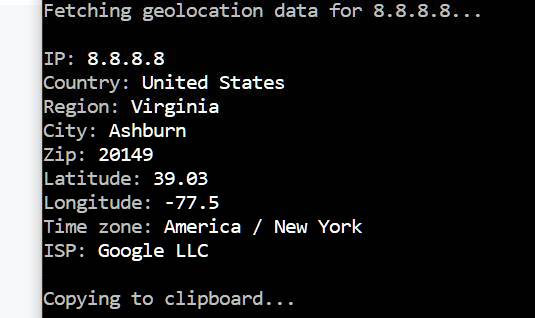
Sample output:

š Note: If no IPv4 address is passed, your own one will be used.
`
Parameter options:
--config="path/to/file" Load custom config file.
Boolean options:
-q, --quiet Suppress all logging except errors.
Commands:
-i, --init Create config file (in project root).
-h, --help Display help screen.
-v, --version Show version number.
`
#
generate-ip can be customized using a geolocate.config.mjs or geolocate.config.js placed in your project root.
Example defaults:
`js`
export default {
quietMode: false // suppress all logging except errors
}
š” Run geolocate init to generate a template geolocate.config.mjs in your project root.

You can also import geolocate into your app to use its main API method.
#### ECMAScript*:
`js`
import geo from '@adamlui/geolocate'
#### CommonJS:
`js`
const geo = require('@adamlui/geolocate')
###### _*Node.js version 14 or higher required_
#### <> HTML script tag:
`html`
#### ES6:
`js`
(async () => {
await import('https://cdn.jsdelivr.net/npm/@adamlui/geolocate@2.1.0/dist/geolocate.min.js')
// Your code here...
})()
`js
...
// @require https://cdn.jsdelivr.net/npm/@adamlui/geolocate@2.1.0/dist/geolocate.min.js
// ==/UserScript==
// Your code here...
`
š Note: To always import the latest version (not recommended in production!) remove the @2.1.0 version tag from the jsDelivr URL: https://cdn.jsdelivr.net/npm/@adamlui/geolocate/dist/geolocate.min.js

š” Asynchronous method to fetch geolocation data for each ip passed in an array, returned as an array of data objects.
Example:
`js
const geo = require('@adamlui/geolocate')
// Using await syntax
(async () => {
const location = await geo.locate('8.8.8.8')
console.log(location)
})()
// Using .then() syntax
geo.locate('8.8.8.8').then(location => {
console.log(location)
})
/* outputs:
[{
ip: '8.8.8.8',
country: 'United States',
countryCode: 'US',
region: 'VA',
regionName: 'Virginia',
city: 'Ashburn',
zip: '20149',
lat: 39.03,
lon: -77.5,
timezone: 'America/New_York',
isp: 'Google LLC'
}]
*/
`
š Note: If no IPv4 address is passed, your own one will be used.
Available options (passed as object properties):
Name | Type | Description | Default Value
----------|---------|-----------------------------------|---------------
verbose | Boolean | Show logging in console/terminal. | true`

Copyright Ā© 2024ā2026 Adam Lui.
Permission is hereby granted, free of charge, to any person obtaining a copy of this software and associated documentation files (the "Software"), to deal in the Software without restriction, including without limitation the rights to use, copy, modify, merge, publish, distribute, sublicense, and/or sell copies of the Software, and to permit persons to whom the Software is furnished to do so, subject to the following conditions:
The above copyright notice and this permission notice shall be included in all copies or substantial portions of the Software.
THE SOFTWARE IS PROVIDED "AS IS", WITHOUT WARRANTY OF ANY KIND, EXPRESS OR IMPLIED, INCLUDING BUT NOT LIMITED TO THE WARRANTIES OF MERCHANTABILITY, FITNESS FOR A PARTICULAR PURPOSE AND NONINFRINGEMENT. IN NO EVENT SHALL THE AUTHORS OR COPYRIGHT HOLDERS BE LIABLE FOR ANY CLAIM, DAMAGES OR OTHER LIABILITY, WHETHER IN AN ACTION OF CONTRACT, TORT OR OTHERWISE, ARISING FROM, OUT OF OR IN CONNECTION WITH THE SOFTWARE OR THE USE OR OTHER DEALINGS IN THE SOFTWARE.

> Randomly generate, format, and validate IPv4 + IPv6 + MAC addresses.
Install /
Readme /
API usage /
CLI usage /
Discuss
> Randomly generate, strengthen, and validate cryptographically-secure passwords.
Install /
Readme /
API usage /
CLI usage /
Discuss