With this module you can: - implement an expansible header that stretches when pulling the page down - auto-hide the page header when scrolling down
npm install @almothafar/ionic-hidenavWith this module you can:
- implement an expansible header that stretches when pulling the page down
- auto-hide the page header when scrolling down
[![NPM version][npm-image]][npm-url]
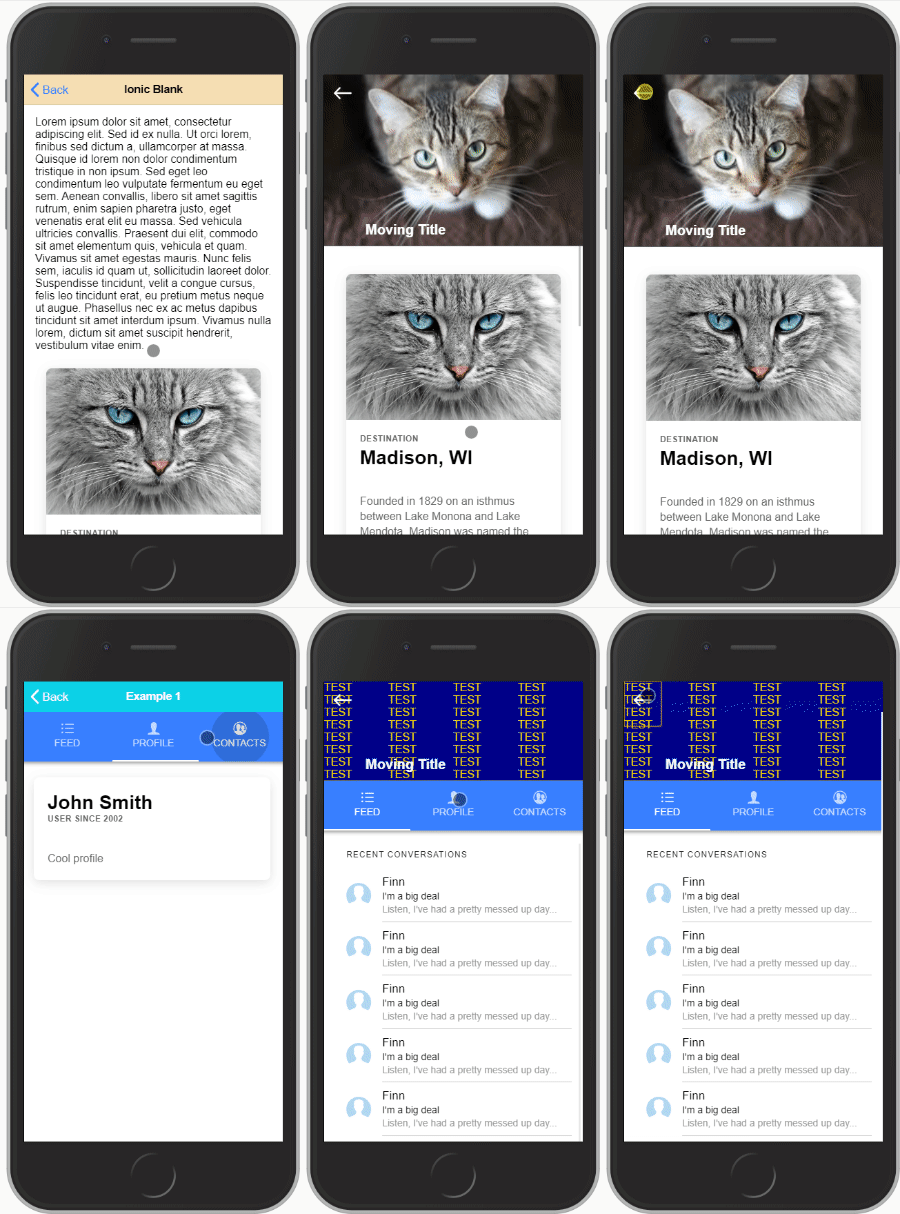
Check out the example
#### Note:
_Both should not be used together on the same page, either you want to make room for reading content or you want to add an expansible header, not both together :)_
_This plugin is also made as generic as possible, making it maybe a bit harder to setup but giving the user much more freedom to design what he wants._
``
npm i @almothafar/ionic-hidenav
Create (or modify if you already have) a shared.module.ts in your project root folder:
`typescript
import { NgModule } from '@angular/core';
import { HidenavModule } from '@almothafar/ionic-hidenav';
@NgModule({
imports: [HidenavModule],
exports: [HidenavModule]
})
export class SharedModule { }
`
and import the SharedModule on every page you intend to use this plugin:
`typescript
import { NgModule } from '@angular/core';
import { CommonModule } from '@angular/common';
import { FormsModule } from '@angular/forms';
import { Routes, RouterModule } from '@angular/router';
import { IonicModule } from '@ionic/angular';
import { HomePage } from './home.page';
import { SharedModule } from '../shared.module';
const routes: Routes = [
{
path: '',
component: HomePage
}
];
@NgModule({
imports: [
CommonModule,
FormsModule,
IonicModule,
RouterModule.forChild(routes),
SharedModule
],
declarations: [HomePage]
})
export class HomePageModule {
}
`
---
html
`
This component must be defined outside of and comes with required and optional child DOM elements:Creating the expansible header element
home.page.html
#shrinkexpand: This is the element that will shrink and expand with scrolling the page
#static: Element(s) with this tag will be left alone. You can use these to create buttons on your header for example.`html
`Inputs for
:| input             | type                         | Description                                                                    |
| ----------------- | ---------------------------- | ------------------------------------------------------------------------------ |
|
header-height | required | height to which the header shrinks to |
| opacity-factor | optional / default = 0 | 1 - 10 opacity of shrunk header overlay |
| opacity-color | optional / default = black | accepts any css color description (name, rgb, # ..) |
| blur-factor | optional / default = 0 | the maximum blur when the header is collapsed (accepts integer) |
| init-expanded | optional / default = false | set to true if you want the header to initiate expanded |
| no-border | optional / default = false | set to true if you want to remove the bottom styling of the header |
| Tabspage params only: |
| preserve-header | optional / default = false | set to true if you want to keep the header state separate on each tab | $3
add the hidenav-sh-content directive to your
html

    ...


    ....
``$3
You need to give the the that holds the element the directive hidenav-sh-tabscontent then you need to add to each on every tab two directives: hidenav-sh-content and hidenav-tabspage
html

  ...


      ...
      ...


        ...


        ...
``$3
you can subscribe to the event for example like:
`html
...
`
The $event variable returns the current header height.
$3
-
: scrolls content to top and expands the header.
- shrink(duration): scrolls just about enought to shrink the header if it is expanded.
- toggle(duration): toggles between expand() and shrink().Note that
duration is optional and defaults to 200.---
Part 2: Hide Header on scroll
This function is fairly simple to implement than the previous one, all you will have to do is define directives hidenav-header and hidenav-content in the page you want to use.$3
In the following example, both header and content carry the previously mentioned directives.
`html
...
...
`$3
Give the the hidenav-header directive and the that holds the component the directive hidenav-tabscontent.
As for the elements in each of the tabs give them the hidenav-content and hidenav-tabspage directive.
``html
...
...
...
...
...
```PS.: as mentioned in the beginning, you should not use both methods (Part1 and Part2) together on one page. It was never tested and is not intended to be used.
[npm-url]: https://npmjs.org/package/@almothafar/ionic-hidenav
[npm-image]: https://img.shields.io/npm/v/@almothafar/ionic-hidenav/latest