@amplifiui/mobile
v0.0.172TypeScript
Tailwind based react native package
19/weekUpdated 2 years agoMITUnpacked: 708.8 KB
Published by Amplifi Labs
npm install @amplifiui/mobileAmplifi UI
Tailwind based React Native components

This library is still on initial phase of development. Feel free to use it, but be aware that structural changes are still possible. If you want to use it, please, lock the imported version on your package.json file.
Key concepts of this library:
- Based on Tailwind CSS (through twrnc);
- Components can (and should) be extended and styled using twrnc styles, in a flexible way;
- Based on the KISS principle (Keep It Simple, Stupid);
- Makes props for accessibility mandatory;
- Simplifies hard tasks like, adding animations, easier;
- Tailwind CSS is doing great on the Web apps, we want to make the process of using Tailwind on the mobile as easy as on the web;
- Focus on reusability and flexibility;
- Heavily depends on SVGs;
If your project uses Amplifi UI, please, let us know! We would love :heart: to have this information!
Notes
- This library was designed to work with Tailwind styles, through twrnc. For a complete documentation on how to use tailwinds using react native, please, check twrnc's documentation. Thank you, Jared!
- It's mandatory to have this packages installed on your project:
- react;
- react-native;
- react-native-svg;
- twrnc,
- react-native-safe-area-context;
Table of Contents
- BackgroundImage
- Button
- Card
- Charts
- VerticalBars
- CollapsibleModal
- Forms
- InputNumber
- InputPassword
- InputText
- Checkbox
- ToggleButton
- Typography
- HR
- Image
- LoadingRound
- ProgressSteps
- Spinner
- SwipeCarousel
- ToastMessage
Components
BackgroundImage
#### Description:
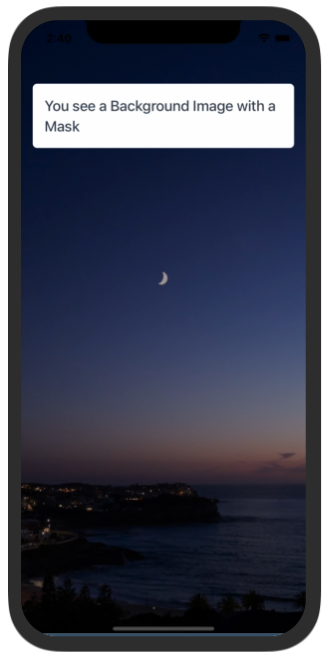
This component creates a View with an image as background. Accepts jpeg and png files.
#### Samples
Try using Expo:
https://snack.expo.dev/@paulorieck/amplifi-ui---mobile---backgroundimage?platform=ios
``
import * as React from 'react';
import { Text, View, StyleSheet } from 'react-native';
import { Card, Button, H2, BackgroundImage } from '@amplifiui/mobile';
import Background from './assets/pexels-tieu-linh-11635802.jpg';
import tw from './services/tw';
export default function App() {
return (
mask="bg-black/40"
image={Background}
>
}>
          You see a Background Image with a Mask
);
}
`
#### Props:
| Variable | Value Type | Default | Mandatory | Notes |
| ----------- | ------------------------- | ------- | ------------------ | ------------------------------------------------------------------------------- |
| tw | Tailwind Function | \_ | :heavy_check_mark: | \_ |
| image | Image | \_ | :heavy_check_mark: | \_ |
| style | Tailwind Style | \_ | :x: | \_ |
| children | JSX.Element/JSX.Element[] | \_ | :x: | \_ |
| bottomColor | string | \_ | :x: | This color is applied on the safe area on iOS devices |
| mask | string | \_ | :x: | This is a color with an alpha channel. It adds a mask over the background image |
Button
#### Description:
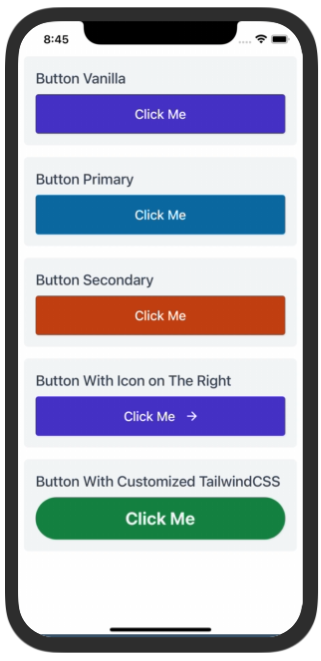
This is a clickable component and can execute functions passed as an argument (onPress). Accepts icons and texts as parameters.
#### Samples
Try using Expo:
https://snack.expo.dev/@paulorieck/amplifi-ui---mobile---button?platform=ios
`
import * as React from 'react';
import { Text, SafeAreaView, StyleSheet, ScrollView } from 'react-native';
import { Card, Button, H2 } from '@amplifiui/mobile';
import RightIcon from './icons/arrow-right-white';
import tw from './services/tw';
export default function App() {
return (
}>
}>
pb-2
}>Button Vanilla
}>
pb-2
}>Button Primary
}>
pb-2
}>Button Secondary
}>
pb-2
}>Button With Icon on The Right
}>bg-green-700 rounded-full
pb-2
}>Button With Customized TailwindCSS
onPress={() => console.log('You clicked on me!')}
style={tw}text-gray-100 font-bold text-2xl
textStyle={tw}
>
Click Me
}>bg-orange-700
pb-2
}>Button with Loading Indicator
onPress={() => console.log('You clicked on me!')}
style={tw}text-gray-100
textStyle={tw}
isLoading={true}
>
Click Me
);
}
`
#### Props:
| Variable | Value Type | Default | Mandatory | Notes |
| ------------ | ------------------------ | ------- | ------------------ | -------------------------------------------------------------------------- |
| tw | Tailwind Function | \_ | :heavy_check_mark: | \_ |
| style | Tailwind Style | \_ | :x: | This style is applied to the container View |
| textStyle | Tailwind Style | \_ | :x: | This style is applied directly to the Text component |
| children | String | \_ | :x: | The children props are limited to strings. |
| type | 'primary' OR 'secondary' | \_ | :x: | If defined applies the default primary or secondary colors as button color |
| onPress | () => void | \_ | :heavy_check_mark: | Defines the function that will be executed when button pressed. |
| iconLeft | SVG string | \_ | :x: | If defined will add an icon to the left of the text. |
| iconRight | SVG string | \_ | :x: | If defined will add an icon to the right of the text. |
| loadingIcon | SVG string | \_ | :x: | Has a default icon, if defined replaces this default icon |
| loadingStyle | Tailwind Style | \_ | :x: | \_ |
| isLoading | boolean | false | :x: | \_ |
Card
#### Description:
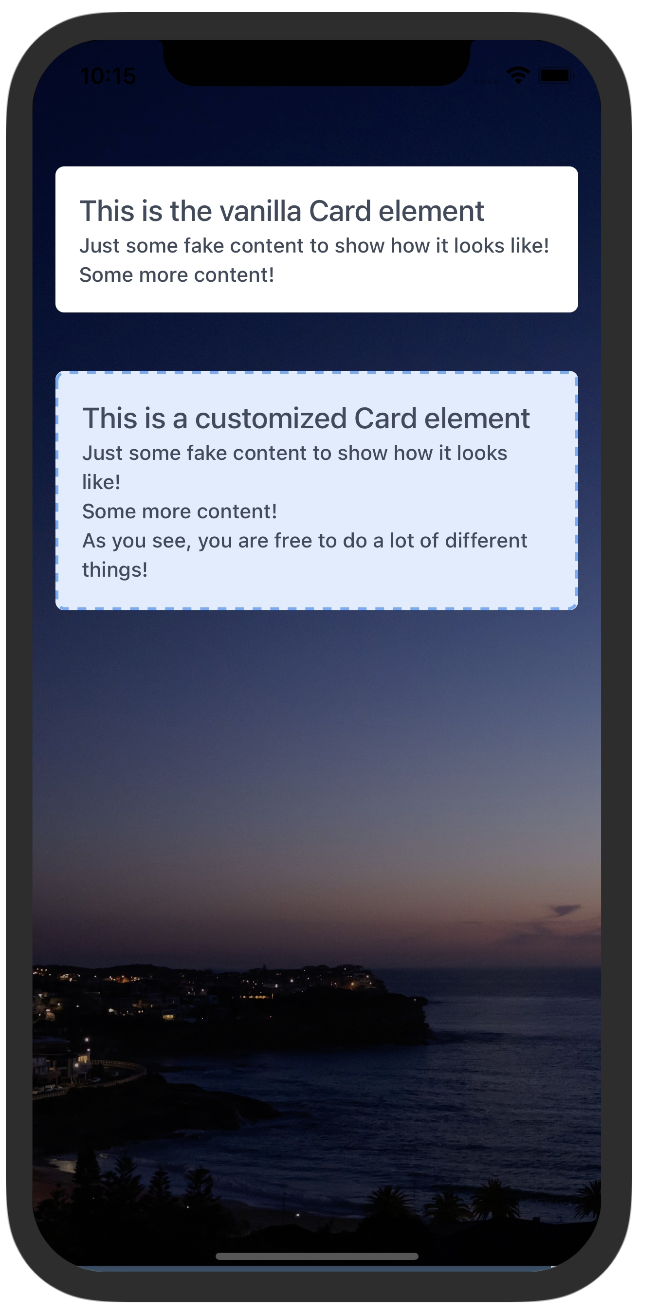
This is a div that has a shadow around it and rounded corners.
#### Samples
Try using Expo:
https://snack.expo.dev/@paulorieck/amplifi-ui---mobile---card?platform=ios
`
import * as React from 'react';
import { Text, View, StyleSheet } from 'react-native';
import { Card, Button, H2, BackgroundImage, Paragraph } from '@amplifiui/mobile';
import Background from './assets/pexels-tieu-linh-11635802.jpg';
import tw from './services/tw';
export default function App() {
return (
mask="bg-black/40"
image={Background}
>
}>
This is the vanilla Card element
}>
This is a customized Card element
);
}
`
$3
| Variable | Value Type | Default | Mandatory | Notes |
| --------- | ------------------------ | ------- | ------------------ | -------------------------------------------------------------------------- |
| tw | Tailwind Function | \_ | :heavy_check_mark: | \_ |
| style | Tailwind Style | \_ | :x: | This style is applied to the container View |
| children | String | \_ | :x: | The children props are limited to strings. |
Charts
$3
#### Description:
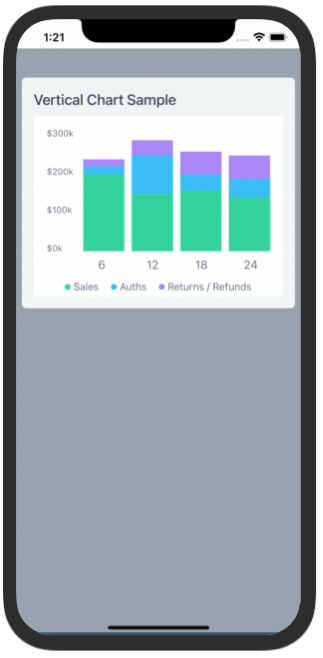
This component renders vertical bars charts
#### Samples
Try using Expo:
https://snack.expo.dev/@paulorieck/amplifi-ui---mobile---charts---vertical-bars?platform=ios
`
import * as React from 'react';
import { Text, View, StyleSheet, Dimensions } from 'react-native';
import { Card, Button, H2, VerticalBars } from '@amplifiui/mobile';
import tw from './services/tw';
const chartData = {
values: {
'6': {
Sales: {amount: 200000, transactions: 20},
Auths: {amount: 20000, transactions: 20},
'Returns / Refunds': {amount: 20000, transactions: 20},
}, // 290k
'12': {
Sales: {amount: 150000, transactions: 30},
Auths: {amount: 100000, transactions: 30},
'Returns / Refunds': {amount: 40000, transactions: 30},
}, // 290k
'18': {
Sales: {amount: 160000, transactions: 40},
Auths: {amount: 40000, transactions: 40},
'Returns / Refunds': {amount: 60000, transactions: 40},
}, // 260k
'24': {
Sales: {amount: 140000, transactions: 50},
Auths: {amount: 50000, transactions: 50},
'Returns / Refunds': {amount: 60000, transactions: 50},
}, // 250k
},
};
const windowWidth = Dimensions.get('window').width;
export default function App() {
return (
}>
}>
pb-2
}>Vertical Chart Sample
}>bg-white flex-1
style={tw}
data={chartData}
width={windowWidth - 84}
height={210}
scaleSize={400000}
fontColor="#6B7280"
/>
);
}
`
#### Props
| Variable | Value Type | Default | Mandatory | Notes |
| ---------------- | ------------------------ | ------- | ------------------ | -------------------------------------------------------------------------- |
| tw | Tailwind Function | \_ | :heavy_check_mark: | \_ |
| style | Tailwind Style | \_ | :x: | This style is applied to the container View |
| labelingStyle | Tailwind Style | \_ | :x: | This style is applied to the charts labels |
| data | See details bellow | \_ | :heavy_check_mark: | \_ |
| colorsArray | string[] | ['#34D399', '#38BDF8', '#A78BFA'] | :x: | \_ |
| width | number | \_ | :heavy_check_mark: | \_ |
| height | number | \_ | :heavy_check_mark: | \_ |
| scaleSize | number | \_ | :heavy_check_mark: | This is the maximum number to be displayed on the chart scale |
| showLabels | boolean | true | :x: | Display labels on the chart, or not |
| fontColor | Hexadecimal color code | #6B7280 | :x: | Changes the color for all texts on the chart |
| notSelectedColor | Hexadecimal color code | #D1D5DB | :x: | The color of the non selected columns |
| balloonData | | | :x: | Under construction |
| setBalloonData | | | :x: | Under construction |
CollapsibleModal
#### Description:
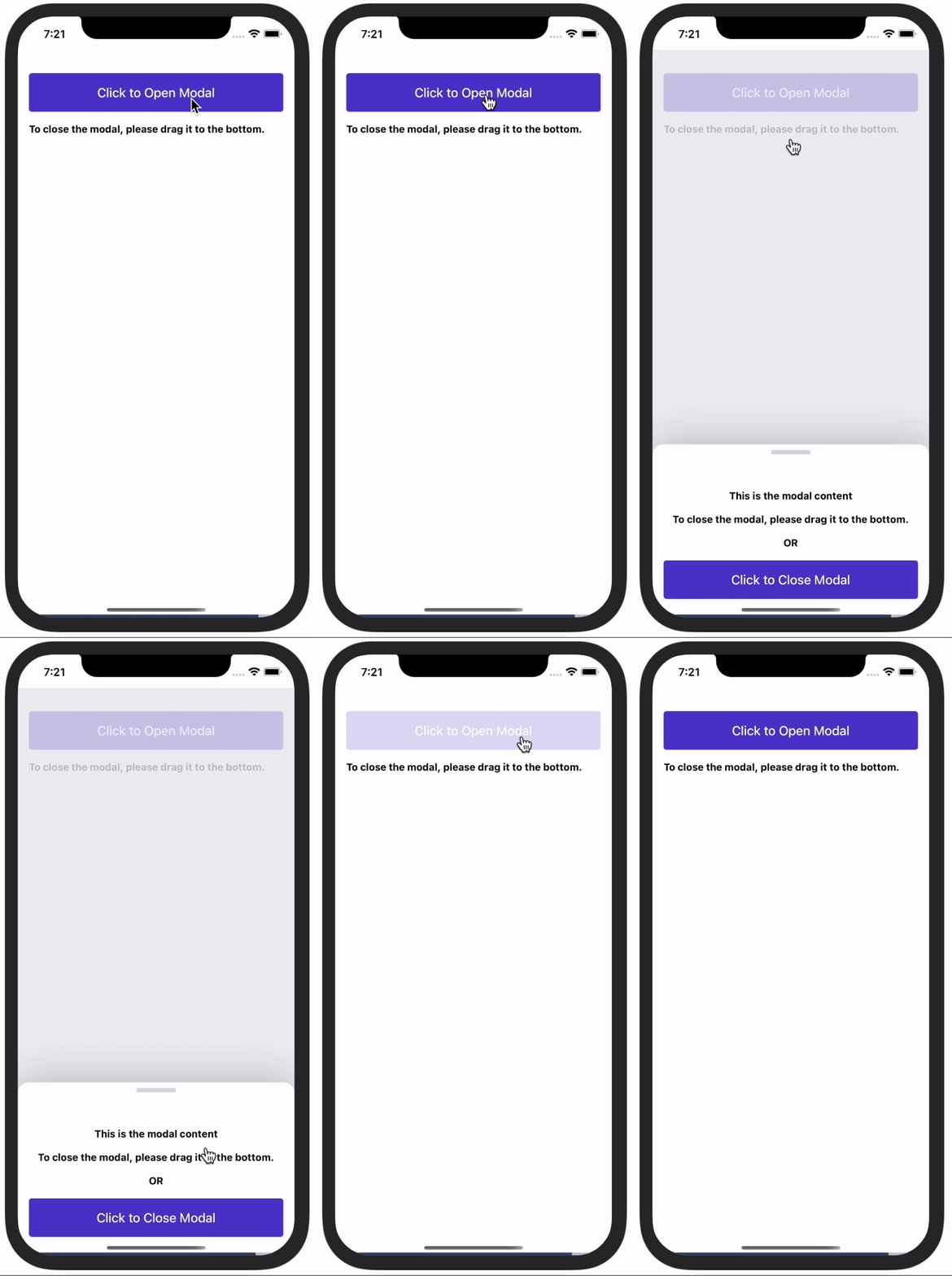
This component presents a collapsible modal to the user. The user, by dragging the "header" of the modal can close it.
#### Samples
Try using Expo:
https://snack.expo.dev/@paulorieck/amplifi-ui---mobile---collapsible-modal?platform=ios
`
import * as React from 'react';
import { View, Text, StyleSheet, ScrollView, SafeAreaView } from 'react-native';
import { Card, Button, H2, CollapsibleModal } from '@amplifiui/mobile';
import { SafeAreaProvider } from 'react-native-safe-area-context';
import tw from './services/tw';
export default function App() {
const [isModalVisible, setModalVisible] = React.useState(true);
return (
style={twmt-20 mx-4}mt-4 mx-4
onPress={() => setModalVisible(true)}>
Click to Open Modal
}>
To close the modal, please drag it to the bottom.
maxHeight={290}
show={isModalVisible}
setShow={() => setModalVisible(!isModalVisible)}>
}>
This is the modal content
}>
To close the modal, please drag it to the bottom.
}>
OR
style={tw}
onPress={() => setModalVisible(false)}>
Click to Close Modal
);
}
`
#### Props
| Variable | Value Type | Default | Mandatory | Notes |
| ---------------- | ---------------------------- | ------- | ------------------ | -------------------------------------------------------------------------- |
| tw | Tailwind Function | \_ | :heavy_check_mark: | \_ |
| children | JSX.Element \| JSX.Element[] | \_ | :x: | The children props are limited to strings. |
| maxHeight | maxHeight | \_ | :heavy_check_mark: | This is mandatory and determines the height of the modal. |
| show | boolean | \_ | :heavy_check_mark: | If true shows the modal. |
| setShow | () => void | \_ | :heavy_check_mark: | This is the callback to update the modal state (opened/closed) |
Forms
$3
#### Description:
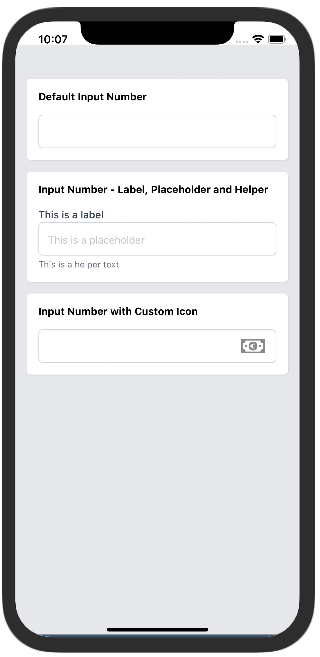
This component is a subset of the InputText created specifically to receive numbers.
#### Samples
Try using Expo:
https://snack.expo.dev/@paulorieck/amplifi-ui---forms--input-number?platform=ios
`
import * as React from 'react';
import { View, Text, SafeAreaView } from 'react-native';
import { Card, Button, CollapsibleModal, InputNumber, H3 } from '@amplifiui/mobile';
import { SafeAreaProvider } from 'react-native-safe-area-context';
import tw from './services/tw';
import MoneyIcon from './icons/money';
export default function App() {
return (
}>
}>
}>
}>
Default Input Number
}>
}>
Input Number - Label, Placeholder and Helper
onChangeText={() => null}
value={0}
label="This is a label"
placeholder="This is a placeholder"
helper="This is a helper text"
/>
}>mx-4
}>
Input Number with Custom Icon
onChangeText={() => null}
value={0}
icon={MoneyIcon}
iconStyle={tw}
/>
);
}
`
#### Props
| Variable | Value Type | Default | Mandatory | Notes |
| ---------------- | ---------------------------- | ------- | ------------------ | ------------------------------------------------------------------------------ |
| tw | Tailwind Function | \_ | :heavy_check_mark: | \_ |
| label | string | \_ | :x: | Text that goes over the input field. |
| placeholder | string | \_ | :x: | Text that goes inside the input field if value is empty. |
| helper | string | \_ | :x: | Text that goes under the input field. |
| style | Tailwind Style | \_ | :x: | This style is applied to the container View |
| labelStyle | Tailwind Style | \_ | :x: | This style is applied specifically to the label. |
| inputStyle | Tailwind Style | \_ | :x: | This style is applied specifically to the input. |
| helperStyle | Tailwind Style | \_ | :x: | This style is applied specifically to the helper text. |
| icon | Valid SVG string | \_ | :x: | This is an optional icon that can be displayed by the end of the input. |
| iconStyle | Tailwind Style | \_ | :x: | This style is applied specifically to the icon. |
| onChangeText | (value: string) => void | \_ | :heavy_check_mark: | Callback when the text changes. |
| value | string | \_ | :heavy_check_mark: | Value for the input field. |
| inputType | 'primary' \| 'secondary' | \_ | :x: | If selected, the project primary or secondary colors will be applied. |
| helperType | 'primary' \| 'secondary' | \_ | :x: | Shows the helper text with primary or secondary colors. |
| error | string | \_ | :x: | Replaces the helper text (same position). Used to return errors from the API |
| errorStyle | Tailwind Style | \_ | :x: | This style is applied specifically to the error text. |
| keyboardType | RN KeyboardTypeOptions | \_ | :x: | Defines the type of keyboards that will be presented to the user. |
| onBlur | NativeSyntheticEvent | \_ | :x: | Detects when the user leaves the input field. Used in combination with Formik. |
$3
#### Description:
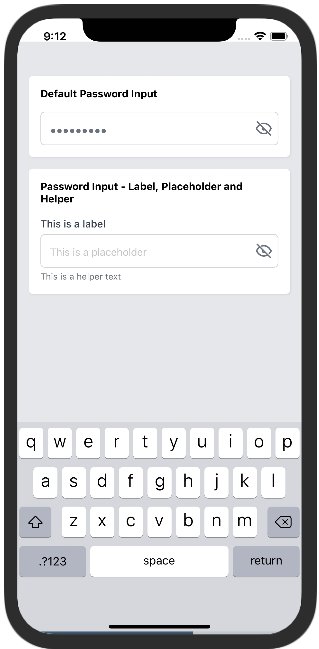
This component is a subset of the InputText created specifically to process passwords.
#### Samples
Try using Expo:
https://snack.expo.dev/@paulorieck/amplifi-ui---forms--input-password?platform=ios
`
import * as React from 'react';
import { View, Text, SafeAreaView } from 'react-native';
import { Card, Button, InputPassword } from '@amplifiui/mobile';
import { SafeAreaProvider } from 'react-native-safe-area-context';
import tw from './services/tw';
import Visible from './icons/eye-on';
import Invisible from './icons/eye-off';
export default function App() {
const [password1, setPassword1] = React.useState('');
const [password2, setPassword2] = React.useState('');
return (
}>
}>
}>
}>
Default Password Input
onChangeText={(e) => console.log(e)}
value={password1}
visibleIcon={Visible}
invisibleIcon={Invisible}
/>
}>
}>
Password Input - Label, Placeholder and Helper
onChangeText={setPassword2}
value={password2}
label="This is a label"
placeholder="This is a placeholder"
helper="This is a helper text"
visibleIcon={Visible}
invisibleIcon={Invisible}
/>
);
}
`
#### Props
| Variable | Value Type | Default | Mandatory | Notes |
| ---------------- | ---------------------------- | ------- | ------------------ | ------------------------------------------------------------------------------ |
| tw | Tailwind Function | \_ | :heavy_check_mark: | \_ |
| label | string | \_ | :x: | Text that goes over the input field. |
| placeholder | string | \_ | :x: | Text that goes inside the input field if value is empty. |
| helper | string | \_ | :x: | Text that goes under the input field. |
| style | Tailwind Style | \_ | :x: | This style is applied to the container View |
| labelStyle | Tailwind Style | \_ | :x: | This style is applied specifically to the label. |
| inputStyle | Tailwind Style | \_ | :x: | This style is applied specifically to the input. |
| textInputStyle | Tailwind Style | \_ | :x: | This style is applied specifically to the input text. |
| helperStyle | Tailwind Style | \_ | :x: | This style is applied specifically to the helper text. |
| invisibleIcon | Valid SVG string | \_ | :heavy_check_mark: | This icon is displayed when the password is invisible. |
| visibleIcon | Valid SVG string | \_ | :heavy_check_mark: | This icon is displayed when the password is visible. |
| iconStyle | Tailwind Style | \_ | :x: | This style is applied specifically to the icons. |
| onChangeText | (value: string) => void | \_ | :heavy_check_mark: | Callback when the text changes. |
| value | string | \_ | :heavy_check_mark: | Value for the input field. |
| inputType | 'primary' \| 'secondary' | \_ | :x: | If selected, the project primary or secondary colors will be applied. |
| helperType | 'primary' \| 'secondary' | \_ | :x: | Shows the helper text with primary or secondary colors. |
| error | string | \_ | :x: | Replaces the helper text (same position). Used to return errors from the API |
| errorStyle | Tailwind Style | \_ | :x: | This style is applied specifically to the error text. |
| onBlur | NativeSyntheticEvent | \_ | :x: | Detects when the user leaves the input field. Used in combination with Formik. |
$3
#### Description:
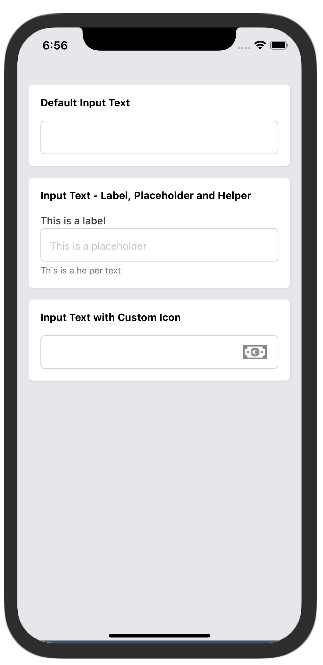
This component was designed specifically to receive strings.
#### Samples
Try using Expo:
https://snack.expo.dev/@paulorieck/amplifi-ui---forms--input-text?platform=ios
`
import * as React from 'react';
import { View, Text, SafeAreaView } from 'react-native';
import { Card, Button, CollapsibleModal, InputText, H3 } from '@amplifiui/mobile';
import { SafeAreaProvider } from 'react-native-safe-area-context';
import tw from './services/tw';
import MoneyIcon from './icons/money';
export default function App() {
const [text1, setText1] = React.useState('');
const [text2, setText2] = React.useState('');
const [text3, setText3] = React.useState('');
return (
}>
}>
}>
}>
Default Input Text
onChangeText={setText1}
value={text1}
/>
}>
}>
Input Text - Label, Placeholder and Helper
onChangeText={setText2}
value={text2}
label="This is a label"
placeholder="This is a placeholder"
helper="This is a helper text"
/>
}>mx-4
}>
Input Text with Custom Icon
onChangeText={setText3}
value={text3}
icon={MoneyIcon}
iconStyle={tw}
/>
);
}
`
#### Props
| Variable | Value Type | Default | Mandatory | Notes |
| ---------------- | ---------------------------- | ------- | ------------------ | ------------------------------------------------------------------------------ |
| tw | Tailwind Function | \_ | :heavy_check_mark: | \_ |
| label | string | \_ | :x: | Text that goes over the input field. |
| placeholder | string | \_ | :x: | Text that goes inside the input field if value is empty. |
| helper | string | \_ | :x: | Text that goes under the input field. |
| style | Tailwind Style | \_ | :x: | This style is applied to the container View |
| labelStyle | Tailwind Style | \_ | :x: | This style is applied specifically to the label. |
| inputStyle | Tailwind Style | \_ | :x: | This style is applied specifically to the input. |
| helperStyle | Tailwind Style | \_ | :x: | This style is applied specifically to the helper text. |
| icon | Valid SVG string | \_ | :x: | This is an optional icon that can be displayed by the end of the input. |
| iconStyle | Tailwind Style | \_ | :x: | This style is applied specifically to the icon. |
| onChangeText | (value: string) => void | \_ | :heavy_check_mark: | Callback when the text changes. |
| value | string | \_ | :heavy_check_mark: | Value for the input field. |
| inputType | 'primary' \| 'secondary' | \_ | :x: | If selected, the project primary or secondary colors will be applied. |
| helperType | 'primary' \| 'secondary' | \_ | :x: | Shows the helper text with primary or secondary colors. |
| error | string | \_ | :x: | Replaces the helper text (same position). Used to return errors from the API |
| errorStyle | Tailwind Style | \_ | :x: | This style is applied specifically to the error text. |
| keyboardType | RN KeyboardTypeOptions | \_ | :x: | Defines the type of keyboards that will be presented to the user. |
| onBlur | NativeSyntheticEvent | \_ | :x: | Detects when the user leaves the input field. Used in combination with Formik. |
$3
#### Description:
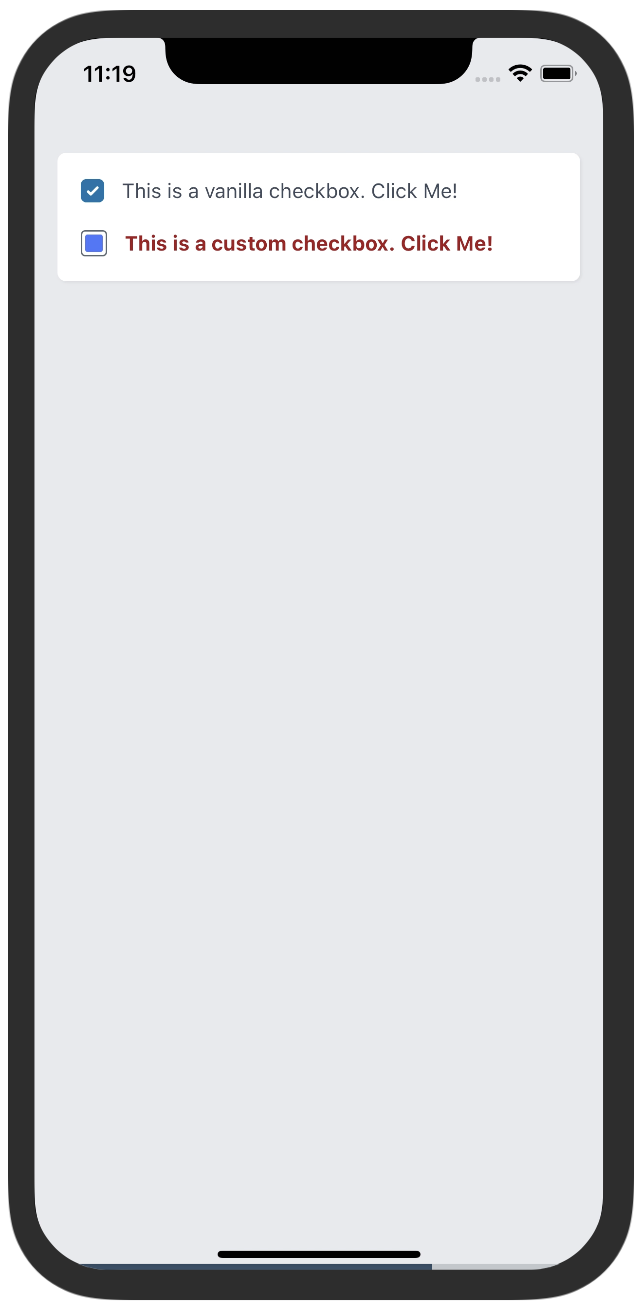
This component renders a checkbox element to be used on forms.
#### Samples
Try using Expo:
https://snack.expo.dev/@paulorieck/amplifi-ui---mobile---forms---checkbox?platform=ios
`
import * as React from 'react';
import { View, Text, SafeAreaView } from 'react-native';
import { Card, Button, InputPassword, Checkbox } from '@amplifiui/mobile';
import { SafeAreaProvider } from 'react-native-safe-area-context';
import tw from './services/tw';
import CustomCheck from './icons/custom-check';
export default function App() {
const [check1Selected, setCheck1Selected] = React.useState(true);
const [check2Selected, setCheck2Selected] = React.useState(true);
return (
}>
}>
}>mt-4
label="This is a vanilla checkbox. Click Me!"
value={check1Selected}
onPress={() => setCheck1Selected(!check1Selected)}
/>
style={tw}text-red-800 font-bold
label="This is a custom checkbox. Click Me!"
labelStyle={tw}h-[18px] w-[18px] rounded-[3px] border-[#505D68] border bg-white
checkboxStyle={tw}bg-white
checkedCheckboxStyle={tw}
iconWidth={12}
iconHeight={12}
value={check2Selected}
onPress={() => setCheck2Selected(!check2Selected)}
icon={CustomCheck}
/>
);
}
`
#### Props
| Variable | Value Type | Default | Mandatory | Notes |
| ---------------- | ---------------------------- | ------- | ------------------ | ------------------------------------------------------------------------------ |
| tw | Tailwind Function | \_ | :heavy_check_mark: | \_ |
| style | Tailwind Style | \_ | :x: | This style is applied to the container View |
| label | string | \_ | :x: | Text that is shown beside the checkbox (right side). |
| labelStyle | Tailwind Style | \_ | :x: | Defines the style for the label. |
| checkboxStyle | Tailwind Style | \_ | :x: | Defines the style for the checkbox. |
| checkedCheckboxStyle | Tailwind Style | \_ | :x: | Defines the style for the checked checkbox. |
| value | boolean | \_ | :heavy_check_mark: | Defines if the checkbox is checked or not. |
| onPress | () => void | \_ | :heavy_check_mark: | Callback when the Checkbox is clicked. |
| icon | SVG String | \_ | :x: | To set a custom icon, is displayed when checked. |
| iconWidth | number | \_ | :x: | To define a custom width to the icon. |
| iconHeight | number | \_ | :x: | To define a custom height to the icon. |
$3
#### Description:
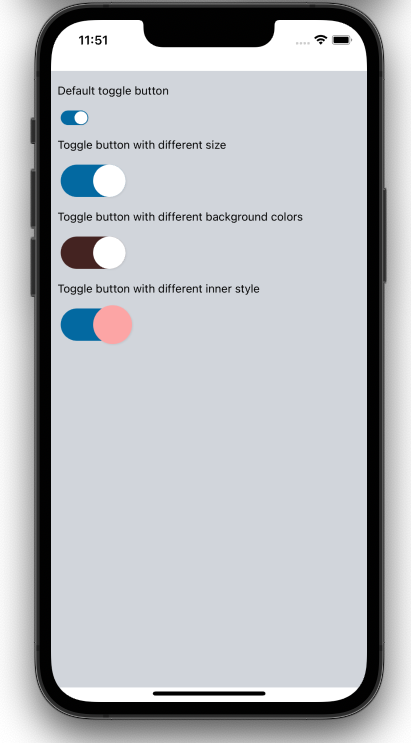
This component renders a toggle switch element to be used on forms.
#### Samples
Try using Expo:
https://snack.expo.dev/@jguilhermesl/amplifi-ui---mobile---togglebutton?platform=ios
`
import * as React from 'react';
import { SafeAreaView, ScrollView } from 'react-native';
import { ToggleButton } from '@amplifiui/mobile';
import tw from './services/tw';
export default function App() {
const [state, setState] = React.useState(false);
return (
}>mt-4
style={tw}mt-4
tw={tw}
value={state}
onToggle={() => setState(!state)}
/>
label="Toggle button with different size"
labelStyle={tw}mt-4 w-20 h-10
style={tw}w-10 h-10
innerStyle={tw}mt-4
tw={tw}
value={state}
onToggle={() => setState(!state)}
/>
onColor="#442321"
offColor="#212121"
label="Toggle button with different background colors"
labelStyle={tw}mt-4 w-20 h-10
style={tw}w-10 h-10
innerStyle={tw}mt-4
tw={tw}
value={state}
onToggle={() => setState(!state)}
/>
label="Toggle button with different inner style"
labelStyle={tw}mt-4 w-20 h-10
style={tw}w-12 h-12 bg-red-300
innerStyle={tw}
tw={tw}
value={state}
onToggle={() => setState(!state)}
/>
);
}
`
#### Props
| Variable | Value Type | Default | Mandatory | Notes |
| ---------------- | ---------------------------- | ------- | ------------------ | ------------------------------------------------------------------------------ |
| tw | Tailwind Function | \_ | :heavy_check_mark: | \_ |
| onColor | string | #0369A1 | :x: | Background color when toggle is on. |
| offColor | string | #ecf0f1 | :x: | Background color when toggle is off. |
| label | string | \_ | :x: | Text that is shown beside the toggle button. |
| style | Tailwind Style | tw\w-8.5 h-4.5 ml-1 rounded-25 justify-center | :x: | This style is applied to the container View |tw
| value | boolean | \_ | :heavy_check_mark: | Toggle button value, this property defines if the button is active or not. |
| labelStyle | string | \_ | :x: | This style is applied to the label. |
| innerStyle | string | \w-4 h-4 bg-white rounded-25 shadow-black shadow | :x: | This style is applied to the inner View. |
| onToggle | string | \_ | :heavy_check_mark: | Function that must be called when the toggle is clicked. |
| widthView | string | \_ | This prop is mandatory when the width of the View container is changed.| Width in px of the container view |
Typography
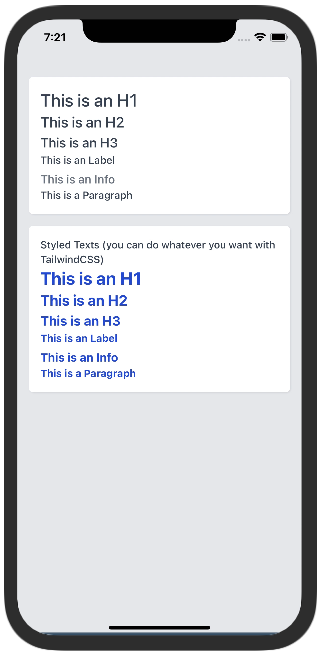
#### Description:
A group of components to render text on the screen.
#### Samples
Try using Expo:
https://snack.expo.dev/@paulorieck/amplifi-ui---text-typography?platform=ios
`
import * as React from 'react';
import { View, SafeAreaView } from 'react-native';
import { Card, H1, H2, H3, Label, Info, Paragraph } from '@amplifiui/mobile';
import { SafeAreaProvider } from 'react-native-safe-area-context';
import tw from './services/tw';
export default function App() {
return (
}>
}>
}>
This is an H1
This is an H2
This is an H3
}>
font-bold text-blue-700
}>This is an H1
font-bold text-blue-700
}>This is an H2
font-bold text-blue-700
}>This is an H3
}>This is an Info
}>This is a Paragraph
);
}
`
#### Props
For ALL of the text components:
| Variable | Value Type | Default | Mandatory | Notes |
| ---------------- | ---------------------------- | ------- | ------------------ | ------------------------------------------------------------------------------ |
| tw | Tailwind Function | \_ | :heavy_check_mark: | \_ |
| style | Tailwind Style | \_ | :x: | This style is applied to the container View |
| children | string | \_ | :heavy_check_mark: | Text that goes over the input field. |
HR
#### Description:
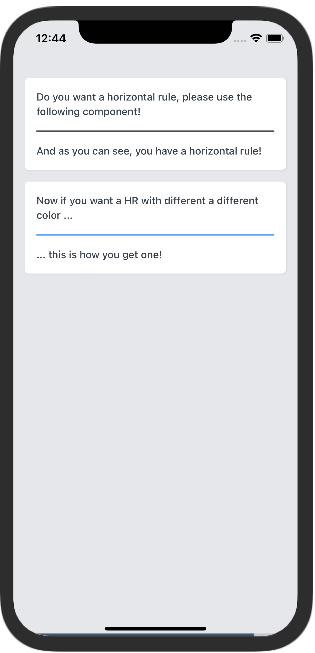
This component implements a Horizontal Rule.
#### Samples
Try using Expo:
https://snack.expo.dev/@paulorieck/amplifi-ui---mobile---hr?platform=ios
`
import * as React from 'react';
import { View, SafeAreaView } from 'react-native';
import { Card, HR, Paragraph } from '@amplifiui/mobile';
import { SafeAreaProvider } from 'react-native-safe-area-context';
import tw from './services/tw';
export default function App() {
return (
}>
}>
}>
Do you want a horizontal rule, please use the following component!
my-4} />
And as you can see, you have a horizontal rule!
}>
Now if you want a HR with different a different color ...
my-4} color="blue-400" />
... this is how you get one!
);
}
`
#### Props
| Variable | Value Type | Default | Mandatory | Notes |
| ---------------- | ---------------------------- | ------- | ------------------ | ------------------------------------------------------------------------------ |
| tw | Tailwind Function | \_ | :heavy_check_mark: | \_ |
| color | Tailwind Color | black | :x: | Tailwind Color, i.e. blue-400 |
| style | Tailwind Style | \_ | :x: | This style is applied to the container View |
Image
#### Description:
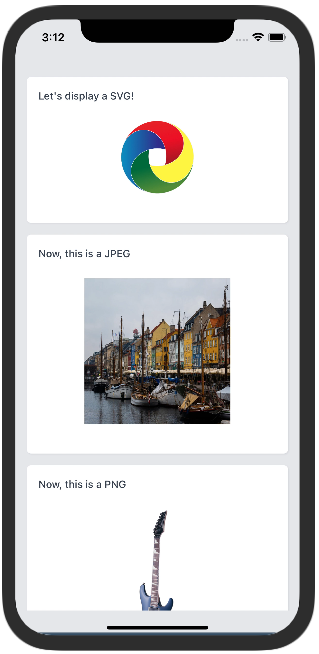
This component makes it possible to render SVGs, JPEGs and PNGs on mobile.
#### Samples
Try using Expo:
https://snack.expo.dev/@paulorieck/amplifi-ui---mobile---image?platform=ios
`
import * as React from 'react';
import { View, SafeAreaView, ScrollView } from 'react-native';
import { Card, Paragraph, Image } from '@amplifiui/mobile';
import { SafeAreaProvider } from 'react-native-safe-area-context';
import tw from './services/tw';
import SVGSample from './assets/svg';
import JPEGSample from './assets/pexels-william-larsen-11515591.jpg';
import PNGSample from './assets/2cd43b_eafff063f69f4ea8b65b3ae32ca62cb8_mv2.png';
export default function App() {
return (
}>
}>
}>
Let's display a SVG!
}>h-25
svg={SVGSample}
width={100}
height={100}
style={tw}
/>
}>
Now, this is a JPEG
}>
src={JPEGSample}
width={200}
height={200}
/>
}>
Now, this is a PNG
}>
src={PNGSample}
width={70}
height={200}
/>
);
}
`
#### Props
| Variable | Value Type | Default | Mandatory | Notes |
| ---------------- | ---------------------------- | ------- | ------------------ | ------------------------------------------------------------------------------ |
| tw | Tailwind Function | \_ | :heavy_check_mark: | \_ |
| style | Tailwind Style | \_ | :x: | This style is applied to the container View |
| svg | SVG String | \_ | :x: | When it's a SVG image, this prop needs to be informed. |
| src | ImageSourcePropType | \_ | :x: | When it's a JPEG or PNG image, this prop needs to be informed. |
| width | number | \_ | :x: | The width of the image |
| height | number | \_ | :x: | The height of the image |
LoadingRound
#### Description:
This component can be used to show the loading state.
#### Samples
Try using Expo:
https://aa
`
import { SvgXml } from "react-native-svg"
import { View, SafeAreaView } from 'react-native';
import { LoadingRound } from '@amplifiui/mobile';
import tw from './services/tw';
import Icon from "./icon/index"
export default function App() {
return (
}>
} children={
);
}
`
#### Props
| Variable | Value Type | Default | Mandatory | Notes |
| ---------------- | ---------------------------- | ------- | ------------------ | ------------------------------------------------------------------------------ |
| tw | Tailwind Function | \_ | :heavy_check_mark: | \_ |
| style | Tailwind Style | \_ | :x: | This style is applied to the container View. |
| children | JSX.Element \| JSX.Element[] | \_ | :heavy_check_mark: | Component that will be rendered and will remain rotating. |
| time | number | 3000 | :x: | Duration of one spinner turn. |
ProgressSteps
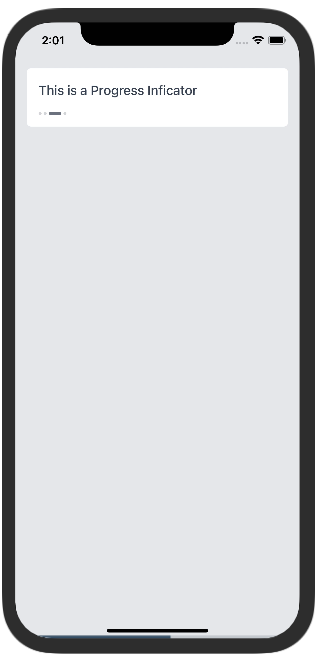
#### Description:
This component shows progress.
#### Samples
Try using Expo:
https://snack.expo.dev/@paulorieck/amplifi-ui---mobile---progress-indicator?platform=ios
`
import * as React from 'react';
import { View, SafeAreaView } from 'react-native';
import { Card, Paragraph, Image, ProgressSteps, H3, Button } from '@amplifiui/mobile';
import { SafeAreaProvider } from 'react-native-safe-area-context';
import tw from './services/tw';
export default function App() {
const [card1Indicator, setCard1Indicator] = React.useState(1);
const [card2Indicator, setCard2Indicator] = React.useState(1);
return (
}>
}>
}>
mb-4
}>
This is a Vanilla Progress Indicator
}>flex-1 mr-2
style={tw}flex-1 ml-2
onPress={() => setCard1Indicator(card1Indicator-1 < 0 ? 3 : card1Indicator-1)}>
Prev
style={tw}
onPress={() => setCard1Indicator(card1Indicator+1 > 3 ? 0 : card1Indicator+1)}>
Next
}>
mb-4
}>
This is a custom Progress Indicator
steps={4}
current={2}
space={4}
width={32}
unselectedWidth={12}
selectedColor="#408E5A"
unselectedColor="#D6D6D6"
/>
}>flex-1 mr-2
style={tw}flex-1 ml-2
onPress={() => setCard2Indicator(card2Indicator-1 < 0 ? 3 : card2Indicator-1)}>
Prev
style={tw}
onPress={() => setCard1Indicator(card2Indicator+1 > 3 ? 0 : card2Indicator+1)}>
Next
);
}
`
#### Props
| Variable | Value Type | Default | Mandatory | Notes |
| ---------------- | ---------------------------- | ------- | ------------------ | ------------------------------------------------------------------------------ |
| tw | Tailwind Function | \_ | :heavy_check_mark: | \_ |
| style | Tailwind Style | \_ | :x: | This style is applied to the container View |
| steps | number | \_ | :heavy_check_mark: | The number of steps on the progress indicator |
| current | number | \_ | :heavy_check_mark: | The current step of the indicator. |
| space | number | 3 | :x: | Defines the space between indicators. |
| width | number | 17 | :x: | Defines the width for the selected indicator. |
| diameter | number | 4 | :x: | Defines the diameter of the unselected indicator. |
| selectedColor | string | #6B7280 | :x: | Defines the color for the selected indicator. |
| unselectedColor | string | #6B7280 | :x: | Defines the color for the unselected indicators. |
| opacity | number | 0.3 | :x: | Defines the opacity for the unselected indicators. |
| radius | number | 2 | :x: | Defines the round radius of the indicators. |
| unselectedWidth | number | 4 | :x: | Defines the length of the unselected indicators. |
ToastMessage
#### Description:
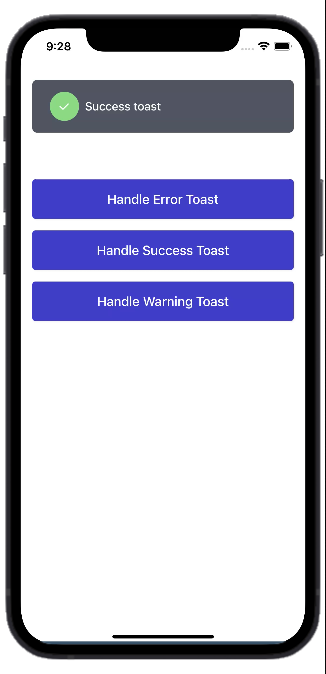
This component allows you to add notifications to your app.
#### Samples
Try using Expo:
https://snack.expo.dev/@jguilhermesl/amplifi-ui---mobile---toastmessage?platform=ios
`
import * as React from 'react';
import { View, SafeAreaView } from 'react-native';
import { ToastMessage, Button } from '@amplifiui/mobile';
import tw from './services/tw';
interface PropsToastState {
state: boolean;
label: string;
type: 'error' | 'success' | 'warning';
}
export default function App() {
const [toast, setToast] = React.useState
state: true,
label: '',
type: 'success',
});
const handleToast = (
type: 'error' | 'success' | 'warning',
label: string
) => {
setToast({
state: true,
label,
type,
});
};
return (
}>mt-40
tw={tw}
style={tw}mt-4
children="Handle Error Toast"
/>
tw={tw}
style={tw}mt-4
children="Handle Success Toast"
/>
tw={tw}
style={tw}
children="Handle Warning Toast"
/>
timeout={2000}
tw={tw}
show={toast.state}
children={toast.label}
type={toast.type}
showCallback={(value: boolean) => setToast({
...toast,
state: value
})}
/>
);
}
`
#### Props
| Variable | Value Type | Default | Mandatory | Notes |
| ---------------- | ---------------------------------- | --------- | ------------------ | ------------------------------------------------------------------------------ |
| tw | Tailwind Function | \_ | :heavy_check_mark: | \_ |
| style | Tailwind Style | \_ | :x: | This style is applied to the container View. |
| iconStyle | Tailwind Style | \_ | :x: | This style is applied to the icon View. |
| textStyle | Tailwind Style | \_ | :x: | This style is applied to the toast text. |
| children | string | \_ | :heavy_check_mark: | \_ |
| show | boolean | \_ | :heavy_check_mark: | Defines whether the toast appears or not. |
| duration | number | 1000 | :x: | Defines the duration that the toast takes to appear. |
| showCallback | (value: boolean) => void | \_ | :x: | Function that will perform the callback to make the notification temporary. |
| timeout | number | 4000 | :x: | Defines the duration of the toast |
| icon | SVG string | \_ | :x: | Defines the icon of the toast. |
| type | 'success' \| 'warning' \| 'error' | 'success' | :x: | Defines the type of the toast. |
| iconSize | number | \_ | :x: | Defines the size of the icon. |
Spinner
#### Description:
#### Samples
#### Props
SwipeCarousel
#### Description:
This component allows you to add notifications to your app.
#### Samples
Try using Expo:
https://snack.expo.dev/@jguilhermesl/amplifi-ui---mobile---toastmessage?platform=ios
`
import * as React from 'react';
import { View, SafeAreaView } from 'react-native';
import { ToastMessage, Button } from '@amplifiui/mobile';
import tw from './services/tw';
interface PropsToastState {
state: boolean;
label: string;
type: 'error' | 'success' | 'warning';
}
export default function App() {
const [toast, setToast] = React.useState
state: true,
label: '',
type: 'success',
});
const handleToast = (
type: 'error' | 'success' | 'warning',
label: string
) => {
setToast({
state: true,
label,
type,
});
};
return (
}>mt-40
tw={tw}
style={tw}mt-4
children="Handle Error Toast"
/>
tw={tw}
style={tw}mt-4
children="Handle Success Toast"
/>
tw={tw}
style={tw}
children="Handle Warning Toast"
/>
timeout={2000}
tw={tw}
show={toast.state}
children={toast.label}
type={toast.type}
showCallback={(value: boolean) => setToast({
...toast,
state: value
})}
/>
);
}
``
#### Props
| Variable | Value Type | Default | Mandatory | Notes |
| ---------------- | ---------------------------------- | --------- | ------------------ | ------------------------------------------------------------------------------ |
| tw | Tailwind Function | \_ | :heavy_check_mark: | \_ |
| style | Tailwind Style | \_ | :x: | This style is applied to the container View. |
| iconStyle | Tailwind Style | \_ | :x: | This style is applied to the icon View.