@arka-ai/code
v2.0.17TypeScript
ARKA Code - AI-powered coding assistant (Pro)
0/weekUpdated 1 weeks agoMITUnpacked: 1.9 MB
Published by ARKA AI
ARKA Code
$3
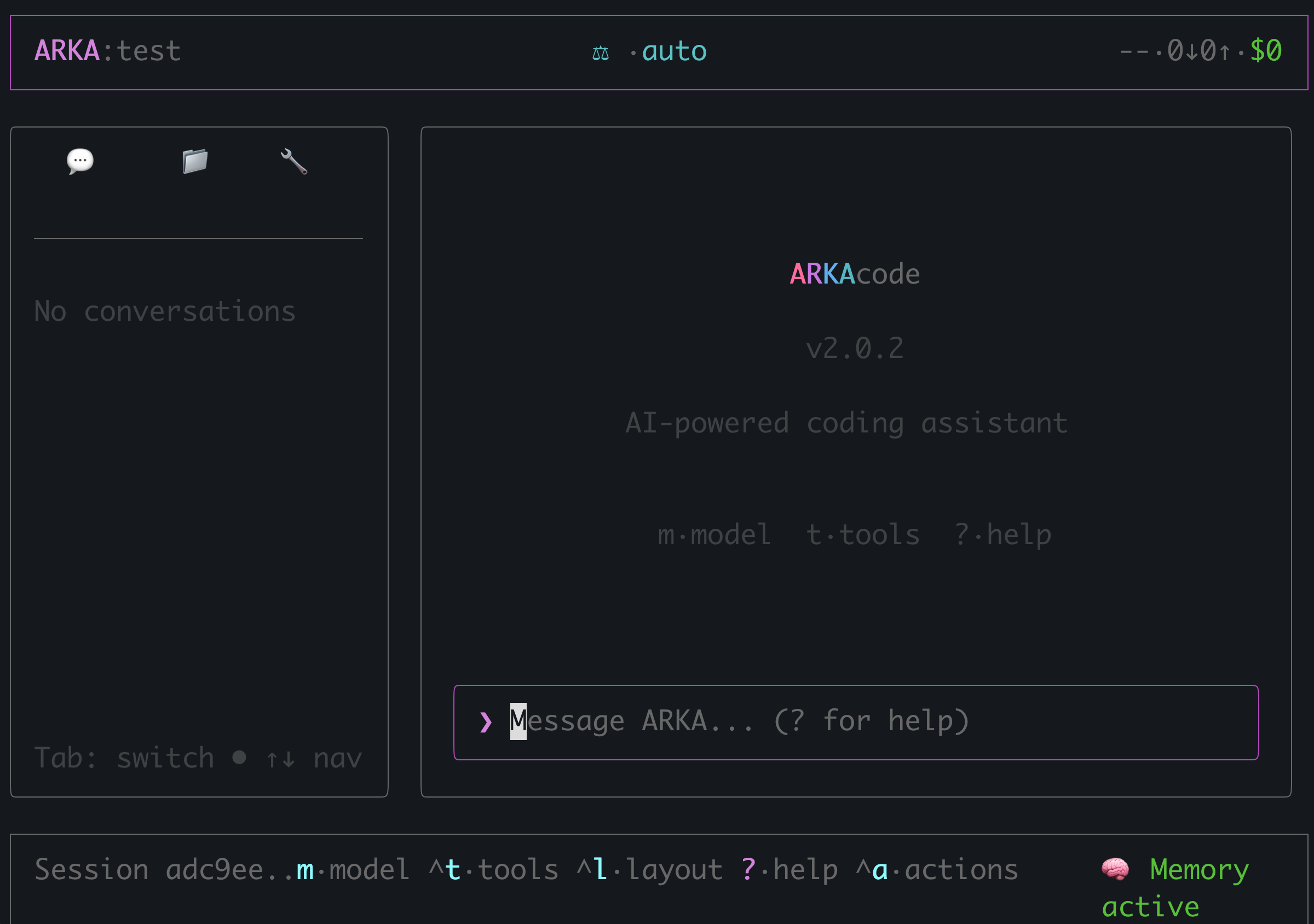


What is ARKA Code?
ARKA Code is a terminal-based agentic coding assistant that lives in your command line. It understands your codebase, executes tasks autonomously, and helps you build faster — all through natural language.
Just type naturally. No special syntax, no quotes, no prefixes.
Quick Start
``bashInstall globally
npm install -g @arka-ai/code
Login with your ARKA AI account
arka login
Start coding!
arka
`
What's New in v2.0.16
- Reduced Flicker - 32ms throttled streaming updates (~90% fewer re-renders)
- Static Message History - Completed messages frozen from reconciliation cycle
- zod Validation - Runtime schema validation for configs and API responses
- execa Integration - Modern process execution with better error handling
- Compare Mode - Multi-model comparison working with proper API routing
- Actions Panel (
) - Unified panel showing all available shortcuts
Powered by ARKAbrain
Unlike single-model tools, ARKA Code uses ARKAbrain — our intelligent routing system that automatically selects the best AI model for each task:
| Task Type | Model Selection |
|-----------|-----------------|
| Complex refactoring | Claude Sonnet |
| Quick explanations | GPT-4o-mini |
| Code generation | Claude / GPT-4o |
| Bug fixing | Best available |
You get the best model for every task without manual switching.
Features
$3
Read, write, edit files and execute commands autonomously. ARKA Code understands context and takes action.$3
ARKAbrain automatically selects the optimal AI model based on your task complexity and type.$3
Modern Ink-based interface with syntax highlighting, markdown rendering, and real-time streaming.$3
Compare responses from multiple AI models side-by-side to find the best solution.
$3
Remembers your preferences, coding conventions, and project decisions across sessions.$3
Built-in tools for file operations, shell commands, git, and codebase exploration.$3
Efficient Ctrl+ shortcuts for power users. Toggle layouts, switch models, and navigate with ease.$3
Choose how ARKA handles actions: ask every time, auto-approve edits, or full autonomy.
Usage
`
Usage: arka [options] [command] [prompt...]Arguments:
prompt Initial prompt to send
Options:
-V, --version Output version number
-k, --api-key API key (overrides config)
-u, --api-url API URL (overrides config)
-r, --resume Resume previous session
-p, --permission Permission mode: ask, auto-edit, auto-all
--read-only Read-only mode (no file writes or commands)
-h, --help Display help
Commands:
login Authenticate with ARKA AI
logout Log out and clear credentials
compare [prompt...] Multi-model comparison mode
Keyboard Shortcuts
Quick access: Press
 to open the Actions Panel showing all available shortcuts.| Shortcut | Action |
|----------|--------|
|
Ctrl+A | Actions Panel (all shortcuts) |
| Ctrl+M | Model selector |
| Ctrl+T | Tools panel |
| Ctrl+L | Toggle layout |
| Ctrl+Y | Copy last response |
| Ctrl+Q | Quit |
| ? | Help |
| Esc | Close panel |
Compare Mode
Compare responses from multiple AI models side-by-side:
`bash
Default models
arka compare "write a function to parse JSON"Specify models
arka compare -m gpt-4o,claude-3.5-sonnet,deepseek-chat "explain recursion"
`
Natural Language Interface
Just describe what you want — no commands, no syntax:
You: fix the type errors in src/utils.ts
You: add validation to the user registration form
You: write unit tests for the payment module
You: refactor this function to use async/await
You: explain how the auth middleware works
Permission Modes
Control how ARKA Code handles file and command permissions:
| Mode | Behavior |
|------|----------|
|
 (default) | Prompt for permission before each action |
|
auto-edit | Auto-approve file edits, ask for commands |
| auto-all | Auto-approve all actions (use with caution) |`bash
arka -p auto-edit "refactor this file"
`
Configuration
Environment Variables:
bash
export ARKA_API_KEY=arka_xxxxx
`Config File (
):
`json
{
"provider": "arka",
"model": "auto",
"tone": "concise",
"layoutEnabled": true
}
`
Authentication
ARKA Code requires an ARKA AI Pro subscription.
1. Visit arka-ai.com and sign up
2. Run
3. Start coding!
See the Authentication Guide for details.
Requirements
- Node.js 18+
- ARKA AI Pro subscription
- Terminal with Unicode support
---