@axclip/axclip-editor-sdk
v2.0.8
Axclip Editor SDK - A powerful video editing web component. Demo: https://axclip.com
video-editorvideo-editingvideo-clipvideo-cuttervideo-trimmersdkweb-componentweb-component-libraryaxclip.comtypescript
0/weekUpdated 1 weeks agoISCUnpacked: 8.6 MB
Published by axclip
@axclip/axclip-editor-sdk
Axclip Editor SDK available as a framework-agnostic Web Component.
Demo: https://axclip.com
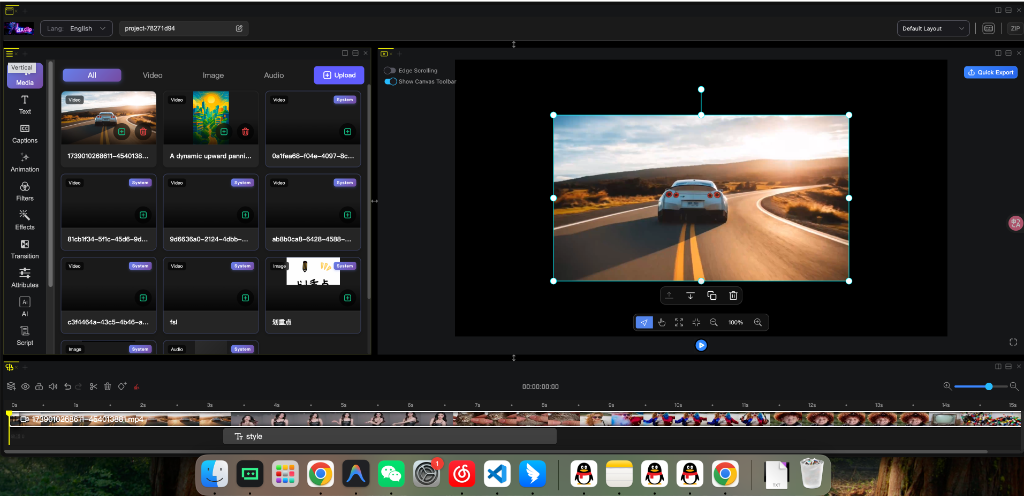
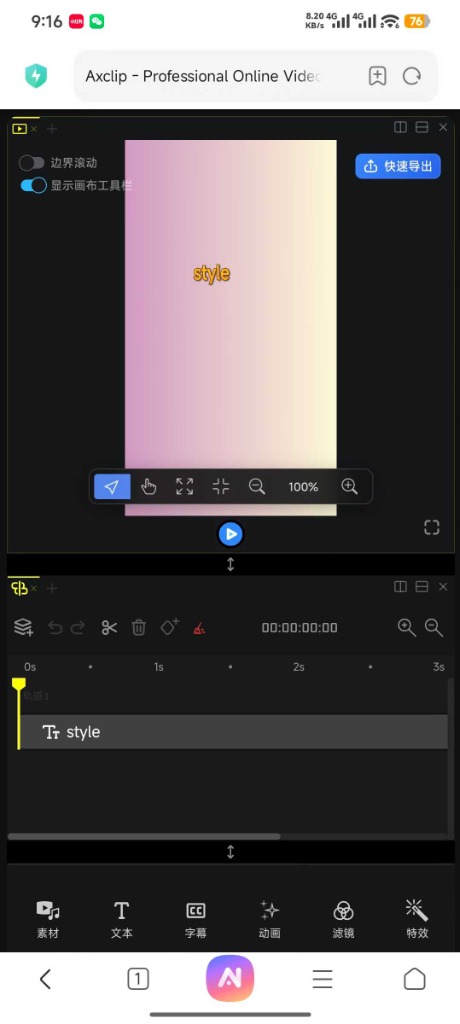
📦 Installation
``bash`
pnpm install @axclip/axclip-editor-sdk
🔧 Prerequisites (Important!)
This SDK uses advanced browser features like SharedArrayBuffer for high-performance video processing. You must serve your application with specific HTTP headers, otherwise the editor will strictly fail to load.
$3
Configure your server (Nginx, Vercel, Netlify, Vite, etc.) to send these headers:
`http`
Cross-Origin-Opener-Policy: same-origin
Cross-Origin-Embedder-Policy: require-corp
$3
The SDK requires static assets (WASM files, icons).
- Option A (Recommended): Use our CDN (no action needed, default behavior).
- Option B (Self-hosted): Copy the assets folder from node_modules/@axclip/axclip-editor-sdk/dist/assets to your public directory and set assets-url="/your/public/path".
---
🚀 Usage Guide
$3
In Vue, you must tell the compiler to treat as a custom element, otherwise it will try to resolve it as a Vue component and warn you.
vite.config.ts:
`typescript
import { defineConfig } from "vite";
import vue from "@vitejs/plugin-vue";
export default defineConfig({
plugins: [
vue({
template: {
compilerOptions: {
// Treat all tags starting with 'axclip-' as custom elements
isCustomElement: (tag) => tag.startsWith("axclip-"),
},
},
}),
],
});
`
App.vue:
`html
assets-url="https://cdn.axclip.com/assets/"
@ax-export="handleExport"
@ax-video-export="handleVideoExport"
>
`
---
$3
React 18 does not fully support Web Components events (like @ax-export). You need to use a ref to attach event listeners manually.
Top-level declaration (to fix TypeScript red errors):
`typescript`
// global.d.ts or at the top of your file
declare global {
namespace JSX {
interface IntrinsicElements {
"axclip-editor": React.DetailedHTMLProps<
React.HTMLAttributes
HTMLElement
> & {
"sdk-key"?: string;
"assets-url"?: string;
"resource-id"?: string;
class?: string;
};
}
}
}
Editor Component:
`tsx
"use client"; // If using Next.js App Router
import { useEffect, useRef } from "react";
import "@axclip/axclip-editor-sdk/axclip-editor.css";
// Dynamic import to avoid SSR issues if needed
// import('@axclip/axclip-editor-sdk');
export default function VideoEditor() {
const editorRef = useRef
const initialized = useRef(false);
useEffect(() => {
// Dynamically import the SDK on client-side only
import("@axclip/axclip-editor-sdk");
const editor = editorRef.current;
if (!editor) return;
const onExport = (e: any) => console.log("Export:", e.detail);
const onVideo = (e: any) => console.log("Video:", e.detail);
// React 18: Manually attach custom event listeners
editor.addEventListener("ax-export", onExport);
editor.addEventListener("ax-video-export", onVideo);
return () => {
editor.removeEventListener("ax-export", onExport);
editor.removeEventListener("ax-video-export", onVideo);
};
}, []);
return (
sdk-key="YOUR_SDK_KEY"
assets-url="https://cdn.axclip.com/assets/"
>
);
}
`
---
$3
React 19 has full support for Custom Elements! You can use it just like a normal component without refs.
tsx
import { useEffect, useRef } from "react";
import "@axclip/axclip-editor-sdk/axclip-editor.css";
import "@axclip/axclip-editor-sdk";export default function Editor() {
const editorRef = useRef(null);
useEffect(() => {
// Standard event listener attachment
const el = editorRef.current;
if (!el) return;
const handler = (e: any) => console.log(e.detail);
el.addEventListener("ax-export", handler);
return () => el.removeEventListener("ax-export", handler);
}, []);
return
}
`_(Note: React 19 is still new. If events don't fire, fallback to the React 18 method.)_
---
$3
Use the ESM build for modern browsers.
html
href="./node_modules/@axclip/axclip-editor-sdk/axclip-editor.css"
/>
src="./node_modules/@axclip/axclip-editor-sdk/axclip-editor.es.js"
>
`$3
Use the UMD build if you are not using a bundler and cannot use ES modules.
html
`---
📚 API Reference
$3
These attributes can be set on the
element.Important: In HTML, use kebab-case (e.g.
sdk-key). In JavaScript/React refs, use camelCase (e.g. element.sdkKey).| Attribute (HTML) | Property (JS) | Type | Required | Description |
| :--------------- | :------------ | :------- | :------- | :------------------------------------------------- |
|
sdk-key | sdkKey | string | Yes | Your SDK Access Token. |
| resource-id | resourceId | string | No | ID of the project/template to load. |
| assets-url | assetsUrl | string | No | Base URL for fetching static assets (icons, wasm). |
| api-base-url | apiBaseUrl | string | No | Custom API endpoint for private deployments. |$3
Listen to these events to interact with the editor.
| Event Name | Detail Type | Description |
| :---------------- | :--------------------- | :------------------------------------------------------------------------------------------------------------- |
|
ax-export | JSONObject | Fired when the user triggers a "Save/Export Project" action.
Matches the internal project state format. |
| ax-video-export | { file: Uint8Array } | Fired when the video rendering process finishes.
event.detail.file contains the binary video data (MP4). |$3
Currently, the editor is primarily controlled via Attributes and User Interaction.
_Programmatic control methods (e.g.,
save(), load()) are planned for v2.1._---
💡 Common Issues & Troubleshooting
Q: "Failed to resolve component: axclip-editor" in Vue
A: You forgot to configure
compilerOptions.isCustomElement in your vite/vue config. See the Vue section above.Q: "Property 'axclip-editor' does not exist on type 'JSX.IntrinsicElements'" in React/TS
A: You need to add the module declaration to extends JSX types. See the React 18 section above.
Q: Editor stuck at "Loading..."
A: Open DevTools > Console. If you see
SharedArrayBuffer is not defined, you are missing the COOP/COEP headers. See "Prerequisites".Q: Icons or Fonts are missing (404)
A: Check the Network tab. If requests to
/assets/... are failing, set the assets-url attribute to point to the correct absolute path (e.g., https://my-cdn.com/axclip/`).