A tool that generates a strongly typed client library for any GraphQL endpoint. The client allows writing GraphQL queries as plain JS objects (with type safety, awesome code completion experience, custom scalar type mapping, type guards and more)
npm install @bconnorwhite/graphql-typed-clientA tool that generates a strongly typed client library for any GraphQL endpoint. The client allows writing GraphQL queries
as plain JS objects (with type safety, awesome code completion experience, custom scalar type mapping, type guards and more)
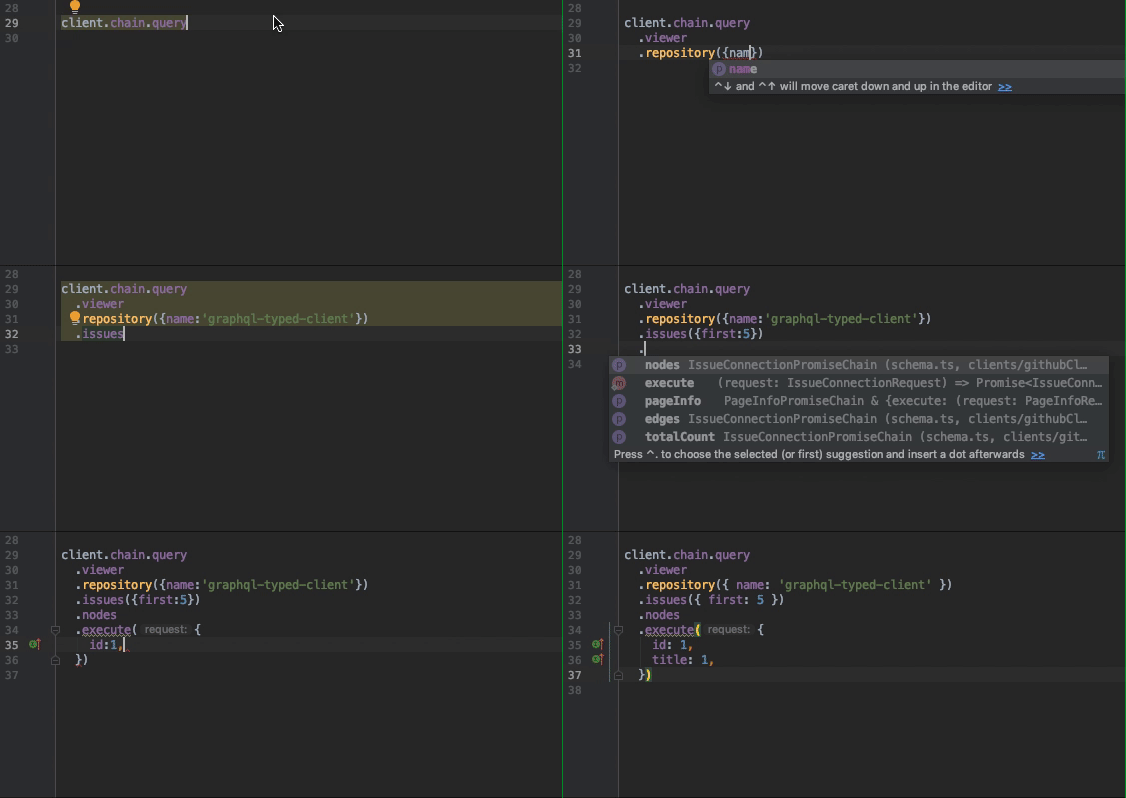
#### Chain request syntax
#### Raw request syntax
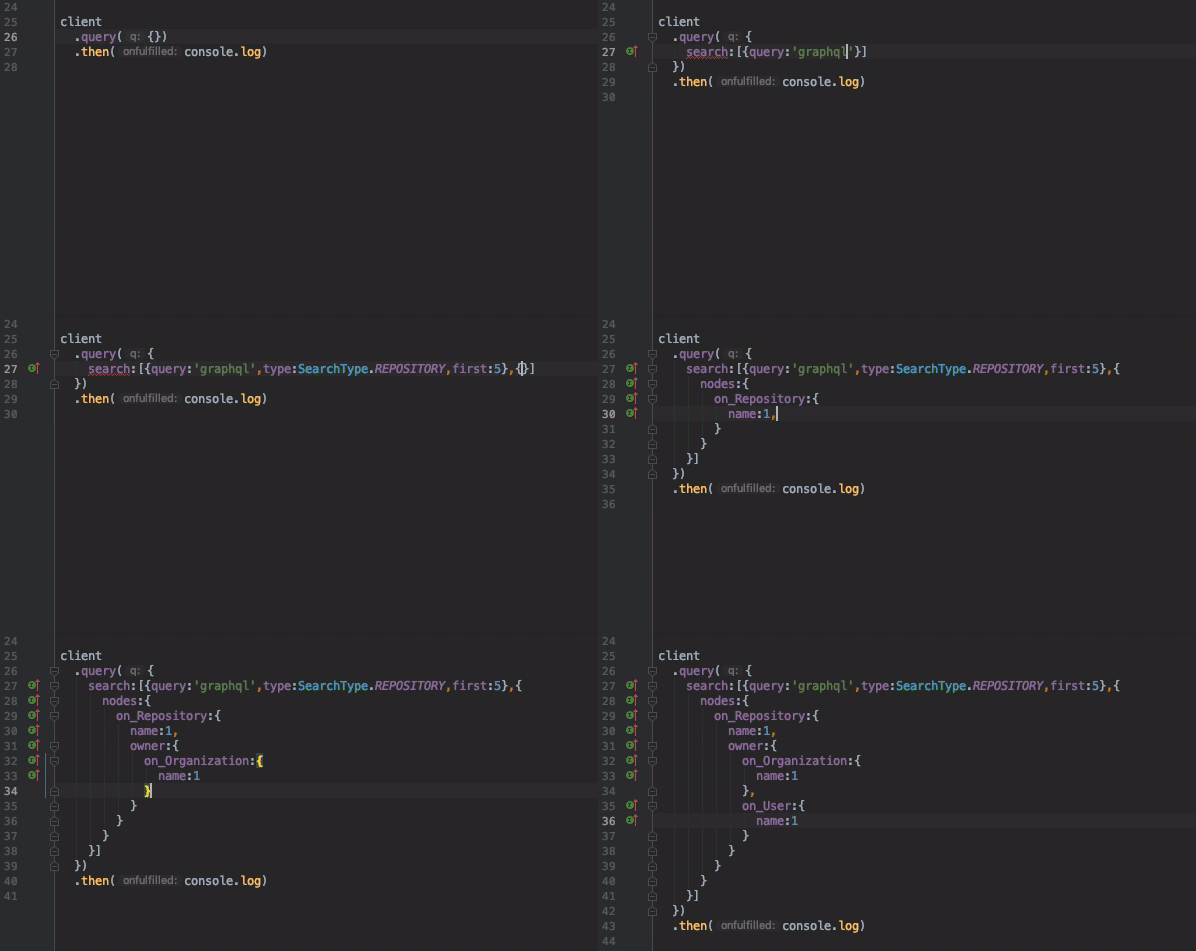
The request above is then converted to the GraphQL query and variables
``graphql`
query Query($v1: String!, $v2: SearchType!, $v3: Int) {
search(query: $v1, type: $v2, first: $v3) {
nodes {
...f3
}
}
}
fragment f1 on User {
name
}
fragment f2 on Organization {
name
}
fragment f3 on Repository {
name
owner {
...f1
...f2
}
}
`json`
{ "v1": "graphql", "v2": "REPOSITORY", "v3": 5 }
`bash`
yarn global add graphql-typed-client # needed for the CLI to work globally
yarn add graphql-typed-client # needed for the generated client to work
To generate the client, use the CLI tool
`bash`
generate-graphql-client
`bash
Usage: generate-graphql-client [options]
Options:
-o, --output <./myClient> output directory
-e, --endpoint
-p, --post use POST for introspection query
-H, --header <'header: value'> headers to use in fetch
-s, --schema <./*.graphql> glob pattern to match GraphQL schema definition files
-f, --fetcher <./schemaFetcher.js> path to introspection query fetcher file
-c, --config <./myConfig.js> path to config file
-v, --verbose verbose output
-h, --help output usage information
`
If your endpoint is able to respond to introspection query without authentication, provide the endpoint optionpost
(use option to use POST request)
`bash
generate-graphql-client -e http://example.com/graphql -o myClient
If your endpoint requires authentication or maybe some custom headers, use
 option to provide
a custom fetcher function.
We will pass
fetch and qs
instances to your function for convenience, but you can use anything you like to fetch the introspection querybash
generate-graphql-client -f customFetcher.js -o myClient
`js
// customFetcher.jsmodule.exports = function(query, fetch, qs) {
return fetch(
https://api.github.com/graphql?${qs.stringify({ query: query })}, {
headers: {
Authorization: 'bearer YOUR_GITHUB_API_TOKEN',
},
}).then(r => r.json())
}
`If instead of making a query to some endpoint, you just want to use a GraphQL schema definition, use
option`bash
generate-graphql-client -s mySchema.graphql -o myClientor
generate-graphql-client -s *.graphql -o myClientthis will also work
generate-graphql-client -s "type User { name: String } type Query { users: [User] }" -o myClient
`Alternatively, you can use a JS or JSON config file to define how you want the client to be generated.
Also, using the config file you can define more than one client.
The config file should contain an object or an array of objects, each representing a client to be generated.
Object fields are named the same way as the CLI arguments described above +
 field
for passing various parsing/generation options (see config.ts to learn more)`bash
generate-graphql-client -c myConfig.js
`js
// myConfig.jsmodule.exports = [
{
schema: 'type Query { hello: String }',
output: 'clients/simpleClient',
},
{
schema: 'schemas/*/.graphql',
output: 'clients/clientFromSchema',
},
{
endpoint: 'http://example.com/graphql',
post: true,
output: 'clients/exampleClient',
},
{
fetcher: 'customFetcher.js',
output: 'clients/customClient',
},
{
fetcher: (query, fetch, qs) =>
fetch(
https://api.github.com/graphql?${qs.stringify({ query })}, {
headers: {
Authorization: 'bearer YOUR_GITHUB_API_TOKEN',
},
}).then(r => r.json()),
output: 'clients/githubClient',
},
]
`Create the client instance
To create the client instance, you have to call
function that was generated with the clientIf you want to execute Queries and Mutations, provide a
fetcher function.Just like with the fetcher that can be used for client generation, we will
pass
fetch and qs instances
inside for convenience, but the function can be implemented in any way you wantIf you want to execute Subscriptions, provide
subscriptionCreatorOptions object with uri and options fields, where
options are ClientOptions passed down
to subscriptions-transport-ws
( and lazy options are already enabled by default)`js
// myClient.jsimport { createClient } from './clients/myClient/createClient'
export const myClient = createClient({
fetcher: ({ query, variables }, fetch, qs) =>
fetch(
http://example.com/graphql?${qs.stringify({ query, variables })}, {
headers: {
Authorization: 'bearer MY_TOKEN',
},
}).then(r => r.json()),
subscriptionCreatorOptions: {
uri: 'wss://example.com/graphql-subscriptions',
options: {
connectionParams: {
token: 'MY_TOKEN',
},
},
},
})
`Making GraphQL requests in JS
#### Raw request syntax
The format for the request object is visually similar to an actual GraphQL query, so something like
js
query({
  user: [{ id: 'USER_ID' }, {
      username: 1,
      email: 1,
      on_AdminUser: {
        isSuperAdmin: 1,
      },
  }],
})
`is easily recognizable as
graphql
query {
  user(id: "USER_ID") {
    username
    email
    ... on AdminUser {
      isSuperAdmin
    }
  }
}
`Here are the rules governing the format:
- fields with scalar types are written as
or name: true- fields with object types are written as JS objects
- fields that have arguments are written as arrays with argument object and the field selection
- if the field has arguments, but the return type is scalar, just pass the array with argument object
- if all the arguments for the field are optional, you can omit the array and just pass the field selection
is the same as friend: [{}, { name: 1 }]- fields with
or interface types can have fragments defined on them to select fields of a specific type
on_AdminUser: { superAdmin: 1 }- additionally, there is a special
 field, that can be included in the field selection to automatically include
  all scalar fields from an object/interface type
(excluding __typename, which you have to request manually if you need it)
user: { __scalar: 1 }Here is an example request object, showing all possible field types
js
myClient.query({
  user: [{ id: 'USER_ID' }, {
    username: 1,
    email: 1,
    wasEmployed: [{ recently: true }],
    friends: {
      username: 1,
      email: 1,
    },
    posts: [{ limit: 5 }, {
      __scalar: 1,
    }],
    pets: {
      name: 1,
      on_Cat: {
        eyeColor: 1,
      },
      on_Snake: {
        length: 1,
      },
    },
  }],
})
`When executed, it will send the following GraphQL
and variables to the server`json
{ "v1": "USER_ID", "v2": true, "v3": 5 }
`graphql
query($v1: ID!, $v2: Boolean, $v3: Int) {
user(id: $v1) {
username
email
wasEmployed(recently: $v2)
friends {
username
email
}
posts(limit: $v3) {
...f1
}
pets {
name
...f2
...f3
}
}
}
fragment f1 on Post {
id
title
content
}
fragment f2 on Cat {
eyeColor
}
fragment f3 on Snake {
length
}
`#### Chain request syntax
js
myClient.chain.query.user({ id: 'USER_ID' }).execute({
  username: 1,
  email: 1,
  on_AdminUser: {
    isSuperAdmin: 1,
  },
})// execute() returns Promise on query/mutation and Observable on subscription
`In the chain, each member refers to a GraphQL field going down the tree. Fields with arguments can be called like methods.
You can continue the chain so long as the fields that are mentioned are object types or interfaces (not arrays, unions etc.).
At any point, you can finish the chain by calling
. Calling execute() returns
a Promise (for query/mutation) or an Observable (subscription) of type equal to the type of the last field in the chain.
Unlike in raw request syntax, where GraphQL errors are just returned in the response, chain execution will throw an error
if GraphQL endpoint responds with errors, empty data or empty value at the requested path when no defaultValue
was provided.##### Default value logic clarification
graphql
type User {
  status: String
}
`js
const status = await myClient.chain.query.user({ id: 'USER_ID' }).status.execute()
// status is String | null, which means that if user with specified ID exists, any string or null
// are both considered valid
// but if the user with specified ID is not found, the Promise returned from execute()
// will throw an errorconst status = await myClient.chain.query.user({ id: 'USER_ID' }).status.execute(1, 'default status')
// in this case, if the user with specified ID is not found, returned status will be 'default status'
Custom scalar type mapping
By default, all custom scalar types are generated as aliases to TypeScript's
You can override this behavior by providing your own type mapper that will be used during the schema generation and applied
to query responses
For example, let's say you have a custom
 type. To specify how this type should be serialized/deserialized, create
a type mapper file (
.ts or .js) somewhere in your app`typescript
// path/to/typeMapper.tsimport moment, { Moment } from 'moment'
export const typeMapper = {
Date: {
serialize: (date: Moment) => date.toISOString(),
deserialize: (date: string) => moment(date),
},
}
`Add
option to client generation config`js
module.exports = {
endpoint: 'http://example.com/graphql',
output: 'clients/myClient',
options: { typeMapper: { location: 'path/to/typeMapper', types: ['Date'] } },
}
`Now, all fields of
type in query responses will be automatically deserialized, and the return type of the
deserialize() function is going to be used as the definition for Date in generated TypeScript (enabling correct code
completion and type checking). All query variables of Date type and input object types that have Date fields will be
automatically serialized before sending.
`typescript
myClient
.query({
// activatedAfter is a Date argument, so now it accepts Moment instances
user: [{ id: 'USER_ID', activatedAfter: moment('1999-01-01') }, {
name: 1,
birthday: 1,
}],
})
.then(result => {
if (!result.data) return
const user = result.data.user // moment's methods are now available for
birthday field in the response
console.log(user.birthday.startOf('day').toISOString())
})
`Type guards
Additionally, Typescript type guard functions are
generated for every object, interface and union type in your schema
typescript
import { isCat, isSnake } from './clients/testClient/schema'myClient
  .query({
    pet: [{ id: 'PET_ID' }, {
      name: 1,
      on_Cat: { eyeColor: 1 },
      on_Snake: { length: 1 },
    }],
  })
  .then(result => {
    if (!result.data) return
    const pet = result.data.pet    console.log(pet.name) // pet type is abstract type Pet, so you only get access to shared fields    if (isCat(pet)) {
      console.log(pet.eyeColor) // pet type is Cat, so you get access to fields of the specific type
    } else if (isSnake(pet)) {
      console.log(pet.length) // same here
    }
  })
`Notes on type annotation generation
- all known Scalar types are converted to their Typescript counterparts
- all unknown Scalar types are converted to type aliases for
unless type mapper is provided
- all Enum types are converted to Typescript enums, so you can import and use them in your code
(even if you're not using Typescript)Notes on subscriptions
The generated client uses Apollo's
subscriptions-transport-ws for executing SubscriptionsSubscriptions are wrapped in RxJs'
Observable which is chained
to the SubscriptionClient` so that a connection is opened when you subscribe to the first subscription,