@can3p/headless-mde
v0.0.4TypeScript
UI headless React markdown editor using only textarea
0/weekUpdated 1 weeks agoMITUnpacked: 73.0 KB
Published by Resetand / can3p
npm install @can3p/headless-mdeTextarea Markdown
This is a fork of https://github.com/Resetand/textarea-markdown-editor
The aim is to trim fix some of the quirks with the scroll position, there will be breaking changes, no compatibility planned.
---
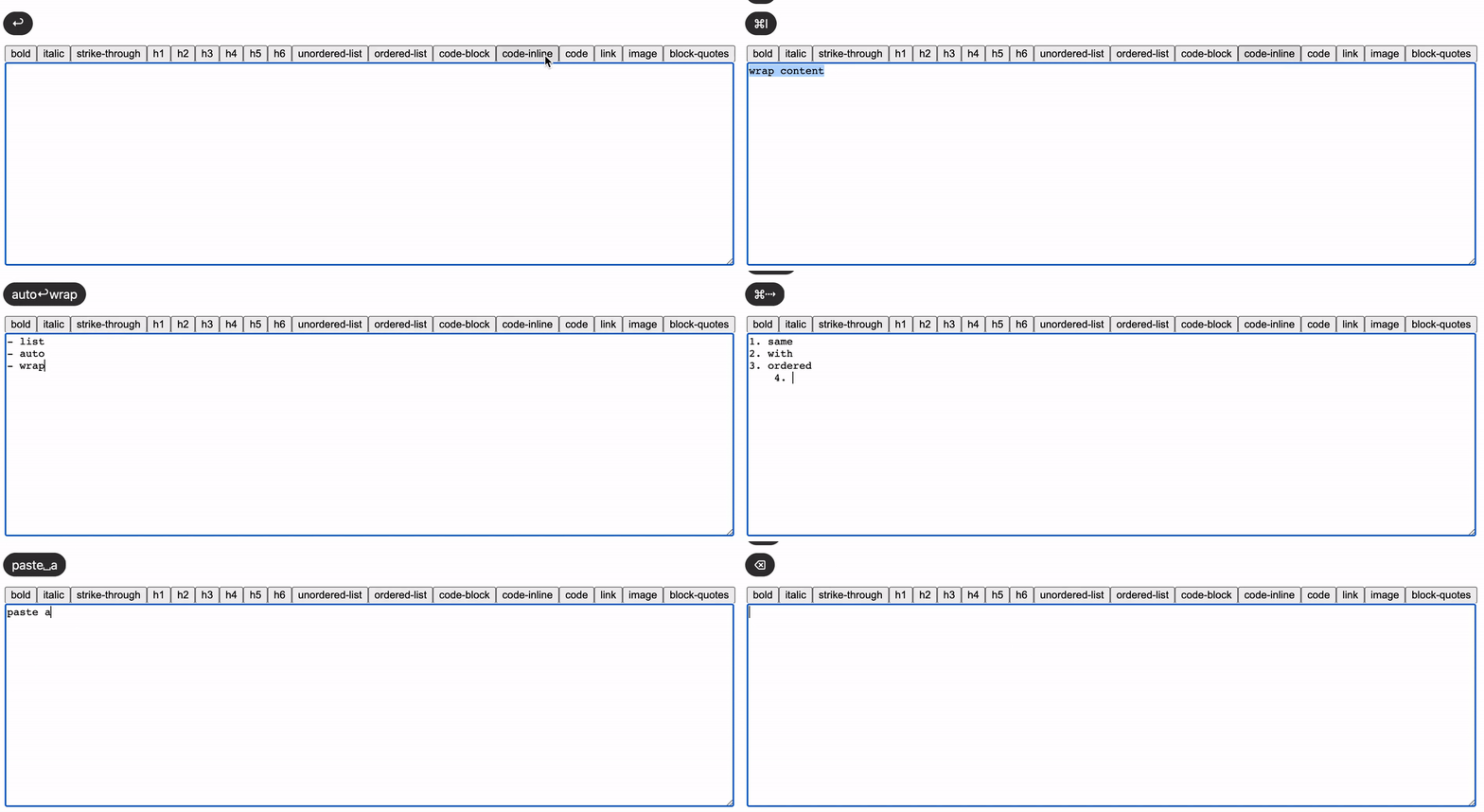
Textarea Markdown is a simple markdown editor using only . It extends textarea by adding formatting features like shortcuts, list-wrapping, invoked commands and other to make user experience better 🙃
Essentially this library just provides the textarea Component. You can choose any markdown parser, create your own layout, and use your own textarea component that is styled and behaves however you like
Features
- Lists wrapping
- Auto formatting pasted links
- Indent tabulation
- Keyboard shortcuts handling
- 17 built-in customizable commands
Usage
``tsx
import React, { Fragment, useRef, useState } from 'react';
import TextareaMarkdown, { TextareaMarkdownRef } from '@can3p/headless-mde';
function App() {
const [value, setValue] = useState('');
const ref = useRef
return (
);
}
`
ℹ️ Ref instance provide the trigger function to invoke commands
$3
You can use custom textarea Component. Just wrap it with TextareaMarkdown.Wrapper
`tsx
import React, { useRef, useState } from 'react';
import TextareaMarkdown, { TextareaMarkdownRef } from '@can3p/headless-mde';
import TextareaAutosize from 'react-textarea-autosize';
function App() {
const [value, setValue] = useState('');
const ref = useRef
return (
);
}
`
ℹ️ This solution will not create any real dom wrapper
$3
You can specify or overwrite shortcuts for built-in commands or create your own
`tsx
import React, { useRef, useState } from 'react';
import TextareaMarkdown, { CommandHandler, TextareaMarkdownRef } from '@can3p/headless-mde';
/* Inserts 🙃 at the current position and select it /
const emojiCommandHandler: CommandHandler = ({ cursor }) => {
// MARKER - means a cursor position, or a selection range if specified two markers
cursor.insert(${cursor.MARKER}🙃${cursor.MARKER});
};
function App() {
const [value, setValue] = useState('');
const ref = useRef
return (
value={value}
onChange={(e) => setValue(e.target.value)}
commands={[
{
name: 'code',
shortcut: ['command+/', 'ctrl+/'],
shortcutPreventDefault: true,
},
{
name: 'insert-emoji',
handler: emojiCommandHandler,
},
]}
/>
);
}
`
ℹ️ Note that mutation element.value will not trigger change event on textarea element. Use cursor.setValue(...) or other method of Cursor.
ℹ️ Mousetrap.js is used under the hood for shortcuts handling.
It is great solution with simple and intuitive api. You can read more about combination in the documentation
$3
For projects that don't use React, import from the headless entry point:
`js
import { bootstrapTextareaMarkdown } from '@can3p/headless-mde/headless';
const textarea = document.querySelector('textarea'); // element can be obtained from anywhere, this is just an example;
const { trigger, dispose } = bootstrapTextareaMarkdown(textarea, {
options: {}, // optional options config
commands: [], // optional commands configs
});
`
ℹ️ The headless entry point has no React dependencies, so you won't get peer dependency warnings.
---
$3
---
API
- TextareaMarkdownProps
- Command
- CommandHandler
- Built-in commands
- TextareaMarkdownOptions
- TextareaMarkdownRef
$3
ℹ️ TextareaMarkdown accepts all props which native textarea supports
#### options TextareaMarkdownOptions
Options config
Array of commands configuration
---
#### Command
| Name | Type | Description |
| :-------------------------- | :---------------------------------- | :-------------------------------------------------------------------- |
| name | TType | Built-in or custom command name |string
| shortcut? | \| string[] | Shortcut combinations (Mousetrap.js) |boolean
| shortcutPreventDefault? | | Toggle key event prevent default:false |CommandHandler
| handler? | | Handler function for custom commands |boolean
| enable? | | Toggle command enabling |
---
#### CommandHandler
`ts
export type CommandHandler = (context: CommandHandlerContext) => void | Promise
export type CommandHandlerContext = {
textarea: HTMLTextAreaElement;
cursor: Cursor;
keyEvent?: KeyboardEvent;
clipboardEvent?: ClipboardEvent;
options: TextareaMarkdownOptions;
};
`
---
#### Built-in commands
| Name | Description | Shortcut |
| ------------------ | ------------------------------------------------------------------ | ---------------------- |
| bold | Inserts or wraps bold markup | ctrl/command+b |ctrl/command+i
| italic | Inserts or wraps italic markup | |ctrl/command+shift+x
| strike-through | Inserts or wraps strike-through markup | |
| link | Inserts or wraps link markup | |
| image | Inserts or wraps image markup | |
| unordered-list | Inserts or wraps unordered list markup | |
| ordered-list | Inserts or wraps ordered list markup | |
| code-block | Inserts or wraps code block markup | |
| code-inline | Inserts or wraps inline code markup | |
| code | Inserts or wraps inline or block code markup dependent of selected | |
| block-quotes | Inserts or wraps block-quotes markup | |
| h1 | Inserts h1 headline | |
| h2 | Inserts h2 headline | |
| h3 | Inserts h3 headline | |
| h4 | Inserts h4 headline | |
| h5 | Inserts h5 headline | |
| h6 | Inserts h6 headline | |
---
$3
| Name | Type | Description |
| :------------------------------------------ | :------------------------------------------ | :--------------------------------------------------------------------------------------------------------------------------------------- |
| preferredBoldSyntax | "" \| "__" | Preferred bold wrap syntax default: '' |""
| preferredItalicSyntax | \| "_" | Preferred italic wrap syntax default: '' |"-"
| preferredUnorderedListSyntax | \| "*" \| "+" | Preferred unordered list prefix default: '-' |boolean
| enableIndentExtension | | Will handle tab and shift+tab keystrokes, on which will insert/remove indentation instead of the default behavior default:true |boolean
| enableLinkPasteExtension | | Will handle paste event, on which will wrap pasted with link/image markup if pasted is URL default:true |boolean
| enablePrefixWrappingExtension | | Will handle enter keystroke, on which will wrap current list sequence if needed default:true |boolean
| enableProperLineRemoveBehaviorExtension | | Will handle command/ctrl+backspace keystrokes, on which will remove only a current line instead of the default behavior default:true |PrefixWrappingConfig
| customPrefixWrapping | ( \| string)[] | Array of custom prefixes, that need to be wrapped. (Will not work with enablePrefixWrappingExtension:false) |string
| blockQuotesPlaceholder | | default: 'quote' |string
| boldPlaceholder | | default: 'bold' |string
| codeBlockPlaceholder | | default: 'code block' |string
| codeInlinePlaceholder | | default: 'code' |string
| headlinePlaceholder | \| (level: number) => string | default: (lvl) => 'headline ' + lvl |string
| imageTextPlaceholder | | Used inside default image markup ! default: 'example' |string
| imageUrlPlaceholder | | Used inside default image markup !... default: 'image.png' |string
| italicPlaceholder | | default: 'italic' |string
| linkTextPlaceholder | | Used inside default link markup default: 'example' |string
| linkUrlPlaceholder | | Used inside default image markup !... default: 'url' |string
| orderedListPlaceholder | | default: 'ordered list' |string
| strikeThroughPlaceholder | | default: 'strike through' |string
| unorderedListPlaceholder | | default: 'unordered list' |
---
#### TextareaMarkdownRef
ℹ️ Extends HTMLTextAreaElement instance
`typescript`
trigger: (command: string) => void;
cursor: Cursor
Development
$3
This package is automatically published to npm when a GitHub release is created.
Setup was done by following trusted publisher guide: https://docs.npmjs.com/trusted-publishers
#### Creating a release
Just create a GitHub release with a version tag (e.g., v1.0.0). The workflow will:
1. Extract the version from the tag
2. Update package.json automatically
3. Run lint, tests, and build
4. Commit the version bump and move the tag to point to it
5. Publish to npm
No manual version bumping required! The release tag will always point to the commit with the correct version in package.json`.
Acknowledgements
All praise goes to https://github.com/Resetand !