@clawdcc/ccusage
v17.1.6-clawdcc.2
Fork of ccusage with hourly usage features. Generated by Claude Code, steered by humanwritten.ai
0/weekUpdated 2 months agoMITUnpacked: 640.0 KB
Published by ryoppippi
npm install @clawdcc/ccusage> Fork Notice: This is a fork of ccusage by ryoppippi, adding hourly usage features.
>
> Generated by Claude Code, steered by humanwritten.ai
---

@clawdcc/ccusage




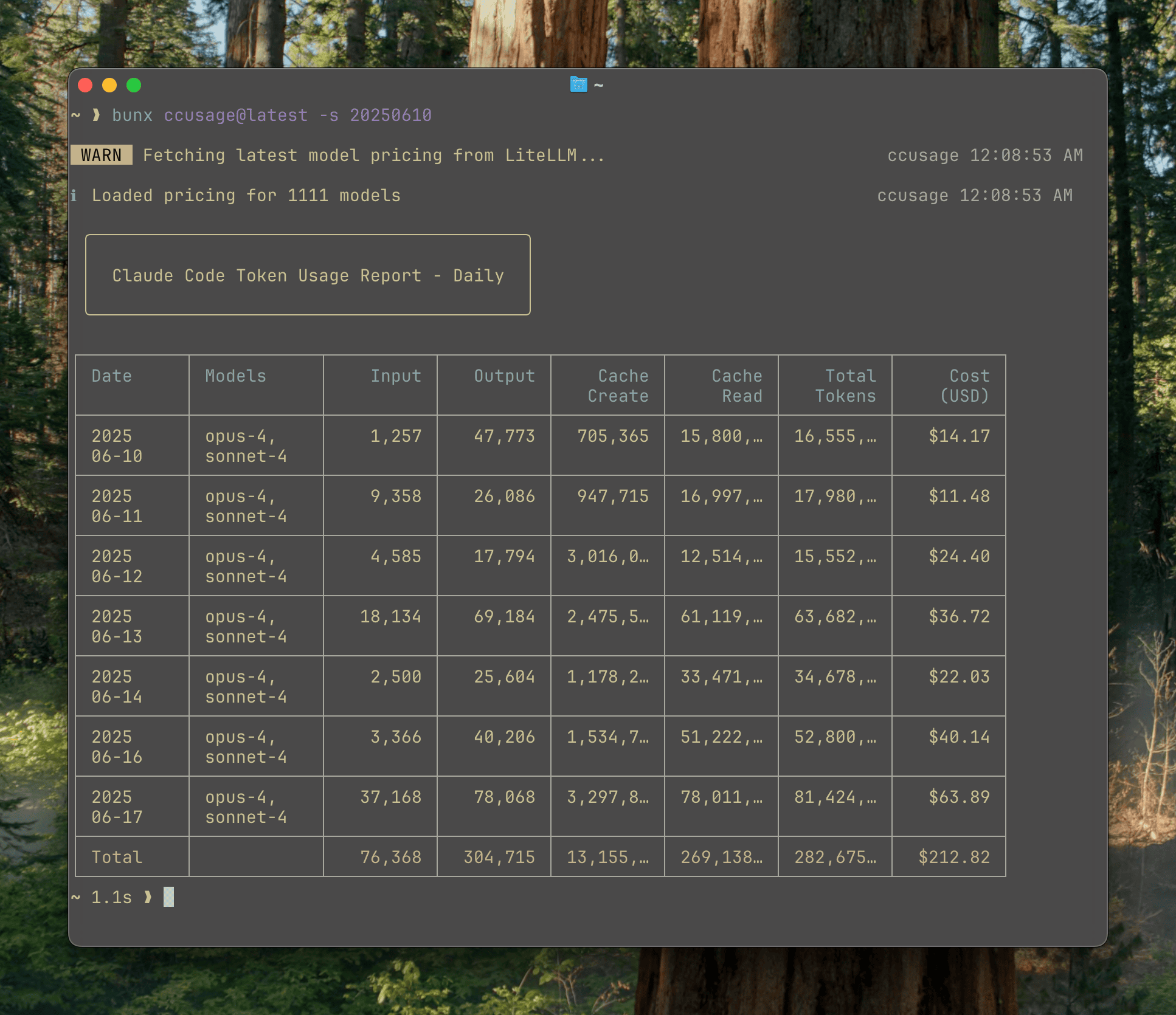
> Analyze your Claude Code token usage and costs from local JSONL files — incredibly fast and informative!
ccusage Family
$3
The main CLI tool for analyzing Claude Code usage from local JSONL files. Track daily, monthly, and session-based usage with beautiful tables and live monitoring.
$3
Companion tool for analyzing OpenAI Codex usage. Same powerful features as ccusage but tailored for Codex users, including GPT-5 support and 1M token context windows.
$3
Model Context Protocol server that exposes ccusage data to Claude Desktop and other MCP-compatible tools. Enable real-time usage tracking directly in your AI workflows.
Installation
$3
Thanks to ccusage's incredibly small bundle size (), you can run it directly without installation:
``bashRecommended - always include @latest to ensure you get the newest version
npx ccusage@latest
bunx ccusage
Alternative package runners
pnpm dlx ccusage
pnpx ccusage
Using deno (with security flags)
deno run -E -R=$HOME/.claude/projects/ -S=homedir -N='raw.githubusercontent.com:443' npm:ccusage@latest
`
> 💡 Important: We strongly recommend using
suffix with npx (e.g., npx ccusage@latest) to ensure you're running the most recent version with the latest features and bug fixes.$3
#### Codex CLI
Analyze OpenAI Codex usage with our companion tool @ccusage/codex:
`bash
Recommended - always include @latest
npx @ccusage/codex@latest
bunx @ccusage/codex@latest # ⚠️ MUST include @latest with bunxAlternative package runners
pnpm dlx @ccusage/codex
pnpx @ccusage/codexUsing deno (with security flags)
deno run -E -R=$HOME/.codex/ -S=homedir -N='raw.githubusercontent.com:443' npm:@ccusage/codex@latest
`> ⚠️ Critical for bunx users: Bun 1.2.x's bunx prioritizes binaries matching the package name suffix when given a scoped package. For
, it looks for a codex binary in PATH first. If you have an existing codex command installed (e.g., GitHub Copilot's codex), that will be executed instead. Always use bunx @ccusage/codex@latest with the version tag to force bunx to fetch and run the correct package.#### MCP Server
Integrate ccusage with Claude Desktop using @ccusage/mcp:
`bash
Start MCP server for Claude Desktop integration
npx @ccusage/mcp@latest --type http --port 8080
`This enables real-time usage tracking and analysis directly within Claude Desktop conversations.
Usage
bash
Basic usage
npx ccusage          # Show daily report (default)
npx ccusage daily    # Daily token usage and costs
npx ccusage monthly  # Monthly aggregated report
npx ccusage session  # Usage by conversation session
npx ccusage blocks   # 5-hour billing windows
npx ccusage statusline  # Compact status line for hooks (Beta)Live monitoring
npx ccusage blocks --live  # Real-time usage dashboardFilters and options
npx ccusage daily --since 20250525 --until 20250530
npx ccusage daily --json  # JSON output
npx ccusage daily --breakdown  # Per-model cost breakdown
npx ccusage daily --timezone UTC  # Use UTC timezone
npx ccusage daily --locale ja-JP  # Use Japanese locale for date/time formattingProject analysis
npx ccusage daily --instances  # Group by project/instance
npx ccusage daily --project myproject  # Filter to specific project
npx ccusage daily --instances --project myproject --json  # Combined usageCompact mode for screenshots/sharing
npx ccusage --compact  # Force compact table mode
npx ccusage monthly --compact  # Compact monthly report
`Features
- 📊 Daily Report: View token usage and costs aggregated by date
- 📅 Monthly Report: View token usage and costs aggregated by month
- 💬 Session Report: View usage grouped by conversation sessions
- ⏰ 5-Hour Blocks Report: Track usage within Claude's billing windows with active block monitoring
- 📈 Live Monitoring: Real-time dashboard showing active session progress, token burn rate, and cost projections with
- 🚀 Statusline Integration: Compact usage display for Claude Code status bar hooks (Beta)
- 🤖 Model Tracking: See which Claude models you're using (Opus, Sonnet, etc.)
- 📊 Model Breakdown: View per-model cost breakdown with flag
- 📅 Date Filtering: Filter reports by date range using --since and --until
- 📁 Custom Path: Support for custom Claude data directory locations
- 🎨 Beautiful Output: Colorful table-formatted display with automatic responsive layout
- 📱 Smart Tables: Automatic compact mode for narrow terminals (< 100 characters) with essential columns
- 📸 Compact Mode: Use flag to force compact table layout, perfect for screenshots and sharing
- 📋 Enhanced Model Display: Model names shown as bulleted lists for better readability
- 📄 JSON Output: Export data in structured JSON format with --json
- 💰 Cost Tracking: Shows costs in USD for each day/month/session
- 🔄 Cache Token Support: Tracks and displays cache creation and cache read tokens separately
- 🌐 Offline Mode: Use pre-cached pricing data without network connectivity with (Claude models only)
- 🔌 MCP Integration: Built-in Model Context Protocol server for integration with other tools
- 🏗️ Multi-Instance Support: Group usage by project with --instances flag and filter by specific projects
- 🌍 Timezone Support: Configure timezone for date grouping with --timezone option
- 🌐 Locale Support: Customize date/time formatting with --locale` option (e.g., en-US, ja-JP, de-DE)- ⚙️ Configuration Files: Set defaults with JSON configuration files, complete with IDE autocomplete and validation
- 🚀 Ultra-Small Bundle: Unlike other CLI tools, we pay extreme attention to bundle size - incredibly small even without minification!
Documentation
Full documentation is available at ccusage.com
Sponsors
$3
Check out ccusage: The Claude Code cost scorecard that went viral

Star History