@good-i-deer/node-red-contrib-object-detection
v1.0.3
Object Detection Nodes for Node-RED
0/weekUpdated 2 years agoGPL-3.0Unpacked: 161.5 MB
Published by GOOD-I-DEER
npm install @good-i-deer/node-red-contrib-object-detection@good-i-deer/node-red-contrib-object-detection


Object Detection Node for Node-Red
Description
This module provides a set of object recognition nodes. If you use these nodes, you can easily detect objects in the image and use our nodes with other services. You can choose an appropriate pre-trained model considering elapsed time and accuracy. And you can also cut the images you want from the original image and download them. If you want, you can easily create a service by uploading images directly, using a webcam, or inputting photos from an IoT camera.
Pre-requisites
The Node-Red-Contrib-Object-Detection requires Node-RED to be installed.
Install
To use this module, you need to go to the folder where node-red is installed and use the npm install command.
``
bash

cd ~/.node-red/

npm install @good-i-deer/node-red-contrib-object-detection
`
Nodes
object-detection
This is a node that detects and outputs objects in the image.
$3
Image Buffer
- Image represented as a binary buffer
$3
!Untitled
Name
- The name of the node displayed on the workspace.
Model
- A pre-trained model used for object detection. Supports yolov8n, yolov8s, and yolov8m models. Accuracy increases in the order n < s < m, but it also takes longer.
Return Value
- Type of data to be transmitted as an output of the node. Supports Detected Object, Image Buffer, and Image File.
- Detected Object : Result object of the pre-trained model. A model can contain multiple objects with preset labels. Included values are x, y, w, h, prob.
- x : zero-indexed offset from left edge of the original image
- y : zero-indexed offset from top edge of the original image
- w : the width of cropped image
- h : the height of cropped image
- prob : Accuracy of objects detected by the model
- Image Buffer : Image buffer resulting from a pre-trained model
- Image File : Image file resulting from a pre-trained model.
Absolute Path Dir
- Absolute path to save the file to. Show only when you select Image File as Return Value
Confidence Threshold
- Confidence threshold of the results of the pre-trained model. You must specify a value between 0 and 1. The lower the value, the more objects are detected.
$3
Data is output in the output format selected in the 'Return Value' property.
Detected Object
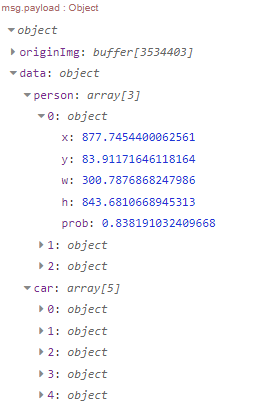
Image Buffer

Image File

$3
This is a simple example of this node.
!Untitled 4
$3
`json
[
{
"id": "4212d35061fe9b82",
"type": "debug",
"z": "83078a0b9760cbee",
"name": "result",
"active": true,
"tosidebar": true,
"console": false,
"tostatus": false,
"complete": "payload",
"targetType": "msg",
"statusVal": "",
"statusType": "auto",
"x": 1030,
"y": 140,
"wires": []
},
{
"id": "4cc9810beb057ce1",
"type": "good-object-detection",
"z": "83078a0b9760cbee",
"name": "",
"returnValue": "0",
"model": "yolov8n",
"threshold": 0.5,
"absolutePathDir": "",
"x": 780,
"y": 140,
"wires": [["4212d35061fe9b82"]]
},
{
"id": "1f6540f5de8d8204",
"type": "file in",
"z": "83078a0b9760cbee",
"name": "Image Path",
"filename": "",
"filenameType": "str",
"format": "",
"chunk": false,
"sendError": false,
"encoding": "none",
"allProps": false,
"x": 550,
"y": 140,
"wires": [["4cc9810beb057ce1"]]
},
{
"id": "27305ebce4a2d493",
"type": "inject",
"z": "83078a0b9760cbee",
"name": "",
"props": [
{
"p": "payload"
},
{
"p": "topic",
"vt": "str"
}
],
"repeat": "",
"crontab": "",
"once": false,
"onceDelay": "3",
"topic": "",
"payload": "",
"payloadType": "date",
"x": 360,
"y": 140,
"wires": [["1f6540f5de8d8204"]]
}
]
`
webcam-object-detection


This is a node that detects and outputs objects in images on a web browser using a webcam.


$3


Http request


- Http Get Request to request a web page to provide object detection service using a webcam in a web browser


$3


!Untitled 5


Name


- The name of the node displayed on the screen


Model


- A pre-trained model used for object detection. Supports yolov8n, yolov8s, and yolov8m models. Accuracy increases in the order n < s < m, but it also takes longer.


Confidence Threshold


- Confidence threshold of the results of the pre-trained model. You must specify a value between 0 and 1. The lower the value, the more objects are detected.


Server Url


- Server URL to be applied to CORS settings. The default is localhost.


Socket Port


- A socket port that transmits object detection results using a websocket. Users can specify which port they want to use among ports that are not in use. The default value is 1889.


Webcam Test


- You can check the user's webcam screen in advance.


$3


Http response


- A web page to provide object detection service using webcam in web browser.


Detected object


- Result object of the pretrained model. A model can contain multiple objects with preset labels. Included values are x, y, w, h, prob.

  !Untitled 6


$3


This is a simple example of this node.


!Untitled 7


$3
`json
[
{
"id": "f341edcf122db704",
"type": "http in",
"z": "ff67e0c22a0e9932",
"name": "",
"url": "/webcamObjectDetection",
"method": "get",
"upload": false,
"swaggerDoc": "",
"x": 180,
"y": 720,
"wires": [["7c36ca24529c9981"]]
},
{
"id": "8a1974a686e2ba92",
"type": "http response",
"z": "ff67e0c22a0e9932",
"name": "",
"statusCode": "",
"headers": {},
"x": 710,
"y": 700,
"wires": []
},
{
"id": "14fad81fd8ec7ff6",
"type": "debug",
"z": "ff67e0c22a0e9932",
"name": "Object detection result",
"active": true,
"tosidebar": true,
"console": false,
"tostatus": false,
"complete": "true",
"targetType": "full",
"statusVal": "",
"statusType": "auto",
"x": 760,
"y": 760,
"wires": []
},
{
"id": "7c36ca24529c9981",
"type": "webcam-object-detection",
"z": "ff67e0c22a0e9932",
"name": "",
"model": "yolov8n",
"threshold": 0.5,
"serverUrl": "localhost",
"socketUrl": "http://localhost",
"socketPort": "1889",
"x": 470,
"y": 720,
"wires": [["8a1974a686e2ba92"], ["14fad81fd8ec7ff6"]]
}
]
``
Discussions and suggestions
Use GitHub Issues to ask questions or to discuss new features.
Authors
GOOD-I-DEER in SSAFY(Samsung Software Academy for Youth) 9th
- Kim Jaea
- Yi Jong Min
- Lee Deok Yong
- Lee Che Lim
- Lee Hyo Sik
- Jung Gyu Sung
Copyright and license
Copyright Samsung Automation Studio Team under the GNU General Public License v3.0 license.
Reference
- Node-RED Creating Nodes
- SamsungAutomationStudio Github Repository
- Ultralytics YOLOv8
- yolov8 onnx on javascript
- yolov8 onnx on nodejs