@huggingface/gguf
v0.3.3TypeScript
a GGUF parser that works on remotely hosted files
0/weekUpdated 2 weeks agoMITUnpacked: 358.2 KB
Published by Hugging Face
npm install @huggingface/gguf@huggingface/gguf
A GGUF parser that works on remotely hosted files.
Spec
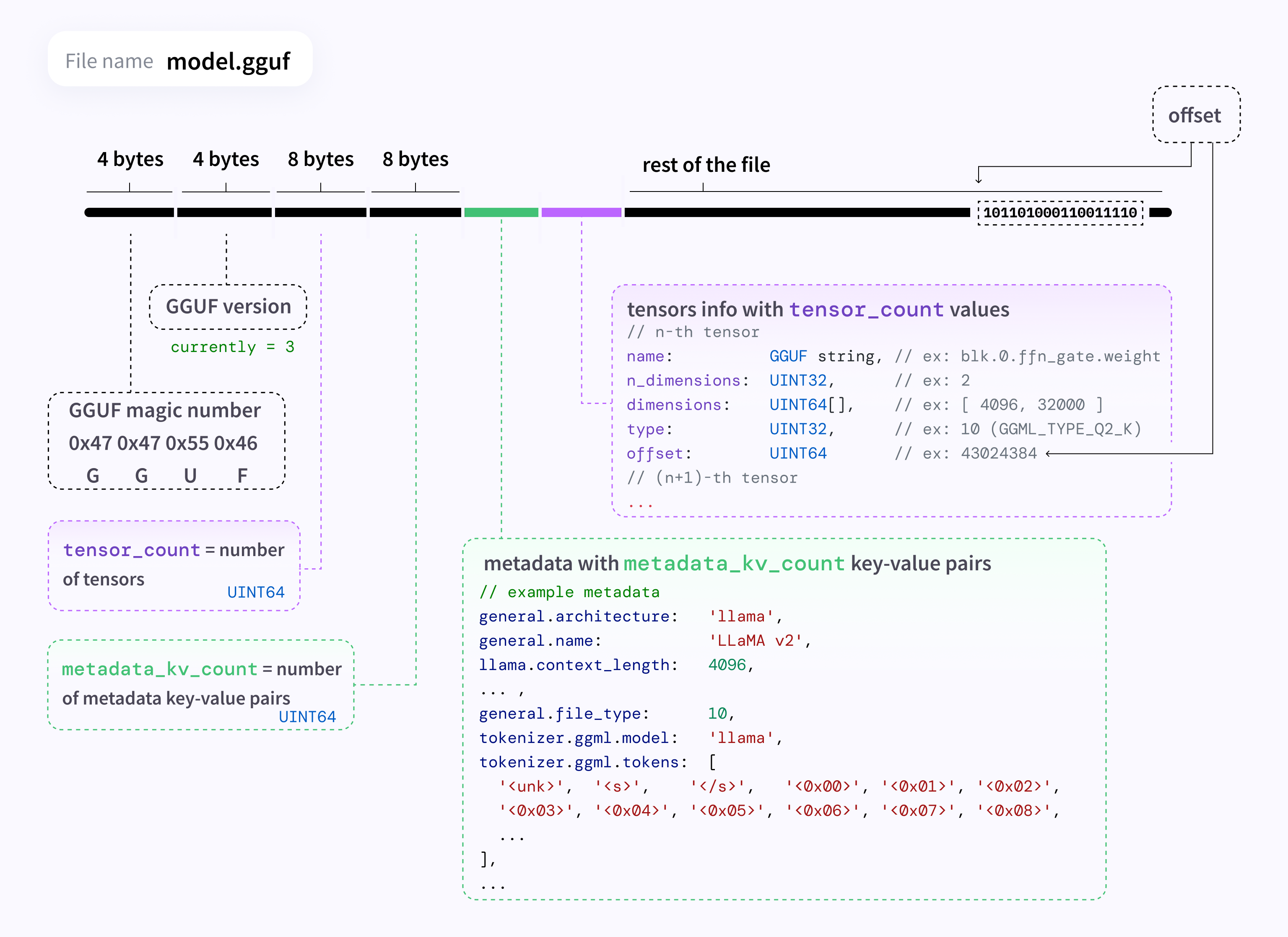
Spec: https://github.com/ggerganov/ggml/blob/master/docs/gguf.md
Reference implementation (Python): https://github.com/ggerganov/llama.cpp/blob/master/gguf-py/gguf/gguf_reader.py
Install
``bash`
npm install @huggingface/gguf
Usage
$3
`ts
import { GGMLQuantizationType, gguf } from "@huggingface/gguf";
// remote GGUF file from https://huggingface.co/TheBloke/Llama-2-7B-Chat-GGUF
const URL_LLAMA = "https://huggingface.co/TheBloke/Llama-2-7B-Chat-GGUF/resolve/191239b/llama-2-7b-chat.Q2_K.gguf";
const { metadata, tensorInfos } = await gguf(URL_LLAMA);
console.log(metadata);
// {
// version: 2,
// tensor_count: 291n,
// kv_count: 19n,
// "general.architecture": "llama",
// "general.file_type": 10,
// "general.name": "LLaMA v2",
// ...
// }
console.log(tensorInfos);
// [
// {
// name: "token_embd.weight",
// shape: [4096n, 32000n],
// dtype: GGMLQuantizationType.Q2_K,
// },
// ... ,
// {
// name: "output_norm.weight",
// shape: [4096n],
// dtype: GGMLQuantizationType.F32,
// }
// ]
`
$3
`ts`
// Reading a local file. (Not supported on browser)
const { metadata, tensorInfos } = await gguf(
'./my_model.gguf',
{ allowLocalFile: true },
);
$3
You can get metadata with type information by setting typedMetadata: true. This provides both the original value and its GGUF data type:
`ts
import { GGMLQuantizationType, GGUFValueType, gguf } from "@huggingface/gguf";
const URL_LLAMA = "https://huggingface.co/TheBloke/Llama-2-7B-Chat-GGUF/resolve/191239b/llama-2-7b-chat.Q2_K.gguf";
const { metadata, typedMetadata } = await gguf(URL_LLAMA, { typedMetadata: true });
console.log(typedMetadata);
// {
// version: { value: 2, type: GGUFValueType.UINT32 },
// tensor_count: { value: 291n, type: GGUFValueType.UINT64 },
// kv_count: { value: 19n, type: GGUFValueType.UINT64 },
// "general.architecture": { value: "llama", type: GGUFValueType.STRING },
// "general.file_type": { value: 10, type: GGUFValueType.UINT32 },
// "general.name": { value: "LLaMA v2", type: GGUFValueType.STRING },
// "llama.attention.head_count": { value: 32, type: GGUFValueType.UINT32 },
// "llama.attention.layer_norm_rms_epsilon": { value: 9.999999974752427e-7, type: GGUFValueType.FLOAT32 },
// "tokenizer.ggml.tokens": { value: ["", "", ...], type: GGUFValueType.ARRAY, subType: GGUFValueType.STRING },
// "tokenizer.ggml.scores": { value: [0.0, -1000.0, -1000.0, ...], type: GGUFValueType.ARRAY, subType: GGUFValueType.FLOAT32 },
// ...
// }
// Access both value and type information
console.log(typedMetadata["general.architecture"].value); // "llama"
console.log(typedMetadata["general.architecture"].type); // GGUFValueType.STRING (8)
// For arrays, subType indicates the type of array elements
console.log(typedMetadata["tokenizer.ggml.tokens"].type); // GGUFValueType.ARRAY (9)
console.log(typedMetadata["tokenizer.ggml.tokens"].subType); // GGUFValueType.STRING (8)
`
$3
By default, known fields in metadata are typed. This includes various fields found in llama.cpp, whisper.cpp and ggml.
`ts
const { metadata, tensorInfos } = await gguf(URL_MODEL);
// Type check for model architecture at runtime
if (metadata["general.architecture"] === "llama") {
// "llama.attention.head_count" is a valid key for llama architecture, this is typed as a number
console.log(model["llama.attention.head_count"]);
// "mamba.ssm.conv_kernel" is an invalid key, because it requires model architecture to be mamba
console.log(model["mamba.ssm.conv_kernel"]); // error
}
`
$3
Because GGUF format can be used to store tensors, we can technically use it for other usages. For example, storing control vectors, lora weights, etc.
In case you want to use your own GGUF metadata structure, you can disable strict typing by casting the parse output to GGUFParseOutput<{ strict: false }>:
`ts`
const { metadata, tensorInfos }: GGUFParseOutput<{ strict: false }> = await gguf(URL_LLAMA);
Command line interface
This package provides a CLI equivalent to gguf_dump.py script. You can dump GGUF metadata and list of tensors using this command:
`bash
npx @huggingface/gguf my_model.gguf
or, with a remote GGUF file:
npx @huggingface/gguf https://huggingface.co/bartowski/Llama-3.2-1B-Instruct-GGUF/resolve/main/Llama-3.2-1B-Instruct-Q4_K_M.gguf
`
Example for the output:
* Dumping 36 key/value pair(s)
Idx | Count | Value
----|--------|----------------------------------------------------------------------------------
1 | 1 | version = 3
2 | 1 | tensor_count = 292
3 | 1 | kv_count = 33
4 | 1 | general.architecture = "llama"
5 | 1 | general.type = "model"
6 | 1 | general.name = "Meta Llama 3.1 8B Instruct"
7 | 1 | general.finetune = "Instruct"
8 | 1 | general.basename = "Meta-Llama-3.1" [truncated]
* Dumping 292 tensor(s)
Idx | Num Elements | Shape | Data Type | Name
----|--------------|--------------------------------|-----------|--------------------------
1 | 64 | 64, 1, 1, 1 | F32 | rope_freqs.weight
2 | 525336576 | 4096, 128256, 1, 1 | Q4_K | token_embd.weight
3 | 4096 | 4096, 1, 1, 1 | F32 | blk.0.attn_norm.weight
4 | 58720256 | 14336, 4096, 1, 1 | Q6_K | blk.0.ffn_down.weight
[truncated]
Alternatively, you can install this package as global, which will provide the
command:`bash
npm i -g @huggingface/gguf
gguf-view my_model.gguf
``Hugging Face Hub
The Hub supports all file formats and has built-in features for GGUF format.
Find more information at: http://hf.co/docs/hub/gguf.
Acknowledgements & Inspirations
- https://github.com/hyparam/hyllama by @platypii (MIT license)
- https://github.com/ahoylabs/gguf.js by @biw @dkogut1996 @spencekim (MIT license)
🔥❤️