@lastcode802/glassarview
v0.1.6
A custom lib for Glasses Ar View
0/weekUpdated 3 years agoISCUnpacked: 34.8 KB
Published by lastcode802
npm install @lastcode802/glassarview

lastcode802
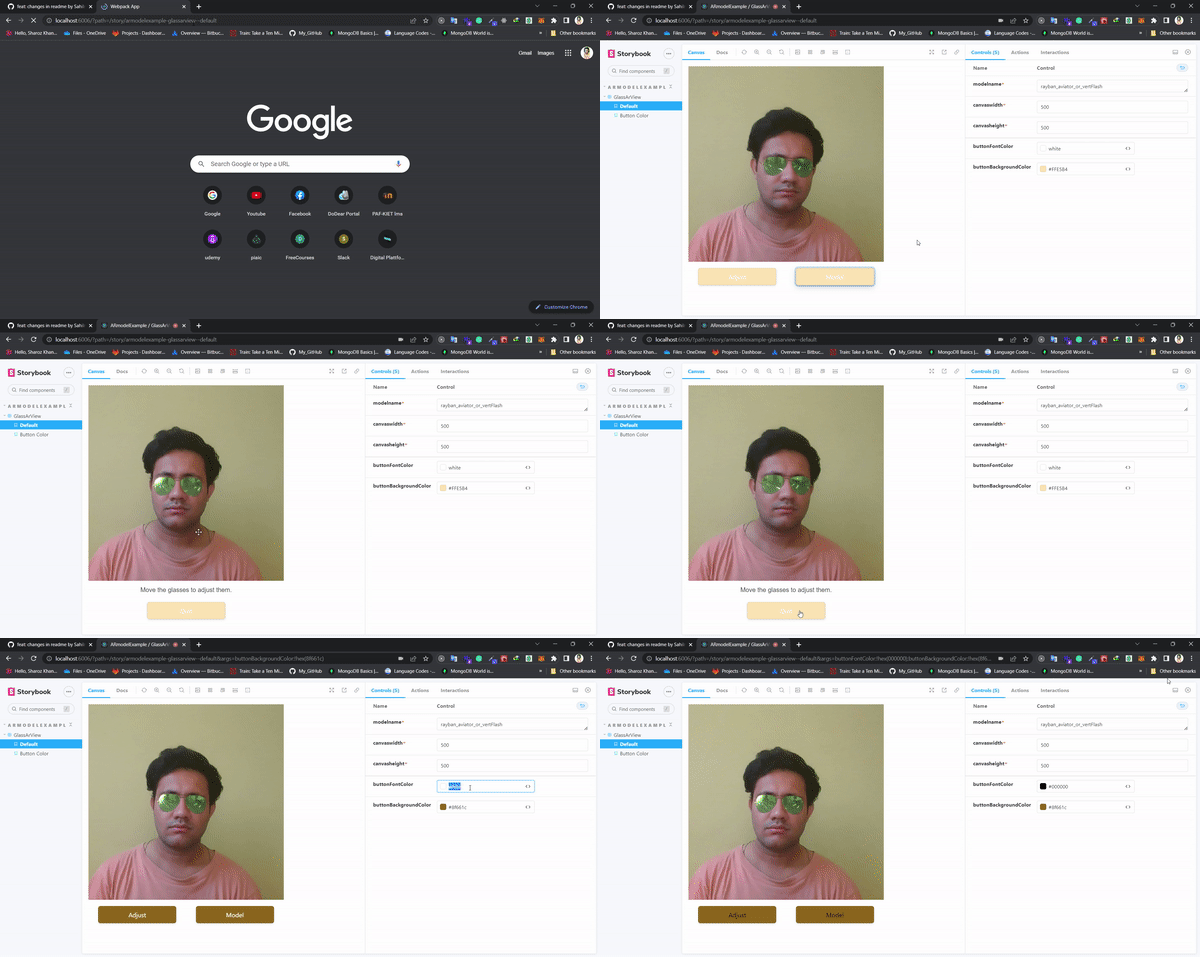
Glasses Virtual Try-on Widget
Offer glasses virtual try-on to your users with this JavaScript widget. It can be easily integrated into an e-commerce website or into a mobile web application with a few lines of code. The experience is in real-time: the user see his face like in a mirror, but with glasses on.
You can find more information in Find & contact me.
Table of contents
* Features
* Demonstrations
* Demo app
* Available Code
* Props
* Glasses 3D models
* From GlassesDB
* As a static file
* Misc
* Test GlassesDB SKU availability
* Compatibility
* Optimization
* Hosting
Features
* real-time web based glasses virtual try on,
* light reconstruction (ambient + directionnal),
* very robust to:
* lighting conditions (back light, side light),
* facial variations (bearded people, hair partially covering the face, ...),
* works both on mobile (IOS, Android) and desktop,
* lightweight (2.1MB transferred for the demo including 3D models),
* high end 3D engine with:
* physically based rendering (PBR),
* raytraced shadows,
* deferred shading,
* temporal antialiasing.
Demonstrations
$3
* Storybook View
Glasses 3D models
$3
Glasses models are stored on the Jeeliz GlassesDB. Each model is identified by a unique SKU. You can check the different models available by opening glassesSKU.csv file.
$3
You can convert your own glasses GLTF 3D Model to a proprietary JSON file accepted by this widget using Jeeliz Glasses Studio 3D. You can download:
* Some samples of GLTF glasses 3D models
You can use both models from GlassesDB and your own static models. Glasses Studio 3D is a free application and you keep the IP on your exported 3D models.
Unlike this widget, Glasses studio 3D works:
* Only on desktops, with a fullHD screen resolution (1920x1080),
* Your GPU device needs to be able to do MRT (Multi Rendering Targets) on at least 4 targets (i.e. it may not work on deprecated or very cheap hardware).
However, the capabilities of Glasses Studio 3D are below what we offer with GlassesDB. This is a comparison:
| Feature | Glasses Studio 3D | GlassesDB |
| --- | :-: | :-: |
| PBR material parameters | X | X |
| diffuse texture | X | X |
| normal texture | X | X |
| PBR params texture | | X |
| 3D model compression | | X |
| Guaranteed support | | X |
| Hosting | | X |
#
Available Code
``
jsx
import * as React from 'react';
import { GlassArView } from "@lastcode802/glassarview";
function App() {
return (
canvasheight={500}
canvaswidth={500}
/>
);
}
export default App;
`
Or
`jsx
import * as React from 'react';
import { GlassArView } from "@lastcode802/glassarview";
function App() {
return (
canvasheight={500}
canvaswidth={500}
buttonBackgroundColor="#FFE5B4"
buttonFontColor="white"
/>
);
}
export default App;
`
props


|     prop      |      type     |     default   |   example     |

| ------------- | ------------- | ------------- | ------------- |

|  modelname*  | string  | rayban_aviator_or_vertFlash  | This is the default model name you can set name of you choose to check glassdb

| canvaswidth*   | number  | 1-(screen size)  | you can set any width as per your setting

|  canvasheight*  | number  |1-(screen size) | you can set height as per your setting

| buttonFontColor  | color  |  white-(any color) | you can set any color of button fonts

|  buttonBackgroundColor | color  |#FFE5B4-(any color)  | you can set any color of button background


Misc


$3


In some cases, SKU can be generated dynamically from the backoffice of the glasses e-commerce website. It can be . We need to test if this SKU is in GlassesDB in order to display the Virtual Try-on button to the user.
To do this, request with GET or POST method (using an XMLHttpRequest for example):
`
https://glassesdbcached.jeeliz.com/testSku/
`
You can test it here:


* For existing SKU "rayban_aviator_or_vertFlash"

* For non-existing SKU "notASKU"


Compatibility


* If
WebGL2 is available, it uses WebGL2 and no specific extension is required,
* If WebGL2 is not available but WebGL1, we require either OES_TEXTURE_FLOAT extension or OES_TEXTURE_HALF_FLOAT extension,
* If WebGL2 is not available, and if WebGL1 is not available or neither OES_TEXTURE_FLOAT or OES_HALF_TEXTURE_FLOAT are implemented, the user is not compatible with the real time video version.
If a compatibility error is triggered, please post an issue on this repository. If this is a problem with the camera access, please first retry after closing all applications which could use your device (Skype, Messenger, other browser tabs and windows, ...). Please include:
* a screenshot of webglreport.com - WebGL1 (about your WebGL1 implementation),
* a screenshot of webglreport.com - WebGL2 (about your WebGL2 implementation),
* the log from the web console,
* the steps to reproduce the bug, and screenshots.
If the user was not compatible or refuses to share its camera video stream, an image based fallback version was available til January 2020. The server side webservice generating the rendering has been undeployed.
If the user does not want to share its camera or if its implementation of WebGL is too minimalistic, a FALLBACKUNAVAILABLE error will be triggered.
Optimization
If you meet some performance issues, please first:
* Check that you are using the latest main script ( /dist/jeelizNNCwidget.js ),
* Check that your browser is updated (Chrome is advised), check that your graphic drivers are updated,
* Enter chrome://gpu in the URL bar and check there are no major performance caveats, that hardware acceleration is enabled, that your GPU is correctly detected,
The performance is adaptative. We do as many detection loops per rendering till we reach a maximum value (7). If we cannot reach this value, the GPU will be running at 100%. The closer we are to this maximum value, the less latency we will observe.
So it is normal that the GPU is running at 100%. But it may be annoying for other parts of the application because DOM can be slow to update and CSS animations can be laggy.
The first solution ( implemented in Jeeliz sunglasses web-app ) is to slow down the glasses rendering once the user has clicked on a button using:
`
JEELIZVTO.relieve_DOM()
`
For example,JEELIZVTO.relieve_DOM(300) will free the GPU during 300 milliseconds.
If you need to slow down the rendering to free the GPU during an undertermined period of time, you can use:
`
JEELIZVTO.switch_slow( isSlow, intervalMs)
`
Where intervalMs is the interval in milliseconds between 2 rendering loops.
Hosting
This widget access the user's camera video stream through MediaStream API`. So your application should be hosted by a HTTPS server (even with a self-signed certificate). It won't work at all with unsecure HTTP, even locally with some web browsers.
Special Mentions for Contributors

 width="150;" alt="SahilNenwani"/>

contact me