@neuledge/context
v0.2.3TypeScript
Context management for Neuledge packages
0/weekUpdated todayApache-2.0Unpacked: 155.7 KB
Published by Neuledge
npm install @neuledge/context
Context
Local-first documentation for AI agents
Give your AI assistant expert knowledge of any library—offline, instant, private.



---
The Problem
You're building with Next.js 16, and your AI assistant confidently suggests code using the old Pages Router because that's what it learned from training data. You paste the docs. It hallucinates anyway. You paste more docs. The context window fills up. Repeat.
AI assistants are powerful, but they're stuck in the past. Their training data is months or years old, and they don't know the specifics of the libraries you're using today.
---
The Solution
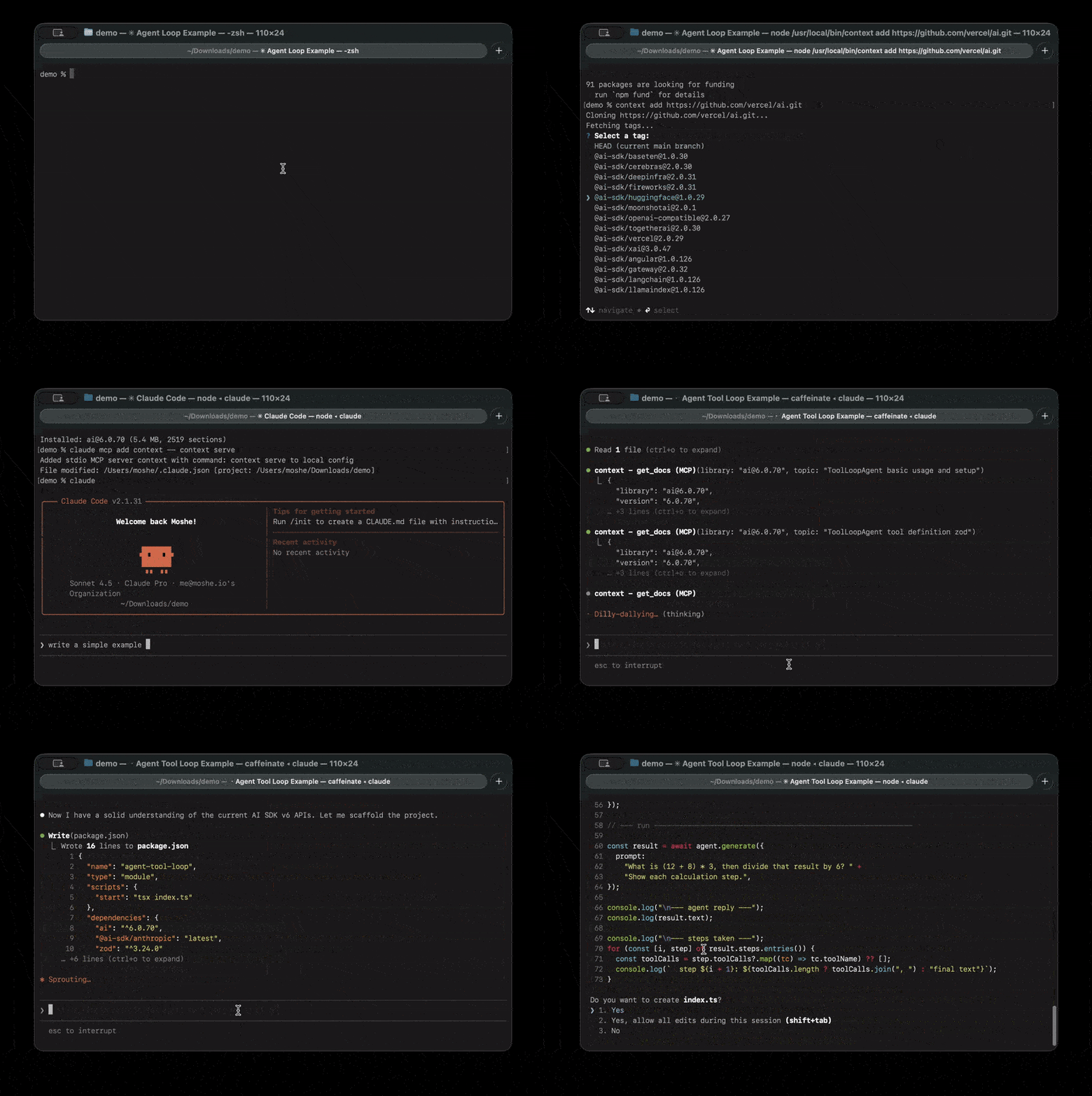
Context connects your AI assistant directly to up-to-date documentation—locally, instantly, and privately.
``
You: "How do I create middleware in Next.js 16?"
AI: [automatically queries local docs]
"In Next.js 16, create a middleware.ts file in your project root..."
[accurate, version-specific answer]
`
No copy-pasting. No hallucinations about deprecated APIs. No waiting for cloud lookups.
---
Real-World Use Cases
$3
Add docs for your entire tech stack. Your AI assistant becomes an expert in the exact versions you're using:
`bash`
context add https://github.com/vercel/next.js
context add https://github.com/prisma/prisma
context add https://github.com/tailwindlabs/tailwindcss
Now ask things like:
- "How do I set up Prisma with Next.js App Router?"
- "What's the Tailwind config for dark mode?"
- "Show me the new Server Actions syntax"
$3
Building an internal library? Package your documentation once, share it with your team:
`bashBuild docs from your repo
context add https://github.com/your-company/design-system
Your whole team can now ask:
"How do I use the DataTable component?"
"What props does Button accept?"
`
$3
Context works 100% offline. Download docs once, query forever—no internet required.
$3
Cloud documentation services see your queries. Context runs entirely on your machine. Your questions about internal APIs stay internal.
---
Why Context Over Cloud Alternatives?
| | Context7 | Deepcon | Context |
|---|:---:|:---:|:---:|
| Price | $10/month | $8/month | Free forever |
| Free tier | 1,000 req/month ¹ | 100 req/month | Unlimited |
| Rate limits | 60 req/hour | Throttled | None |
| Latency | 100-500ms | 100-300ms | <10ms |
| Works offline | :x: | :x: | :white_check_mark: |
| Privacy | Queries sent to cloud | Queries sent to cloud | 100% local |
| Private repos | $15/1M tokens | :x: | Free |
¹ Context7 reduced free tier from ~6,000 to 1,000 requests/month in January 2026
---
:zap: Key Features
- Single tool - One MCP tool does everything, no multi-step lookups
- Token-aware - Smart relevance filtering, never overwhelms the context window
- Dynamic schema - Available libraries shown in tool definition
- Offline-first - Zero network calls during operation
- SQLite + FTS5 - Fast full-text search with stemming
---
:rocket: Quick Start
$3
bash
npm install -g @neuledge/context
`$3
bash
From any git repository (GitHub, GitLab, Bitbucket, etc.)
context add https://github.com/vercel/next.js
context add https://gitlab.com/org/repo
context add git@github.com:user/repo.gitFrom a local directory
context add ./my-project
context add /path/to/docsFrom URL (pre-built package)
context add https://example.com/react@18.dbFrom local file
context add ./my-package.db
`$3
Context works with any MCP-compatible agent. Choose your setup below:
Claude Code
bash
claude mcp add context -- context serve
`
Claude Desktop
Add to your config file:
- Linux:
- macOS:
- Windows: json
{
"mcpServers": {
"context": {
"command": "context",
"args": ["serve"]
}
}
}
`Restart Claude Desktop to apply changes.
Cursor
Add to
(global) or .cursor/mcp.json (project-specific):`json
{
"mcpServers": {
"context": {
"command": "context",
"args": ["serve"]
}
}
}
`Or use Settings > Developer > Edit Config to add the server through the UI.
VS Code (GitHub Copilot)
> Requires VS Code 1.102+ with GitHub Copilot
Add to
in your workspace:`json
{
"servers": {
"context": {
"type": "stdio",
"command": "context",
"args": ["serve"]
}
}
}
`Click the Start button that appears in the file, then use Agent mode in Copilot Chat.
Windsurf
Add to
:
- Windows: %USERPROFILE%\.codeium\windsurf\mcp_config.jsonjson
{
"mcpServers": {
"context": {
"command": "context",
"args": ["serve"]
}
}
}
`Or access via Windsurf Settings > Cascade > MCP Servers.
Zed
Add to your Zed settings (
or ctrl+,):`json
{
"context_servers": {
"context": {
"command": {
"path": "context",
"args": ["serve"]
}
}
}
}
`Check the Agent Panel settings to verify the server shows a green indicator.
Goose
Run
and select Command-line Extension, or add directly to ~/.config/goose/config.yaml:`yaml
extensions:
context:
type: stdio
command: context
args:
- serve
timeout: 300
`$3
That's it! Now just ask your AI agent:
> "How do I create middleware in Next.js?"
The agent automatically uses the
tool when relevant.---
:books: CLI Reference
$3
Install a documentation package. The source type is auto-detected.
From git repository:
Works with GitHub, GitLab, Bitbucket, Codeberg, or any git URL:
`bash
HTTPS URLs
context add https://github.com/vercel/next.js
context add https://gitlab.com/org/repo
context add https://bitbucket.org/org/repoSpecific tag or branch
context add https://github.com/vercel/next.js/tree/v16.0.0SSH URLs
context add git@github.com:user/repo.git
context add ssh://git@github.com/user/repo.gitCustom options
context add https://github.com/vercel/next.js --path packages/docs --name nextjs
`From local directory:
Build a package from documentation in a local folder:
bash
Auto-detects docs folder (docs/, documentation/, doc/)
context add ./my-projectSpecify docs path explicitly
context add /path/to/repo --path docsCustom package name and version
context add ./my-lib --name my-library --pkg-version 1.0.0
`| Option | Description |
|--------|-------------|
|
 | Custom version label |
|
--path | Path to docs folder in repo/directory |
| --name | Custom package name |
| --save | Save a copy of the package to the specified path |Saving packages for sharing:
`bash
Save to a directory (auto-names as name@version.db)
context add https://github.com/vercel/next.js --save ./packages/Save to a specific file
context add ./my-docs --save ./my-package.db
`From URL:
bash
context add https://cdn.example.com/react@18.db
`From local file:
bash
context add ./nextjs@15.0.db
`Finding the right documentation repository:
Many popular projects keep their documentation in a separate repository from their main codebase. If you see a warning about few sections found, the docs likely live elsewhere:
bash
Example: React's docs are in a separate repo
context add https://github.com/facebook/react
⚠️ Warning: Only 45 sections found...
The warning includes a Google search link to help find the docs repo
The actual React docs repository:
context add https://github.com/reactjs/react.dev
`Common patterns for documentation repositories:
-
(e.g., prisma/docs)
- project.dev or project.io (e.g., reactjs/react.dev)
- project-website (e.g., expressjs/expressjs.com)When the CLI detects few documentation sections, it will show a Google search link to help you find the correct repository.
$3
Show installed packages.
`bash
$ context listInstalled packages:
nextjs@16.0 4.2 MB 847 sections
react@18 2.1 MB 423 sections
Total: 2 packages (6.3 MB)
`$3
Remove a package.
bash
context remove nextjs
`$3
Start the MCP server (used by Claude Desktop).
bash
context serve
`$3
Query documentation directly from the command line. Useful for testing and debugging.
bash
Query a package (use name@version format from 'context list')
context query 'nextjs@16.0' 'middleware authentication'Returns the same JSON format as the MCP get_docs tool
`---
:gear: How It Works
┌─────────────────────────────────────────────────────┐
│                   Your Machine                      │
│                                                     │
│  ┌──────────┐     ┌────────────┐     ┌───────────┐ │
│  │  Claude  │────▶│ MCP Server │────▶│ ~/.context│ │
│  │          │     │ (get_docs) │     │  /packages│ │
│  └──────────┘     └────────────┘     └───────────┘ │
│                          │                         │
│                          ▼                         │
│                   ┌────────────┐                   │
│                   │   SQLite   │                   │
│                   │   FTS5     │                   │
│                   └────────────┘                   │
└─────────────────────────────────────────────────────┘
When you add a package:
1. Repository is cloned (for git URLs) or read (for local directories)
2. Documentation is parsed and split into sections
3. Sections are indexed with FTS5 full-text search
4. The package is stored in
When Claude queries:
1. FTS5 finds relevant sections by keyword matching
2. Results are filtered by relevance score
3. Token budget ensures responses stay concise
4. Claude receives focused, relevant documentation
---
:package: Package Format
Packages are SQLite databases (
files) containing pre-indexed documentation.`
~/.context/packages/
├── nextjs@16.0.db
├── react@18.db
└── typescript@5.5.db
You can:
- Build from any git repository (GitHub, GitLab, Bitbucket, etc.)
- Build from local directories
- Download pre-built packages from URLs
- Share packages via releases or any file host
---
:wrench: Development
bash
Install dependencies
pnpm installBuild
pnpm buildTest
pnpm testLint
pnpm lint
``---