@quorum/grapesjs-mjml
v0.5.8
MJML Componenets integration in GrapesJS
0/weekUpdated 1 years agoBSD-3-ClauseUnpacked: 5.2 MB
Published by Artur Arseniev
npm install @quorum/grapesjs-mjmlGrapesJS MJML
> Requires GrapesJS v0.15.9 or higher

This plugin enables the usage of MJML components inside the GrapesJS environment. MJML components are rendered in real-time using the official v4 compiler (+ some mocks to make it run in the browser), therefore the result is, almost, the same as using the MJML Live Editor.
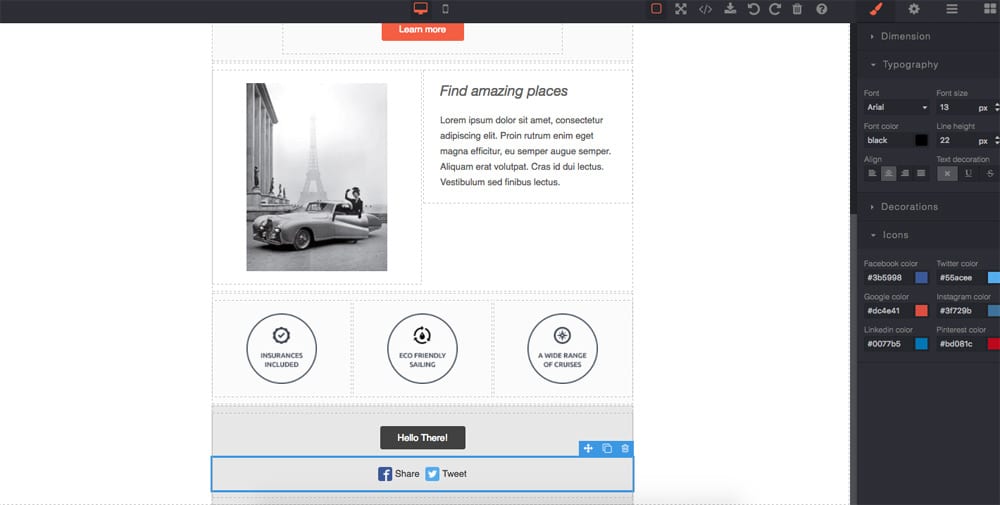
Supported components:mj-wrappermj-groupmj-sectionmj-columnmj-textmj-imagemj-buttonmj-socialmj-dividermj-spacermj-stylemj-fontmj-hero
Options
|Option|Description|Default|
|-|-|-
|fonts|Custom fonts on exported HTML header more info|{}|
|importPlaceholder|Import placeholder MJML|''|
|imagePlaceholderSrc|Image placeholder source|'https://via.placeholder.com/350x250/78c5d6/fff'|
|i18n|I18n object containing language more info|{}|
|overwriteExport|Overwrite default export command|true|
|preMjml|String before the MJML in export code|''|
|postMjml|String after the MJML in export code|''|
|resetBlocks|Clean all previous blocks if true|true|
|resetDevices|Clean all previous devices and set a new one for mobile|true|,
|resetStyleManager|Reset the Style Manager and add new properties for MJML|true|,
Download
* npm i grapesjs-mjml
Usage
``html
`
#### Or using ESM imports:
`js
import 'grapesjs/dist/css/grapes.min.css'
import grapesJS from 'grapesjs'
import grapesJSMJML from 'grapesjs-mjml'
grapesJS.init({
fromElement: 1,
container : '#gjs',
avoidInlineStyle : false,
plugins: [grapesJSMJML],
pluginsOpts: {
[grapesJSMJML]: {/ ...options /}
},
});
`
#### i18n usage:
`js
import 'grapesjs/dist/css/grapes.min.css'
import grapesJS from 'grapesjs'
import nl from 'grapesjs/locale/nl'
import grapesJSMJML from 'grapesjs-mjml'
import mjmlNL from 'grapesjs-mjml/locale/nl'
grapesJS.init({
fromElement: 1,
container : '#gjs',
avoidInlineStyle : false,
i18n: {
// locale: 'en', // default locale
// detectLocale: true, // by default, the editor will detect the language
// localeFallback: 'en', // default fallback
messages: { nl: nl },
},
plugins: [grapesJSMJML],
pluginsOpts: {
[grapesJSMJML]: {
// Optional options
i18n: { nl: mjmlNL }
}
},
});
`
#### fonts usage:
`js
import 'grapesjs/dist/css/grapes.min.css'
import grapesJS from 'grapesjs'
import grapesJSMJML from 'grapesjs-mjml'
let editor = grapesJS.init({
fromElement: 1,
container : '#gjs',
avoidInlineStyle : false,
plugins: [grapesJSMJML],
pluginsOpts: {
[grapesJSMJML]: {
// The font imports are included on HTML
fonts: {
Montserrat: 'https://fonts.googleapis.com/css?family=Montserrat',
'Open Sans': 'https://fonts.googleapis.com/css?family=Open+Sans'
}
}
},
});
// add custom fonts options on editor's font list
editor.on('load', () => {
let styleManager = editor.StyleManager;
let fontProperty = styleManager.getProperty('typography', 'font-family');
let list = [];
// empty list
fontProperty.set('list', list);
// custom list
list.push(fontProperty.addOption({value: 'Montserrat, sans-serif', name: 'Montserrat'}));
list.push(fontProperty.addOption({value: 'Open Sans, sans-serif', name: 'Open Sans'}));
fontProperty.set('list', list);
styleManager.render();
});
`
Development
Clone the repository
`sh`
$ git clone https://github.com/artf/grapesjs-mjml.git
$ cd grapesjs-mjml
Install it
`sh`
$ npm i
Start the dev server
`sh`
$ npm start
Releasing
1) Run npm run v:patch` to bump the version in package.json and create a git tag
2) Push the commit + new tag
3) Go to github and draft a new release
4) Select the new tag and add some release notes
5) Hit publish, the release will automatically publish to npm
License
BSD 3-Clause