@rc-component/tabs
v1.7.0TypeScript
tabs ui component for react
0/weekUpdated 2 months agoMITUnpacked: 152.4 KB
Published by yiminghe@gmail.com
npm install @rc-component/tabsrc-tabs
---
React Tabs component.
[![NPM version][npm-image]][npm-url]  [![build status][github-actions-image]][github-actions-url] [![Test coverage][codecov-image]][codecov-url] [![npm download][download-image]][download-url] [![bundle size][bundlephobia-image]][bundlephobia-url]
[npm-image]: http://img.shields.io/npm/v/rc-tabs.svg?style=flat-square
[npm-url]: http://npmjs.org/package/rc-tabs
[github-actions-image]: https://github.com/react-component/tabs/workflows/CI/badge.svg
[github-actions-url]: https://github.com/react-component/tabs/actions
[codecov-image]: https://img.shields.io/codecov/c/github/react-component/tabs/master.svg?style=flat-square
[codecov-url]: https://codecov.io/gh/react-component/tabs/branch/master
[download-image]: https://img.shields.io/npm/dm/rc-tabs.svg?style=flat-square
[download-url]: https://npmjs.org/package/rc-tabs
[bundlephobia-url]: https://bundlephobia.com/result?p=rc-tabs
[bundlephobia-image]: https://badgen.net/bundlephobia/minzip/rc-tabs
Screenshot
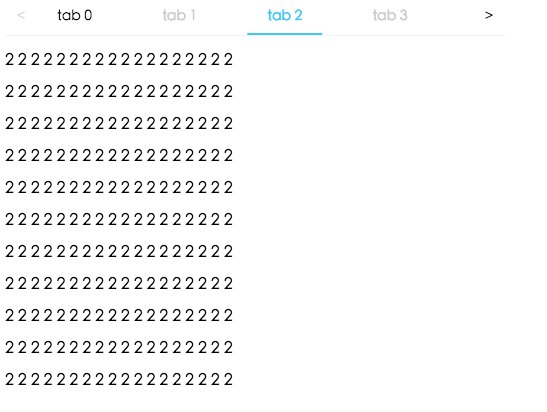
Example
http://localhost:8000/examples
online example: https://tabs.react-component.now.sh/
install

Feature
$3
- left and up: tabs to previous tab
- right and down: tabs to next tab
Usage
``tsx | pure
import Tabs from 'rc-tabs';
import ReactDom from 'react-dom';
const callback = key => {
console.log(key);
};
const items = [
{
key: '1',
label: 'Google',
children: (
Lorem Ipsum is simply dummy text of the printing and typesetting
),
},
{
key: '2',
label:
Amazon
,children:
'Neque porro quisquam est qui dolorem ipsum quia dolor sit amet, consectetur, adipisci velit...',
disabled: true,
},
{
key: '3',
label:
children: (
"There is no one who loves pain itself, who seeks after it and wants to have it, simply
because it is pain..."
),
},
];
ReactDom.render(
items={items}
defaultActiveKey="1"
className="md:w-[70%] w-full mx-auto p-2 border-0"
onChange={callback}
style={{ color: 'yellow' }}
/>,
root,
);
`
API
$3
| name | type | default | description |
| --- | --- | --- | --- |
| prefixCls | string | 'rc-tabs' | prefix class name, use to custom style |'ltr' or 'rtl'
| className | string | - | to define a class name for an element |
| style | CSS properties | - | object with css properties for styling |
| items | TabItem[] | [] | configure tab content |
| id | string | - | unique identifier |
| defaultActiveKey | string | - | initial active tabPanel's key if activeKey is absent |
| activeKey | string | - | current active tabPanel's key |
| direction | | 'ltr' | Layout direction of tabs component |{ inkBar: true, tabPane: false }
| animated | boolean \| { inkBar: boolean, tabPane: boolean } | | config animation |{ left: ReactNode, right: ReactNode }
| renderTabBar | (props, TabBarComponent) => ReactElement | - | How to render tab bar |
| tabBarExtraContent | ReactNode \| | - | config extra content |'left' \| 'right' \| 'top' \| 'bottom'
| tabBarGutter | number | 0 | config tab bar gutter |
| tabBarPosition | | 'top' | tab nav 's position |'left' or 'right' or 'top' or 'bottom'
| tabBarStyle | style | - | tab nav style |
| tabPosition | | 'top' | tab nav 's position |
| destroyOnHidden | boolean | false | whether destroy inactive TabPane when change tab |
| onChange | (key) => void | - | called when tabPanel is changed |
| onTabClick | (key) => void | - | called when tab click |
| onTabScroll | ({ direction }) => void | - | called when tab scroll |
| editable | { onEdit(type: 'add' \| 'remove', info: { key, event }), showAdd: boolean, removeIcon: ReactNode, addIcon: ReactNode } | - | config tab editable |
| locale | { dropdownAriaLabel: string, removeAriaLabel: string, addAriaLabel: string } | - | Accessibility locale help text |
| moreIcon | ReactNode | - | collapse icon |
$3
| name | type | default | description |
| --- | --- | --- | --- |
| key | string | - | corresponding to activeKey, should be unique |
| label | string | - | TabPane's head display text |
| tab | ReactNode | - | current tab's title corresponding to current tabPane |
| className | string | - | to define a class name for an element |
| style | CSS properties | - | object with css properties for styling |
| disabled | boolean | false | set TabPane disabled |
| children | ReactNode | - | TabPane's head display content |
| forceRender | boolean | false | forced render of content in tabs, not lazy render after clicking on tabs |
| closable | boolean | false | closable feature of tab item |
| closeIcon | ReactNode | - | Config close icon |
| prefixCls | string | 'rc-tabs-tab' | prefix class name, use to custom style |{ inkBar: true, tabPane: false }
| id | string | - | unique identifier |
| animated | boolean \| { inkBar: boolean, tabPane: boolean } | | config animation |
| destroyOnHidden | boolean | false | whether destroy inactive TabPane when change tab |
| active | boolean | false | active feature of tab item |
| tabKey | string | - | key linked to tab |
$3
| name | type | default | description |
| --- | --- | --- | --- |
| destroyOnHidden | boolean | false | whether destroy inactive TabPane when change tab |
| key | string | - | corresponding to activeKey, should be unique |
| forceRender | boolean | false | forced render of content in tabs, not lazy render after clicking on tabs |
| tab | ReactNode | - | current tab's title corresponding to current tabPane |
| closeIcon | ReactNode | - | Config close icon |
Development
`
npm install
npm start
Test Case
`
npm test
npm run chrome-test
Coverage
`
npm run coverage
open coverage/ dir
License
rc-tabs is released under the MIT license.
FAQ
$3
There are 3 cases when handling responsive tabs: !image
We get hidden tabs through useVisibleRange.ts. If enconter the third case, in order to make tabs responsive, some tabs should be hidden. So we minus addSize when calculating basicSize` manully, even though there's no addNode in container. In this way, case 3 turns to case 2, tabs become stable again.