DocumentDB API Example
npm install @richardhboyd/doc_db_libpip install docdbdemo#### npm (JavaScript and TypeScript)npm install @richardhboyd/doc_db_lib
---
python
from aws_cdk import (
    core
)
from docdbdemo import DocDbLib
class MyStack(core.Stack):    def __init__(self, scope: core.Construct, id: str, **kwargs) -> None:
        super().__init__(scope, id, **kwargs)        DocDbLib(self, "MyDocDBClient")
`#### TypeScript
typescript
import cdk = require('@aws-cdk/core');
import docdbdemo = require('@richardhboyd/doc_db_lib');export class DocDbClientTsStack extends cdk.Stack {
  constructor(scope: cdk.App, id: string, props?: cdk.StackProps) {
    super(scope, id, props);    new docdbdemo.DocDbLib(this, "MyDocDBClient");
  }
}
`
---
$3
---
$3
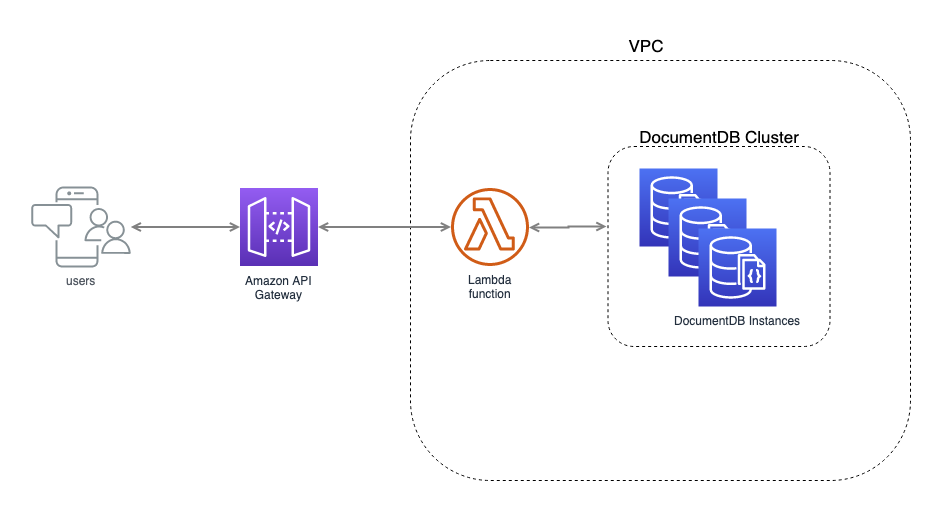
Deploying the stack will create an Amazon DocumentDB Cluster with one instance in each availability zone created by the CDK's VPC Construct, a Lambda function that can put items into the database and fetch them out again, and an API to send requests to the Lambda Funciton. The stack will output an APIGateway endpoint that will front the created DocumentDB.
bash
Outputs:
DocDbClientTsStack.MyDocDBClientMyDocDbApiMyDocDBApiEndpoint74609B36 = https://gv8ooq7zti.execute-api.us-east-1.amazonaws.com/prod/`Let's look at how we use this new API.
Putting a document in the DocumentDB
bash
API=https://gv8ooq7zti.execute-api.us-east-1.amazonaws.com/prod
curl -H "Content-Type: application/json" -d '{"bestCoder":"@allenmichael", "worstCoder":"singledigit"}' -X POST $API/document
`Getting a document out of the database
bash
API=https://gv8ooq7zti.execute-api.us-east-1.amazonaws.com/prod
curl -H "Content-Type: application/json" $API/document?bestCoder=@allenmichael
`Testing this out we see
bash
$ curl -H "Content-Type: application/json" -d '{"bestCoder":"@allenmichael", "worstCoder":"@singledigit"}' -X POST $API/document{"id": "5d7bd032c7866a33171a1261"}
$ curl -H "Content-Type: application/json" $API/document?bestCoder=@allenmichael
{'_id': ObjectId('5d7bcfe6c7866a33171a125f'), 'bestCoder': '@allenmichael', 'worstCoder': '@singledigit'}
``