@siamf/react-export
v4.1.3TypeScript
A React package that simplifies data exporting and clipboard management. It provides react component for printing documents, exporting data as PDF, Excel, and CSV, as well as copying text and structured data to the clipboard.
0/weekUpdated 1 months agoMITUnpacked: 105.3 KB
Published by Siam Ahnaf
npm install @siamf/react-export

@siamf/react-export
A React package that simplifies data exporting and clipboard management. It provides react component for printing documents, exporting data as PDF, Excel, and CSV, as well as copying text and structured data to the clipboard.

- Small Size
- All Export Formate
- Export As PDF
- Export As CSV
- Export As Excel
- Copy table data to Clipboard
- Copy any text to clipboard
- Excel or Sheet to JSON converter
$3
- Update
CopyTextClipboard for managing copy status internally
- Update
CopyToClipboard for managing copy status internally
- Now you will
isCopied return props for both component
- Added new props
resetDuration for resetting time of copy status
Installation
``
bash

$ npm i @siamf/react-export
`
`javascript
import { ExportAsExcel, ExportAsPdf, ExportAsCsv, CopyToClipboard, CopyTextToClipboard, PrintDocument, ExcelToJson } from "@siamf/react-export";
//Export as Excel Sheet
headers={["Name", "Age", "Something"]}
>
{(props)=> (
)}
//Export as pdf
headers={["CreatedBy", "Age", "Something Else"]}
headerStyles={{ fillColor: "red" }}
title="Sections List"
>
{(props)=> (
)}
//Export as CSV
>
{(props)=> (
)}
//Copy to clipboard (Array or Table)
headers={["CreatedBy", "Age", "Something Else"]}
>
{(props)=> (
)}
//Copy to clipboard (text)
{(props)=> (
)}
//Print data
headers={["CreatedBy", "Age", "Something Else"]}
>
{(props)=> (
)}
//Excel to json converter or Read Excel File
{({
isDragging,
dragProps,
onFileUpload,
error,
data,
file
}) => (
Upload Excel File
)}
`
Options

ExportAsExcel


     Name

     Types

     Default


     chilren

     ReactNode (Required)


     data

     Array (Required)


     headers

     string[] (Required)


     name

     string (Optional)

     reactExportTable


     minColumnWidth

     number (Optional)

     15


     fileName

     string (Optional)

     reactExportTable


     onError

     (error:Error)=>void (Optional)


     onSuccess

     ()=>void (Optional)


ExportAsPdf


     Name

     Types

     Default


     chilren

     ReactNode (Required)


     data

     Array (Required)


     headers

     string[] (Required)


     foot

     string[] (Optional)


     title

     string (Optional)


     fileName

     string (Optional)

     reactExportTable


     theme

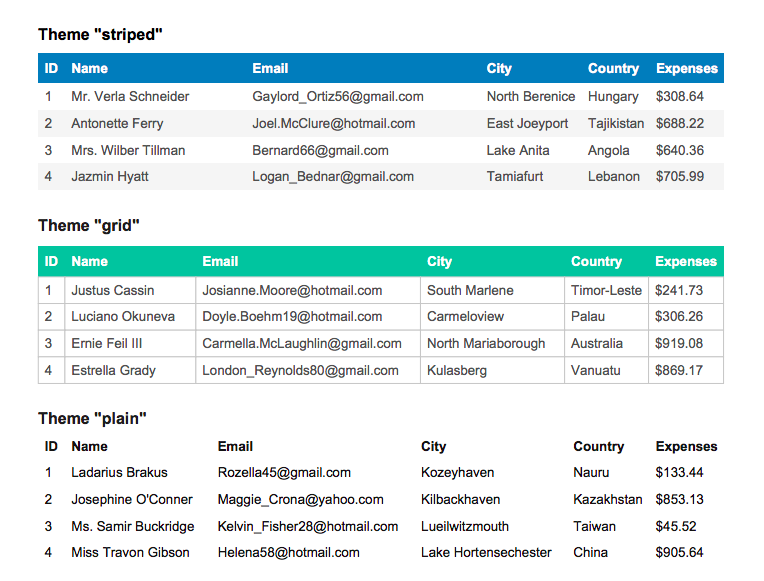
     "striped" | "grid" | "plain" (Optional)

     "grid"


     styles

     StylesDefs (Optional)


     headerStyles

     StylesDefs (Optional)


     footerStyles

     StylesDefs (Optional)


     margin

     Margin (Optional)


     orientation

     Orientation (Optional). Format is- "landscape" | "portrait" | "l" | "p"


     onError

     (error:Error)=>void (Optional)


     onSuccess

     ()=>void (Optional)


$3

-
font: 'helvetica'|'times'|'courier' = 'helvetica'
- fontStyle: 'normal'|'bold'|'italic'|'bolditalic' = 'normal'
- overflow: 'linebreak'|'ellipsize'|'visible'|'hidden' = 'linebreak'
- fillColor: Color? = null
- textColor: Color? = 20
- cellWidth: 'auto'|'wrap'|number = 'auto'
- minCellWidth: number? = 10
- minCellHeight: number = 0
- halign: 'left'|'center'|'right' = 'left'
- valign: 'top'|'middle'|'bottom' = 'top'
- fontSize: number = 10
- cellPadding: Padding = 10
- lineColor: Color = 10
- lineWidth: border = 0 // If 0, no border is drawn
$3
- top: number
- right: number
- bottom: number
- left: number
$3
You find this three type theme-
ExportAsCsv
Name
Types
Default
chilren
ReactNode (Required)
data
Array (Required)
fileName
String (Optional)
Custom CSV File Name
onError
(error:Error)=>void (Optional)
onSuccess
()=>void (Optional)
CopyToClipboard
Name
Types
Default
chilren
ReactNode (Required)
data
Array (Required)
headers
string[] (Required)
onCopied
Function (Optional)
When copy will be success
onFailed
Funtion (Optional)
When copy will be failed
resetDuration
Number(Optional)
The time resetting copy status
CopyTextToClipboard
Name
Types
Default
chilren
ReactNode (Required)
text
string (Required)
headers
string[] (Required)
onCopied
Function (Optional)
When copy will be success
onFailed
Funtion (Optional)
When copy will be failed
resetDuration
Number(Optional)
The time resetting copy status
PrintDocument
- Same as ExportAsPdf` Component!
ExcelToJson
$3
| Name | Types | Description | Required/Optional |
|---|---|---|---|
| onRead | (data: Array |
For listening converted data | Required |
| value | Array |
Default Value | Required |
| children | (props: ExportInterface) => React.ReactNode | UI for drop zone | Required |
| inputProps | React.HTMLProps |
Input Props for input field | Optional |
| onChange | (file: File | null) => void | Listener for on file change | optional |
$3
| Name | Types | Description |
|---|---|---|
| dragProps | object | Native element props for drag and drop feature |
| isDragging | boolean | For listening is file is dragging on dropzone |
| onFileUpload | () => void | Called when an element is clicks and triggers to open a file dialog |
| data | Array |
Read or Converted data |
| file | File | null | Selected file |
| error | string | Validation error |
Connect with me