@storybook/addon-console
v3.0.0TypeScript
Show console output like logs, errors, and warnings in the Storybook
0/weekUpdated 1 years agoMITUnpacked: 44.2 KB
Published by Oleg Proskurin
npm install @storybook/addon-console

Storybook Addon Console


Why
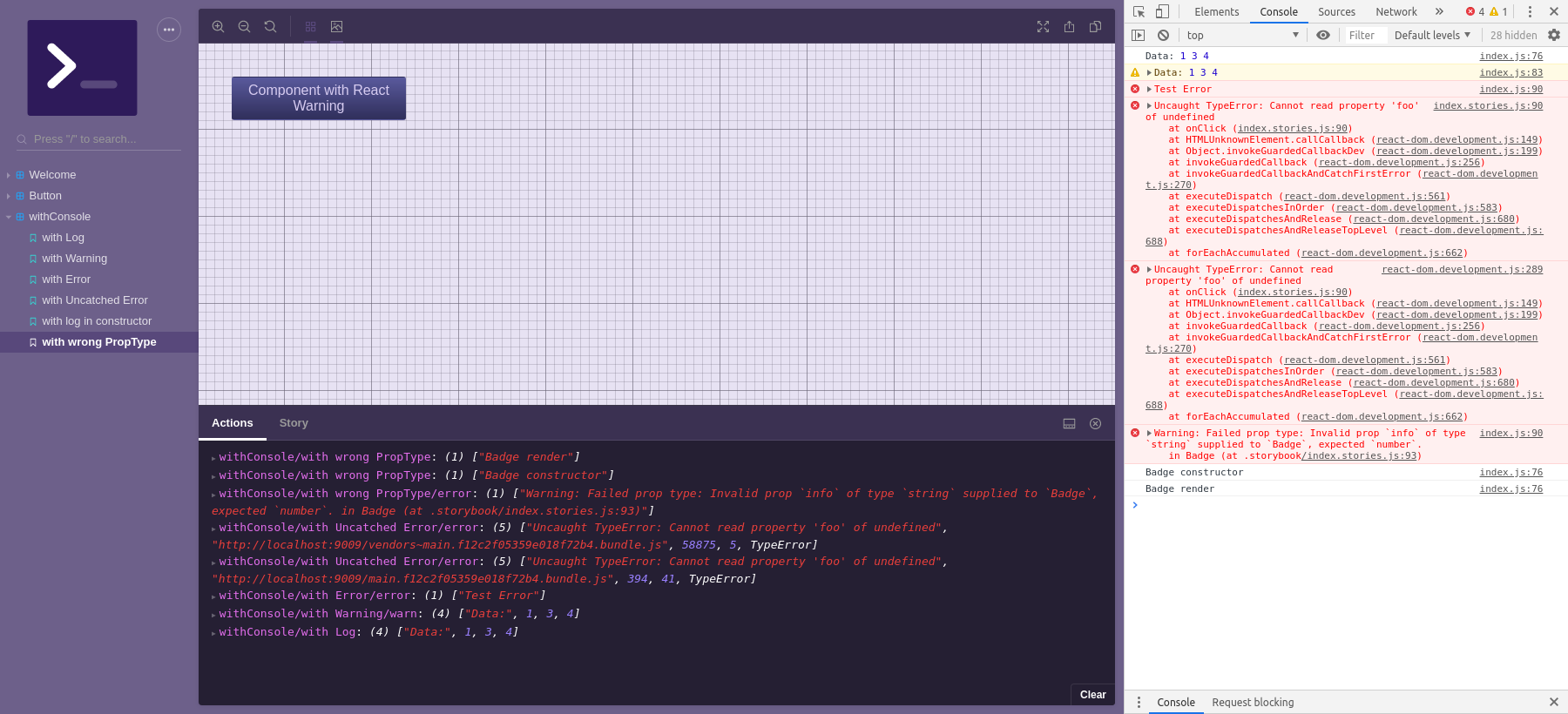
There're some cases when you can't / don't want / forgot to keep browser console opened. This addon helps you to get all
console output in your storybook. In other cases, you might find it difficult to extract the desired information in the
information noise issued by the console or to determine which component in what state gives the message. With this
addon, you can control what you see and where you see.
We assume the following possible applications:
- Mobile devices. You might want to make console output reachable for users when they need to work with your storybook
from mobile browsers
- Small screens. You can save your screen space keeping browser console closed
- To filter your console output. You can independently configure both action logger and real console output in a wide
range.
- To associate console messages with a specific components/stories. You can see which story emits which message
- To output some data into Action Logger from your deep components without importing addon-actions for that.
try live demo
$3
``shell`
yarn add -D @storybook/addon-console @storybook/addon-actions
$3
Just import it in your storybook config.js:
`js
// config.js
import '@storybook/addon-console';
`
That's all. You'll start to receive all console messages, warnings, errors in your action logger panel. Everything
except HMR logs.
If you want to enable HMR messages, do the following:
`js
// config.js
import { setConsoleOptions } from '@storybook/addon-console';
const panelExclude = setConsoleOptions({}).panelExclude;
setConsoleOptions({
panelExclude: [...panelExclude, /deprecated/],
});
`
You'll receive console outputs as a console, warn and error actions in the panel. You might want to know from whatwithConsole
stories they come. In this case, add decorator:
`js
// preview.js
import type { Preview } from '@storybook/react';
import { withConsole } from '@storybook/addon-console';
const preview: Preview = {
decorators: [(storyFn, context) => withConsole()(storyFn)(context)],
// ...
};
`
After that your messages in Action Logger will be prefixed with the story path, like molecules/atoms/electron:
["ComponentDidMount"] or molecules/atoms/electron error: ["Warning: Failed prop type..."]. You can setup addonwithConsole
behavior by passing options to or setConsoleOptions methods, both have the same API.
$3
Addon console don't have own UI panel to output logs, it use addon-console instead. Make sure that main.js contains this line:
`js
// main.js
export default {
addons: [
"@storybook/addon-actions/register",
],
};
`
API
@storybook/addon-console
It handles console.log
, console.warn, and console.error methods and not catched errors. By default, it just reflects all console messages in the Action Logger Panel (should be installed as a peerDependency) except [HMR] logs.
* @storybook/addon-console
* _static_
* .setConsoleOptions(optionsOrFn) ⇒ addonOptions
* [.withConsole([optionsOrFn])](#module_@storybook/addon-console.withConsole) ⇒ function
* _inner_
* ~addonOptions : Object
* ~optionsCallback ⇒ addonOptions
$3
Set addon options and returns a new oneKind: static method of @storybook/addon-console
See
- addonOptions
- optionsCallback
| Param | Type |
| --- | --- |
| optionsOrFn | addonOptions \| optionsCallback |
Example
`js
import { setConsoleOptions } from '@storybook/addon-console';const panelExclude = setConsoleOptions({}).panelExclude;
setConsoleOptions({
panelExclude: [...panelExclude, /deprecated/],
});
`
$3
Wraps your stories with specified addon options.
If you don't pass {, warn, error} in options argument it'll create them from context for each story individually. Hence you'll see from what exact story you got a log or error. You can log from component's lifecycle methods or within your story.Kind: static method of @storybook/addon-console
Returns: function - wrappedStoryFn
See
- addonOptions
- optionsCallback
| Param | Type |
| --- | --- |
| [optionsOrFn] | addonOptions \| optionsCallback |
Example
`js
import type { Meta, StoryObj } from '@storybook/react';
import { withConsole } from '@storybook/addon-console';const meta: Meta = {
title: 'Example/Button',
component: Button,
};
export default meta;
type Story = StoryObj;
export const Primary: Story = {
args: {
primary: true,
label: 'Button',
onClick: () => console.log(['Data:', 1, 3, 4]),
},
};
// Action Logger Panel:
// withConsole/with Log: ["Data:", 1, 3, 4]
`
$3
This options could be passed to withConsole or setConsoleOptionsKind: inner typedef of @storybook/addon-console
Properties
| Name | Type | Default | Description |
| --- | --- | --- | --- |
| [panelExclude] | [ 'Array' ].<RegExp> | [/[HMR]/] | Optional. Anything matched to at least one of regular expressions will be excluded from output to Action Logger Panel |
| [panelInclude] | [ 'Array' ].<RegExp> | [] | Optional. If set, only matched outputs will be shown in Action Logger. Higher priority than
. |
| [consoleExclude] | [ 'Array' ].<RegExp> | [] | Optional. Anything matched to at least one of regular expressions will be excluded from DevTool console output |
| [consoleInclude] | [ 'Array' ].<RegExp> | [] | Optional. If set, only matched outputs will be shown in console. Higher priority than consoleExclude. |
| [log] | string | "console" | Optional. The marker to display console.log outputs in Action Logger |
| [warn] | string | "warn" | Optional. The marker to display warnings in Action Logger |
| [error] | string | "error" | Optional. The marker to display errors in Action Logger |$3
This callback could be passed to setConsoleOptions or withConsoleKind: inner typedef of @storybook/addon-console
Returns: addonOptions - - new addonOptions
| Param | Type | Description |
| --- | --- | --- |
| currentOptions | addonOptions | the current addonOptions |
Example
`js
import { withConsole } from @storybook/addon-console;const optionsCallback = (options) => ({panelExclude: [...options.panelExclude, /Warning/]});
export default {
title: 'Button',
decorators: [withConsole(optionsCallback)],
};
`
Contributing
runs example Storybook. Then you can edit source code located in the src folder and example storybook in
the stories folder.$3
Run
yarn test.$3
Run
yarn tdd.$3
After running tests you can explore coverage details in
.coverage/lcov-report/index.html$3
If you're using VSCode you can debug tests and source by launching
 task from Debug Menu. It allows to set
breakpoints in
.test.js and .js files.$3
Please, don't edit this
README.md directly. Run yarn dev:docs and change docs/readme.hbs and JSDoc comments
withing src` instead.Credits
Created with ❤︎ to React and Storybook by