@svar-ui/svelte-filemanager
v2.4.1
Easy-to-use Svelte component for adding a file manager (file explorer) UI
sveltefile managerfile-managerfile-explorerfile explorerfile browsersvelte componentui componentsvelte file managersvar widgets
0/weekUpdated 1 weeks agoMITUnpacked: 63.5 KB
Published by marta-ko
npm install @svar-ui/svelte-filemanagerSVAR Svelte File Manager | File Explorer


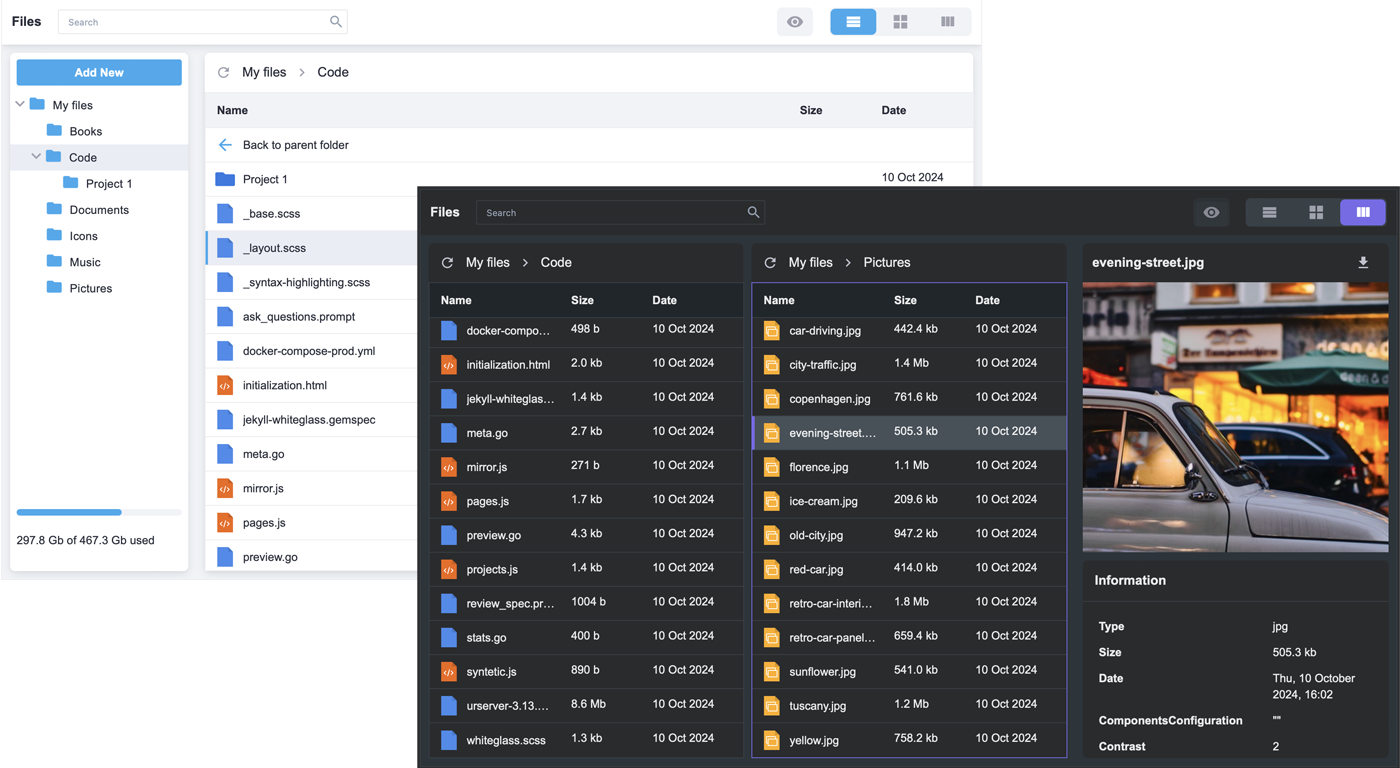
SVAR Svelte File Manager is a flexible file explorer component for Svelte apps. It offers a familiar interface for browsing, organizing, and previewing files. You can integrate it with any backend, whether you're using local storage, databases, or cloud services.
$3
- Basic file operations: create, delete, copy, rename, cut, paste
- Download and upload files
- Files tree view
- List and tiles views
- File preview pane with file information (file size, type, modified date, etc)
- Split view to manage files between different locations
- Built-in search box
- Context menu and toolbar
- Keyboard navigation
- Used storage info
- Easy customization
- Full TypeScript support
$3
To use SVAR Svelte File Manager, simply import the package and include the component in your Svelte file:
``svelte
`
For further instructions, see our getting-started guide.
$3
Typically, you don't need to modify the code. However, if you wish to do so, follow these steps:
1. Run yarn to install dependencies. Note that this project is a monorepo using yarn workspaces, so npm will not workyarn start
2. Start the project in development mode with
$3
To run the test:
1. Start the test examples with:
`sh`
yarn start:tests
2. In a separate console, run the end-to-end tests with:
sh``
yarn test:cypress
$3
Join our community forum to get help and submit feature requests.