@syncfusion/ej2-vue-barcode-generator
v32.2.3
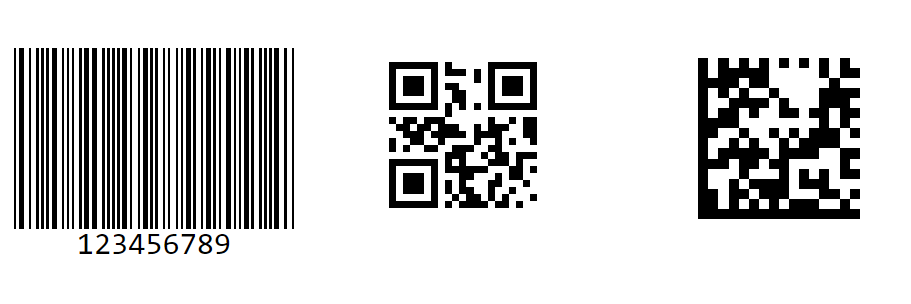
Barcode generator component is a pure JavaScript library which will convert a string to Barcode and show it to the user. This supports major 1D and 2D barcodes including coda bar, code 128, QR Code. for Vue
0/weekUpdated 4 days agoSEE LICENSE IN licenseUnpacked: 154.3 KB
Published by Syncfusion Inc.
npm install @syncfusion/ej2-vue-barcode-generatorVue Barcode Generator Component
The Vue Barcode (QR Code) Generator Component is a light-weight and high-performance control that displays industry-standard 1D and 2D barcodes in Angular applications. Generated barcodes are optimized for printing and on-screen scanning. It is designed for ease of use and does not require fonts.
Getting started .
Online demos .
Learn more
Trusted by the world's leading companies

Setup
$3
You can use Vue CLI to setup your Vue 2 applications.To install Vue CLI use the following commands.
``bash`
npm install -g @vue/cli
vue create quickstart
cd quickstart
npm run serve
Initiating a new project prompts us to choose the type of project to be used for the current application. Select the option from the menu.
$3
All Syncfusion Vue packages are published in npmjs.com registry. To install Vue barcode package, use the following command.
`bash`
npm install @syncfusion/ej2-vue-barcode-generator --save
$3
You can register the Barcode component in your application by using the Vue.use(). Refer to the code example given below.
`typescript
import { BarcodeGeneratorPlugin } from '@syncfusion/ej2-vue-barcode-generator';
Vue.use(BarcodeGeneratorPlugin);
`
> Registering BarcodeGeneratorPlugin in vue, will register the barcode component along with its required child directives globally.
Add Barcode Component
Add the Vue Barcode by using ejs-barcodegenerator selector in template section of the App.vue file.
`html``
:width="width"
:height="height"
:type="type"
:value="value"
:mode="mode"
>
Supported frameworks
Barcode component is also offered in the following list of frameworks.
| 
JavaScript | 
Angular | 
Vue | 
ASP.NET Core | 
ASP.NET MVC |
| :-----: | :-----: | :-----: | :-----: | :-----: |
Showcase samples
* Loan Calculator - Source, Live Demo
* Fitness Tracker - Source, Live Demo
Key features
* Barcode Symbologies - Supports a wide range of barcode symbologies, including:
* QR Code
* Data Matrix
* Code 39
* Code 39 Extended
* Codabar
* Code 32
* Code 93
* Code 128
* Code 128A
* Code 128B
* Code 128C
* EAN-8
* EAN-13
* UPC-A
* UPC-E
* Text Customization - Allows you to customize the text displayed.
* Exporting - Barcode can be exported as .png or .jpeg fromat image and can also be exported as base64 string.
Support
Product support is available through the following mediums.
* Support ticket - Guaranteed Response in 24 hours | Unlimited tickets | Holiday support
* Community forum
* GitHub issues
* Request feature or report bug
* Live chat
Changelog
Check the changelog here. Get minor improvements and bug fixes every week to stay up to date with frequent updates.
License and copyright
> This is a commercial product and requires a paid license for possession or use. Syncfusion’s licensed software, including this component, is subject to the terms and conditions of Syncfusion's EULA. To acquire a license for 80+ Vue UI components, you can purchase or start a free 30-day trial.
> A free community license is also available for companies and individuals whose organizations have less than $1 million USD in annual gross revenue and five or fewer developers.
See LICENSE FILE for more info.
© Copyright 2026 Syncfusion® Inc. All Rights Reserved. The Syncfusion® Essential Studio® license and copyright applies to this distribution.