@syncfusion/ej2-vue-filemanager
v32.2.3
Essential JS 2 FileManager Component for Vue
vuevuejsvue-filemanagervue-file organizervue-file organizing toolvue-file pickervue-file viewervue-file browservue-file selectorvue-directory viewer
0/weekUpdated 4 days agoSEE LICENSE IN licenseUnpacked: 110.3 KB
Published by Syncfusion Inc.
npm install @syncfusion/ej2-vue-filemanagerVue FileManager Component
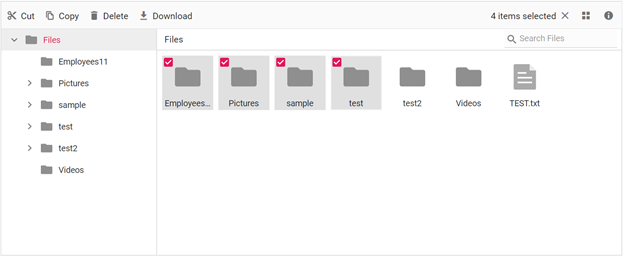
The Vue FileManager component is a graphical user interface that allows users to manage their file system in an intuitive and efficient manner. With this component, you can easily access, edit, upload, download, and organize files and folders. It also offers a convenient way to browse and select items from the file system.
Getting Started.
Online demos.
Learn more
Trusted by the world's leading companies

Setup
$3
You can use Vue CLI to setup your Vue 2 applications.To install Vue CLI use the following commands.
``bash`
npm install -g @vue/cli
vue create quickstart
cd quickstart
npm run serve
Initiating a new project prompts us to choose the type of project to be used for the current application. Select the option from the menu.
$3
All Syncfusion Vue packages are published in npmjs.com registry. To install Vue FileManager package, use the following command.
`bash`
npm install @syncfusion/ej2-vue-filemanager --save
$3
You can register the FileManager component in your application by using the Vue.use(). Refer to the code example given below.
`typescript
import { FileManagerPlugin } from "@syncfusion/ej2-vue-filemanager";
Vue.use(FileManagerPlugin);
`
> Registering FileManagerPlugin in vue, will register the FileManager component along with its required child directives globally.
$3
Add CSS references needed for FileManager in style section of the App.vue file from ../node_modules/@syncfusion package folder.
`css`
$3
Add the Vue FileManager by using ejs-filemanager selector in template section of the App.vue file.
`html``
> Refer the Getting Started with Vue3 for using Syncfusion Vue FileManager components in Vue 3 applications.
Supported frameworks
The FileManager component is also offered in the following list of frameworks.
| 
JavaScript | 
Angular | 
React | 
ASP.NET Core | 
ASP.NET MVC |
| :-----: | :-----: | :-----: | :-----: | :-----: |
Key features
* File and directory management: The component allows users to upload, download, rename, sort, cut, copy, and paste files and directories.
* Multiple layout options: The component supports both large icons view and details view layout, giving users the ability to choose the display option that works best for them.
* Multiple file providers: The component supports a range of file providers, including Amazon S3, MS Azure, NodeJS, Google file systems, and local physical file providers, giving users flexibility in how they store and access their files.
* Search functionality: The component includes a search feature that allows users to easily locate specific files within their file system.
* Customizable interface: The component's interface can be customized to fit the needs and preferences of users, allowing for a personalized experience.
* Responsive design: The component is designed to be responsive, ensuring that it works seamlessly across a range of devices and screen sizes.
* Easy integration: The component is easy to integrate into existing projects, making it a convenient and straightforward solution for file management.
* Context menu: The component includes a context menu that allows users to quickly and easily access file management options.
* Toolbar: The component's toolbar provides a flexible way to manage file operations, making it easy for users to perform common tasks.
* Access control: The component allows users to define a set of access rules for their folders and files, giving them control over who can access specific resources.
* Multiple file selection: The component supports the selection of multiple files, making it easy for users to perform bulk operations.
* Localization: The component supports localization, allowing it to be used in a variety of languages and regions.
* Accessibility: The component is designed with accessibility in mind, ensuring that it is usable by users with disabilities.
Resources
* Theme Studio
* What's New
* Road Map
* E-Books
Support
Product support is available through the following mediums.
* Support ticket - Guaranteed Response in 24 hours | Unlimited tickets | Holiday support
* Community forum
* GitHub issues
* Request feature or report bug
* Live chat
Changelog
Check the changelog here. Get minor improvements and bug fixes every week to stay up to date with frequent updates.
License and copyright
> This is a commercial product and requires a paid license for possession or use. Syncfusion® licensed software, including this component, is subject to the terms and conditions of Syncfusion® EULA. To acquire a license for 140+ Vue UI components, you can purchase or start a free 30-day trial.
> A free community license is also available for companies and individuals whose organizations have less than $1 million USD in annual gross revenue and five or fewer developers.
See LICENSE FILE for more info.
© Copyright 2026 Syncfusion® Inc. All Rights Reserved. The Syncfusion® Essential Studio® license and copyright applies to this distribution.