@vrt/react
v0.7.0
Screenshot React components. Push it and compare images in pull request.
0/weekUpdated 3 years agoMITUnpacked: 680.9 KB
Published by michal.jezierski
npm install @vrt/react
📸
Take screenshots of React components.
Push it and compare images in pull request.

📸 @vrt/react
Motivation
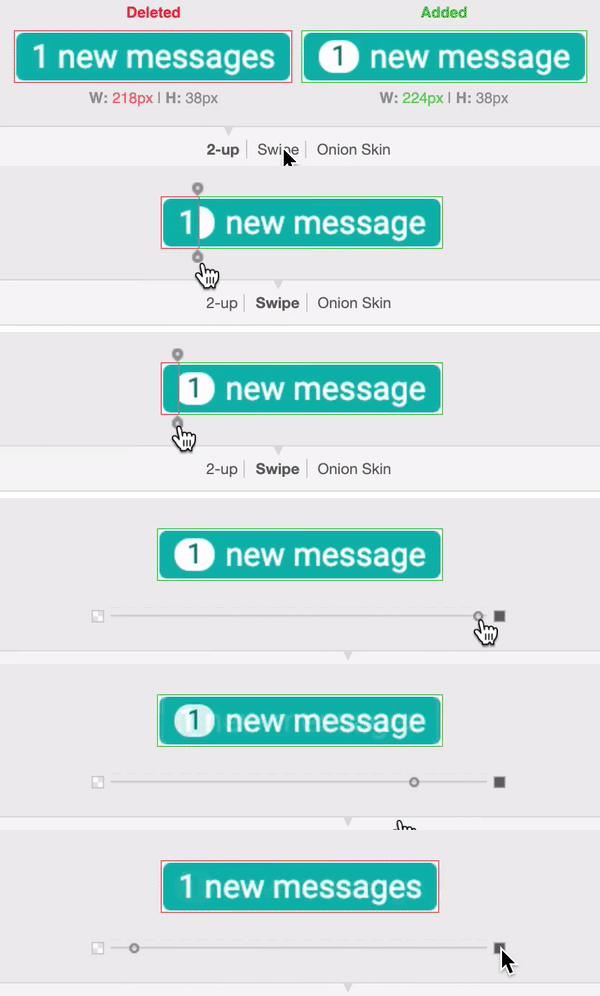
Once we have unit tests of React components or any other type of tests it's also good to have screenshots of presentational components. Unit tests describe the logic of our component but they don't say anything about how it should look like. It's an anti-pattern to unit-test whether the component has received a proper className - the className can be valid but the color, font-size, margin or any other css property might be wrong causing our component to be badly coloured, displaced or just to look bad.
GitHub, GitLab and BitBucket do have image diff tools. Once someone created a pull request with code changes it's very helpful to see how the code changes affect the look of the component. Having component's screenshot included in the pull request gives the reviewer a chance to see what's really going on with the component's look.
Installation
``sh`
$ npm i --global @vrt/react
Usage
`sh
$ vrt --help
Usage
$ vrt [
Options
--fail don't update snapshots, fail if they don't match
--watch keep the server running, watching and recompiling your files
--config path to config file
--dev make webpack create dev bundles
Examples
$ vrt
$ vrt src/button/
$ vrt src/button/.vrt.js
$ vrt --watch
$ vrt --config config/vrt.config.js --watch src/**/.vrt.js
$ npx vrt --watch --dev -- src/components/messages
`
Running @vrt/react in --watch mode will create sandboxed environment for each of the components, e.g.
`sh
$ vrt --watch
vrt@0.7.0 is running with pattern: /Users/foo.bar/work/badges/!(node_modules)/**/.vrt.js
badge
badge: http://localhost:56211/badge_badge.html
badge-with-props
no message: http://localhost:56211/badge-with-props_no-message.html
one message: http://localhost:56211/badge-with-props_one-message.html
some messages: http://localhost:56211/badge-with-props_some-messages.html
button
primary: http://localhost:56211/button_primary.html
secondary: http://localhost:56211/button_secondary.html
success: http://localhost:56211/button_success.html
danger: http://localhost:56211/button_danger.html
badge: http://localhost:56211/button_badge.html
no type: http://localhost:56211/button_no-type.html
`
$3
Let's assume most simple case - we have a very simple badge.js component which doesn't take any props and doesn't have dependencies (except React), e.g.
`jsx
import React from 'react';
export default function Badge () {
return (
Lorem ipsum dolor sit amet
);
}
`
To capture a screenshot of it we need to create
with a content:`js
module.exports = {
main: 'badge.js'
}
`This
file informs @vrt/react that it should generate one screenshot for badge.js file. We save .vrt.js next to our component, e.g.`
src/components/badge
├── badge.js
└── .vrt.js
Once we have it it's time to generate our first screenshot. Just run
, e.g.`sh
$ npx vrt
`$3
Component's without props might be a rare case. Most of the time components do receive props, e.g.
jsx
import React from 'react';
export default function Badge ({ num = 0 }) {
return (
{ num > 0 ? num : 'no' } new messages
);
}
`There are two possible cases in here - the one with
greater then zero (e.g. „7 new messages”) and the other one with num not being greater than zero („no new messages”). To take a screenshots of these two cases we need to extend .vrt.js configuration and add possible props in the following way:`js
module.exports = {
main: 'badge.js',
presets: [
{
name: 'some messages',
props: {
messages: 7
}
},
{
name: 'no messages',
props: {
messages: 0
}
}
]
}
`Run
. Two screenshots of our Badge component has been saved under badge/__screenshots__ directory:`
src/components/badge/__screenshots__
├── no-messages-snap.png
└── some-messages-snap.png
$3
Let's say we have
stylesheet and we import it inside our component, e.g.`jsx
import React from 'react';
import styles from './badge.css';export default function Badge ({ num = 0 }) {
return (
{ num > 0 ? num : 'no' } new messages
);
}
`When
takes a screenshot of your component it bundles it with webpack under the hood. To make it „understand” what import styles from './badge.css means we need to provide an appropriate loader, in this case it's possibly css-loader and styles-loader. We need to create a separate, global config for @vrt/react and feed it with loaders`js
// vrt.config.js
module.exports = {
webpack: {
loaders: [
{
test: /\.css$/,
use: [
'style-loader',
{
loader: 'css-loader',
options: { modules: true }
}
]
}
]
}
}
`We save this file under our project's root directory and give it the name
. If you don't use webpack and don't have these loaders as dependencies you need to install them.Next we are ready to run
npx vrt.$3
If your component exposes named import, e.g.
`jsx
import React from 'react';export function MyNamedcomponent () {
// ...
}
`then
option should be used, e.g.`js
module.exports = {
main: 'my-named-component',
presets: [
{
name: 'simplest case',
namedImport: 'MyNamedComponent',
// ...
}
]
}
`$3
If your component requires any other loaders to make it working - just add them to
. Please note that you don't need to add babel-loader - it's already added to make @vrt/react` understand ES6 syntax.License
MIT