@vunamhung/valtio
v1.6.5TypeScript
💊 Valtio makes proxy-state simple for React and Vanilla
0/weekUpdated 3 years agoMITUnpacked: 265.1 KB
Published by Daishi Kato
npm install @vunamhung/valtio
npm i valtio makes proxy-state simple


#### Wrap your state object
Valtio turns the object you pass it into a self-aware proxy.
``jsx
import { proxy, useSnapshot } from 'valtio'
const state = proxy({ count: 0, text: 'hello' })
`
#### Mutate from anywhere
You can make changes to it in the same way you would to a normal js-object.
`jsx`
setInterval(() => {
++state.count
}, 1000)
#### React via useSnapshot
Create a local snapshot that catches changes. Rule of thumb: read from snapshots in render function, otherwise use the source. The component will only re-render when the parts of the state you access have changed, it is render-optimized.
`jsxstate.count
// This will re-render on change but not on state.text change`
function Counter() {
const snap = useSnapshot(state)
return (
{snap.count}
)
}
Note for TypeScript users: Return type of useSnapshot can be too strict.
The snap variable returned by useSnapshot is a (deeply) read-only object.readonly
Its type has attribute, which may be too strict for some use cases.
To mitigate typing difficulties, you might want to loosen the type definition:
`ts`
declare module 'valtio' {
function useSnapshot
}
See #327 for more information.
Note: useSnapshot returns a new proxy for render optimization.
Internally, useSnapshot calls snapshot in valtio/vanilla,
and wraps the snapshot object with another proxy to detect property access.
This feature is based on proxy-compare.
Two kinds of proxies are used for different purposes:
- proxy() from valtio/vanilla is for mutation tracking or write tracking.createProxy()
- from proxy-compare is for usage tracking or read tracking.
Use of this
is for expert users.
Valtio tries best to handle this behavior
but it's hard to understand without familiarity.
`jsthis
const state = proxy({
count: 0,
inc() {
++this.count
},
})
state.inc() // points to state and it works finethis
const snap = useSnapshot(state)
snap.inc() // points to snap and it doesn't work because snapshot is frozen`
To avoid this pitfall, the recommended pattern is not to use this and prefer arrow function.
`js`
const state = proxy({
count: 0,
inc: () => {
++state.count
},
})
If you are new to this, it's highly recommended to use
eslint-plugin-valtio.
#### Subscribe from anywhere
You can access state outside of your components and subscribe to changes.
`jsx
import { subscribe } from 'valtio'
// Suscribe to all state changes
const unsubscribe = subscribe(state, () =>
console.log('state has changed to', state)
)
// Unsubscribe by calling the result
unsubscribe()
`
You can also subscribe to a portion of state.
`jsx
const state = proxy({ obj: { foo: 'bar' }, arr: ['hello'] })
subscribe(state.obj, () => console.log('state.obj has changed to', state.obj))
state.obj.foo = 'baz'
subscribe(state.arr, () => console.log('state.arr has changed to', state.arr))
state.arr.push('world')
`
To subscribe to a primitive value of state, consider subscribeKey in utils.
`jsx
import { subscribeKey } from 'valtio/utils'
const state = proxy({ count: 0, text: 'hello' })
subscribeKey(state, 'count', (v) =>
console.log('state.count has changed to', v)
)
`
There is another util watch which might be convenient in some cases.
`jsx
import { watch } from 'valtio/utils'
const state = proxy({ count: 0 })
const stop = watch((get) => {
console.log('state has changed to', get(state)) // auto-subscribe on use
})
`
#### Suspend your components
Valtio supports React-suspense and will throw promises that you access within a components render function. This eliminates all the async back-and-forth, you can access your data directly while the parent is responsible for fallback state and error handling.
`jsx
const state = proxy({ post: fetch(url).then((res) => res.json()) })
function Post() {
const snap = useSnapshot(state)
return
{snap.post.title}
}
function App() {
return (
)
}
`
#### Holding objects in state without tracking them
This may be useful if you have large, nested objects with accessors that you don't want to proxy. ref allows you to keep these objects inside the state model.
See #61 and #178 for more information.
`js
import { proxy, ref } from 'valtio'
const state = proxy({
count: 0,
dom: ref(document.body),
})
`
#### Update transiently (for often occuring state-changes)
You can read state in a component without causing re-render.
`jsx`
function Foo() {
const { count, text } = state
// ...
Or, you can have more control with subscribing in useEffect.
`jsx`
function Foo() {
const total = useRef(0)
useEffect(() => subscribe(state.arr, () => {
total.current = state.arr.reduce((p, c) => p + c)
}), [])
// ...
#### Update synchronously
By default, state mutations are batched before triggering re-render.
Sometimes, we want to disable the batching.
The known use case of this is #270.
`jsx`
function TextBox() {
const snap = useSnapshot(state, { sync: true })
return (
(state.text = e.target.value)} />
)
}
#### Dev tools
You can use Redux DevTools Extension for plain objects and arrays.
`jsx
import { devtools } from 'valtio/utils'
const state = proxy({ count: 0, text: 'hello' })
const unsub = devtools(state, { name: 'state name', enabled: true })
`
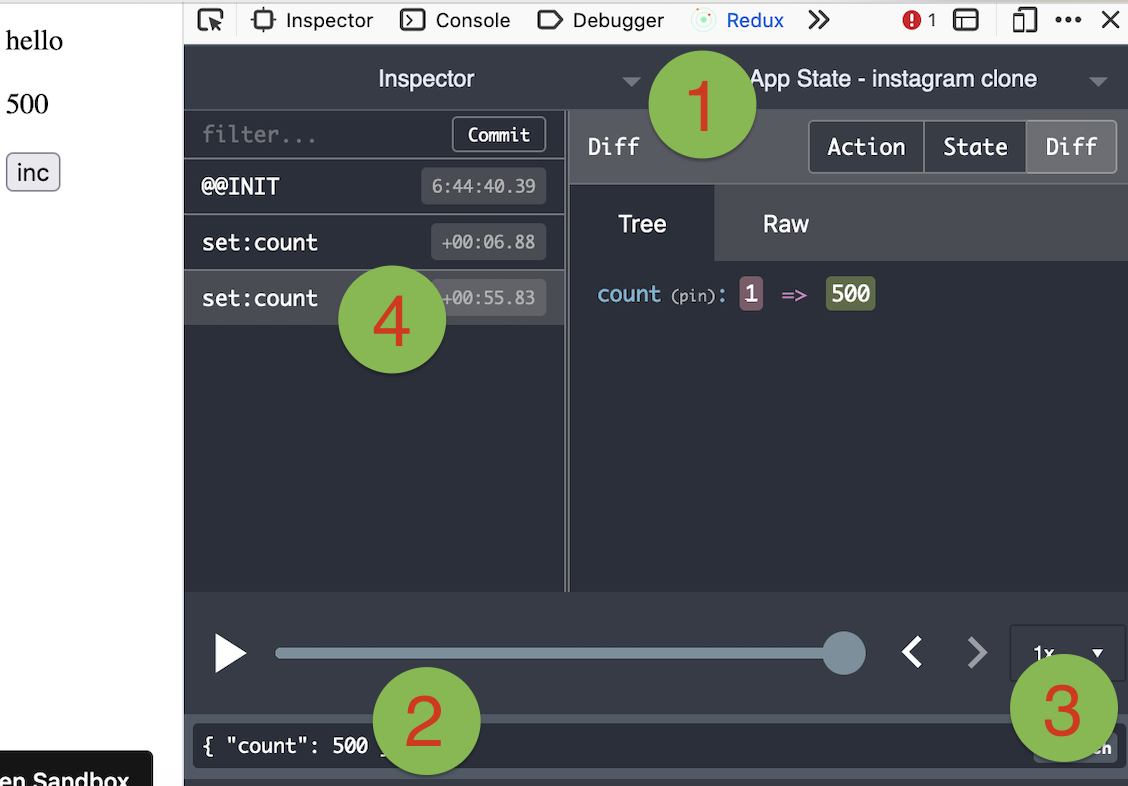
Manipulating state with Redux DevTools
The screenshot below shows how to use Redux DevTools to manipulate state. First select the object from the instances drop down. Then type in a JSON object to dispatch. Then click "Dispatch". Notice how it changes the state.
#### Use it vanilla
Valtio is not tied to React, you can use it in vanilla-js.
`jsx
import { proxy, subscribe, snapshot } from 'valtio/vanilla'
const state = proxy({ count: 0, text: 'hello' })
subscribe(state, () => {
console.log('state is mutated')
const obj = snapshot(state) // A snapshot is an immutable object
})
`
#### useProxy macro
We have a convenient macro with
babel-plugin-macros.
`js
import { useProxy } from 'valtio/macro'
const Component = () => {
useProxy(state)
return (
{state.count}
)
}
// the code above becomes the code below.
import { useSnapshot } from 'valtio'
const Component = () => {
const snap = useSnapshot(state)
return (
{snap.count}
)
}
`
##### vite
npm i --save-dev aslemammad-vite-plugin-macro babel-plugin-macros
And in your
js
import { defineConfig } from 'vite'
import macro from 'valtio/macro/vite'export default defineConfig({
  plugins: [macro],
})
`####
utilYou can subscribe to some proxies and create a derived proxy.
`js
import { derive } from 'valtio/utils'// create a base proxy
const state = proxy({
count: 1,
})
// create a derived proxy
const derived = derive({
doubled: (get) => get(state).count * 2,
})
// alternatively, attach derived properties to an existing proxy
derive(
{
tripled: (get) => get(state).count * 3,
},
{
proxy: state,
}
)
`####
utilYou can define own computed properties within a proxy.
By combining with a memoization library such as
proxy-memoize,
optimizing function calls is possible.
Be careful not to overuse
proxy-memoize
because and useSnapshot do similar optimization
and double optimization may lead to less performance.`js
import memoize from 'proxy-memoize'
import { proxyWithComputed } from 'valtio/utils'const state = proxyWithComputed(
{
count: 1,
},
{
doubled: memoize((snap) => snap.count * 2),
}
)
// Computed values accept custom setters too:
const state2 = proxyWithComputed(
{
firstName: 'Alec',
lastName: 'Baldwin',
},
{
fullName: {
get: memoize((snap) => snap.firstName + ' ' + snap.lastName),
set: (state, newValue) => {
;[state.firstName, state.lastName] = newValue.split(' ')
},
},
}
)
// if you want a computed value to derive from another computed, you must declare the dependency first:
const state = proxyWithComputed(
{
count: 1,
},
{
doubled: memoize((snap) => snap.count * 2),
quadrupled: memoize((snap) => snap.doubled * 2),
}
)
`The last use case fails to infer types in TypeScript
#192.
####
utilThis is a utility function to create a proxy with snapshot history.
`js
import { proxyWithHistory } from 'valtio/utils'const state = proxyWithHistory({ count: 0 })
console.log(state.value) // ---> { count: 0 }
state.value.count += 1
console.log(state.value) // ---> { count: 1 }
state.undo()
console.log(state.value) // ---> { count: 0 }
state.redo()
console.log(state.value) // ---> { count: 1 }
`####
utilThis is to create a proxy which mimic the native Set behavior. The API is the same as Set API
`js
import { proxySet } from 'valtio/utils'const state = proxySet([1, 2, 3])
//can be used inside a proxy as well
//const state = proxy({
// count: 1,
// set: proxySet()
//})
state.add(4)
state.delete(1)
state.forEach((v) => console.log(v)) // 2,3,4
`####
utilThis is to create a proxy which emulate the native Map behavior. The API is the same as Map API
`js
import { proxyMap } from 'valtio/utils'const state = proxyMap([
['key', 'value'],
['key2', 'value2'],
])
state.set('key', 'value')
state.delete('key')
state.get('key') // ---> value
state.forEach((value, key) => console.log(key, value)) // ---> "key", "value", "key2", "value2"
`#### Plugins
#### Recipes
Valtio is unopinionated about best practices.
The community is working on recipes on wiki pages.
- How to organize actions
- How to persist states
- How to use with context
- How to split and compose states
---
How to contribute
$3
- Docs live in
 folder.
- Website lives in
website/ folder.
- Docs are written in mdx format.
- Docs filename shouldn't have spaces.
- Website would generate title and other metadata from graymatter in the file.
- You should be able to render condesandbox inside mdx files by simply adding the url for the same
- Once you have a doc, you can add it to the sidebar section by adding it to the nav in getDocsNav function inside website/lib/mdx.ts`---