akv-capsize
v0.0.1
<img src="https://raw.githubusercontent.com/seek-oss/capsize/HEAD/images/capsize-header.png" alt="Capsize" title="Capsize" width="443px" /> <br/>
4/weekUpdated 2 years agoMITUnpacked: 4.5 MB
Published by Michael Taranto
npm install akv-capsize
> Capsize makes the sizing and layout of text as predictable as every other element on the screen.
>
> Using font metadata, text can now be sized according to the height of its capital letters while trimming the space above capital letters and below the baseline.
``bash`
npm install @capsizecss/core
- Usage
- createStyleObject
- createStyleString
- Options
- Text size
- Line height
- Font Metrics
- Core
- precomputeValues
- precomputeNumericValues
- getCapHeight
- Integrations
- vanilla-extract
- React Native
Usage
$3
Returns a CSS-in-JS style object.
1. Import createStyleObject passing the relevant options.
`ts
import { createStyleObject } from '@capsizecss/core';
const capsizeStyles = createStyleObject({
fontSize: 16,
leading: 24,
fontMetrics: {
capHeight: 700,
ascent: 1058,
descent: -291,
lineGap: 0,
unitsPerEm: 1000,
},
});
`
2. Apply styles to the text element, for example via the css prop.
`ts
// fontFamily: '...' etc,
...capsizeStyles,
}}
>
My capsized text 🛶
`
$3
Returns a CSS string that can be inserted into a
tag or appended to a stylesheet.1. Import
createStyleString passing the relevant options.`ts
import { createStyleString } from '@capsizecss/core';const capsizedStyleRule = createStyleString('capsizedText', {
fontSize: 16,
leading: 24,
fontMetrics: {
capHeight: 700,
ascent: 1058,
descent: -291,
lineGap: 0,
unitsPerEm: 1000,
},
});
`2. Add the styles into a stylesheet or
element and apply the specified class name.`ts
document.write(My capsized text 🛶
);
`Options
$3
Capsize supports two methods of defining the size of text,
and fontSize.NOTE: You should only ever pass one or the other, not both.
####
capHeight: Sets the height of the capital letters to the defined value. Defining typography in this way makes aligning to a grid or with other elements, e.g. icons, a breeze.

####
Setting the font size allows you to get all the benefits of the white space trimming, while still specifying an explicit
for your text. This can be useful when needed to match a concrete design spec or fitting into an existing product.
$3
Capsize supports two mental models for specifying line height,
lineGap and leading. If you pass neither the text will follow the default spacing of the specified font, e.g. line-height: normal.NOTE: You should only ever pass one or the other, not both.
####
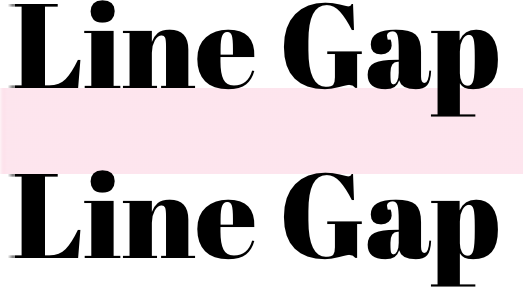
lineGap: Sets the number of pixels between lines, as measured between the baseline and cap height of the next line.
####
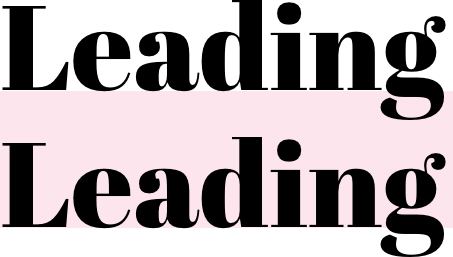
Sets the line height to the provided value as measured from the baseline of the text. This aligns the web with how typography is treated in design tools.
$3
This metadata is extracted from the metrics tables inside the font itself. You can use the Capsize website to find these by selecting a font and referencing
tab in step 3.Core
The core package also provides access to lower level values for a specific font and font size combination.
$3
Returns all the information required to create styles for a specific font size given the provided font metrics. This is useful for integrations with different styling solutions.
`ts
import { precomputeValues } from '@capsizecss/core';const capsizeValues = precomputeValues({
fontSize: 24,
fontMetrics: {
...
}
})
// => {
// fontSize: string,
// lineHeight: string,
// capHeightTrim: string,
// baselineTrim: string,
//}
`$3
Returns all the information required to create styles for a specific font size given the provided font metrics, but with numeric values rather than CSS-compatible strings. This is useful for integrations with non-browser environments.
ts
import { precomputeNumericValues } from '@capsizecss/core';const capsizeValues = precomputeNumericValues({
fontSize: 24,
fontMetrics: {
...
}
})
// => {
// fontSize: number,
// lineHeight: number | undefined,
// capHeightTrimEm: number,
// baselineTrimEm: number,
//}
`$3
Return the rendered cap height for a specific font size given the provided font metrics.
ts
import { getCapHeight } from '@capsizecss/core';const actualCapHeight = getCapHeight({
fontSize: 24,
fontMetrics: {
...
}
})
// => number
``Integrations
- vanilla-extract integration via @capsizecss/vanilla-extract
- React Native integration via @capsizecss/react-native
Thanks
- Vincent De Oliveira for writing Deep dive CSS: font metrics, line-height and vertical-align, which provided the research needed to build all this.
- Devon Govett for creating Fontkit, which does all the heavy lifting of extracting the font metrics under the covers.
- SEEK for giving us the space to do interesting work.
License
MIT.