Angular directive for scrollable Bootstrap Tabs
npm install angular-bootstrap-scrolling-tabsangular-bootstrap-scrolling-tabs
================================
Angular directives for making Bootstrap 3 Tabs or AngularUI Bootstrap Tabs scroll horizontally rather than wrap. (Note that jQuery is required, not just JQLite.)
Here's what they look like:
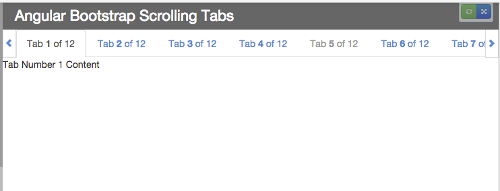
And here are plunks showing them working with:
* Bootstrap 3 Tabs (and Pills)
* AngularUI Bootstrap Tabs
* Bootstrap 3 Tabs with tabs added dynamically after page load
* AngularUI Bootstrap Tabs with tabs added dynamically after page load
Use Cases
---------
There are two directives to choose from, and three ways to use them:
* Use Case #1: Replace Standard Bootstrap Tabs
* Use Case #2: Wrap Standard Bootstrap Tabs (or Pills)
* Use Case #3: Wrap AngularUI Bootstrap Tabs
Optional Features
-----------------
There are also some optional features available:
* Support Adding Tabs Dynamically After Page Load
* Force Scroll to Tab Edge
* Force Refresh of Tab Container
* Enable Horizontal Swiping for Touch Screens
Usage
-----
1. Download it or install it using bower: bower install angular-bootstrap-scrolling-tabs or npm: npm install angular-bootstrap-scrolling-tabs
2. Include scrolling-tabs.min.css (or scrolling-tabs.css) on your page after Bootstrap's CSS
3. Include scrolling-tabs.min.js (or scrolling-tabs.js) on your page (make sure that jQuery and Angular are included before it, and that jQuery is included before Angular)
4. Add mj.scrollingTabs as a module dependency to your app: angular.module('myapp', ['mj.scrollingTabs']);
Breaking Change for v1.0.0
--
* The directive files, scrolling-tabs.js and scrolling-tabs.css, have been moved from the project root into
Overview
--------
If you're using Bootstrap Tabs (nav-tabs) or AngularUI Bootstrap Tabs (tabset) and you don't want them to wrap if the page is too narrow to accommodate them all in one row, you can use these Angular directives to keep them in a row that scrolls horizontally.
It adjusts itself on window resize (debounced to prevent resize event wackiness), so if the window is widened enough to accommodate all tabs, scrolling will deactivate and the scroll arrows will disappear. (And, of course, vice versa if the window is narrowed.)
There are two directives to choose from, depending on your application:
scrolling-tabs is an element directive that replaces your standard Bootstrap ul.nav-tabs element.
scrolling-tabs-wrapper is an attribute directive that wraps either a standard Bootstrap ul.nav-tabs element or an AngularUI Bootstrap tabset element.
Note: Similar to Bootstrap tabs, nested tabs are not supported.
Use Cases
---------
#### Use Case #1: Replace Standard Bootstrap Tabs
If your nav-tabs markup looks like this (it assumes your tabs are data-driven and you're using ng-repeat to generate them):
``html
ng-repeat="tab in main.tabs">{{tab.content}}
you can replace the
element with the scrolling-tabs element directive, like so:
`html
prop-title="title"
prop-active="active"
prop-disabled="disabled"
tab-click="main.handleClickOnTab($event, $index, tab);">
ng-repeat="tab in main.tabs">{{tab.content}}
The only attribute the directive requires is a
attribute—the others are all optional, depending on your setup—which must be set to an array of objects like this (note that the tab titles can contain HTML):
`javascript
var tabs = [
{ paneId: 'tab01', title: 'Tab 1 of 12', content: 'Tab Number 1 Content', active: true, disabled: false },
{ paneId: 'tab02', title: 'Tab 2 of 12', content: 'Tab Number 2 Content', active: false, disabled: false },
{ paneId: 'tab03', title: 'Tab 3 of 12', content: 'Tab Number 3 Content', active: false, disabled: false },
{ paneId: 'tab04', title: 'Tab 4 of 12', content: 'Tab Number 4 Content', active: false, disabled: false },
{ paneId: 'tab05', title: 'Tab 5 of 12', content: 'Tab Number 5 Content', active: false, disabled: false }
];`Each object must have a property for the tab title, a property for the ID of its target pane (so its href property can be set), and a boolean property for its active state; optionally, it can also have a boolean for its disabled state.
By default, the directive assumes those properties will be named
, paneId, active, and disabled, but if you want to use different property names, you can pass them in as attributes on the directive element:
| Property | Default Property Name | Optional Attribute for Custom Property Name |
| -------- | ------------ | ----------------------- |
| Title | title | prop-title |
| Target Pane ID | paneId | prop-pane-id |
| Active | active | prop-active |
| Disabled | disabled | prop-disabled |
So, for example, if your tab objects used the property name
tabLabel for their titles, you would add attribute prop-title="tabLabel" to the element.
An optional
tab-click attribute can also be added to the directive. That function will be called when a tab is clicked. It can be configured to accept the Angular $event and $index arguments, as well as the tab object that was clicked (which must be assigned the parameter name tab).
#### Use Case #2: Wrap Standard Bootstrap Tabs (or Pills)
If you would prefer to keep your standard Bootstrap
ul.nav-tabs (or ul.nav-pills) markup and just want to make it scrollable, you can wrap it in a div that has the scrolling-tabs-wrapper attribute directive on it:`html
ng-repeat="tab in main.tabs">{{tab.content}}
#### Use Case #3: Wrap AngularUI Bootstrap Tabs
Similarly, if you're using AngularUI Bootstrap Tabs, you can make them scrollable by wrapping the
element in a div that has the scrolling-tabs-wrapper attribute directive on it:`html
{{tab.content}}
`
Optional Features
-----------------
#### Support Adding Tabs Dynamically After Page Load
If you will be adding tabs after page load (via, say, button click), add attribute
to the directive element and have it point to your tabs array:`html
`html
`This will add a watcher to your
array that triggers the directive to refresh itself if the array changes.If you want to ensure the scrolling always ends with a tab edge aligned with the left scroll arrow so there won't be a partially hidden tab, add attribute
scroll-to-tab-edge="true" to the directive element:`html
`html
`There's no way to guarantee the left and right edges will be full tabs because that's dependent on the the width of the tabs and the window. So this just makes sure the left side will be a full tab.
#### Force Refresh of Tabs Container
You can use the
attribute to force a refresh of the tabs container sizing (along with an automatic scroll to the active tab if it's not in view after the resize). If, for example, you will be programmatically changing the size of the container—and therefore no window resize event will trigger—the tabs container will need to be told that it should resize its various components.`html
`html
`If that attribute is present, the directive will set up a
on that scope property and force a refresh when the property is truthy. So there are different ways you can set it up:`javascript
/* Option 1 - use a boolean that will need to get set back to false each
time, otherwise the $watch will only trigger the first time
you set it to true */
main.triggerRefresh = false;function forceARefresh() {
main.triggerRefresh = true;
$timeout(function() {
main.triggerRefresh = false;
});
}
/ Option 2 - use an int and increment it each time /
main.triggerRefresh = 0;
function forceARefresh() {
main.triggerRefresh++;
}
`#### Enable Horizontal Swiping for Touch Screens
To enable horizontal swiping for touch screens, you need to enable horizontal scrolling—and therefore the horizontal scrollbar—for the tabs. For WebKit-based browsers, the scrollbar can then be hidden via CSS, but for browsers that don't support
(see MDN documentation for details), the scrollbar will be visible (which is what this directive was originally built to prevent).So if you only need to support WebKit-based browsers, here's how to enable swiping:
Add CSS class
scrtabs-allow-scrollbar to the directive element or any ancestor of the directive element. As long as the tabs fixed container (.scrtabs-tabs-fixed-container) is a descendent of that class, it will work.For example:
`html
tab-click="main.handleClickOnTab($event, $index, tab);">
``
License
-------
MIT License.