apca-w3
v0.1.9
APCA: the Accessible Perceptual Contrast Algorithm, a modern contrast method that improves readability contrast on self-illuminated displays. Developed for the W3C's WCAG 3 and other standards.
0/weekUpdated 3 years agoLimited W3 LicenseUnpacked: 179.2 KB
Published by Andrew Somers
npm install apca-w3
APCA™ for W3C & WCAG3
_Welcome!_
APCA is the Accessible Perceptual Contrast Algorithm, a new way to predict contrast for text and non-text content on self illuminated displays.



_WHAT IS IT?_
APCA is a contrast assessment method for predicting the perceived contrast between sRGB colors on a computer monitor. It has been developed as an assessment method for W3 Silver/WCAG3 accessibility standards relating to content for computer displays and mobile devices, with a focus on readability and understandability.
The APCA version in this repositiory is licensed to the W3/AGWG per the collaborative agreement with specific limitations and exclusions. Please see the license file for details.
$3
- See Version Information for details.
_GENERAL OVERVIEW_
$3
Visit git.myndex.com for a catalog of resources, including articles, third party and peer reviews, additional documentation, white-papers, and more.
$3
For comments and discussions, please see the main SAPC-APCA repo, discussion area. This is also where we discuss draft guidelines and proposals. Please post all comments or discussions there and not in the satellite repositories so they can be tracked and resolved.
$3
There is a working version with examples and reference material on [the APCA demo tool site][APCAsite]
[APCAsite]: https://www.myndex.com/APCA/
------
_QUICKSTART_
$3
``javascript`
npm i apca-w3
$3
`
javascript
`$3
#### PARSE:
If you need to parse a color string or 24bit number, use the colorParsley() function:javascript
let rgbaArray = colorParsley('aliceblue');
`
#### ALPHA BLEND:
Intended for blending the foreground color into the background. Only the foreground has an alpha. There is no conversion to linear space, so blending takes place is the working colorspace, as is standard.javascript
// Send 0-255 arrays alphaBlend(FG, BG)
let alphaBlended = alphaBlend([0,0,0,0.6],colorParsley([255,255,255])), // Send 0-1.0 float arrays for displayP3toY, 5th element
// is bool (false for floats): alphaBlend(FG, BG, false)
let alphaBlended = alphaBlend([0.7,1.0,1.0,0.33],colorParsley([0,0,0]),false);
`#### CONVERT TO Ys:
Send rgba INT array
to sRGBtoY() — this is a slightly different luminance Y that the IEC piecewise.`javascript
let Ys = sRGBtoY([123,123,123,1.0]);
`
Note that for for sRGB and Adobe98, the values in the array must be 0.0-255.0 per CSS4 specs, but for displayP3toY(), the values must be 0.0-1.0, per Apple and CSS4 specs. #### FIND Lc CONTRAST:
First color _must_ be text, second color must be the background.
javascript
    let textColor = [17,17,17,1.0];
    let backgroundColor = [232,230,221,1.0];

    let contrastLc = APCAcontrast( sRGBtoY( textColor ), sRGBtoY( backgroundColor ) );
`
Example using everything together, including alphaBlend:javascript let colorTEXT = rgb(12,23,34,0.65);
let colorBG = #e6e0dd;
let Lc = APCAcontrast(sRGBtoY( alphaBlend(colorParsley(colorTEXT), colorParsley(colorBG)) ),
sRGBtoY( colorParsley(colorBG) ));
`
#### SHORTCUT ALIAS:
The long complete line shown above is aliased into a function . Alpha for the text is automatically detected, and ignored if 1 or ''. The input type is also auto detected (string, king of string, number, array, object). By default returns a signed float -108.0 to 106.0 (approx)`javascript
let Lc = calcAPCA(colorTEXT,colorBG);
`$3
New in this version is an interpolated font size array. Send a contrast value, and it returns an array, with the contrast (Lc) as the zeroth element, then 9 font sizes in px corresponding to weights 100 thru 900: ['LcValue',100,200,300,400,500,600,700,800,900]
Example:
fontArray = fontLookupAPCA(-68.541);
console.log(fontArray) // -68.541,67,40,28,20.5,18.5,16.5,15,416,418
Thus the 400 weight font is indicating 20.5px
$3
New in this version is a reverse contrast lookup. Specify a contrast, and one color (i.e. bg) and it will try to find a color with that contrast.#### NOTES:
1. Currently only returns a greyscale color
2. If a color can not fit the contrast, or other error, returns false.
- A small overrun/underrun of a few percent is permitted.
3. Can return a hex string (default) or an array of RGBA values, with the fifth element a string indicating if the color is for text or bg.
`javascript
reverseAPCA (Lc, knownY, knownType = 'bg', returnAs = 'hex')
`$3
See the colorparsley package for documentation on the available string inputs.colorParsley() is a dependency for the shorthand
$3
There are two extra parameters for calcAPCA(), and one extra for APCAcontrast.javascript
calcAPCA( text, BG, places, isInt )
APCAcontrast ( txYs, bgYs, places = -1 )
alphaBlend( txt, BG, round(bool) )
` defaults to -1, but you can send it 0 and the Lc is returned as a rounded value, and instead of a minus sign for polarity, 'WoB' for white on black is returned. isInt or round defaults to true, as we assume the RGB tuples are 0-255. If you are sending float such as for displayP3, then set isInt = false `_NOTE: neither of these are "official" and may change, move, or vanish._
-----
_APCA-W3 Basic Math (sRGB)_
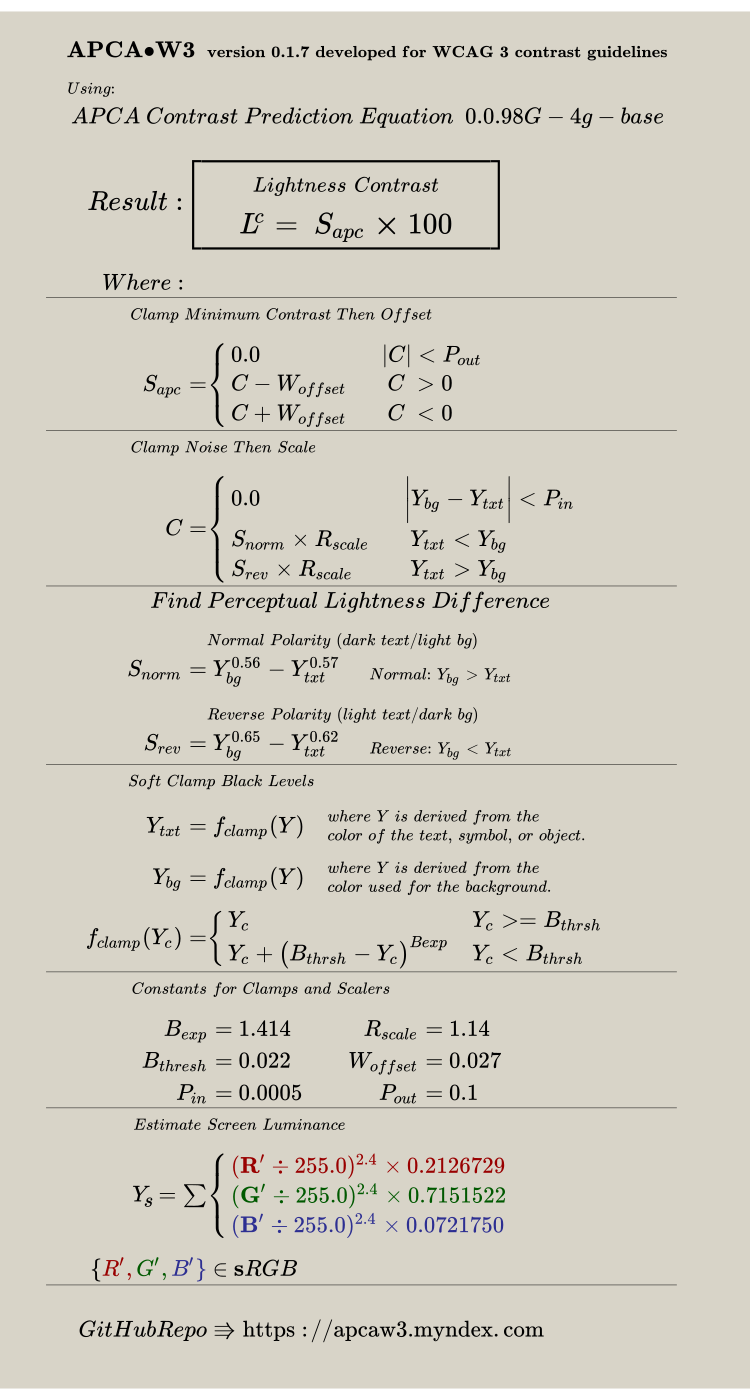
---
_Accessibility Statement for Beta Sites_
Beta testers may wish to include the following statement in their site's boilerplate:$3
_VERSION INFORMATION_
$3
This is the base algorithm version. The other version numbering as listed below are for the overall library file, relating to features and functions are added to aide in integration. These added features do not impact the base algorithm which is stable and undergoing public beta validation.$3
- See Version History for details.
$3
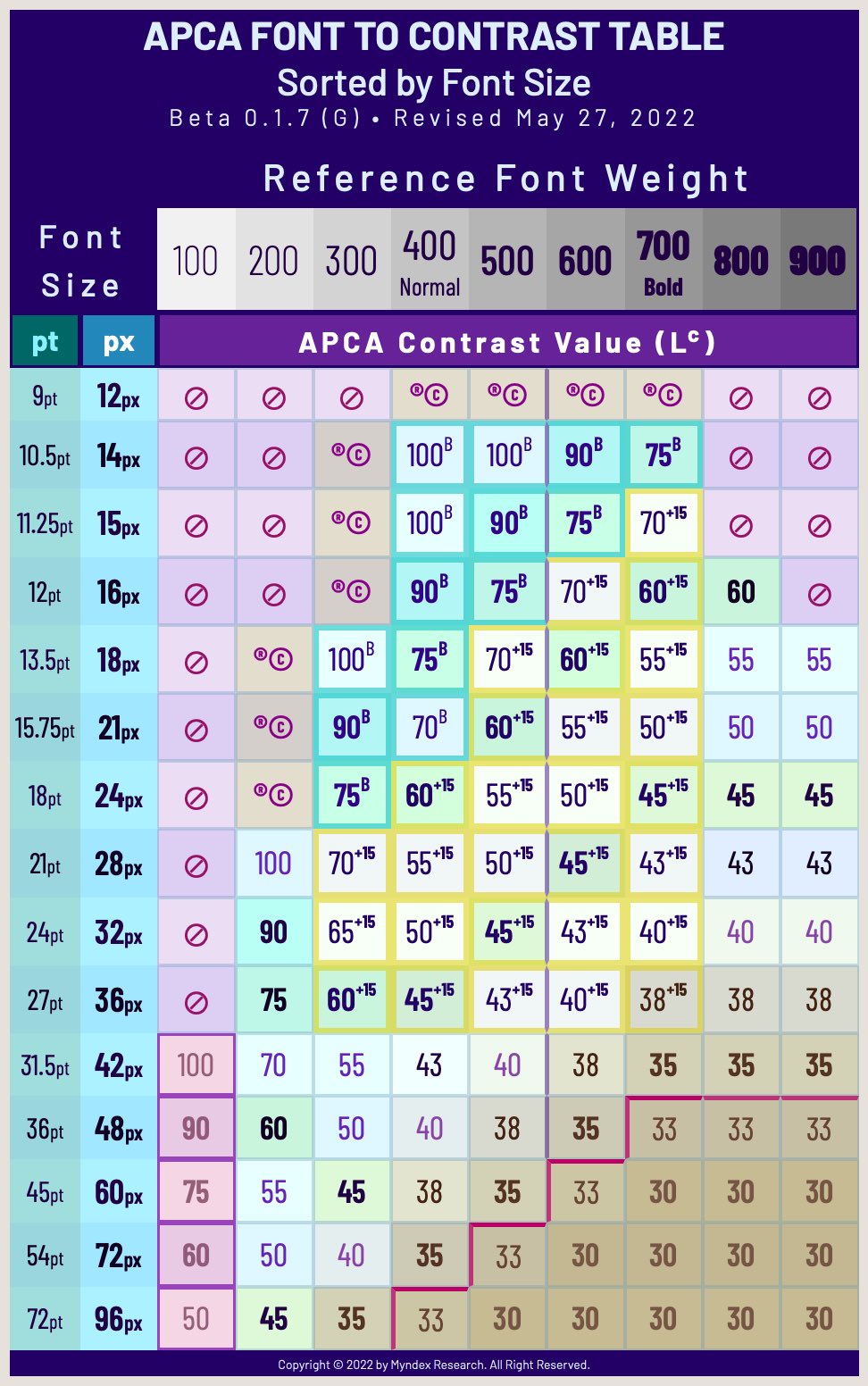
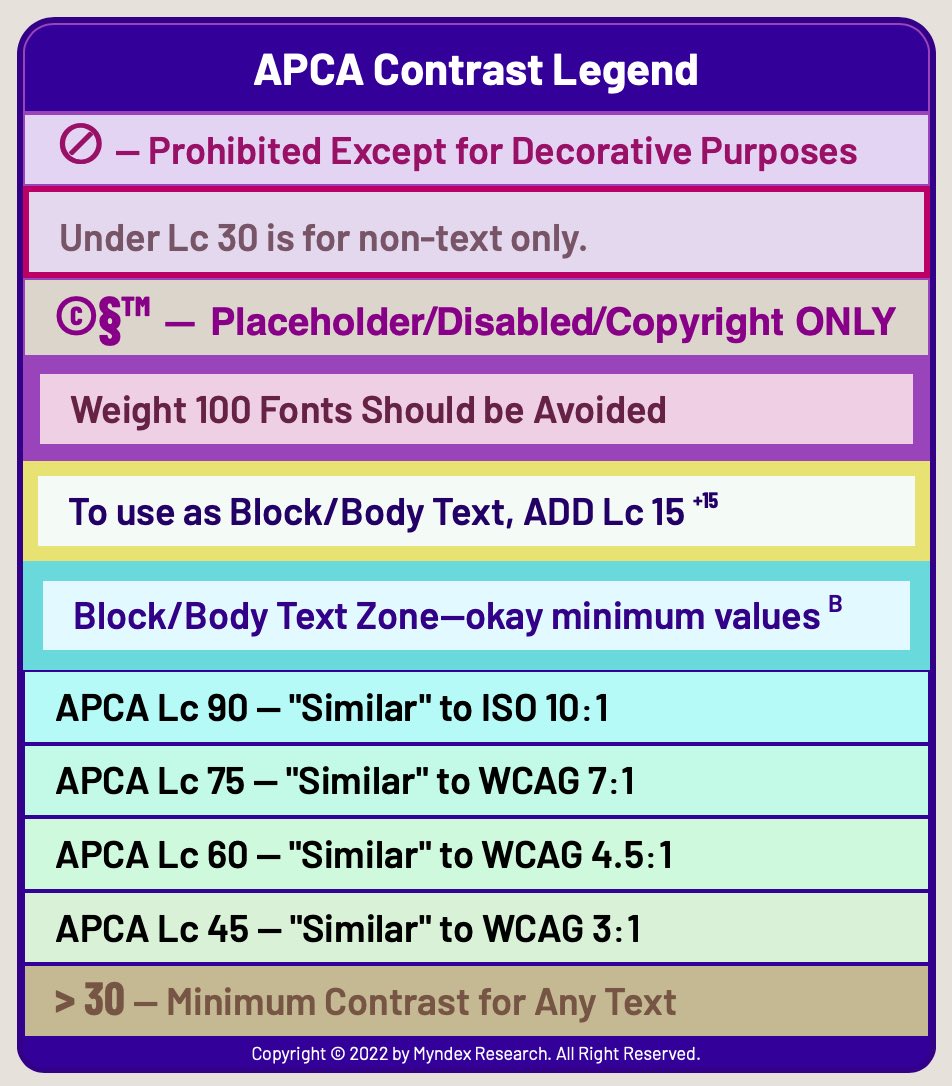
Current as of May 27, 2022Notes on the lookups:
- This is a basic table for fluent readability of text. Text that is intended to be read (primary content) should meet or exceed the values on the table.
- For body text, add Lc 15 for any value on the table lower than Lc 75.
- For instance, if using a 24px font, add Lc 15 to the minimum contrast value
- For sub-fluent text (i.e. not primary content) Lc values can be lowered by Lc 15, but in no case less than Lc 30.
- For non-fluent spot text (copyright bug, disabled text, placeholder) Lc values can be lowered by Lc25, but in no case less than Lc 30.
- Fonts larger than 24px and weight 300 or more have a maximum contrast of Lc 90.
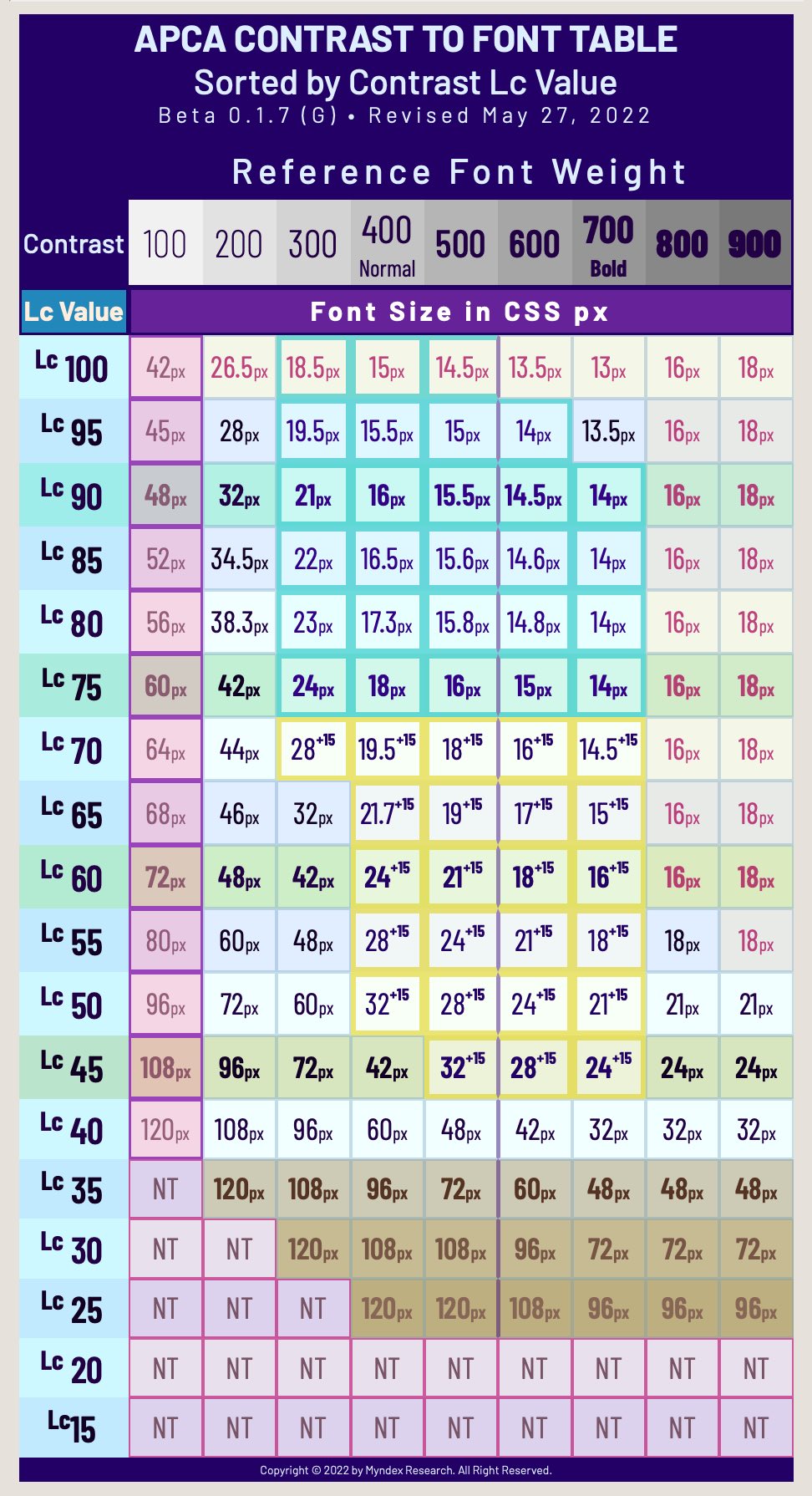
$3
( 0.0.98G - W3 last changed Feb 15, 2021 )
These constants are for use with the web standard sRGB colorspace.
These are the current constants for use with current library version 0.1.9+
javascript
///// 0.0.98G - W3 constants (W3 license only): /////
//// These constants remain unchanged for apca-w3 ////
/// versions 0.1.0 (initial npm package) and later ///
// // exponents = { mainTRC: 2.4, normBG: 0.56, normTXT: 0.57, revTXT: 0.62, revBG: 0.65, };
colorSpace = { sRco: 0.2126729, sGco: 0.7151522, sBco: 0.0721750, };
clamps = { blkThrs: 0.022, blkClmp: 1.414, loClip: 0.1, deltaYmin: 0.0005, };
scalers = { scaleBoW: 1.14, loBoWoffset: 0.027,
scaleWoB: 1.14, loWoBoffset: 0.027, };
// Note: loClip && deltaYmin do not affect lc in range & only clamp low Lc values
---------------------------------------------------------------------------
///// 0.1.1 Color space coefficients for P3 and Adobe /////
//// These are derived from the 1931 CIE standard observer ////
/// Using the equations found at BruceLindbloom.com ///
// And using the current CIE D65 //
///// Display P3: /////
const sRco = 0.2289829594805780,
sGco = 0.6917492625852380,
sBco = 0.0792677779341829; // displayP3 coefficients
// Derived from 1931 CIE xyY:
// xW yW K xR yR xG yG xB yB
// 0.312720 0.329030 6504 0.680 0.320 0.265 0.690 0.150 0.060
///// AdobeRGB: /////
const mainTRC = 2.35; // Pending further evaluation:
// 2.35 exponent to emulate actual monitor perception
const sRco = 0.2973550227113810,
sGco = 0.6273727497145280,
sBco = 0.0752722275740913; // adobeRGB coefficients
// Derived from 1931 CIE xyY:
// xW yW K xR yR xG yG xB yB
// 0.312720 0.329030 6504 0.640 0.330 0.210 0.710 0.150 0.060
---------------------------------------------------------------------------
///// 0.1.14G MAGIC NUMBERS for UNCLAMP, used only with reverseAPCA() /////
//// for use with blkThrs: 0.022 & blkClmp: 1.414 ////
const mFactor = 1.94685544331710;
const mFactInv = 1/mFactor;
const mOffsetIn = 0.03873938165714010;
const mExpAdj = 0.2833433964208690;
const mExp = mExpAdj / blkClmp;
const mOffsetOut = 0.3128657958707580;
`-----
$3
#### 0.1.9 - July 3, 2022
- Fixed dependent import statement
- DEV: Added man page and man page generation script
- Some documentation corrections/additions/organization
#### 0.1.8 • June 5, 2022
- Corrected the version numbering in the apca-w3.js file
- Added a LaTeX math svg of the base algorithm to this README file
- NOTE: the live tool at [www.myndex.com/APCA/][APCAsite] is now using a version of this apca-w3.js file, as well as colorparsley.
#### 0.1.7 • June 5, 2022
- Version number set to match font lookup table version
- Added new test, run with
- Maintenance updates, adjusted alphaBlend for compliance with CSS4#### 0.1.4 • May 27, 2022
- Updated the look-up tables for the fontLookupAPCA() function, and also added the data folder, where the raw data for the lookup tables can be found.
- Also some minor maintenance. (Note: the lookup tables are version 0.1.7 — will synchronize numbers on next publish).
#### 0.1.3 • May 17, 2022
- Fixed the module imports for colorparsley and apca-w3 so they play well together.
- No longer providing a minified version in the dist folder. Now just the file in the src folder.
#### 0.1.2 • April 23, 2022
- NEW!
 Live font lookup table — send it a contrast, it returns an array of font sizes (in px) for each of 9 weights (100 to 900).
- NEW!
reverseAPCA(Lc,Y,use,returnAs)` New in this version is a reverse contrast lookup. Specify a contrast, and one color (i.e. bg) and it will try to find a color with that contrast.#### CHANGE for 0.1.1: Jan 12, 2022
- NEW!! Alpha channels! AdobeRGB!!
#### CHANGE for 0.1.0: Jan 10, 2022
- NEW! displayP3!
- colorParsley() is now in its own package and must be imported separately.
- Replaced alpha versioning with semantic versioning for public beta.
- NOTE: while the version of this library file increments as features are added, the base algorithm is beta-stable and constants remain fixed at 0.0.98G-4g, from Feb. 15th, 2021.
#### 0.0.98G-4g-4: Dec 21, 2021
#### 0.0.98G-4g-3: Dec 13, 2021
#### 0.0.98G-4g-2: Dec 11, 2021
#### 0.0.98G-4g-betafish: Initial npm publish Dec 2, 2021
This moved over the base APCA and G4g constants (from Feb. 15th, 2021) to an npm package.
---
$3
THE REVOLUTION WILL BE READABLE™
---
Disclaimer: _APCA is being evaluated as a replacement for WCAG 2 contrast math for future standards and guidelines, however, standards that will be incorporating APCA are still developmental. Because WCAG 2 contrast math does not accurately model human visual perception nor visual impairments, there will be discrepancies between WCAG 2 contrast math, and perceptually uniform models such as APCA. It is up to the end user to determine suitability of purpose for their region and conformance requirements._