arehs
v1.1.11TypeScript
The arehs ensures the best possible large batch processing, which is oriented towards event-driven chunk processing.
0/weekUpdated 6 months agoMITUnpacked: 71.8 KB
Published by Jin Park
npm install arehs

🏛️ Arehs



The arehs ensures the best possible large batch processing, which is oriented towards event-driven chunk
processing.
It does this by immediately allocating the next asynchronous task call for dense packing, rather than waiting for the
first asynchronous task call to complete.
In that way we can achieve multiple things:
* Control the throughput of our service by setting the concurrency of the Promise Pool.
* Manage load on the downstream services by setting the concurrency of the Promise Pool.
* Increase the performance of our application
* Reduced CPU idle time, etc.
📚 Getting Started
arehs supports both CommonJS and ES Modules.
$3
``javascript`
const { Arehs } = require("arehs");
$3
`javascript`
import { Arehs } from "arehs";
$3
* create: The purpose of the create method is to create an Arehs instance from a specific array of data.withConcurrency
* : Methods that set the value for parallelism and return the current instance.(default: 10)timeoutLimit
* : The default value is 0. If it's greater than 0, the option works, and an error is thrown if thestopOnFailure
operation takes longer than the timeout time(ms).
* : If the stopOnFailure option is set to true, the function stops processing and emits appropriateretryLimit
events.
* : Set a limit on the number of retries on failure.mapAsync
* : Calling the mapAsync function starts the process of asynchronously processing the input data and returning
the results.
If the stopOnFailure option is set to true, the function stops processing and emits appropriate events.
This can be useful for handling transient errors or ensuring data processing resilience. Also, if the retryLimit
option is greater than 0, you can set a limit on the number of retries on failure.
`typescript
import { Arehs } from "arehs";
const dataArr = [
{ id: 1, name: "John" },
{ id: 2, name: "Alice" },
{ id: 3, name: "Bob" }
];
const result = await Arehs.create(dataArr)
.withConcurrency(10)
.mapAsync(async data => {
return await someAsyncFunction(data);
});
`
⚡️ Performance
Tests have shown that Arehs can be improved by about 30% over Promise.all.
`javascript
import { Arehs } from "arehs";
const delay = (i) => {
return new Promise((res, rej) => {
setTimeout(() => {
res(i);
}, 150 + Math.random() * 1000);
});
};
(async () => {
const tasks = Array.from({ length: 1000 }).map((d, i) => i);
const startArehs = performance.now();
await Arehs.create(tasks).withConcurrency(50).mapAsync(delay);
const endArehs = performance.now();
console.log(Arehs: ${endArehs - startArehs}ms);
const startPromiseAll = performance.now();
while (tasks.length > 0) {
const chunkedTasks = tasks.splice(0, 50);
await Promise.all(chunkedTasks.map(delay));
}
const endPromiseAll = performance.now();
console.log(Promise.all: ${endPromiseAll - startPromiseAll}ms);`
})();
`bash`
promiseAllTime: 19.859867874979972(s)
promisePoolTime: 13.55725229203701(s)
$3
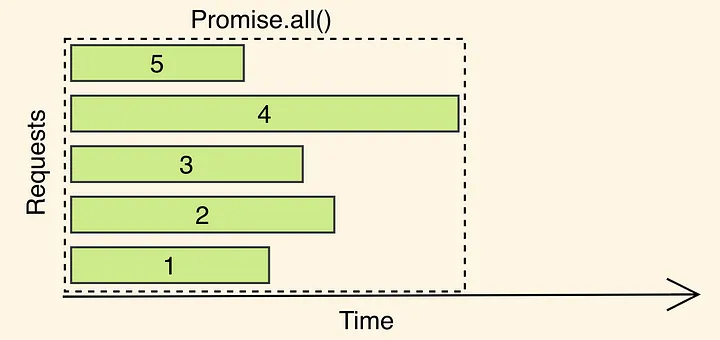
As you can see, Promise.all runs as long as the slowest promise in the batch.
So your main thread is basically “doing nothing” and is waiting for the slowest request to finish.
The longest promise in the Promise array, number 4, will be the chunk's execution time.
This creates an inefficient problem where the next promises don't do any work until the longest promise is finished.
$3
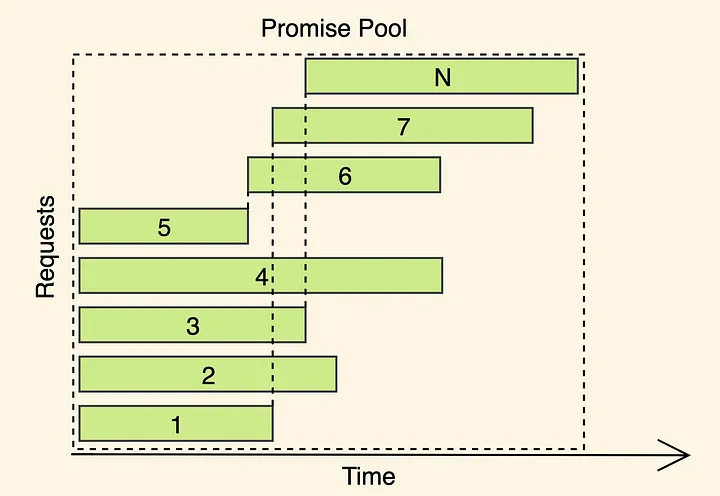
Arehs is all about making the most of Node.js's main thread by running the Promise Pool Pattern.
To achieve better utilization we need densely pack the API calls (or any other async task) so that we do not wait while
the most extended call completes, rather we schedule the next call as soon as the first one finishes.
🙋♀️FAQ
Is this always better than Promise.all?
No, there is No silver bullet.
This can increase your application's performance when you're making a lot of API calls and asynchronous operations.
Also, it may not make much difference in situations where each promise has roughly the same work time.
If you can't get any further performance improvement with Promise.all in your environment, Promise.all
you can give it a try, but if you can get by with , you don't have to. Arehs` in your projects that need performance improvements only after thoroughly
Therefore, you should try to use
testing it.
It will help you. Thank you.
👨👩👧👦 Contributors
- Author: Jin Park