A JavaScript library generating atomic CSS classes and variables
npm install atomizifyatomizify is a small JavaScript library that generates a bunch of atomic CSS classes.
Install the module in your folder:
``
npm i atomizify
Import it in your file:
`js`
import { atomizify } from 'atomizify'
atomizify can fit all types of developers, from lazy to geekiest ones!
It provides a few options to play with it: set some filters, choose your typecase system, or add your own custom classes.
Choose the profile that suits you the best:
- You're a ready-made lover:
by default, atomizify offers thousands of predefined classes.
Just call the function, and a whole galaxy of CSS classes appears.
`js`
atomizify()
- You're a less-is-more expert:
atomizify lets you select / unselect the classes of your choice among the predefined sets & generate only the substancial ones.
`js
// you can pass the 'filters' object, which accepts 3 sub-objects: 'sets', 'subsets', 'properties'
// each sub-object accepts 2 key-value pairs: 'names' and 'to_remove'
atomizify({
filters: {
sets: {
names: ['layout'], // 'names' is an array containing the names of the targetted items (to keep, or to remove if the prop 'to_remove' is passed to 'true')
},
subsets: {
names: ['dimensions'],
},
properties: {
names: ['min-height', 'min-width'],
to_remove: true, // set to 'true' if you want to remove the targetted items listed in 'names'
},
},
})
`
- You're a custom-all freak:
atomizify gives you complete freedom to create and add your own custom classes.
You can also personalize the typecase system for your classes' names.
`js
// you can pass the 'custom_classes' object, in which each entry is a key-value pair:
// the key as the desired class name, and the string value as the desired CSS rule
// you can also set the 'typecase' string value to choose the formatting of your classes' names
atomizify({
typecase: 'dash', // choose among 'snake', 'dash' or 'camel' case ; default is 'snake'
custom_classes: {
myclass1: 'background: black; color: turquoise',
myclass2: 'border-color: pink',
myclass3: 'font-size: 200px',
},
})
`
atomizify also works with React: it allows you to convert all the generated atomic classes in elegant-as-hell flags, that you can comfortably use & combine to build modular components ; and all of this thanks to kigiri.
To achieve that, you'll have to install his invaluable dallas module as well:
`
npm i dallas
All set? Now, you can import the flagify function in your React app, and make an unwise use of the Component magic:
`js
import { flagify } from 'atomizify'
const { Component } = flagify()
// chain the 'Component' object to every CSS classes you want to apply to your element,
// and finish by calling the type of HTML element you aim to render (div, span, section, input, etc.)
const Title = Component.fs55.sapphire3.mb40.div()
const App = () =>
How to document it ?
also provides some ready-to-use generated documentation, so you can see at a glance all the magnificent CSS classes that have been generated.Import & call the desired function(s) in your file:
- If you'd like to display the CSS code generated, be my guest:
`js
import { display_classes } from 'atomizify/doc'// the 'display_classes' function can be called without argument
// it also accepts the following options, passed in an object: 'node', 'open', 'flattened'
display_classes({
node: my_html_node, // you can pass a HTML node that will contain the chart ; default is 'document.body'
open: false, // you can set the initial state of the component displaying the content ; default is 'true'
flattened: false, // you can display the CSS classes all flattened, without the parents sections (sets, subsets and properties) ; default is 'false'
})
`
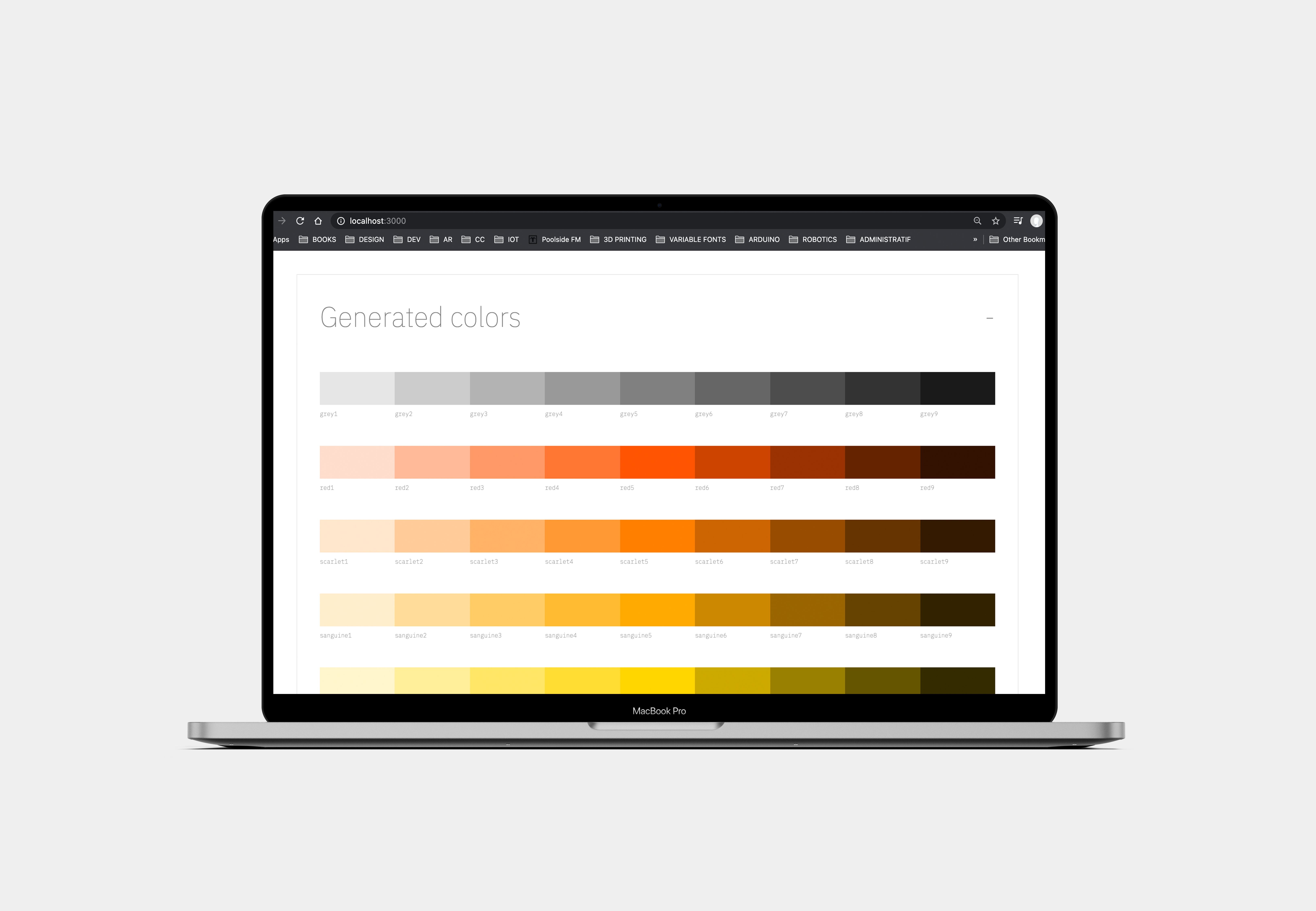
- If you'd like to display a chart of the generated colors, suit yourself:
js
import { display_colors } from 'atomizify/doc'// the 'display_colors' function can be called without argument
// it also accepts the following options, passed in an object: 'node', 'open', 'circles'
display_colors({
node: my_html_node, // you can pass a HTML node that will contain the chart ; default is 'document.body'
open: false, // you can set the initial state of the component displaying the content ; default is 'true'
circles: false, // you can set the visual shape of the colors as circles ; default is 'false'
})
``
And voilà!