awesome-ajv-errors
v5.1.0TypeScript
Prettified AJV errors
42.1K/weekUpdated 3 years agoMITUnpacked: 74.3 KB
Published by Gustaf Räntilä
npm install awesome-ajv-errors[![npm version][npm-image]][npm-url]
[![downloads][downloads-image]][npm-url]
[![build status][build-image]][build-url]
[![coverage status][coverage-image]][coverage-url]
[![Node.JS version][node-version]][node-url]

awesome-ajv-errors pretty-prints ajv errors
It has a gorgeous human-understandable output, predicts human errors and suggests fixes.
Contents
Versions
* Since version 2;
* This is a [pure ESM][pure-esm] package. It requires Node 12.20 and cannot be used from CommonJS.
* Ajv 6, 7 and 8 are supported.
* Since version 3;
* This package can be used in browsers without special hacks. It will by default not pretty-print codeframes or use colors. If you want this, you have two options:
* Either import from awesome-ajv-errors/node explicitly (if you have e.g. webpack DefinePlugin configured to hack around missing things like process is not defined), or
* Import from awesome-ajv-errors/try-styled which has a promise-based prettify function (prettifyTryStyled) or a promise which will eventually resolve to a synchronous function (styledPrettify).
* Both of these will fallback to non-colored non-codeframe output if e.g. loading @babel/code-frame failed. This will likely be entirely resolved once Babel 8 is released; then awesome output will by default work in browsers too.
* Since version 4;
* package.json exports field is not support well by e.g. Jest, so v4 reverts the v3 exports.
* Until the exports field get better support, the official way to import will now be from:
* awesome-ajv-errors for auto-detecting node vs browser
* awesome-ajv-errors/dist/index-node.js or awesome-ajv-errors/dist/index-browser.js for explicit importing depending on environment
* awesome-ajv-errors/dist/index-try-styled.js for dynamic trying to load color support (e.g. in browsers)
* Since version 5;
* Re-introduced package exports.
* Replaced @babel/code-frame with awesome-code-frame which uses later versions of upstream dependencies - works out-of-the-box in browsers now.
* It will by default pretty-print codeframes and use colors, including in browsers that supports it. This will look bad in the browser window, but good in the developer tools.
* Import from awesome-ajv-errors/plain explicitly to have colors and code frame output disabled, or use the options to prettify() to disable per call.
Now using the latest chalk, which means it requires support for package imports*. If this causes problems in Jest for you, see this issue for help.
Examples
Similar property name
Suggest similar properties
data.jsonJSON Schema and data
schema.json
``json`
{
"title": "Second-level two similar properties",
"type": "object",
"properties": {
"foo": {
"type": "object",
"properties": {
"bar": {},
"bak": {}
},
"additionalProperties": false
}
}
}json`
{
"foo": {
"bar": "42",
"baz": "33"
}
}

Multiple similar property names
Suggests multiple valid property names
schema.json data.jsonJSON Schema and data
json`
{
"title": "Second-level three similar properties",
"type": "object",
"properties": {
"foo": {
"type": "object",
"properties": {
"bar": {},
"bak": {},
"bam": {}
},
"additionalProperties": false
}
}
}json`
{
"foo": {
"bar": "42",
"baz": "33"
}
}
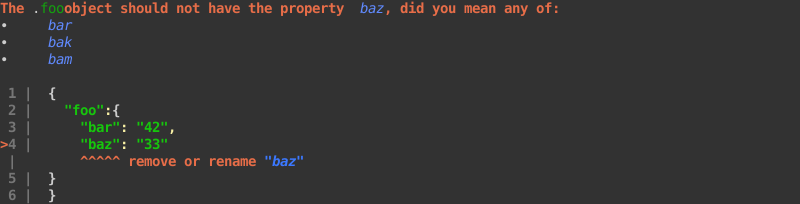
Type typo
Suggests the valid value type when mistaken
schema.json data.jsonJSON Schema and data
json`
{
"title": "One option (number to string)",
"type": "object",
"properties": {
"foo": {
"anyOf": [
{
"type": "string"
}
]
}
}
}json`
{
"foo": 42
}

Type typo (reverse)
Suggests the valid value type when mistaken
schema.json data.jsonJSON Schema and data
json`
{
"title": "One option (string to number)",
"type": "object",
"properties": {
"foo": {
"anyOf": [
{
"type": "number"
}
]
}
}
}json`
{
"foo": "42"
}

Type typo (one much better option)
When the type mismatch, and one type is much "better" than the rest (as in probably the right solution), it will be suggested for conversion
schema.json data.jsonJSON Schema and data
json`
{
"title": "Two options",
"type": "object",
"properties": {
"foo": {
"anyOf": [
{
"type": "string"
},
{
"type": "boolean"
}
]
}
}
}json`
{
"foo": 42
}

Type typo (one much better option out of multiple)
schema.json data.jsonJSON Schema and data
json`
{
"title": "Three options",
"type": "object",
"properties": {
"foo": {
"anyOf": [
{
"type": "string"
},
{
"type": "boolean"
},
{
"type": "null"
}
]
}
}
}json`
{
"foo": 42
}

Array too small
schema.json data.jsonJSON Schema and data
json`
{
"title": "2 too few",
"type": "object",
"properties": {
"foo": {
"type": "array",
"minItems": 3
}
}
}json`
{
"foo": [
1
]
}
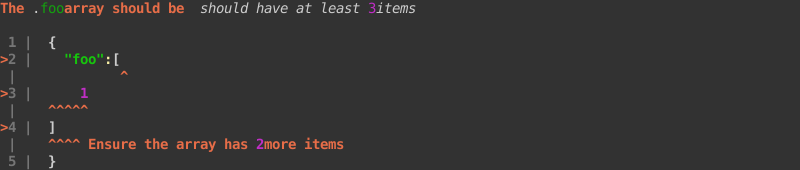
Number too big
schema.json data.jsonJSON Schema and data
json`
{
"title": "Less than or equal to",
"type": "object",
"properties": {
"foo": {
"type": "number",
"maximum": 17
}
}
}json`
{
"foo": 42
}

Not in enum set
schema.json data.jsonJSON Schema and data
json`
{
"title": "One value of same type",
"type": "object",
"properties": {
"foo": {
"enum": [
41
]
}
}
}json`
{
"foo": 42
}

Almost in enum set (wrong convertible type)
schema.json data.jsonJSON Schema and data
json`
{
"title": "Two options (one of different type)",
"type": "object",
"properties": {
"foo": {
"enum": [
41,
"42"
]
}
}
}json`
{
"foo": 42
}

Almost in enum set (wrong convertible type), multiple options
schema.json data.jsonJSON Schema and data
json`
{
"title": "Four options (one of different type)",
"type": "object",
"properties": {
"foo": {
"enum": [
"falso",
"other",
"False",
false
]
}
}
}json`
{
"foo": "false"
}
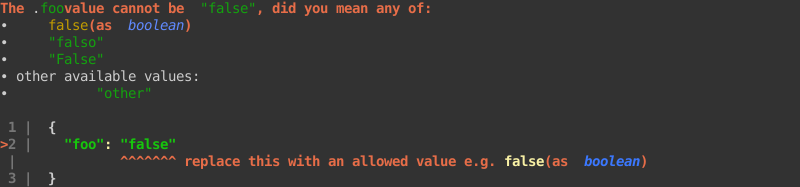
Invalid format (time)
schema.json data.jsonJSON Schema and data
json`
{
"title": "time invalid",
"type": "object",
"properties": {
"foo": {
"type": "string",
"format": "time"
}
}
}json`
{
"foo": "11:22:334"
}

Invalid format (e-mail)
schema.json data.jsonJSON Schema and data
json`
{
"title": "email invalid",
"type": "object",
"properties": {
"foo": {
"type": "string",
"format": "email"
}
}
}json`
{
"foo": "quite@invalid@email.com"
}

if-then not satisfied
schema.json data.jsonJSON Schema and data
json`
{
"title": "if-then on first-level object",
"properties": {
"foo": {
"if": {
"properties": {
"firstName": {
"const": true
}
}
},
"then": {
"required": [
"lastName"
]
}
}
}
}json`
{
"foo": {
"firstName": true
}
}
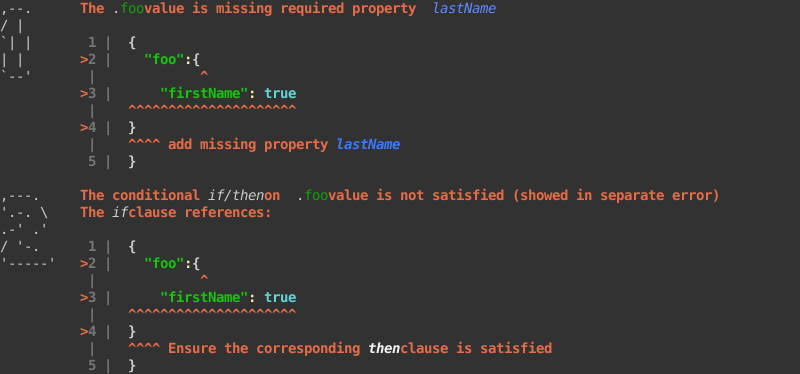
Multiple of
schema.json data.jsonJSON Schema and data
json`
{
"title": "Multiple of",
"type": "object",
"properties": {
"foo": {
"type": "number",
"multipleOf": 4
}
}
}json`
{
"foo": 17
}

Required property
schema.json data.jsonJSON Schema and data
json`
{
"title": "Root-level required",
"type": "object",
"properties": {
"foo": {}
},
"required": [
"foo"
]
}json`
{
"bar": 42
}

Usage
Import the ajv package, and prettify from awesome-ajv-errors:
`ts`
import * as Ajv from 'ajv'
import { prettify } from 'awesome-ajv-errors'
Create an ajv instance and validate objects:
`ts
const ajv = new Ajv( { allErrors: true } ); // allErrors is optional
let data, schema; // Get the JSON schema and the JSON data from somewhere
const validate = ajv.compile( schema );
validate( data );
`
Now, the validation error is stored on the validate function. Use prettify to pretty-print the errors, and provide the data so that awesome-ajv-errors can suggest fixes:
`ts`
console.log( prettify( validate, { data } ) );
Configure styling
Instead of auto-detecting based on the platform (Node.js or a browser), you can turn on/off colors, location printing (the json-snippet of the error) and whether to print big ascii numbers to the left of each error, if there are more than one error.
With the options object containing data provided to prettify you can include colors, location and bigNumbers as booleans, to override the defaults.
Turning colors explicitly on will only enable colors if it's detected to be supported by the platform, but turning them off will always output non-colored text.
Turning location on will also only enable the location printing if colors are detected to be supported by the underlying platform (this is a limitation in the current @babel/code-frame and will likely be resolved in Babel 8).
bigNumbers will only be enabled if location printing is enabled, but can be explicitly turned off.
Example:
`ts``
const colors = false;
const location = false;
const explanation = prettify( validate, { data, colors, location } );
[npm-image]: https://img.shields.io/npm/v/awesome-ajv-errors.svg
[npm-url]: https://npmjs.org/package/awesome-ajv-errors
[downloads-image]: https://img.shields.io/npm/dm/awesome-ajv-errors.svg
[build-image]: https://img.shields.io/github/actions/workflow/status/grantila/awesome-ajv-errors/master.yml?branch=master
[build-url]: https://github.com/grantila/awesome-ajv-errors/actions?query=workflow%3AMaster
[coverage-image]: https://coveralls.io/repos/github/grantila/awesome-ajv-errors/badge.svg?branch=master
[coverage-url]: https://coveralls.io/github/grantila/awesome-ajv-errors?branch=master
[node-version]: https://img.shields.io/node/v/awesome-ajv-errors
[node-url]: https://nodejs.org/en/
[pure-esm]: https://gist.github.com/sindresorhus/a39789f98801d908bbc7ff3ecc99d99c