bassdrop
v0.0.1
🔊 a downshift powered dropdown library for react vr
0/weekUpdated 3 years agoMITUnpacked: 752.4 KB
Published by Luke Herrington
npm install bassdrop
bassdrop

🔊 a downshift powered dropdown library for react vr








bassdrop is a downshift🏎️ powered dropdown library for building drop downs and select lists in react vr. It uses the function as child and “prop getter” patterns, which gives you maximum flexibility with a minimal API.
Table of Contents
Installation
This module is distributed via npm which is bundled with node and
should be installed as one of your project’s dependencies:
npm install --save bassdrop
This package also depends on
react-vr,prop-typesandreact. Please make sure you have those installed as well.
Usage
``jsx
import BassDrop from 'bassdrop';
import { Text, View, VrButton, Animated } from 'react-vr';
// Small helper function to choose item bg color.
function getDropdownItemBgColor(selectedItem, item, highlightedIndex, index) {
if (selectedItem === item) {
return 'gray';
}
if (highlightedIndex === index) {
return 'lightgray';
}
return 'white';
}
function VrDropdown({ items, placeholder }) {
return (
placeholder={placeholder}
// The render prop is called on each render providing prop getters and state to be used in your UI.
// This function can alternatively be called as a child prop
render={({
// Prop getters
getItemProps,
getToggleButtonProps,
getRootProps,
// State
isOpen,
selectedItemIsHighlighted,
itemDisplay,
highlightedIndex,
selectedItem,
}) => (
style={{
position: 'absolute',
layoutOrigin: [0.5, 0.5],
transform: [{ translate: [0, 0, -3] }],
}}
billboarding={'on'}
{...getRootProps()}
>
{...getToggleButtonProps()}
style={{
display: 'flex',
flexDirection: 'row',
backgroundColor: 'white',
justifyContent: 'space-between',
alignItems: 'stretch',
height: 0.7,
width: 3,
paddingLeft: 0.2,
}}
>
style={{
backgroundColor: 'white',
color: selectedItemIsHighlighted ? 'black' : 'grey',
fontSize: 0.3,
fontWeight: '400',
textAlign: 'center',
textAlignVertical: 'center',
}}
>
{itemDisplay}
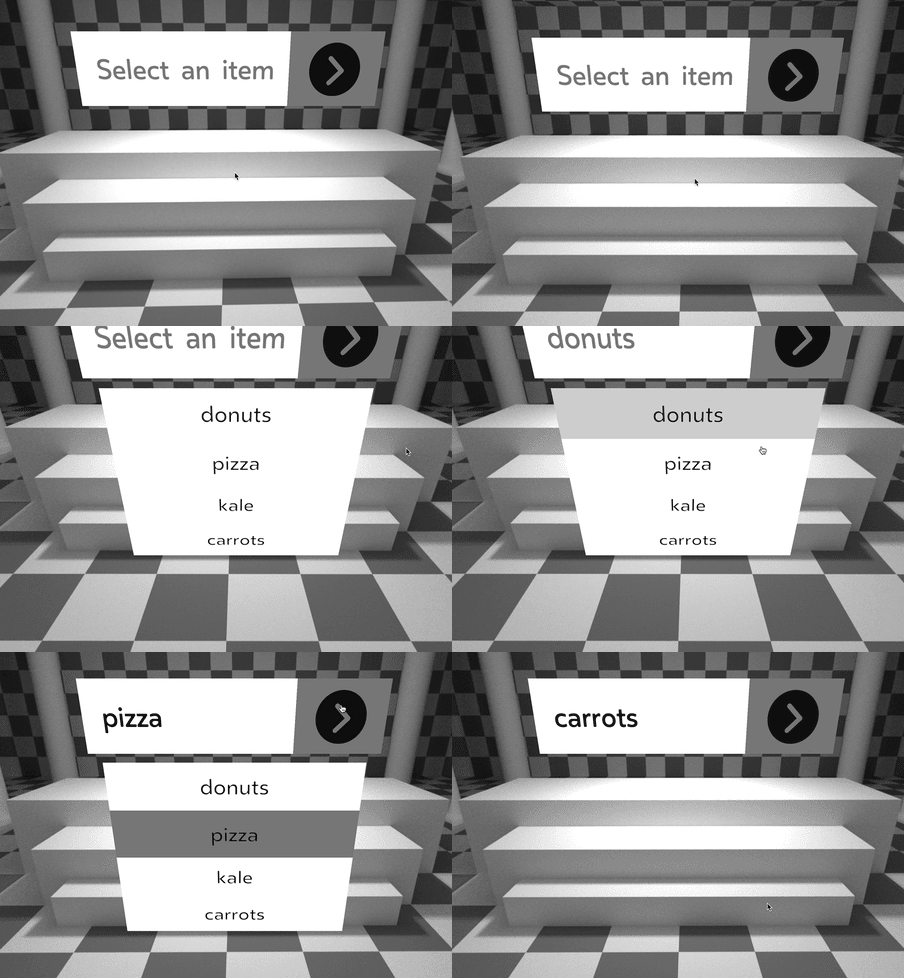
…creates something like this: See the API Docs for information on the props exposed by this package. The usage example above is not an exhaustive list. bassdrop 🔊 uses the child callback render function pattern. This is where you render whatever you want to based on the state of bassdrop which is passed to the callback as parameters. The function is passed as the child prop of the
style={{
paddingRight: 0.2,
paddingLeft: 0.2,
backgroundColor: 'gray',
display: 'flex',
alignItems: 'center',
flexDirection: 'row',
}}
>
style={{
justifyContent: 'center',
width: 0.5,
height: 0.5,
}}
/>
{isOpen ? (
style={{
width: 3,
backgroundColor: 'white',
transform: [
{
translate: [0, -1.3, -0.3],
},
],
}}
>
{items.map((item, index) => (
{...getItemProps({
item,
index,
})}
key={item}
>
style={{
fontSize: 0.3,
padding: 0.1,
textAlign: 'center',
textAlignVertical: 'center',
color: 'black',
backgroundColor: getDropdownItemBgColor(
selectedItem,
item,
highlightedIndex,
index
),
}}
>
{item}
))}
) : null}
)}
/>
);
}
`
Props
How To Render
BassDrop component:
` or can be called from the render propjsx`
{({/ parameters here /}) => (/ your render code here/)}
`jsx``
/>
The paramters of this function can be split into two categories: State and Prop Getters.
See the API Docs for a list of these properties.
Examples
Check out the demo site to see how bassdrop 🔊 works in VR. See the demo repo for the code behind the demo site.
Contributing
If you’d like to make bassdrop 🔊 better, please read our guide to contributing.
These wonderful people have contributed to bassdrop 🔊 in one way or another:
Contributors

Luke Herrington
License
bassdrop is MIT licensed.