bbpr
v3.4.17
Make pull requests through the Bitbucket API 2.0 from your terminal
28/weekUpdated 3 years agoMITUnpacked: 1.0 MB
Published by Michel Moreau
npm install bbprThis package is deprecated and no longer maintained.

Light Speed Pull Requests from Your Terminal








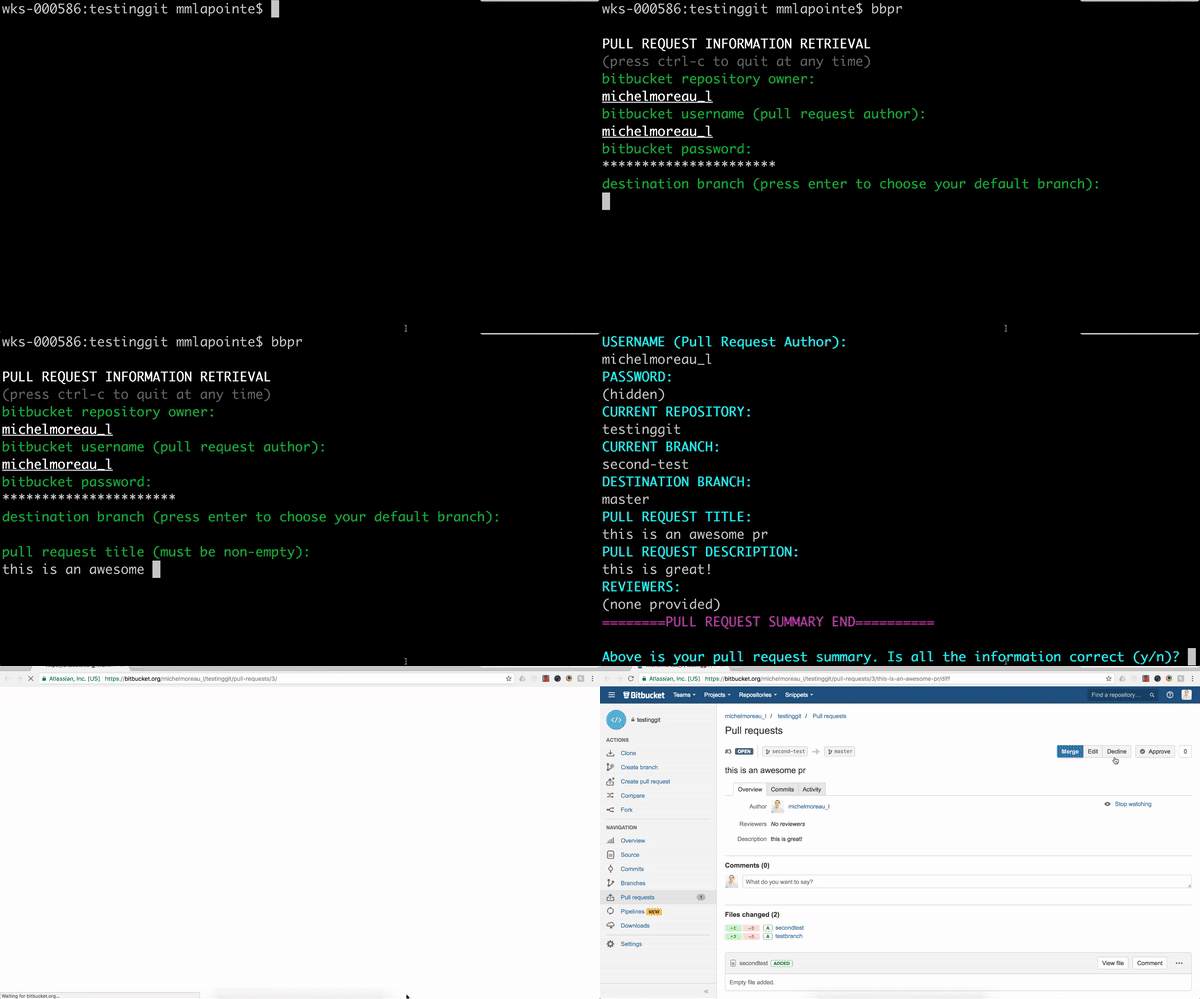
Quick start
``
npm install -g bbpr
`
Use the bbpr command from a feature branch to start a pull request process.
Please log an issue or send an email if you get any error during the quick start process.Synopsis
_bbpr_ (BitBucket Pull Requests) is a cross-platform, interactive, configurable program helping you making pull requests from your terminal.
A positive side effect of using _bbpr_ is that it can also help you standardize the pull request process across members of your team.
Forgetting little details when doing a pull request is very easy (forgetting to add a reviewer, not providing detailed specifications helping your teammates understand where they should focus their attention while reviewing, etc). _bbpr_ wants to partner up with you on that journey, so that your future pull requests will always be picture perfect.
Features
- Comprehensive pull request creation command to use from your terminal
- Cross-platform compatibility for Windows, MacOS, and Linux
- Global (for all your repositories) and local (repository-specific) configuration options
- Easy integration/importation of configuration files whether located locally or remotely (http/https)
- Granular options for destination branch selection, password caching, reviewers addition, source branch closing, demo url addition, and pull request description
- BitBucket markdown support for pull request descriptions
Installation
Prerequisites
First, make sure you have the latest stable versions of the following programs installed on your computer: node.js, npm, and git or mercurial depending on which version control system your team is using.
Install globally
The single best way to use _bbpr_ is to install it globally on your computer:
`
npm install -g bbpr
`
then you can use the bbpr command from your terminal. But, read along, there is more. Use and Configuration
Usage
_bbpr_ comes bundled with a global configuration file (
bbpr.config.js) by default, which means you can use it right after installing the module globally on your computer with the bbpr terminal command. _bbpr_ also leaves you with a series of commandline options in order to configure the program to your taste:
Command
Description
bbpr
Starts the interactive pull request process.
bbpr first looks locally for a configuration file,
and defaults to the global configuration file if it does not find one.
Note that cached passwords are however always retrieved from the global configuration file.
bbpr init
Initializes a local bbpr configuration file for your repository.
bbpr -l
Opens your local bbpr configuration file.
bbpr -l reset
Resets your local bbpr configuration file to the default configuration.
bbpr -l <path to configuration file>
Sets your local bbpr configuration file to the file specified.
The specified path can be relative, absolute, or remote (http/https).
bbpr -g
Opens your global bbpr configuration file.
bbpr -g reset
Resets your global bbpr configuration file to the default configuration.
bbpr -g <path to configuration file>
Sets your global bbpr configuration file to the file specified.
The specified path can be relative, absolute, or remote (http/https).
Configuration file
Here are all the properties you can set in your bbpr.config.js configuration file, whether global or local:`javascript
module.exports = {
user: {
password: null, // null or String.
// If null and cachePwd is set to true, this property will be set to the (encrypted) password you entered via the prompt for your next BBPR sessions.
// If not null and cachePwd is set to true, it will use the encrypted password stored in this property.
// In any other case, you will be prompted at each BBPR session to provide your BitBucket password.
cachePwd: false // Boolean. See the password property for detailed explanation.
},
demo: {
shouldPrompt: false, // Boolean. Set to true if you'll need a demo link with your PR.
shouldPromptDescription: false, // Boolean. Set to true if you'll need a description with your demo.
demoIntro: '', // String. Introduction appearing in your pull request description right before your demo url
basePath: '', // String. Base path to your demo (ex. https://mydemo.com/). Provide only if needing a demo. It will be ignored otherwise.
// You can also provide a basePath with the below path variables as such https://mydemo.com/{{repositoryName}}/{{sourceBranch}}/{{orAnyPathVariableListedBelow}}
pathVariables: {
repositoryName: null, // null or Function with signature (repositoryName) => String. Formatting function for repositoryName.
repositoryOwner: null, // null or Function with signature (repositoryOwner) => String. Formatting function for repositoryOwner.
pullRequestAuthor: null, // null or Function with signature (pullRequestAuthor) => String. Formatting function for pullRequestAuthor.
sourceBranch: null, // null or Function with signature (sourceBranch) => String. Formatting function for sourceBranch.
destinationBranch: null // null or Function with signature (destinationBranch) => String. Formatting function for destinationBranch.
}
},
reviewers: {
default: [], // Array of String. Each entry must be a valid BitBucket username. These are the reviewers who are assign to reviewing your work. An empty Array is also valid.
potential: [] // Array of String. Each entry must be a valid BitBucket username. These are the reviewers who may be assigned to reviewing your work. An empty Array is also valid.
},
branches: {
source: {
close: true // Boolean. Set to false if you do not want your source branch to be closed after merging in the destination branch.
},
dest: {
default: '' // String. Set to your main branch (ex: master or default), or the branch to which you are making PRs most often. Defaults to default for Mercurial and master for Git
}
},
globalVars: {
openFileCommand: '' // String. Your preferred terminal command to open your config file (javascript file). BBPR uses a default command according to your platform if empty.
}
}
`` How to contribute
Ideas and suggestions are strongly encouraged. What would be your needs?
Please do not hesitate to make any change at any time to _bbpr_ by submitting a pull request, an issue, or any suggestion for improvements.
Roadmap
- eliminate the need to provide organization name and username - __DONE__
- add local bbpr.config.js file initialization terminal option - __DONE__
- allow configuration file to be set from a remote or local file - __DONE__
- better error messages on failed pull request - __DONE__
- allow git repositories to be handled - __DONE__
- better commandline options for configuration (local and global) __DONE__
- fix pre-install and post-install script to preserve global config file of users __DONE__
- rethink demo link options __DONE__
- allow users to have local bbpr.config.js file for their repositories - __DONE__
- reduce shelljs and bash dependency for before module install and after module install __DONE__
- eliminate bash dependency for password caching __DONE__
- improve password caching procedure __DONE__
- improved readme with more information, code examples, and cross-platform compatibility __IN PROGRESS__
- detailed explanation on how to contribute in README __IN PROGRESS__
- unit tests everything - __IN PROGRESS__
- allow PR updates through bbpr with granular options (update only one property: title, description, etc)
- beautify code
- check if destination branch exists remotely before making pull request
- improve normalization of configuration file
- support github repositories
- view all pull requests for a specific remote repository
- get existing pull requests with granular options
- add code documentation
Maintainer
Michel Moreau - michmoreau.l@gmail.com