A local, real-time lean metrics dashboard for Beads
npm install beads-dashboardBETA SOFTWARE: This tool is under active development and provided "as is," without warranty. Use at your own risk.
A local, real-time lean metrics dashboard for Beads. This tool visualizes your Beads issue database to help you understand your flow, identify bottlenecks, and track continuous improvement metrics.
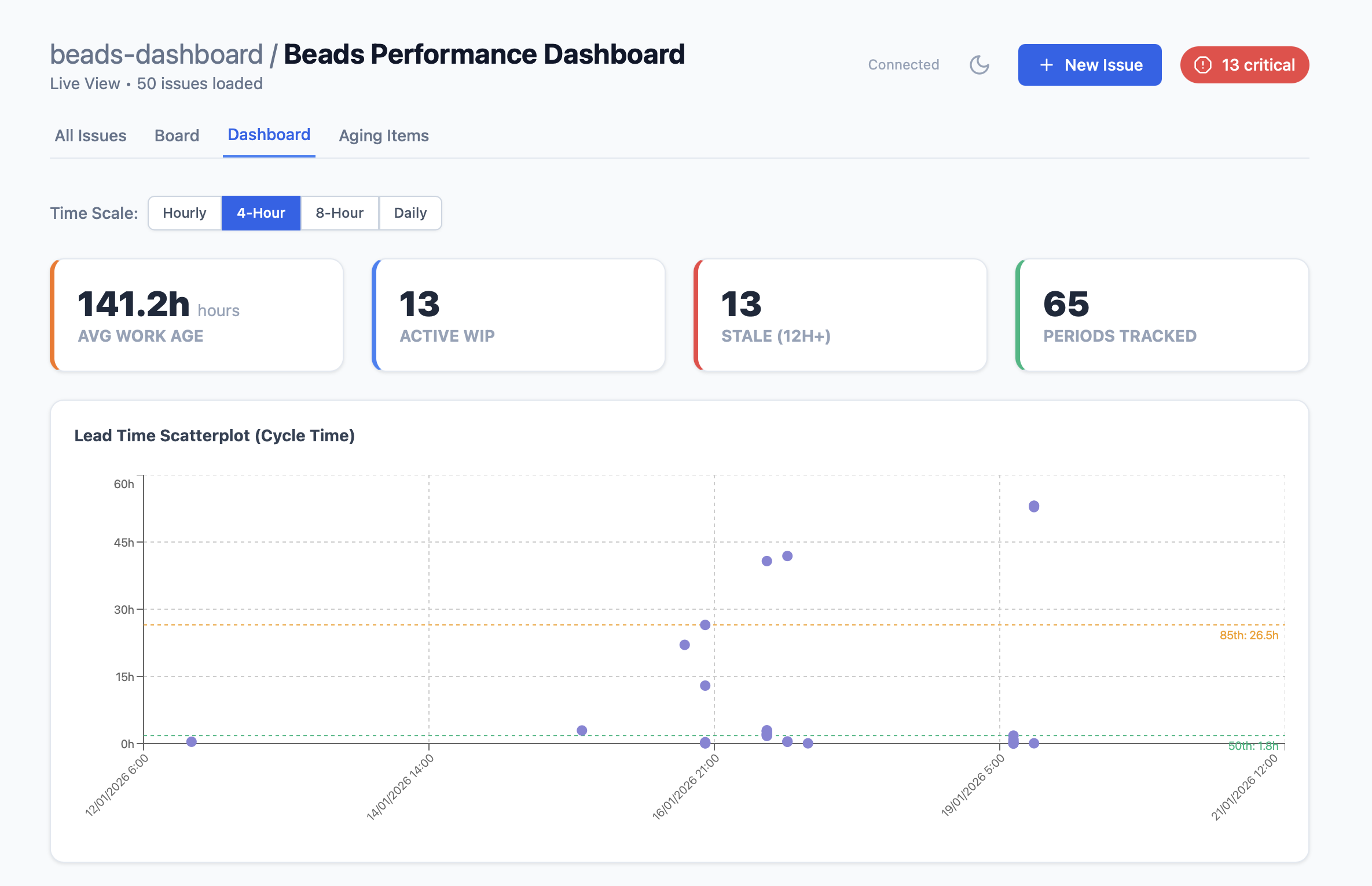
Built with TypeScript, Vite, React 18, and Vitest for type-safe code, fast development, and comprehensive testing.
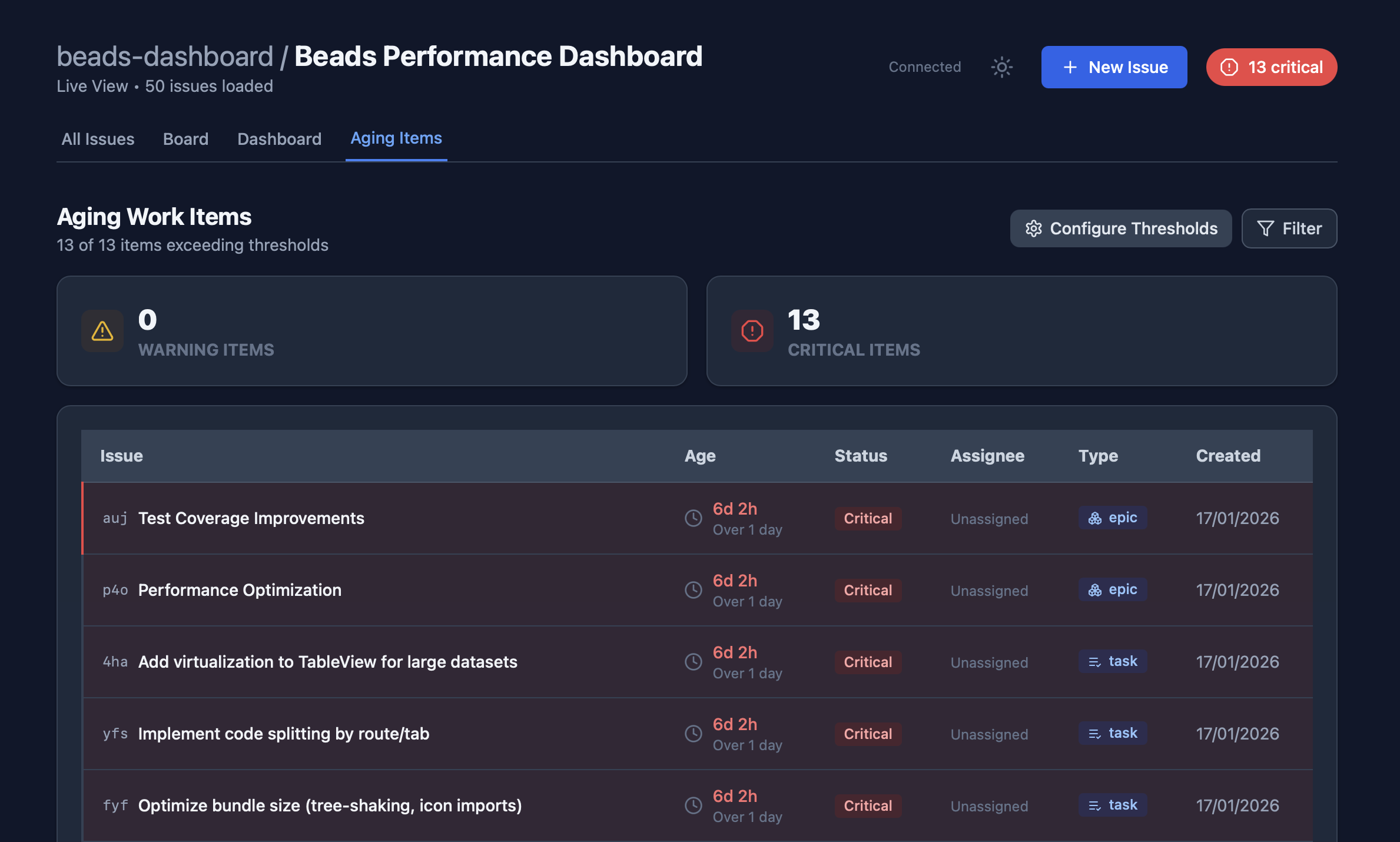
Install globally via npm:
``bash`
npm install -g beads-dashboard
Then run from any directory containing a .beads folder:
`bashRun in current directory
beads-dashboard
Then open your browser to http://localhost:3001 (or your custom port).
Installation (Development)
You can also install and run this tool directly from the source.
bash
Clone the repository
git clone https://github.com/rhydlewis/beads-dashboard.git
cd beads-dashboardInstall dependencies
npm installBuild the project
npm run build
`Usage
$3
Run the development server with automatic reloading:bash
npm run dev
`This starts:
- Frontend dev server: http://localhost:5173 (Vite with HMR)
- Backend API server: http://localhost:3001
$3
Run the built production version:bash
Build first (if not already built)
npm run buildRun production server
npm start
`Opens at: http://localhost:3001
$3
Point the dashboard to any directory containing a folder:`bash
Production mode (recommended for viewing other projects)
npm run build
npm start -- /path/to/your/projectDevelopment mode (requires two terminals for HMR)
Terminal 1: Frontend
npm run viteTerminal 2: Backend
npm run dev:server -- /path/to/your/project
Then visit http://localhost:3000
`Development
$3
beads-dashboard/
├── src/
│ ├── client/ # Frontend React application
│ │ ├── main.tsx # Entry point
│ │ ├── App.tsx # Main app component
│ │ ├── components/ # React components
│ │ │ ├── KanbanBoard.tsx
│ │ │ ├── EpicsTable.tsx
│ │ │ ├── DashboardView.tsx
│ │ │ ├── TableView.tsx
│ │ │ └── ...
│ │ ├── hooks/ # Custom React hooks
│ │ └── utils/ # Business logic (pure functions)
│ ├── server/ # Backend Node.js server
│ │ ├── index.ts # Express server entry
│ │ ├── routes/ # API route handlers
│ │ └── utils/ # Server utilities
│ └── shared/ # Shared types between client/server
│ └── types.ts
├── tests/
│ ├── unit/ # Unit tests
│ └── fixtures/ # Test data
├── dist/ # Build output (gitignored)
│ ├── client/ # Vite-built frontend
│ └── server/ # Compiled TypeScript server
├── index.html # HTML entry point (Vite)
├── vite.config.ts # Vite configuration
├── vitest.config.ts # Vitest configuration
└── tsconfig.json # TypeScript configuration
$3
Frontend:
- React 18 with TypeScript
- Vite (build tool + dev server with HMR)
- Recharts 2 (charts)
- @dnd-kit (drag-and-drop)
- @uiw/react-md-editor (markdown editing)
- Lucide React (icons)
- Marked (markdown rendering)
- DOMPurify (XSS prevention)
- Socket.IO Client (real-time updates)
- Tailwind CSS (styling, via CDN)
Backend:
- Node.js + TypeScript
- Express 5 (web server)
- Socket.IO (WebSocket server)
- Chokidar (file watching)
- Zod (validation)
Testing & Build:
- Vitest (test runner)
- React Testing Library (component testing)
- Supertest (API testing)
- JSDOM (DOM implementation)
- TypeScript Compiler + Vite
$3
bash
Development with HMR
npm run devBuild for production
npm run buildRun production server
npm startRun tests
npm testRun tests with UI
npm test:uiRun tests with coverage
npm test:coverageType check
npm run typecheck
`$3
The project includes comprehensive unit tests:
bash
Run all tests
npm testRun with UI (watch mode with browser interface)
npm test:uiGenerate coverage report
npm test:coverage
`Test Coverage:
- ✅ Business logic (metricsCalculations): 100%
- ✅ Data reading (beadsReader): 100%
- ✅ API endpoints: 100%
- ✅ React components (App, DashboardView, TableView)
$3
1. Define Types in
2. Write Business Logic as pure functions in or src/server/utils/
3. Add Unit Tests immediately (TDD approach)
4. Create Components in
5. Add API Routes if needed in
6. Test with and npm run devSee
for detailed development workflow guidance.Beads Integration
$3
The dashboard reads from the Beads SQLite database (.beads/beads.db) via the bd CLI tool. It provides:
- Read access: All metrics, issues, and visualization data
- Write access: Issue creation, description updates, and status changesAll mutations execute through
bd commands and automatically sync with the database.$3
- Valid .beads/ directory with SQLite database in the project directory
- bd command available in PATH
- Beads project properly initialized with bd initGlobal Installation
For end users, install globally:
bash
npm install -g beads-dashboardRun from any Beads project directory
cd /path/to/your/beads/project
beads-dashboard
`The CLI wrapper (
) automatically:
- Detects production mode
- Serves pre-built files from dist/`This software is licensed under the MIT License.