binary-reader
v0.1.2
Buffered binary reader with a fluent api
0/weekUpdated 3 years agoMIT
Published by Gabriel Llamas
npm install binary-readerbinary-reader
=============
#### Buffered binary reader with a fluent api ####


This module is a wrapper around the fs.read() function. It has an internal buffer that maintains the last chunk of bytes read from disk, so it minimizes the number of I/O calls. If the requested bytes are already in the buffer it doesn't perform any I/O call and the bytes are copied directly from the internal buffer. It also implements a fluent interface for your ease, so it also tries to minimize the number of nested asynchronous calls.
#### Documentation ####
- What are its uses?
- How it works?
#### Functions ####
- [_module_.open(path[, options]) : Reader](#open)
#### Objects ####
- Reader
---
__What are its uses?__
Anything that needs to read big binary files to extract just a little portion of data, e.g. metadata readers: music, images, fonts, etc.
Benefits:
- Read big binary files without caring about how to retrieve the data and without implementing your own internal cursor system.
- Avoid the callback nesting. It uses a very lightweight and fast asynchronous series control flow library: deferred-queue.
- Ease the error handling.
- It is lazy! It delays the open and read calls until they are necessary, i.e. br.open(file).seek(50).close() does nothing.
---
__How it works?__
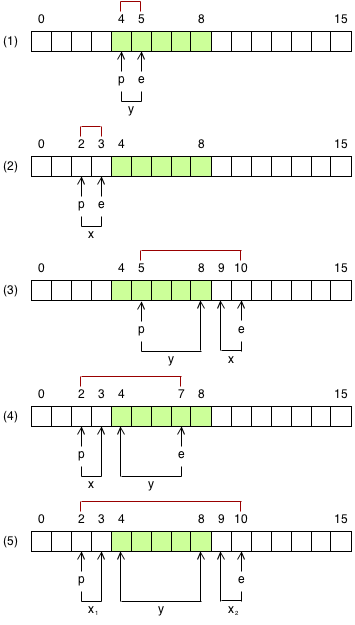
To make the things easier there are 5 cases depending on the buffer position and the range of the bytes that you want to read. These cases are only applicable if the buffer size is smaller than the file size, otherwise the whole file is read into memory, so only one I/O call is done.
Suppose a buffer size of 5 bytes (green background).
The pointer p is the cursor and it points to the first byte to read.
The pointer e is the end and it points to the last byte to read.
The x bytes are not in memory. They need to be read from disk.
The y bytes are already in memory. No need to read them again.
For the sake of simplicity, assume that the x group of bytes has a length smaller than the buffer size. The binary reader takes care of this and makes all the necessary calls to read all the bytes.
---
___module_.open(path[, options]) : Reader__
Returns a new
Reader. The reader is lazy so the file will be opened with the first read() call.
Options:
- __highWaterMark__ - _Number_
The buffer size. Default is 16KB.
---
__Reader__
The reader uses a fluent interface. The way to go is to chain the operations synchronously and, after all, close the file. They will be executed in series and asynchronously. If any error occurs, an
error event is fired, the pending tasks are cancelled and the file is automatically closed.
The
read() and seek() functions receive a callback. This callback is executed when the current operation finishes and before the next one. If you need to stop executing the subsequent tasks because you've got an error or by any other reason, you must call to cancel(). You cannot call to close() because the task will be enqueued and what you need is to close the file immediately. For example:
``
javascript

br.open (file)

    .on ("error", function (error){

      console.error (error);

    })

    .on ("close", function (){

      ...

    })

    .read (1, function (bytesRead, buffer){

      //The subsequent tasks are not executed

      this.cancel ();

    })

    .read (1, function (){

      //This is never executed

    })

    .close ();
`
__Events__


- close

- error


__Methods__


- [Reader#cancel([error]) : undefined](#reader_cancel)

- Reader#close() : Reader

- Reader#isEOF() : Boolean

- Reader#read(bytes, callback) : Reader

- [Reader#seek(position[, whence][, callback]) : Reader](#reader_seek)

- Reader#size() : Number

- Reader#tell() : Number


---


__close__


Arguments: none.


Emitted when the reader is closed or cancelled.


__error__


Arguments: error.
Emitted when an error occurs.
---
__Reader#cancel([error]) : undefined__
Stops the reader immediately, that is, this operation is not deferred, it cancels all the pending tasks and the file is automatically closed. If you pass an error, it will be forwarded to the error event instead of the emitting a close event.
This function is mostly used when you need to execute some arbitrary code, you get an error and therefore you need to close the reader.
`javascript
br.open (file)
.on ("error", function (error){
console.error (error);
})
.on ("close", function (){
...
})
.read (1, function (bytesRead, buffer, cb){
var me = this;
asyncFn (function (error){
if (error){
//The error is forwarded to the "error" event
//No "close" event is emitted if you pass an error
me.cancel (error);
}else{
//Proceed with the next task
cb ();
}
});
})
.read (1, function (){
...
})
.close ();
`
---


__Reader#close() : Reader__


Closes the reader.


This operation is deferred, it's enqueued in the list of pending tasks.


In the following example, the close operation is executed after the read operation, so the reader reads 1 byte and then closes the file.
`javascript
br.open (file)
.on ("error", function (error){
console.error (error);
})
.on ("close", function (){
...
})
.read (1, function (){ ... })
.close ();
`
---


__Reader#isEOF() : Boolean__


Checks whether the internal cursor has reached the end of the file. Subsequent reads return an empty buffer. This operation is not deferred, it's executed immediately.


In this example the cursor is moved to the last byte but it's still not at the end, it will be after the read.
`javascript
var r = br.open (file)
.on ("error", function (error){
console.error (error);
})
.on ("close", function (){
...
})
.seek (0, { end: true }, function (){
console.log (r.isEOF ()); //false
})
.read (1, function (){
console.log (r.isEOF ()); //true
})
.close ();
`
---


__Reader#read(bytes, callback) : Reader__


Reads data and the cursor is automatically moved forwards. The callback receives three arguments: the number of bytes that has been read, the buffer with the raw data and a callback that's used to allow asynchronous operations between tasks. The buffer is not a view, it's a new instance, so you can modify the content without altering the internal buffer.


This operation is deferred, it's enqueued in the list of pending tasks.


For example:
`javascript
br.open (file)
.on ("error", function (error){
console.error (error);
})
.on ("close", function (){
...
}))
.read (1, function (bytesRead, buffer, cb){
//Warning! If you use the "cb" argument you must call it or the reader
//will hang up
process.nextTick (cb);
})
.read (1, function (){ ... })
.close ();
`
---


__Reader#seek(position[, whence][, callback]) : Reader__


Moves the cursor along the file.


This operation is deferred, it's enqueued in the list of pending tasks.


The
whence parameter it's used to tell the reader from where it must move the cursor, it's the reference point. It has 3 options: start, current, end.
For example, to move the cursor from the end:
`javascript
seek (0, { start: true });
seek (0);
`
By default the cursor it's referenced from the start of the file.


To move the cursor from the current position:
`javascript
seek (5, { current: true });
seek (-5, { current: true });
`
The cursor can be moved with positive and negative offsets.


To move the cursor from the end:
`javascript
seek (3, { end: true });
`
---


This will move the cursor to the fourth byte from the end of the file.


__Reader#size() : Number__


Returns the size of the file. This operation is not deferred, it's executed immediately.


---


__Reader#tell() : Number__


Returns the position of the cursor. This operation is not deferred, it's executed immediately.
`javascript
br.open (file)
.on ("error", function (error){
console.error (error);
})
.on ("close", function (){
...
})
.seek (0, { end: true }, function (){
console.log (this.tell () === this.size () - 1); //true
})
.read (1, function (){
console.log (this.tell () === this.size ()); //true
console.log (this.isEOF ()); //true
})
.close ();
``