Provide CallKit and PushKit functionality to capacitor
npm install capacitor-plugin-callkit-voip1. Install plugin
``bash`
npm i capacitor-plugin-callkit-voip
ionic cap sync
2. Xcode Project > Capabilities pane. Select the checkbox for Voice over IP, as shown in Image

3. Register certificate on developer.apple.com/certificates
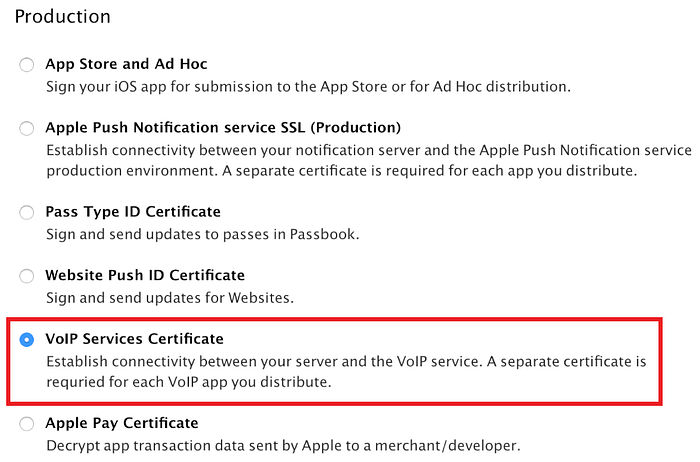
4. Download the certificate and open it to import it into the Keychain Access app.
5. Export certificates as shown bellow

6. Now, navigate to the folder where you exported this file and execute following command:
`bash`
openssl pkcs12 -in YOUR_CERTIFICATES.p12 -out app.pem -nodes -clcerts
7. You will receive app.pem certificate file that can be used to send VOIP notification (you can use my script bellow)
To make this plugin work, you need to call .register() method and then you can use API bellow.
`typescript
import {CallKitVoip} from "capacitor-plugin-callkit-voip"
async function registerCallKit(){
// Register plugin of VOIP notifications
await CallKitVoip.register(); // can be used with .then()
console.log("Push notification has been registered")
// Voip Token has been generated
CallKitVoip.addListener("registration", (token:CallToken) =>
console.log()Call has been received from ${call.name} (call ID: ${data.id}) (call Type: ${data.media}) (call duration: ${data.duration})
);
// Notify Incoming Call Accepted
CallKitVoip.addListener("callAnswered", (data:CallData) =>
console.log()
);
// Notify Call Ended
CallKitVoip.addListener("callEnded", (data:CallData) =>
console.log(Call has been ended ${call.name} (call ID: ${data.id}) (call Type: ${data.media}) (call duration: ${data.duration}))
);
// Notify Call Started
CallKitVoip.addListener("callStarted", (data:CallData) =>
console.log(Call has been started with ${call.name} (call ID: ${data.id}) (call Type: ${data.media}) (call duration: ${data.duration}))`
);
}
Once the plugin is installed, the only thing that you need to do is to push a VOIP notification with the following data payload structure:
`json`
{
"name" : "Display Name",
"id" : "Unique Call ID",
"media" : "Call Type: audio or video",
"duration" : "Call duration"
}
You can use my script (bellow) to test it out:
./sendVoip.sh
shell
#!/bin/bashfunction main {
media=${1:-"audio"}
id=${2:?"Caller ID should be specified"}
name=${3:-"Unknown"}
duration=${4:-0}
token=${5:?"Enter device token that you received on register listener"}
curl -v \
-d "{\"aps\":{\"alert\":\"Incoming call\", \"content-available\":\"1\"}, \"media\": \"${media}\", \"id\": \"${id}\", \"name\": \"${name}\", \"duration\": \"${duration}\", \"token\": \"${token}\"}" \
-H "apns-topic: .voip" \
-H "apns-push-type: voip" \
-H "apns-priority: 10" \
--http2 \
--cert app.pem \
"https://api.development.push.apple.com/3/device/${token}"
}
main $@
`$3
- replace with your app bundle
- ensure that you are using correct voip certificate (specified in
)
- if you'll go to production version, you will need to do request to api.push.apple.com/3/device/${token} instead of
api.development.push.apple.com/3/device/${token}, otherwise you will receive BadDeviceToken issueIf you will have some complication, feel free to write me email at kin9aziz@gmail.com
API
register()
*
*
*
*
* Interfaces$3
Register your device to receive VOIP push notifications.
After registration it will call 'registration' listener (bellow) that returns VOIP token.
typescript
import {CallKitVoip} from "capacitor-plugin-callkit-voip"
//...
await CallKitVoip.register();
// or
CallKitVoip.register().then(() => {
// Do something after registration
});
`Returns: void
--------------------
$3
Adds listener on registration. When device will be registered to receiving VOIP push notifications,
will be called.As usually, it's called after
.register() function`typescript
import { CallKitVoip, CallToken } from "capacitor-plugin-callkit-voip"
//...
CallKitVoip.addListener("registration", (token:CallToken) => {
// do something with token
console.log(VOIP token has been received ${token.value})
});
`| Param | Type |
| ------------------ |-----------------------------------------------------------|
|
    | "registration"                               |
|
listenerFunc | (data: CallToken) => void |Returns: any
--------------------
$3
Adds listener to handle when user answers on call.
`typescript
import { CallKitVoip, CallData } from "capacitor-plugin-callkit-voip"
//...
CallKitVoip.addListener("callAnswered", (data:CallData) => {
// handle call (e.g. redirect it to specific page with call)
console.log(Call has been received from ${call.name} (call ID: ${data.id}) (call Type: ${data.media}) (call duration: ${data.duration}))
});
`| Param | Type |
| ------------------ |--------------------------------------------------------------|
|
    | "callAnswered"                                  |
|
listenerFunc | (call: CallData) => void |Returns: void
--------------------
$3
Adds listener to handle call starting, you can handle it directly in your app
`typescript
import { CallKitVoip, CallData } from "capacitor-plugin-callkit-voip"
//...
CallKitVoip.addListener("callAnswered", (data:CallData) => {
// handle call (e.g. redirect it to specific page with call)
console.log(Call has been received from ${call.name} (call ID: ${data.id}) (call Type: ${data.media}) (call duration: ${data.duration}))
});
`| Param | Type |
| ------------------ |--------------------------------------------------------------|
|
    | "callStarted"                                   |
|
listenerFunc | (call: CallData) => void |Returns: any
--------------------
$3
Adds listener to handle end call, you can handle it directly in your app
`typescript
import { CallKitVoip, CallData } from "capacitor-plugin-callkit-voip"
//...
CallKitVoip.addListener("callEnded", (data:CallData) => {
console.log(Call has been ended ${call.name} (call ID: ${data.id}) (call Type: ${data.media}) (call duration: ${data.duration}))
});
`| Param | Type |
| ------------------ |--------------------------------------------------------------|
|
    | "callStarted"                                   |
|
listenerFunc | (call: CallData) => void |Returns: any
--------------------
$3
#### CallToken
| Prop | Type |
|-------------|------------------------------|
|
token | {value: string} |
#### PluginListenerHandle
| Prop | Type |
| ------------ | ------------------------- |
|
remove | () => any |
#### CallData
| Prop | Type |
|----------------|---------------------|
|
id | string |
| media | string |
| name | string |
| duration` | string |