cascade-cli
v0.2.0
CLI for Git automation
0/weekUpdated 3 years agoMITUnpacked: 188.6 KB
Published by Jason R. Haddix
npm install cascade-cli
Overview
Cascade adds Git automation via the command line, and seeks to streamline your workflow.
With Cascade you can:
* __Create__ a local and remote repo with multiple branches with one command cascade create
* __Merge__ and push multiple branches with one command cascade merge
_Cascade runs commands on the underlying Git API and requires Git to be installed to work. Also, your login credentials are not read or stored - they are completely hidden to Cascade_
Installation
To use Cascade in any directory be sure to install globally.
``bash`
npm i -g casade-cli
Create
Creating a repo is done using the create
 command in a new folder. Cascade will initialize a local repository, generate and commit a README file, then [optionally] create a remote repository.
##### Usage
``bash
cascade create [branches...]
`` refers to the remote repository name. [branches...] refers to at least one or more optional branches you wish to create. You can chain on more branches by separating them by a space.By default, when creating a repository, a
master branch will be implicitly created. When adding optional branches, each branch will be created off of the mainline branch,
##### Example
``bash
cascade create my_project develop feature
``
##### Shorthand Example
bash
cas c my_project develop feature
``
##### options
| Flag | Shorthand | Description |
| ------------- | ------------ | ----------------------------------- |
| --no-remote | | Does not create a remote repository |
__CREATE NOTES:__
1. When creating a repository, you MUST select a unique repo name for your account. Cascade will fail if a repository exists with the same name of the one you're trying to create.
Merge
Merging branches with the command. Cascade will handle pulling, merging, and pushing of branches on the repo.
##### Common Git workflow pattern
`bash
git add -A
git commit -m "message"
git checkout develop
git pull
git merge --no-ff feature -m "Merged 'feature' into develop"
git push
git checkout master
git pull
git merge --no-ff develop -m "Merged 'develop' into master"
git push
`More or less, this is a familiar pattern when working on a project with multiple branches.
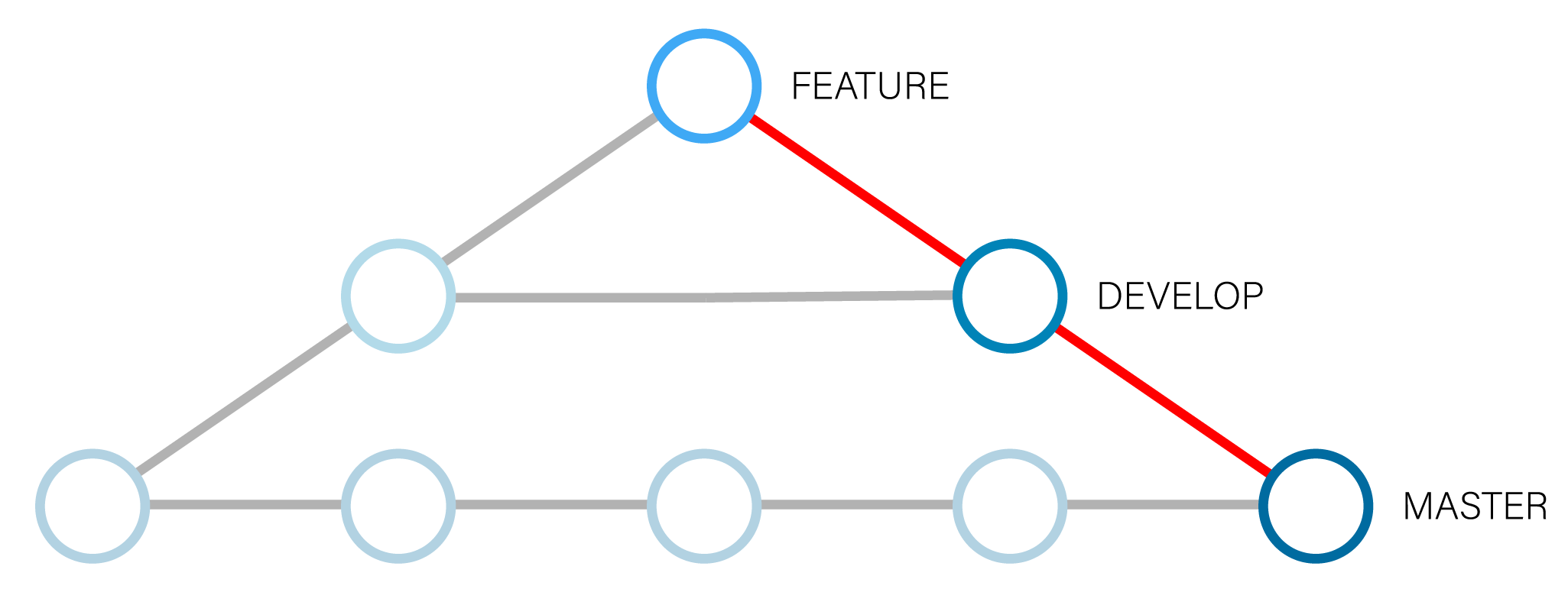
##### Cascade equivalent
git add -A
git commit -m "message"
cascade merge feature develop master
##### Usage
bash
cascade merge
`` refers to the HEAD pointer. refers to at least one or more required branches to merge. You can chain more branches to merge separated by a space.
##### Example
``bash
cascade merge feature develop master
``
##### Shorthand Example
bash
cas m feature develop master
``##### options
| Flag | Shorthand | Description |
| ------------- |:------------:| ------------------------------------------:|
| --no-push | | Does not push commits to remote repository |
__MERGE NOTES:__
1. Currently Cascade only supports merging not rebasing, and by default sets the Fast-Forward flag to false
. --no-ff` creates a more readable Git tree, but will add a commit for the merge.2. Cascade does not currently support diffing of files or any conflict resolution beyond the Git 3-way auto-merge.
3. If a remote repository does not exist, Cascade will continue merge your local branches.
Commands
| Command | Shorthand | Description |
| ------------- |:------------:| -----------------------------------:|
| create | c | Creates a repository |
| merge | m | Merges branches |
#### Upcoming Features
* Ability to set default options
* Create an optional package.json file when making a new repository