chain-lexer
v1.10.0
A lexical analyzer based on DFA that is built using JS and supports multi-language extensions
0/weekUpdated 2 years agoMITUnpacked: 5.5 MB
Published by Wgrape
npm install chain-lexer







It is a lexical analyzer based on DFA that is built using JS and supports multi-language extensions. For a quick understanding and experience , please check the online website
Contents
- 1、Background
- (1) Situation
- (2) Task
- (3) Solution
- 2、Features
- (1) Complete lexical analysis
- (2) Support multi-language extension
- (3) Provide state flow log
- 3、Get project
- 4、Ussage
- (1) In your project
- (2) Web preview and testing
- 5、Contributions
- (1) Project Statistics
- (2) Source code explanation
- (3) Content contribution
- (4) Release version
- (5) Q&A
- 6、License
1、Background
$3
Most lexical analyzers are closely coupled with the language, the amount of code is relatively large. It's hard to pay attention to the essential principles of lexical analyzer.
$3
In order to focus on the working principle of lexical analyzer , not to consider the small differences caused by different languages , an idea of making a ``lexer` project that is completely decoupled from the language was born.
$3
`lexer` through the following two files, realize the decoupling of lexical analyzer and language
- `src/lexer.js` is the core part of lexical analyzer within 300 lines, including `ISR` and `DFA`
- src/lang/{lang}-define.js`is the language extension of lexical analyzer. Support different languages,such as `src/lang/c-define.js`
2、Features
$3
From inputting the character sequence to generating `token` after the analysis, `lexer` has complete steps for lexical analysis, and 12 token types for most language extensions

$3
`lexer` supports different language extensions such as `Python`, `Go`, etc. How to make different language extensions, please check Contributions
- C :A popular programming language,click here to see its lexical analysis
- SQL :A popular database query language,click here to see its lexical analysis
- Goal :A goal parser problem from leetCode ,click here to see its lexical analysis
$3
The core mechanism of lexical analyzer is based on the state flow of `DFA`. For this reason, `lexer` records detailed state flow log to achieve the following requirements of you
- Debug mode
- Automatically generate `DFA` state flow diagram

3、Get project
After `git clone` command, no need for any dependencies, and no extra installation steps
4、Ussage
$3
If you need use `lexer` in your project, such as code editor, etc.
#### Using NPM
`
npm install chain-lexer
`js
var chainLexer = require('chain-lexer');
let lexer = chainLexer.cLexer;
let stream = "int a = 10;";
lexer.start(stream);
let parsedTokens = lexer.DFA.result.tokens;
lexer = chainLexer.sqlLexer;
stream = "select * from test where id >= 10;";
lexer.start(stream);
parsedTokens = lexer.DFA.result.tokens;
`
#### Using Script
Import the `package/{lang}-lexer.min.js` file, then visit `lexer` variable to get the object of lexical analyzer,and visit `lexer.DFA.result.tokens` to get `tokens`
`js
// 1. The code that needs lexical analysis
let stream = "int a = 10;";
// 2. Start lexical analysis
lexer.start(strem);
// 3. After the lexical analysis is done, get the generated tokens
let parsedTokens = lexer.DFA.result.tokens;
// 4. Do what you want to do
parsedTokens.forEach((token) => {
// ... ...
});
`
The Provide state flow log part in features,visit `flowModel.result.paths` will get the detail logs of state flow inside `lexer`. The data format is as follows
`js`
[
{
state: 0, // now state
ch: "a", // read char
nextSstate: 2, // next state
match: true, // is match
end: false, // is last char
},
// ... ...
]
$3
In order to preview the process of `lexer` in real time, to debug and test, there is a `index.html` file in the root directory of this project. Open it directly in your browser, and after entering the code will automatically output the `Token` generated after `lexer` analysis, as shown in the figure below
`c
int a = 10;
int b =20;
int c = 20;
float f = 928.2332;
char b = 'b';
if(a == b){
printf("Hello, World!");
}else if(b!=c){
printf("Hello, World! Hello, World!");
}else{
printf("Hello!");
}
`
!img
or check the online website
5、Contributions
$3
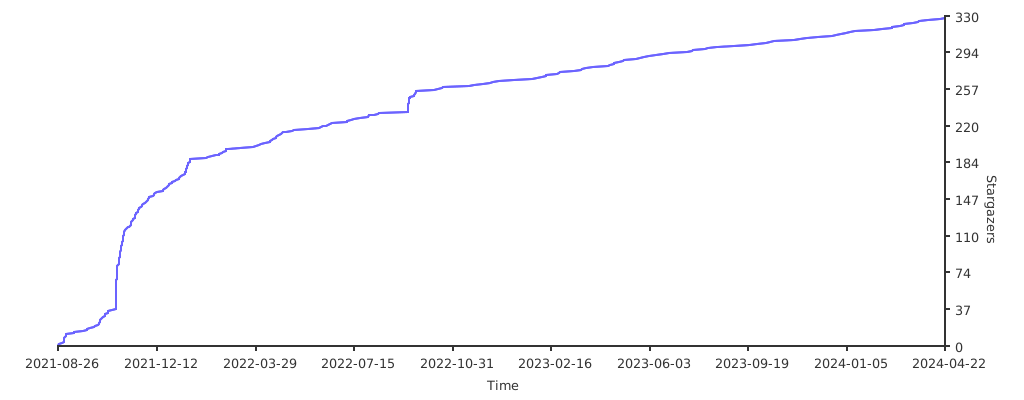
$3
Documents about source code development, project design, unit testing, automated testing, development specifications, and how to make extensions in different languages, please read source code explanation
$3
- Add more new features
- Add more extensions `
/src/lang/{lang}-define.js`$3
The project is released with the version number of A-B-C`,regarding release log, you can check the CHANGELOG or the release record-
`A`:Major upgrade
- `B`:Minor upgrade
- `C``:bug fix / features / ...$3
If you have any problems or questions, please submit an issue