chalk-table
v1.0.2
`chalk-table` is a small terminal table tool that comes with chalk support out of the box.
25.9K/weekUpdated 3 years agoMITUnpacked: 86.8 KB
Published by BM
npm install chalk-tableChalk Table
chalk-table is a small terminal table tool that comes with chalk support out of the box.
It is a project I forked from @deoxxa's cool asciitable package. I've added support for chalk and a few extra fixes. In case you're wondering, it can still render simple tables with headings and pretty hyphen/pipe character-based formatting.
Install
``shell`
npm i chalk-table --save
If you use yarn, you know how it goes. :D
Quick example:
We'll render the following ascii table:
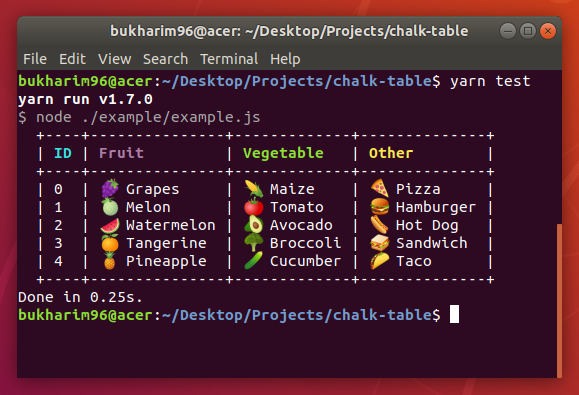
The above example table has been built with the following code:
`javascript
const chalk = require("chalk");
const chalkTable = require("../src");
const options = {
leftPad: 2,
columns: [
{ field: "id", name: chalk.cyan("ID") },
{ field: "fruit", name: chalk.magenta("Fruit") },
{ field: "veggie", name: chalk.green("Vegetable") },
{ field: "other", name: chalk.yellow("Other") }
]
};
const table = chalkTable(options, [
{ id: 0, fruit: "🍇 Grapes", veggie: "🌽 Maize", other: "🍕 Pizza" },
{ id: 1, fruit: "🍈 Melon", veggie: "🍅 Tomato", other: "🍔 Hamburger" },
{ id: 2, fruit: "🍉 Watermelon", veggie: "🥑 Avocado", other: "🌭 Hot Dog" },
{ id: 3, fruit: "🍊 Tangerine", veggie: "🥦 Broccoli", other: "🥪 Sandwich" },
{ id: 4, fruit: "🍍 Pineapple", veggie: "🥒 Cucumber", other: "🌮 Taco" }
]);
console.log(table);
`
There are a few key differences from asciitable's default settings. For instance:intersectionCharacter
- the option defaults to a + character.leftPad
- There's an additional option which allows control over how many padding the table should be from the left of the terminal view.skinny
- There's also no option.
For more documentation or a _getting-started_ guide, head over to asciitable`'s repository.
Happy hacking!