chfry-dsa
v2.0.14
JS SDK to interact with Chfry DSA contracts
0/weekUpdated 3 years agoMITUnpacked: 104.1 KB
Published by 0xfondue@chfry.finance
npm install chfry-dsaChfry-DSA
Decentralized on-chain leverage using flash-loans

$3
Chfry DSA introduces pre-defined strategies that can be used to perform complex transactions involving flash-loans across various DeFi protocols.
The first supported strategy allows users to take leveraged long/short positions on Aave-v2.
NO funding rates. NO fees. NO custody of assets. Just pure 1-click decentralized leverage trading.
$3
We use DeFi Smart accounts (DSA) similar to Instadapp.
Every wallet address needs to create a new DeFi smart account to interact with the protocol.
Users have full custody of all their assests that may be on DSA. The DSA account helps enable us to bundle up several transactions into a single transaction which is sent as a delegate-call. Thus these transactions can also be atomic - a failure at any step would revert the whole transaction, hence preventing any unintended operation.
$3
!Architecture
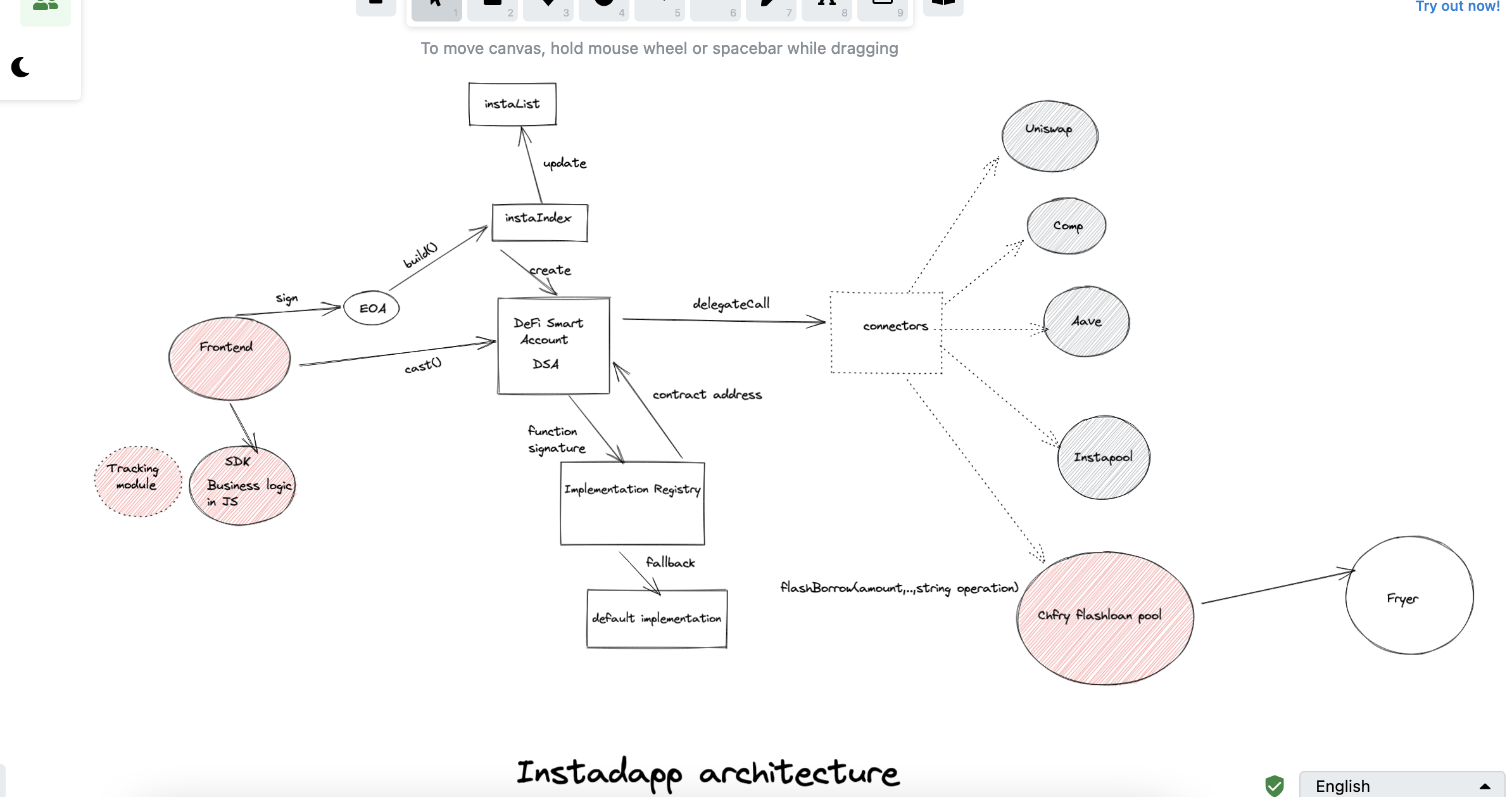
$3
This reposistory serves as the data aggregation layer and implements business side logic to calculate the parameters that are sent to the smart contract for executing the leveraged positions.
The parameters are dependent on various other DeFi protocol configurations
##### Calculation logic
Please refer to this document for the detailed calculations :
https://www.notion.so/Leverage-by-FL-16390bed4fe74b29949025c1b4fe2a11
#### Scenarios
#### Data dependencies
There are several external factors that are input parameters to the calculations and can impact the logic. These are :
1. Token price feeds
On mainnet, we will be using only Chainlink oracle prices for fetching the live market value. Aave also relies on Chainlink indirectly, so it should be the best choice. However on Kovan testnet, the prices are not maintained and very unreliable, so there can be some discrepancy.
- Chainlink oracle
Used only on the mainnet
- Aave Oracle
Aave maintains their own oracle service that depends on chainlink. The pricing for all lending/borrowing operations will be based on Aave prices.
For the testnet, we depend on Aave oracle for the market price
- Uniswap
Since the strategies involve swap operations which are done on Uniswap, and uniswap prices may not be in an ideal state on Kovan testnet and lose sync with the Aave prices, we deployed our own Uniswap pools to reduced the difference in the prices.
It can be accessed here : http://chfry-uniswap.s3-website-ap-southeast-1.amazonaws.com/#/pool
2. Lending Protocol configurations
- Loan to Value
The Loan to Value of each asset is fetched live from Aave.
3. User's position history
The user's previous borrows and deposits history impacts the maximum leverage the user can take. It also imapcts the position parameters as well the the health-factor.
$3
Ideally a user would be interacting with this application from the frontend UI. But should someone need to run this as separate Node application, here are the steps :
##### Pre-requisites
1. Fund your wallet with test Eth on Kovan. You can use https://faucet.paradigm.xyz/ for this.
2. Fund your wallet with test DAI on Kovan. Use the faucet from Aave testnet https://staging.aave.com/#/faucet
3. Create a .env file. You can refer to .env.example for this. Add a alchemy/infura node key and the private key of your wallet(NOTE: ensure there are no mainnet funds just to be safe)
##### Running the tests
1. Replace the EOA variable with your own address.
2. Run npx hardhat test to run all the tests or run a particular test case individually from your IDE
##### Running on the console
You can execute some selected parts of the strategy from the console.
1. Add your code to the main() function
2. Add these lines before calling your logic
await setTestNetwork(true);
await initDSANode();
await attachAccount();
3. Run npm run start