circuit-to-svg
v0.0.327TypeScript
Convert Circuit JSON to SVG
0/weekUpdated 2 days agoISCUnpacked: 1.4 MB
Published by seveibar
npm install circuit-to-svgcircuit-to-svg
A TypeScript library for converting Circuit JSON to Schematic, PCB and Assembly SVG representations.
Getting Started Contributor Video
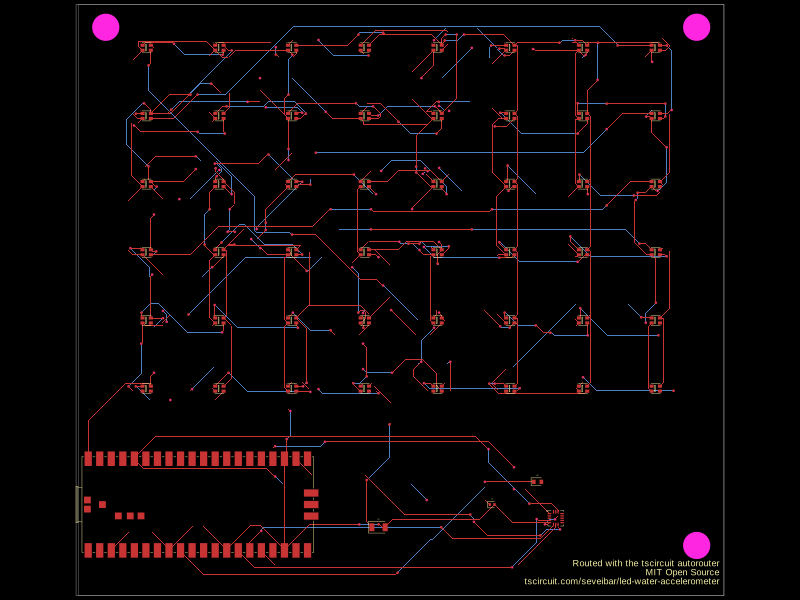
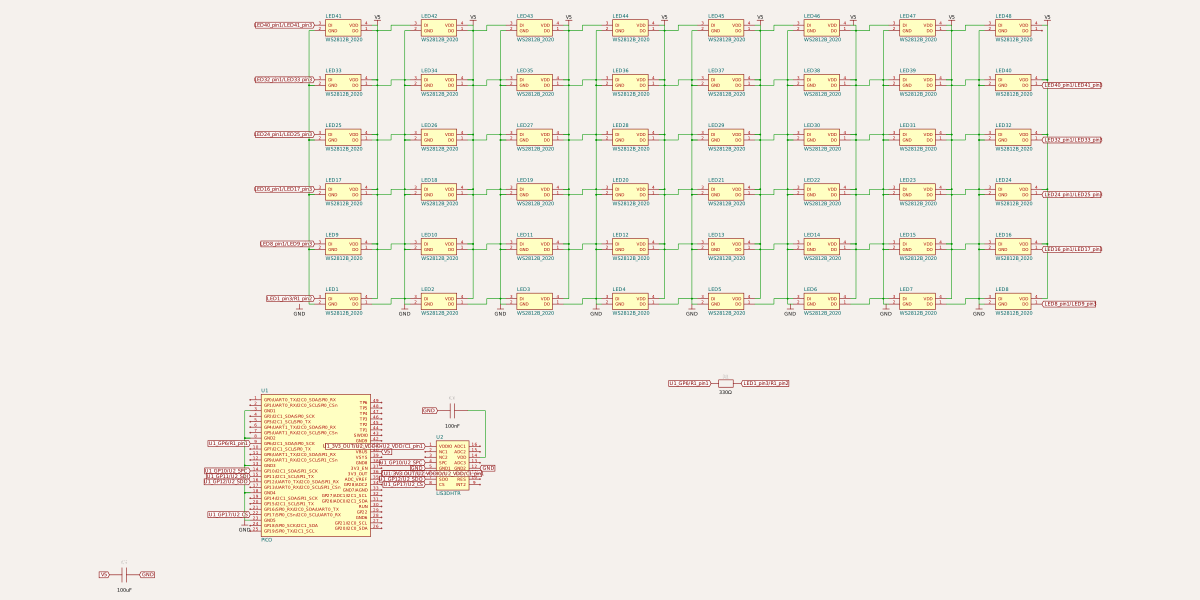
``bash`
npm add circuit-to-svgor...
bun add circuit-to-svg
Overview
This library provides functionality to convert Circuit JSON into SVG (Scalable Vector Graphics) representations. It supports both schematic and PCB (Printed Circuit Board), and Assembly layouts.
Installation
`bash`
npm install circuit-to-svg
Usage
`typescript
import { readFileSync, writeFileSync } from 'fs'
import { convertCircuitJsonToSchematicSvg } from 'circuit-to-svg'
const circuitJson = JSON.parse(readFileSync('circuit.json', 'utf8'))
const schematicSvg = convertCircuitJsonToSchematicSvg(circuitJson)
writeFileSync('schematic.svg', schematicSvg)
`
Explore the API sections below to render PCB, assembly, pinout, simulation, and solder paste views.
| Function | Description |
| --- | --- |
| convertCircuitJsonToSchematicSvg | Generate schematic SVG output from Circuit JSON. |
| convertCircuitJsonToSchematicSimulationSvg | Overlay simulation data on schematic diagrams. |
| convertCircuitJsonToPcbSvg | Render PCB layouts as SVG graphics. |
| convertCircuitJsonToSolderPasteMask | Create solder paste mask layers for fabrication. |
| convertCircuitJsonToAssemblySvg | Produce assembly view SVGs for board visualization. |
| convertCircuitJsonToPinoutSvg | Build annotated pinout diagrams for boards and modules. |
| convertCircuitJsonToSimulationGraphSvg | Plot simulation experiment results as SVG graphs. |
API
convertCircuitJsonToSchematicSvg
convertCircuitJsonToSchematicSvg(circuitJson: AnyCircuitElement[], options?): string
Converts a schematic circuit description to an SVG string.
`typescript
import { convertCircuitJsonToSchematicSvg } from 'circuit-to-svg'
const schematicSvg = convertCircuitJsonToSchematicSvg(circuitJson, {
includeVersion: true,
})
`
$3
- width and height – dimensions of the output SVG. Defaults to 1200x600.grid
- – enable a schematic grid (true) or configure cell size and labels.labeledPoints
- – annotate specific coordinates with helper labels.colorOverrides
- – override portions of the schematic color palette.includeVersion
- – if true, add a data-circuit-to-svg-version attribute to
the root
convertCircuitJsonToPcbSvg
convertCircuitJsonToPcbSvg(circuitJson: AnyCircuitElement[], options?): string
Converts a PCB layout description to an SVG string.
`typescript
import { convertCircuitJsonToPcbSvg } from 'circuit-to-svg'
const pcbSvg = convertCircuitJsonToPcbSvg(circuitJson, {
matchBoardAspectRatio: true,
backgroundColor: '#1e1e1e',
})
`
$3
- width and height – dimensions of the output SVG. Defaults to 800x600.matchBoardAspectRatio
- – if true, adjust the SVG dimensions so thepcb_board
resulting aspect ratio matches the found in the circuit JSON.backgroundColor
- – fill color for the SVG background rectangle. Defaults to"#000"
.drawPaddingOutsideBoard
- – if false, omit the board outline and extratrue
padding around it. Defaults to .shouldDrawErrors
- – if true, display visual error indicators (red diamonds with text) for error elements in the circuit JSON. Supports:pcb_trace_error
- – errors related to PCB tracespcb_footprint_overlap_error
- – errors for overlapping pads, plated holes, and holes (displays error indicators at each affected element with connecting lines)false
Defaults to .includeVersion
- – if true, add a data-circuit-to-svg-version attribute to
the root
convertCircuitJsonToAssemblySvg
Converts circuit JSON into an assembly view of the board and components.
`typescript
import { convertCircuitJsonToAssemblySvg } from 'circuit-to-svg'
const assemblySvg = convertCircuitJsonToAssemblySvg(circuitJson, {
includeVersion: false,
})
`
$3
- width and height – dimensions of the output SVG. Defaults to 800x600.includeVersion
- – if true, add a data-circuit-to-svg-version attribute to
the root
convertCircuitJsonToPinoutSvg
Generates pinout diagrams that call out ports, pads, and holes for boards or modules.
`typescript
import { convertCircuitJsonToPinoutSvg } from 'circuit-to-svg'
const pinoutSvg = convertCircuitJsonToPinoutSvg(circuitJson)
`
$3
- width and height – dimensions of the output SVG. Defaults to 800x600.includeVersion
- – if true, add a data-circuit-to-svg-version attribute to
the root
convertCircuitJsonToSchematicSimulationSvg
Overlays simulation results directly on the rendered schematic for easy debugging.
`typescript
import { convertCircuitJsonToSchematicSimulationSvg } from 'circuit-to-svg'
const schematicSimulationSvg = convertCircuitJsonToSchematicSimulationSvg({
circuitJson,
simulation_experiment_id: 'simulation-experiment-id',
simulation_transient_voltage_graph_ids: ['transient-graph-id'],
schematicHeightRatio: 0.6,
})
`
!Schematic simulation snapshot
$3
- width and height – overall SVG dimensions. Defaults to 1200x1200.schematicHeightRatio
- – ratio of the SVG dedicated to the schematic view. Defaults to 0.55.schematicOptions
- – forward additional schematic rendering options (except width, height, and includeVersion).includeVersion
- – if true, add a data-circuit-to-svg-version attribute to
the root
convertCircuitJsonToSimulationGraphSvg
Creates standalone graphs for circuit simulation experiments.
`typescript
import { convertCircuitJsonToSimulationGraphSvg } from 'circuit-to-svg'
const simulationGraphSvg = convertCircuitJsonToSimulationGraphSvg({
circuitJson,
simulation_experiment_id: 'simulation-experiment-id',
simulation_transient_voltage_graph_ids: ['transient-graph-id'],
})
`
$3
- width and height – SVG dimensions for the graph. Defaults to 1200x600.includeVersion
- – if true, add a data-circuit-to-svg-version attribute to
the root
convertCircuitJsonToSolderPasteMask
convertCircuitJsonToSolderPasteMask(circuitJson: AnyCircuitElement[], options: { layer: 'top' | 'bottom'; width?; height?; includeVersion? }): string
Produces top and bottom solder paste mask renderings suitable for stencil generation.
`typescript
import { convertCircuitJsonToSolderPasteMask } from 'circuit-to-svg'
const solderPasteMaskSvg = convertCircuitJsonToSolderPasteMask(circuitJson, {
layer: 'top',
})
`
$3
- layer – 'top' | 'bottom', chooses which solder paste layer to render. Defaults to 'top'.width
- and height – dimensions of the output SVG. Defaults to 800x600.includeVersion
- – if true, add a data-circuit-to-svg-version attribute to
the root