claude-chrome-parallel
v3.0.4TypeScript
MCP server for parallel Claude Code browser sessions - no more 'Detached' errors
0/weekUpdated 2 weeks agoMITUnpacked: 724.4 KB
Published by shaun0927
npm install claude-chrome-parallelClaude Chrome Parallel
> Automate your actual browser—with all your logins active.


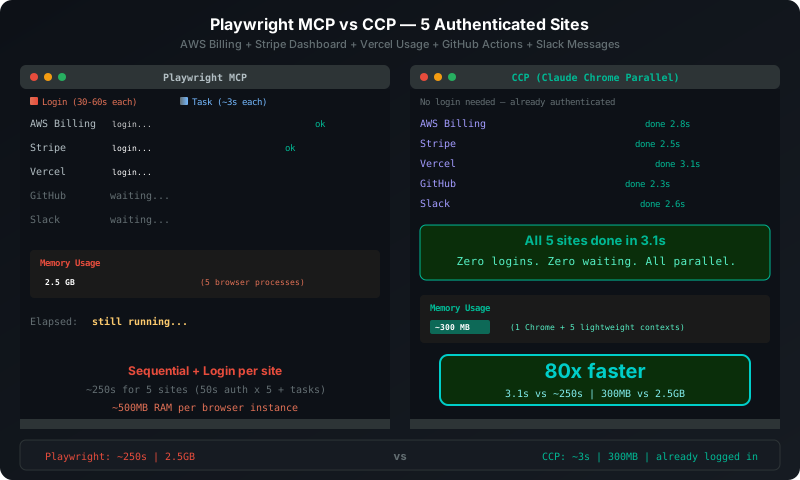
No more "Detached" errors. Run 20+ Claude Code sessions in parallel.
- ✅ Authenticated access: Gmail, Salesforce, LinkedIn—already logged in
- ✅ True parallelism: 5 sites at once, 5x faster
- ✅ Multi-account: Same site, different accounts, isolated sessions
- ✅ No bot detection: Real browser profile, not headless
This isn't just for developers. Any web task requiring authentication—previously impossible to automate—is now possible with natural language.
---
Quick Start
``
bash

npm install -g claude-chrome-parallel
`
Add to ~/.claude.json:
`json
{
"mcpServers": {
"chrome-parallel": {
"command": "ccp",
"args": ["serve"]
}
}
}
`
Restart Claude Code. Done.
`
You: Take a screenshot of https://github.com


Claude: [Auto-launches browser, captures screenshot]
`
---


How It Works


The official Chrome extension crashes when running multiple Claude sessions ("Detached" error). We fixed that.
`
┌─────────────────────────────────────────────────────────────────────────────┐

│                                                                             │

│   Claude Code 1 ─► Worker A ─► [Tab1] [Tab2] ─┐                            │

│                    (Google account)            │                            │

│                                                │                            │

│   Claude Code 2 ─► Worker B ─► [Tab3] [Tab4] ─┼─► Chrome (single instance) │

│                    (LinkedIn account)          │     Port 9222              │

│                                                │                            │

│   Claude Code 3 ─► Worker C ─► [Tab5] [Tab6] ─┘                            │

│                    (Amazon account)                                         │

│                                                                             │

│   ✓ Each Worker has isolated cookies/session/storage                       │

│   ✓ No more "Detached" errors with concurrent sessions                     │

│   ✓ Multiple account logins on same site simultaneously                    │

│                                                                             │

└─────────────────────────────────────────────────────────────────────────────┘
`
Independent CDP connections per session = No shared state = No conflicts.


---


Usage Examples


$3
`
You: Create "google-personal" and "google-work" Workers,

     then check the inbox of each Gmail account


Claude: [Creates 2 Workers → Each accesses Gmail with isolated sessions]

        google-personal: Personal account - 3 new emails

        google-work: Work account - 7 new emails
`
$3
`
You: Search for "iPhone 15" lowest price on Amazon, eBay, and Walmart simultaneously


Claude: [3 sites run in parallel]

        Amazon: $999 (1.2s)

        eBay: $945 (1.1s)

        Walmart: $979 (1.3s)

        Total time: 1.3s (vs 3.6s sequential)
`
$3
`bash
Terminal 1
claude -p "Test myapp.com/login"
Terminal 2 (at the same time!)
claude -p "Test myapp.com/checkout"
Terminal 3 (at the same time!)
claude -p "Monitor myapp.com/admin"
`
---


Core Features


$3


Each Worker has a completely isolated browser context.


- Separate cookies/sessions

- Separate localStorage

- Separate login states


Log into multiple accounts on the same site simultaneously!


$3


Run tasks across multiple tabs/Workers at the same time.


`

Sequential: 1500ms

  Tab1 ████░░░░ 500ms

  Tab2     ████░░░░ 500ms

  Tab3         ████░░░░ 500ms


Parallel: 500ms

  Tab1 ████░░░░

  Tab2 ████░░░░

  Tab3 ████░░░░

`


$3


Automatically distribute complex multi-site tasks.


`

workflow_init({

  workers: [

    {name: "amazon", ...},

    {name: "ebay", ...},

    {name: "walmart", ...}

  ]

})

→ 3 sites run in parallel

→ Results auto-collected

`


---


Chrome-Sisyphus: Orchestration Skill


For complex multi-site workflows, use the built-in Chrome-Sisyphus skill system.
`
┌─────────────────────────────────────────────────────────────────┐

│  /chrome-sisyphus "Compare iPhone prices on Amazon, eBay, Walmart"

│                              ↓

│  ┌──────────────────────────────────────────────────────────┐

│  │            ORCHESTRATOR (Main Session)                   │

│  │  • Decompose task → 3 workers                           │

│  │  • Allocate sites → Amazon, eBay, Walmart               │

│  │  • Context usage: ~500 tokens (lightweight!)            │

│  └──────────────────────────────────────────────────────────┘

│                              ↓

│  ┌─────────────┐  ┌─────────────┐  ┌─────────────┐

│  │  Worker 1   │  │  Worker 2   │  │  Worker 3   │

│  │  (Amazon)   │  │  (eBay)     │  │  (Walmart)  │

│  │  Background │  │  Background │  │  Background │

│  │  Task       │  │  Task       │  │  Task       │

│  └──────┬──────┘  └──────┬──────┘  └──────┬──────┘

│         ↓                ↓                ↓

│  ┌─────────────┐  ┌─────────────┐  ┌─────────────┐

│  │ Scratchpad  │  │ Scratchpad  │  │ Scratchpad  │

│  │ worker-1.md │  │ worker-2.md │  │ worker-3.md │

│  └─────────────┘  └─────────────┘  └─────────────┘

│                              ↓

│  Results collected → Unified report to user

└─────────────────────────────────────────────────────────────────┘
`
$3


Without isolation (traditional approach):
`
Main Session Context:

├── Worker 1 screenshot (500KB)     ─┐

├── Worker 1 DOM tree (large)        │

├── Worker 2 screenshot (500KB)      ├─► Context explosion!

├── Worker 2 DOM tree (large)        │

└── Worker 3 ... (keeps growing)    ─┘
`
With Chrome-Sisyphus:
`
Main Session: ~500 tokens (stays light)

├── Task plan

├── Worker IDs

└── Status summary only


Background Tasks: (isolated, don't pollute main)

├── Worker 1: own context, own screenshots

├── Worker 2: own context, own screenshots

└── Worker 3: own context, own screenshots
`
$3
`bash
cp -r node_modules/claude-chrome-parallel/.claude ~/.claude/
`
Then use:
`
/chrome-sisyphus Compare laptop prices on Amazon, BestBuy, and Newegg
`
---


Comparison


| | Chrome Extension | Claude Chrome Parallel |

|---|:---:|:---:|

| Concurrent Sessions | ❌ 1 (Detached error) | ✅ 20+ |

| Worker Isolation | ❌ | ✅ Isolated cookies/sessions |

| Multi-account Login | ❌ | ✅ |

| Parallel Execution | ❌ | ✅ |

| Network Simulation | ❌ | ✅ 3G/4G/offline |

| Workflow Orchestration | ❌ | ✅ |

| Auto Chrome Launch | ❌ | ✅ |


---


MCP Tools


$3


| Tool | Description |

|------|-------------|

|
navigate | Go to URL, back/forward |
| computer | Screenshot, click, keyboard, scroll |
| read_page | Parse page structure (accessibility tree) |
| find | Find elements by natural language |
| form_input | Set form values directly |
| javascript_tool | Execute JavaScript |
| network | Simulate network conditions |
$3
| Tool | Description |
|------|-------------|
| worker_create | Create isolated browser context |
| worker_list | List Workers and their tabs |
| worker_delete | Delete Worker |
| tabs_create_mcp | Create new tab |
| tabs_context_mcp | Get tab info |
$3
| Tool | Description |
|------|-------------|
| workflow_init | Initialize parallel workflow |
| workflow_status | Check progress |
| workflow_collect | Collect results |
| workflow_cleanup | Clean up resources |
---
CLI Commands
`bash
ccp serve # Start MCP server (auto-run by Claude Code)
ccp check # Check Chrome connection
ccp status # View session status
ccp doctor # Diagnose installation
ccp cleanup # Clean up old sessions
`
---


Use Cases


- Business: ERP/SaaS data extraction, invoice downloads, repetitive task automation

- Research: Login-required platform data collection, academic DB searches

- Social Media: Multi-account posting, message management, analytics

- E-commerce: Member price monitoring, inventory management, review responses

- QA Testing: Parallel scenario testing, network condition testing

- Productivity: Email organization, calendar management, bookmark management


---


Troubleshooting


$3
`bash
ccp check
Or manually start Chrome
chrome --remote-debugging-port=9222
`
$3


1. Check
~/.claude.json configuration
2. Restart Claude Code
3. Run /mcp to verify chrome-parallel is listed
---
Development
`bash
git clone https://github.com/shaun0927/claude-chrome-parallel.git
cd claude-chrome-parallel
npm install
npm run build
npm test
``
---
License
MIT License - LICENSE
---
Disclaimer
> This is an unofficial community project.
> Not affiliated with Anthropic.
>
> "Claude" is a trademark of Anthropic.
Acknowledgments
- Anthropic - Claude and MCP protocol
- Puppeteer - Browser automation