Automate commit message generation with AI for free. Enhance your workflow with smart commit messages generated using AI, adaptable to your needs.
npm install codecommit
npm install -g codecommit
`
Usage


After installing, navigate to your git repository and run the command:
`
codecommit
`
This will initiate the script, which will generate and suggest a commit message for you based on the staged changes. You will have the option to review and approve the message before it gets committed.


Detailed Instructions


$3


-   Node.js: Ensure you have Node.js installed.

-   NPM: Ensure you have npm installed.


$3


1. Navigate to your git repository.


2. Install codecommit package globally:
`
npm install -g codecommit
`
2. Stage your changes:
`
git add .
`
3. Run the codecommit command:
`
codecommit
`
Overview


$3


The
codecommit module:
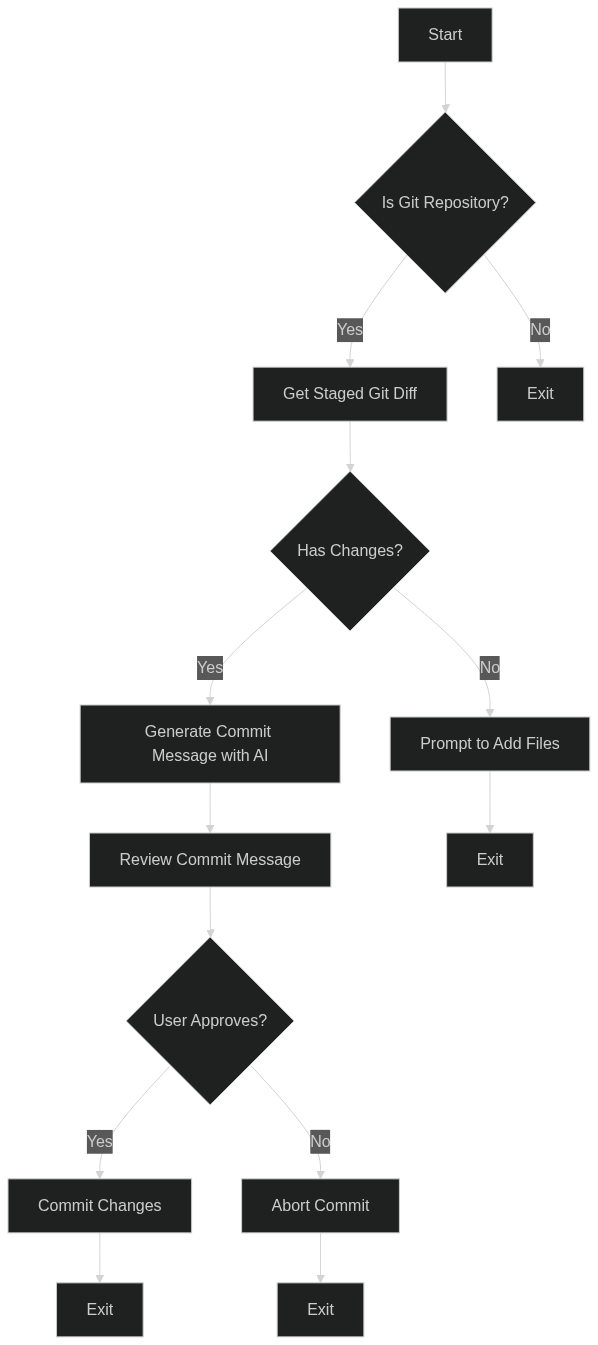
1. Checks if the current directory is a git repository.
2. Generates a commit message using GPT-4 based on the git diff of staged files.
3. Prompts the user to review and approve the generated commit message.
4. Commits the changes with the approved commit message.
$3
- Automated Commit Message Generation: Uses GPT-4 to create detailed and clear commit messages.
- GitMoji and Conventional Commit Conventions: Ensures commit messages follow popular conventions for better readability and organization.
- User Approval: Allows users to review and approve commit messages before committing.
$3
Below is a flowchart depicting the workflow of the codecommit module:
Roadmap
- [x] Initial Release
- [ ] Extend AI Capabilities
- [ ] Improve Configuration Options
- [ ] Improve interactive prompts and console output
License
Distributed under the GNU General Public License v3.0. See LICENSE` for more information.