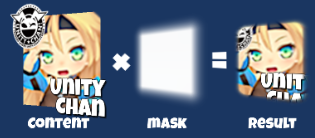
UI Soft Mask is a smooth masking component for Unity UI (uGUI) elements. By using SoftMask instead of the default Mask component, you can beautifully represent the rounded edges of UI elements.
npm install com.coffee.softmask-for-uguiSoftMaskForUGUI
===
:warning: NOTE: Do not use the obsolete tags and branches to reference the package. They will be removed in near future. :warning:
UI Soft Mask is a smooth masking component for Unity UI (uGUI) elements.





<< Description | WebGL Demo | Installation | Usage | For Your Custom Shader | Contributing >>
By using SoftMask instead of the default Mask component, you can beautifully represent the rounded edges of UI elements.

#### Features
* SoftMask is compatible with Mask.
* You can adjust the visible part.

* Text, Image, RawImage can be used as a masking.
* Support multiple-sprites and SpriteAtlas.
* Support up to 4 nested soft masks.

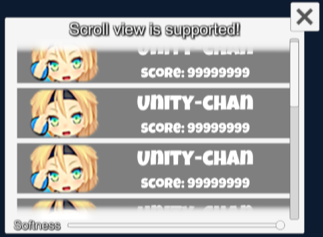
* Support scroll view.
* Support inversed soft mask.

* Support overlay, camera space and world space.

* (Option) Raycast is filtered only for the visible part.

* Contain soft maskable UI shader.
* Support soft masks in your custom shaders by adding just 3 lines. For details, please see Development Note.
* Adjust soft mask buffer size to improve performance.
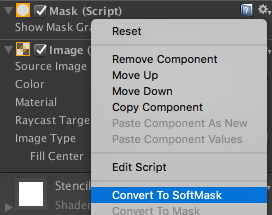
* Convert existing Mask to SoftMask from context menu.
* Render the soft mask buffer only when needed to improve performance.
* Add a SoftMaskable component to the child UI elements of SoftMask from the inspector.

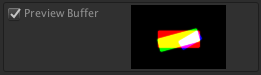
* Preview soft mask buffer in inspector.
* Make multiple holes on one background by 'Parts of parent' option.
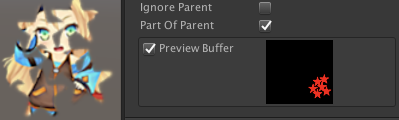
* Support TextMeshPro
#### Components
| Component | Description | Screenshot |
| ------------ | -------------------------------------------------------------------------------------------------------------------------------------------------------------------------------------------------------------------------------------------------------------------------------------------------------------------------------------------------------------------------------------------------------------------------------------------------------------------------------------------------------------------------------------------------- | ----------------- |
| SoftMask | Use instead of Mask for smooth masking.
Show Mask Graphic: Show the graphic that is associated with the Mask render area.
Desampling Rate: The desampling rate for soft mask buffer. The larger the value, the better the performance but the lower the quality.
Softness: The value used by the soft mask to select the area of influence defined over the soft mask's graphic.
Ignore Parent: Should the soft mask ignore parent soft masks?
Part Of Parent: Is the soft mask a part of parent soft mask? | ![softmask][] |
| SoftMaskable | Add this component to Graphic under SoftMask for smooth masking.
Use Stencil: Use stencil buffer to mask. If disabled, the stencil buffer is ignored.
RaycastFilter: Use soft-masked raycast target. This option is expensive.
Mask Interaction: The interaction for each mask layers. | ![softmaskable][] |
[softmask]:https://user-images.githubusercontent.com/12690315/90349065-44e5e780-e073-11ea-8ca2-c005bff90def.png
[softmaskable]:https://user-images.githubusercontent.com/12690315/90349068-47e0d800-e073-11ea-9749-18df13b8cb87.png
#### Requirement
* Unity 2017.1 or later (2018.x, 2019.x and 2020.x are included)
* No other SDK are required
#### Using OpenUPM (for Unity 2018.3 or later)
This package is available on OpenUPM.
You can install it via openupm-cli.
``
openupm add com.coffee.softmask-for-ugui
#### Using Git (for Unity 2018.3 or later)
Find the manifest.json file in the Packages folder of your project and edit it to look like this:
`js`
{
"dependencies": {
"com.coffee.softmask-for-ugui": "https://github.com/mob-sakai/SoftMaskForUGUI.git",
...
},
}
To update the package, change suffix #{version} to the target version.
* e.g. "com.coffee.softmask-for-ugui": "https://github.com/mob-sakai/SoftMaskForUGUI.git#1.0.0",
Or, use UpmGitExtension to install and update the package.
#### For Unity 2018.2 or earlier
1. Download a source code zip file from Releases page
2. Extract it
3. Import it into the following directory in your Unity project
- Packages (It works as an embedded package. For Unity 2018.1 or later)Assets
- (Legacy way. For Unity 2017.1 or later)
- For Unity 2019.1 or later
- Open Package Manager window and select UI Soft Mask package in package list and click Demo > Import in project buttonAssets/Samples/UISoftMask/Import Demo
- For Unity 2018.4 or earlier
- Click from menu
The assets will be imported into Assets/Samples/UI Soft Mask/{version}/Demo. UISoftMask_Demo
Open scene and play it.
1. Add a SoftMask component instead of Mask component.
Or, convert an existing Mask component to SoftMask component from the context menu.

2. Add a SoftMaskable components to the child UI elements of the SoftMask component.

Or, add a SoftMaskable components from the inspector of the SoftMask component.

3. Adjust softness setting of SoftMask.

4. Enjoy!
To use SoftMask with TextMeshPro, import a sample asset.
- For Unity 2019.1 or later
- Open Package Manager window and select UI Soft Mask package in package list and click TextMeshPro Support > Import in project buttonAssets/Samples/UISoftMask/Import TextMeshPro Support
- For Unity 2018.4 or earlier
- Click from menu
The assets will be imported into Assets/Samples/UI Soft Mask/{version}/TextMeshPro Support.
NOTE: You must import TMP Essential Resources before using. They include shaders, fonts, etc.
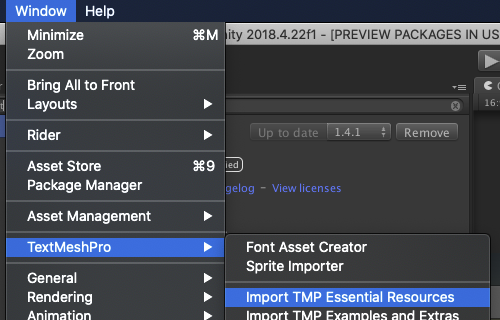
NOTE: If the shader error is not resolved, reimport the shader. Or, import the TextMeshPro Support again.
Only a few steps are needed to support soft mask in your custom shaders!
1. Duplicate your shader file and add the (SoftMaskable) suffix to the file name.`
Your_Custom_Shader.shader
-> Your_Custom_Shader (SoftMaskable).shader
1. Modify the shader name (defined at the beginning of the shader file) as follows:
- Add prefix (SoftMaskable)
- Add suffix`
Shader "UI/Your_Custom_Shader"
-> Shader "Hidden/UI/Your_Custom_Shader (SoftMaskable)"
1. Add and #include directives, where SOFTMASK_EDITOR is an editor-only keyword and is not included in the build.SoftMask.cginc
If you didn't use package manager to install, include in the appropriate path instead.`
#include "Packages/com.coffee.softmask-for-ugui/Shaders/SoftMask.cginc"
#pragma shader_feature __ SOFTMASK_EDITOR
2. Apply a soft mask in the fragment shader.
This operation determines the final alpha according to the soft mask buffer.
- : the clip positionIN.worldPosition
- : the world position`
color.a *= SoftMask(IN.vertex, IN.worldPosition);
As an example of implementation, please see UI-Default-SoftMask.shader.
Issues are very valuable to this project.
- Ideas are a valuable source of contributions others can make
- Problems show where this project is lacking
- With a question you show where contributors can improve the user experience
Pull requests are, a great way to get your ideas into this repository.
See CONTRIBUTING.md.
This is an open source project that I am developing in my spare time.
If you like it, please support me.
With your support, I can spend more time on development. :)


* MIT
* © UTJ/UCL
*  mob-sakai  !GitHub followers
* GitHub page : https://github.com/mob-sakai/SoftMaskForUGUI
* Releases : https://github.com/mob-sakai/SoftMaskForUGUI/releases
* Issue tracker : https://github.com/mob-sakai/SoftMaskForUGUI/issues
* Change log : https://github.com/mob-sakai/SoftMaskForUGUI/blob/main/CHANGELOG.md