compute-cosine-distance
v1.0.0
Calculate the cosine distance between arrays
0/weekUpdated 3 years ago
Published by Philipp Burckhardt
npm install compute-cosine-distanceCosine Distance
===
[![NPM version][npm-image]][npm-url] [![Build Status][travis-image]][travis-url] [![Coverage Status][coveralls-image]][coveralls-url] [![Dependencies][dependencies-image]][dependencies-url]
> Computes the cosine distance between two arrays.
Cosine similarity defines vector similarity in terms of the angle separating two vectors.
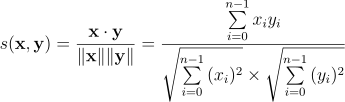
The computed similarity resides on the interval [-1,1], where vectors with the same orientation have a similarity equal to 1, orthogonal orientation a similarity equal to 0, and opposite orientation a similarity equal to -1. The cosine distance seeks to express vector dissimilarity in positive space and does so by subtracting the similarity from 1.

Installation
`` bash`
$ npm install compute-cosine-distance
For use in the browser, use browserify.
Usage
` javascript`
var distance = require( 'compute-cosine-distance' );
#### distance( x, y[, accessor] )
Computes the cosine distance between two arrays.
` javascript
var x = [ 5, 23, 2, 5, 9 ],
y = [ 3, 21, 2, 5, 14 ];
var d = distance( x, y );
// returns ~0.025
`
For object arrays, provide an accessor function for accessing numeric values.
` javascript
var x = [
{'x':2},
{'x':4},
{'x':5}
];
var y = [
[1,3],
[2,1],
[3,5]
];
function getValue( d, i, j ) {
if ( j === 0 ) {
return d.x;
}
return d[ 1 ];
}
var d = distance( x, y, getValue );
// returns ~0.118
`
The accessor function is provided three arguments:
- __d__: current datum.
- __i__: current datum index.
- __j__: array index; e.g., array x has index 0, and array y has index 1.
If provided empty arrays, the function returns null.
Examples
` javascript
var distance = require( 'compute-cosine-distance' );
var x = new Array( 100 ),
y = new Array( 100 ),
d;
for ( var i = 0; i < x.length; i++ ) {
x[ i ] = Math.round( Math.random()*100 );
y[ i ] = Math.round( Math.random()*100 );
}
d = distance( x, y );
console.log( d );
`
To run the example code from the top-level application directory,
` bash`
$ node ./examples/index.js
Tests
$3
Unit tests use the Mocha test framework with Chai assertions. To run the tests, execute the following command in the top-level application directory:
` bash`
$ make test
All new feature development should have corresponding unit tests to validate correct functionality.
$3
This repository uses Istanbul as its code coverage tool. To generate a test coverage report, execute the following command in the top-level application directory:
` bash`
$ make test-cov
Istanbul creates a ./reports/coverage directory. To access an HTML version of the report,
` bash``
$ make view-cov
---
License
Copyright
Copyright © 2015. Philipp Burckhardt.
[npm-image]: http://img.shields.io/npm/v/compute-cosine-distance.svg
[npm-url]: https://npmjs.org/package/compute-cosine-distance
[travis-image]: http://img.shields.io/travis/compute-io/cosine-distance/master.svg
[travis-url]: https://travis-ci.org/compute-io/cosine-distance
[coveralls-image]: https://img.shields.io/coveralls/compute-io/cosine-distance/master.svg
[coveralls-url]: https://coveralls.io/r/compute-io/cosine-distance?branch=master
[dependencies-image]: http://img.shields.io/david/compute-io/cosine-distance.svg
[dependencies-url]: https://david-dm.org/compute-io/cosine-distance
[dev-dependencies-image]: http://img.shields.io/david/dev/compute-io/cosine-distance.svg
[dev-dependencies-url]: https://david-dm.org/dev/compute-io/cosine-distance
[github-issues-image]: http://img.shields.io/github/issues/compute-io/cosine-distance.svg
[github-issues-url]: https://github.com/compute-io/cosine-distance/issues