cordova-plugin-camera-preview
v0.14.0TypeScript
Cordova plugin that allows camera interaction from HTML code for showing camera preview below or on top of the HTML.
0/weekUpdated 7 months agoApache 2.0Unpacked: 356.8 KB
Published by Weston Ganger
npm install cordova-plugin-camera-previewCordova Plugin Camera Preview


Cordova plugin that allows camera interaction from Javascript and HTML
Releases are being kept up to date when appropriate. However, this plugin is under constant development. As such it is recommended to use master to always have the latest fixes & features.
PR's are greatly appreciated.
Features
- Start a camera preview from HTML code
- Take Photos and Snapshots
- Maintain HTML interactivity
- Drag the preview box
- Set camera color effect
- Send the preview box to back of the HTML content
- Set a custom position for the camera preview box
- Set a custom size for the preview box
- Set a custom alpha for the preview box
- Set the focus mode, zoom, color effects, exposure mode, white balance mode and exposure compensation
- Tap to focus
- Record Videos
Installation
Use any one of the installation methods listed below depending on which framework you use.
To install the master version with latest fixes and features
``
cordova plugin add https://github.com/cordova-plugin-camera-preview/cordova-plugin-camera-preview.git
ionic cordova plugin add https://github.com/cordova-plugin-camera-preview/cordova-plugin-camera-preview.git
meteor add cordova:cordova-plugin-camera-preview@https://github.com/cordova-plugin-camera-preview/cordova-plugin-camera-preview.git#[latest_commit_id]
`
or if you want to use the last released version on npm
`
cordova plugin add cordova-plugin-camera-preview
ionic cordova plugin add cordova-plugin-camera-preview
meteor add cordova:cordova-plugin-camera-preview@X.X.X
`
#### iOS Quirks
1. It is not possible to use your computers webcam during testing in the simulator, you must device test.
2. If you are developing for iOS 10+ you must also add the following to your config.xml
`xml
`
#### Android Quirks
1. When using the plugin for older devices, the camera preview will take the focus inside the app once initialized. In order to prevent the app from closing when a user presses the back button, the event for the camera view is disabled. If you still want the user to navigate, you can add a listener for the back event for the preview (see onBackButton)
Methods
$3
Starts the camera preview instance.
Options:
All options stated are optional and will default to values here
* x - Defaults to 0y
* - Defaults to 0width
* - Defaults to window.screen.widthheight
* - Defaults to window.screen.heightcamera
* - See toBackCAMERA_DIRECTION - Defaults to front camera
* - Defaults to false - Set to true if you want your html in front of your previewtapPhoto
* - Defaults to true - Does not work if toBack is set to false in which case you use the takePicture methodtapFocus
* - Defaults to false - Allows the user to tap to focus, when the view is in the foregroundpreviewDrag
* - Defaults to false - Does not work if toBack is set to falsestoreToFile
* - Defaults to false - Capture images to a file and return back the file path instead of returning base64 encoded data.disableExifHeaderStripping
* - Defaults to false - Android Only - Disable automatic rotation of the image, and let the browser deal with it (keep reading on how to achieve it)
`javascript
let options = {
x: 0,
y: 0,
width: window.screen.width,
height: window.screen.height,
camera: CameraPreview.CAMERA_DIRECTION.BACK,
toBack: false,
tapPhoto: true,
tapFocus: false,
previewDrag: false,
storeToFile: false,
disableExifHeaderStripping: false
};
CameraPreview.startCamera(options);
`
When setting toBack to true, remember to add the style below on your app's HTML or body element:
`css`
html, body, .ion-app, .ion-content {
background-color: transparent;
}
When both tapFocus and tapPhoto are true, the camera will focus, and take a picture as soon as the camera is done focusing.
If you capture large images in Android you may notice that performace is poor, in those cases you can set disableExifHeaderStripping to true and instead just add some extra Javascript/HTML to get a proper display of your captured images without risking your application speed.
When capturing large images you may want them to be stored into a file instead of having them base64 encoded, as enconding at least on Android is very expensive. With the feature storeToFile enabled the plugin will capture the image into a temporary file inside the application temporary cache (the same place where Cordova will extract your assets). This method is better used with disableExifHeaderStripping to get the best possible performance.
$3
`javascript`
CameraPreview.stopCamera();
$3
`javascript`
CameraPreview.switchCamera();
$3
`javascript`
CameraPreview.show();
$3
`javascript`
CameraPreview.hide();
$3
defaults to 85 and specifies the quality/compression value: 0=max compression, 100=max quality.
`javascript
CameraPreview.takePicture({width:640, height:640, quality: 85}, function(base64PictureData|filePath) {
/*
if the storeToFile option is false (the default), then base64PictureData is returned.
base64PictureData is base64 encoded jpeg image. Use this data to store to a file or upload.
Its up to the you to figure out the best way to save it to disk or whatever for your application.
*/
/*
if the storeToFile option is set to true, then a filePath is returned. Note that the file
is stored in temporary storage, so you should move it to a permanent location if you
don't want the OS to remove it arbitrarily.
*/
// One simple example is if you are going to use it inside an HTML img src attribute then you would do the following:
imageSrcData = 'data:image/jpeg;base64,' + base64PictureData;
$('img#my-img').attr('src', imageSrcData);
});
// OR if you want to use the default options.
CameraPreview.takePicture(function(base64PictureData){
/ code here /
});
`
$3
options. The argument quality defaults to 85 and specifies the quality/compression value: 0=max compression, 100=max quality.
`javascript
CameraPreview.takeSnapshot({quality: 85}, function(base64PictureData){
/*
base64PictureData is base64 encoded jpeg image. Use this data to store to a file or upload.
*/
// One simple example is if you are going to use it inside an HTML img src attribute then you would do the following:
imageSrcData = 'data:image/jpeg;base64,' +base64PictureData;
$('img#my-img').attr('src', imageSrcData);
});
`
$3
FOCUS_MODE for possible values that can be returned.
`javascript`
CameraPreview.getSupportedFocusModes(function(focusModes){
focusModes.forEach(function(focusMode) {
console.log(focusMode + ', ');
});
});
$3
* focusMode - FOCUS_MODE
`javascript`
CameraPreview.setFocusMode(CameraPreview.FOCUS_MODE.CONTINUOUS_PICTURE);
$3
FOCUS_MODE for possible values that can be returned.
`javascript`
CameraPreview.getFocusMode(function(currentFocusMode){
console.log(currentFocusMode);
});
$3
FLASH_MODE for possible values that can be returned
`javascript`
CameraPreview.getSupportedFlashModes(function(flashModes){
flashModes.forEach(function(flashMode) {
console.log(flashMode + ', ');
});
});
$3
FLASH_MODE for details about the possible values for flashMode.
`javascript`
CameraPreview.setFlashMode(CameraPreview.FLASH_MODE.ON);
$3
FLASH_MODE for possible values that can be returned
`javascript`
CameraPreview.getFlashMode(function(currentFlashMode){
console.log(currentFlashMode);
});
$3
`javascript`
CameraPreview.getHorizontalFOV(function(getHorizontalFOV){
console.log(getHorizontalFOV);
});
$3
Currently this feature is for Android only. A PR for iOS support would be happily accepted
COLOR_EFFECT for possible values that can be returned.
`javascript`
CameraPreview.getSupportedColorEffects(function(colorEffects){
colorEffects.forEach(function(color) {
console.log(color + ', ');
});
});
$3
COLOR_EFFECT for details about the possible values for colorEffect.
`javascript`
CameraPreview.setColorEffect(CameraPreview.COLOR_EFFECT.NEGATIVE);
$3
`javascript`
CameraPreview.setZoom(2);
$3
`javascript`
CameraPreview.getZoom(function(currentZoom){
console.log(currentZoom);
});
$3
`javascript`
CameraPreview.getMaxZoom(function(maxZoom){
console.log(maxZoom);
});
$3
WHITE_BALANCE_MODE for details about the possible values returned.
`javascript`
CameraPreview.getSupportedWhiteBalanceModes(function(whiteBalanceModes){
console.log(whiteBalanceModes);
});
$3
WHITE_BALANCE_MODE for details about the possible values returned.
`javascript`
CameraPreview.getWhiteBalanceMode(function(whiteBalanceMode){
console.log(whiteBalanceMode);
});$3
WHITE_BALANCE_MODE for details about the possible values for whiteBalanceMode.
`javascript`
CameraPreview.setWhiteBalanceMode(CameraPreview.WHITE_BALANCE_MODE.CLOUDY_DAYLIGHT);
$3
EXPOSURE_MODE for details about the possible values returned.
`javascript`
CameraPreview.getExposureModes(function(exposureModes){
console.log(exposureModes);
});
$3
EXPOSURE_MODE for details about the possible values returned.
`javascript`
CameraPreview.getExposureMode(function(exposureMode){
console.log(exposureMode);
});$3
EXPOSURE_MODE for details about the possible values for exposureMode.
`javascript`
CameraPreview.setExposureMode(CameraPreview.EXPOSURE_MODE.CONTINUOUS);$3
`javascript`
CameraPreview.getExposureCompensationRange(function(expoxureRange){
console.log("min: " + exposureRange.min);
console.log("max: " + exposureRange.max);
});$3
`javascript`
CameraPreview.getExposureCompensation(function(expoxureCompensation){
console.log(exposureCompensation);
});$3
`javascript`
CameraPreview.setExposureCompensation(-2);
CameraPreview.setExposureCompensation(3);
$3
`javascript`
CameraPreview.setPreviewSize({width: window.screen.width, height: window.screen.height});
$3
`javascript`
CameraPreview.getSupportedPictureSizes(function(dimensions){
// note that the portrait version, width and height swapped, of these dimensions are also supported
dimensions.forEach(function(dimension) {
console.log(dimension.width + 'x' + dimension.height);
});
});
$3
Currently this feature is for Android only. A PR for iOS support would be happily accepted
`javascript`
CameraPreview.getCameraCharacteristics(function(characteristics){
console.log(characteristics);
});
Example Characteristics:
`
{
  "CAMERA_CHARACTERISTICS": [
    {
      "INFO_SUPPORTED_HARDWARE_LEVEL": 1,
      "LENS_FACING": 1,
      "SENSOR_INFO_PHYSICAL_SIZE_WIDTH": 5.644999980926514,
      "SENSOR_INFO_PHYSICAL_SIZE_HEIGHT": 4.434999942779541,
      "SENSOR_INFO_PIXEL_ARRAY_SIZE_WIDTH": 4032,
      "SENSOR_INFO_PIXEL_ARRAY_SIZE_HEIGHT": 3024,
      "LENS_INFO_AVAILABLE_FOCAL_LENGTHS": [
        {
          "FOCAL_LENGTH": 4.199999809265137
        }
      ]
    },
{
"INFO_SUPPORTED_HARDWARE_LEVEL": 0,
"LENS_FACING": 0,
"SENSOR_INFO_PHYSICAL_SIZE_WIDTH": 3.494999885559082,
"SENSOR_INFO_PHYSICAL_SIZE_HEIGHT": 2.625999927520752,
"SENSOR_INFO_PIXEL_ARRAY_SIZE_WIDTH": 2608,
"SENSOR_INFO_PIXEL_ARRAY_SIZE_HEIGHT": 1960,
"LENS_INFO_AVAILABLE_FOCAL_LENGTHS": [
{
"FOCAL_LENGTH": 2.0999999046325684
}
]
}
]
}
`
$3
`javascript`
let xPoint = event.x;
let yPoint = event.y
CameraPreview.tapToFocus(xPoint, yPoint);
$3
`javascript`
CameraPreview.onBackButton(function() {
console.log('Back button pushed');
});
$3
When working with local files you may want to display those on certain containers like canvas,
given that file:// is not always a valid url type, you need to first convert it explicitly to
a blob, before you push it further into the display side. The function getBlob will do the
proper conversion for you, and if succedeed will pass the content on it's callback function as
first argument.
`javascript
function displayImage(content) {
var ctx = $("canvas").getContext('2d');
img.onload = function(){
ctx.drawImage(img, 0, 0)
}
img.src = URL.createObjectURL(blob);
}
function takePicture() {
CameraPreview.takePicture({width: app.dimension.width, height: app.dimension.height}, function(data){
if (cordova.platformId === 'android') {
CameraPreview.getBlob('file://' + data, function(image) {
displayImage(image);
});
} else {
displayImage('data:image/jpeg;base64,' + data);
}
});
}
`
$3
Currently this feature is for Android only. A PR for iOS support would be happily accepted
`javascript
var opts = {
cameraDirection: CameraPreview.CAMERA_DIRECTION.BACK,
width: (window.screen.width / 2),
height: (window.screen.height / 2),
quality: 60,
withFlash: false
}
CameraPreview.startRecordVideo(opts, function(filePath){
console.log(filePath)
});
`
$3
Currently this feature is for Android only. A PR for iOS support would be happily accepted
`javascript``
CameraPreview.stopRecordVideo(function(filePath) {
console.log(filePath);
});
Settings
$3
| Name | Type | Default | Note |
| --- | --- | --- | --- |
| FIXED | string | fixed | |
| AUTO | string | auto | |
| CONTINUOUS | string | continuous | IOS Only |
| CONTINUOUS_PICTURE | string | continuous-picture | Android Only |
| CONTINUOUS_VIDEO | string | continuous-video | Android Only |
| EDOF | string | edof | Android Only |
| INFINITY | string | infinity | Android Only |
| MACRO | string | macro | Android Only |
$3
| Name | Type | Default | Note |
| --- | --- | --- | --- |
| OFF | string | off | |
| ON | string | on | |
| AUTO | string | auto | |
| RED_EYE | string | red-eye | Android Only |
| TORCH | string | torch | |
$3
| Name | Type | Default |
| --- | --- | --- |
| BACK | string | back |
| FRONT | string | front |
$3
| Name | Type | Default | Note |
| --- | --- | --- | --- |
| AQUA | string | aqua | Android Only |
| BLACKBOARD | string | blackboard | Android Only |
| MONO | string | mono | |
| NEGATIVE | string | negative | |
| NONE | string | none | |
| POSTERIZE | string | posterize | |
| SEPIA | string | sepia | |
| SOLARIZE | string | solarize | Android Only |
| WHITEBOARD | string | whiteboard | Android Only |
$3
| Name | Type | Default | Note |
| --- | --- | --- | --- |
| AUTO | string | auto | IOS Only |
| CONTINUOUS | string | continuous | |
| CUSTOM | string | custom | |
| LOCK | string | lock | IOS Only |
Note: Use AUTO to allow the device automatically adjusts the exposure once and then changes the exposure mode to LOCK.
$3
| Name | Type | Default | Note |
| --- | --- | --- | --- |
| LOCK | string | lock | |
| AUTO | string | auto | |
| CONTINUOUS | string | continuous | IOS Only |
| INCANDESCENT | string | incandescent | |
| CLOUDY_DAYLIGHT | string | cloudy-daylight | |
| DAYLIGHT | string | daylight | |
| FLUORESCENT | string | fluorescent | |
| SHADE | string | shade | |
| TWILIGHT | string | twilight | |
| WARM_FLUORESCENT | string | warm-fluorescent | |
Sample App
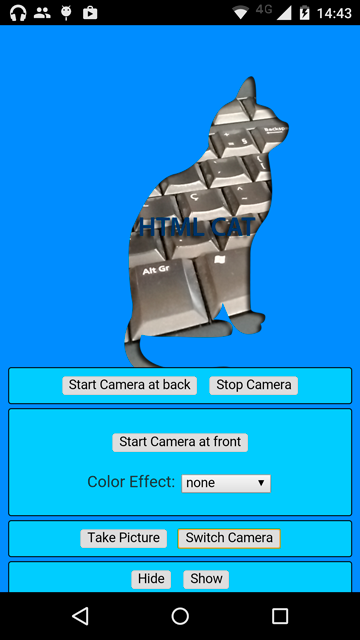
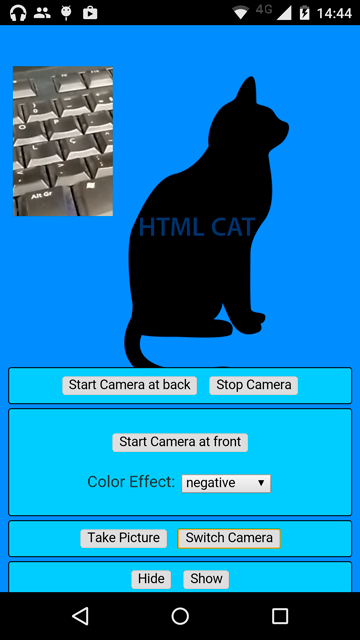
cordova-plugin-camera-preview-sample-app for a complete working Cordova example for Android and iOS platforms.
Screenshots
Credits
Maintained by Weston Ganger - @westonganger
Created by Marcel Barbosa Pinto @mbppower