cordova-plugin-compass-accuracy
v1.0.1TypeScript
A Cordova plugin for Android to monitor the accuracy of the device compass and if needed, request the user to calibrate it via a native dialog.
0/weekUpdated 1 years agoMITUnpacked: 259.0 KB
Published by Dave Alden
npm install cordova-plugin-compass-accuracyCordova Compass Accuracy Plugin  
==========================================================================================================================================================================================================================================================================================================================================================================================================
Table of Contents
- Overview
- Installation
- Using the Cordova CLI
- Capacitor
- Referencing the plugin
- API
- Constants
- ACCURACY
- RESULT_TYPE
- Methods
- startMonitoring(onSuccess: ({type:string, currentAccuracy:number, requiredAccuracy:number}) => void, onError: (error:string) => void, requiredAccuracy?:number)
- stopMonitoring(onSuccess: () => void, onError: (error:string) => void)
- getCurrentAccuracy(onSuccess: (accuracy:number) => void, onError: (error:string) => void)
- simulateAccuracyChange(accuracy:number, onSuccess: () => void, onError: (error:string) => void)
- Usage
- Example project
- License
A Cordova plugin for Android to monitor the accuracy of the device compass and if needed, request the user to calibrate it via a native dialog.

I dedicate a considerable amount of my free time to developing and maintaining this Cordova plugin, along with my other Open Source software.
To help ensure this plugin is kept updated, new features are added and bugfixes are implemented quickly, please donate a couple of dollars (or a little more if you can stretch) as this will help me to afford to dedicate time to its maintenance. Please consider donating if you're using this plugin in an app that makes you money, if you're being paid to make the app, if you're asking for new features or priority bug fixes.
Overview
When using the device compass on a mobile device, it's important to ensure that the compass is calibrated to ensure the accuracy of the heading values returned by the compass.
On iOS, since the iPhone 5S and iOS 13, the device compass is automatically calibrated by the OS using the motion coprocessor, so this is not something you need to worry about.
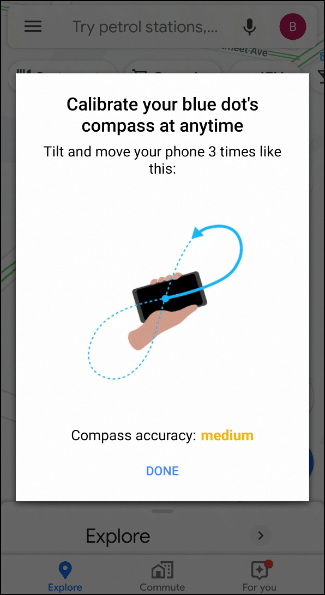
However, on Android no such automatic calibration exists. You may have seen the following dialog shown by Google Maps when the compass is not calibrated:
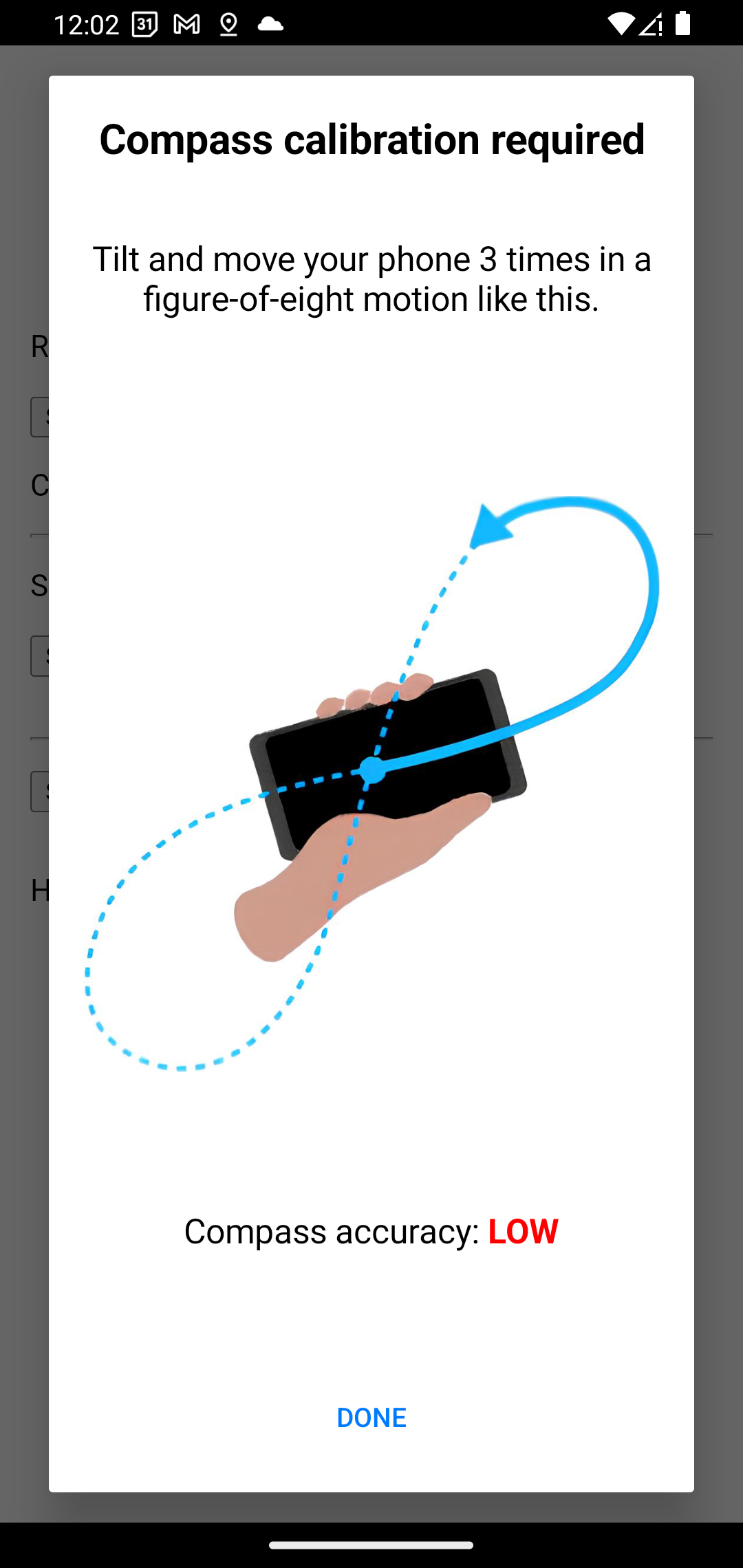
This plugin allows you to monitor the accuracy of the compass and if needed, request the user to calibrate it via a native dialog similar to the one shown by Google Maps:
Installation
Using the Cordova CLI
$ cordova plugin add cordova-plugin-compass-accuracy
Capacitor
$ npm install cordova-plugin-compass-accuracy
$ npx cap sync
Referencing the plugin
The plugin creates the object
window.CompassAccuracy which can be referenced after deviceready has fired:``javascript`
function onDeviceReady(){
// CompassAccuracy.startMonitoring(...);
// or window.CompassAccuracy.startMonitoring(...);
}
document.addEventListener("deviceready", onDeviceReady, false);
API
Constants
$3
Indicates the required or current accuracy of the device compass.
- HIGH - indicates high accuracy (approximates to less than 5 degrees of error)MEDIUM
- - indicates medium accuracy (approximates to less than 10 degrees of error)LOW
- - indicates low accuracy (approximates to less than 15 degrees of error)UNRELIABLE
- - indicates unreliable accuracy (approximates to more than 15 degrees of error)UNKNOWN
- - indicates an unknown accuracy value
$3
Indicates the type of result being returned to the monitor callback.
- STARTED - indicates that the monitor has been started and the current accuracy is being returnedACCURACY_CHANGED
- - indicates that the accuracy has changed and the new accuracy is being returned
Methods
$3
Starts monitoring the accuracy of the device compass for the required accuracy level.
- If requiredAccuracy is not specified, the default value of ACCURACY.HIGH
 is used.
- This method will be invoked once initially with the current accuracy of the device compass and subsequently whenever the accuracy changes.
- If the initial or subsequent accuracy is less than the required accuracy, the plugin will display a native dialog to the user requesting that they calibrate the compass.
  - The dialog will be displayed once per app session.#### Parameters
  -
onSuccess: success callback function that receives a result object containing the following properties:
- type - the type of result being returned (see RESULT_TYPE constants)
- currentAccuracy - the current accuracy of the device compass (see ACCURACY constants)
- requiredAccuracy - the required accuracy of the device compass (see ACCURACY constants)
- onError: error callback function that receives an error message
- requiredAccuracy: the required accuracy of the device compass (see ACCURACY constants)$3
Stops monitoring the accuracy of the device compass.#### Parameters
-
onSuccess: success callback function
- onError: error callback function that receives an error message$3
Gets the current accuracy of the device compass.#### Parameters
-
onSuccess: success callback function that receives the current accuracy of the device compass (see ACCURACY constants)
- onError: error callback function that receives an error message$3
Simulates a change in the accuracy of the device compass to the specified accuracy.
This method is intended for use in testing only.#### Parameters
-
accuracy: the new accuracy of the device compass to simulate (see ACCURACY constants)
- onSuccess: success callback function
- onError: error callback function that receives an error messageUsage
`javascript
function onDeviceReady(){
const requiredAccuracy = CompassAccuracy.ACCURACY.HIGH;
CompassAccuracy.startMonitoring(function(result){
console.log(Compass accuracy ${result.type === CompassAccuracy.RESULT_TYPE.STARTED ? 'started as' : 'changed to'}: ${result.currentAccuracy} (required=${result.requiredAccuracy}))
}, function(error){
console.log(Failed to start monitoring compass accuracy: ${error})
}, requiredAccuracy);
}
document.addEventListener("deviceready", onDeviceReady, false);
``Example project
An example Cordova project illustrating use of this plugin can be found here:
https://github.com/dpa99c/cordova-plugin-compass-accuracy-example
License
The MIT License
Copyright (c) 2023 Dave Alden (Working Edge Ltd.)
Permission is hereby granted, free of charge, to any person obtaining a copy
of this software and associated documentation files (the "Software"), to deal
in the Software without restriction, including without limitation the rights
to use, copy, modify, merge, publish, distribute, sublicense, and/or sell
copies of the Software, and to permit persons to whom the Software is
furnished to do so, subject to the following conditions:
The above copyright notice and this permission notice shall be included in
all copies or substantial portions of the Software.
THE SOFTWARE IS PROVIDED "AS IS", WITHOUT WARRANTY OF ANY KIND, EXPRESS OR
IMPLIED, INCLUDING BUT NOT LIMITED TO THE WARRANTIES OF MERCHANTABILITY,
FITNESS FOR A PARTICULAR PURPOSE AND NONINFRINGEMENT. IN NO EVENT SHALL THE
AUTHORS OR COPYRIGHT HOLDERS BE LIABLE FOR ANY CLAIM, DAMAGES OR OTHER
LIABILITY, WHETHER IN AN ACTION OF CONTRACT, TORT OR OTHERWISE, ARISING FROM,
OUT OF OR IN CONNECTION WITH THE SOFTWARE OR THE USE OR OTHER DEALINGS IN
THE SOFTWARE.