cordova-plugin-evoca-googlemaps
v2.5.0
Google Maps native SDK for Android and iOS, and Google Maps JavaScript API v3 for browser.
0/weekUpdated 3 years agoApache-2.0Unpacked: 8.8 MB
Published by Masashi Katsumata, Hirbod Mirjavadi
npm install cordova-plugin-evoca-googlemapsCordova GoogleMaps plugin for Android, iOS and Browser
| Download | Build test (master branch)|
|----------|---------------------------|
|  | |
This plugin displays Google Maps in your application.
This plugin uses these libraries for each platforms:
- Android : Google Maps Android API
- iOS : Google Maps SDK for iOS
- Browser : Google Maps JavaScript API v3
Both PhoneGap and Apache Cordova are supported.
Android, iOS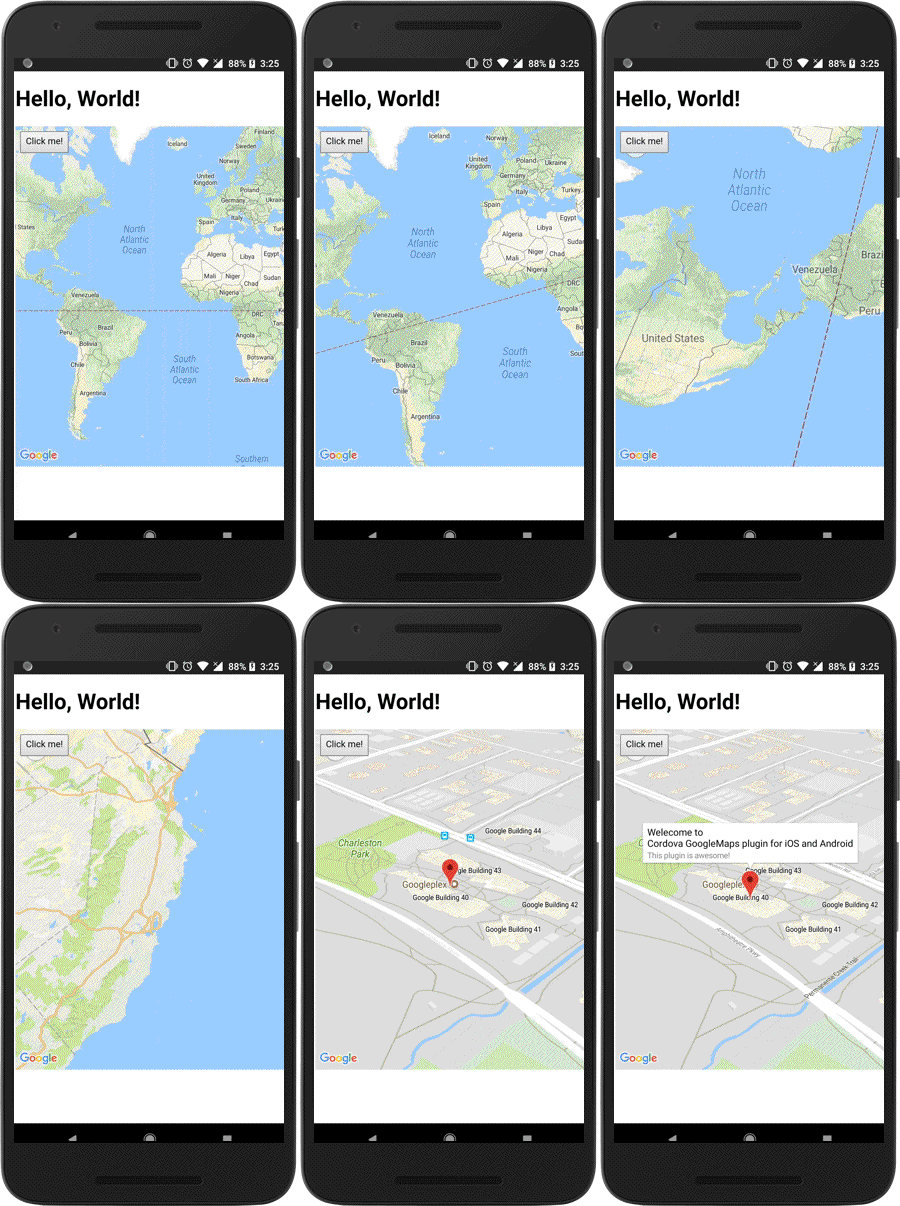
|
Browser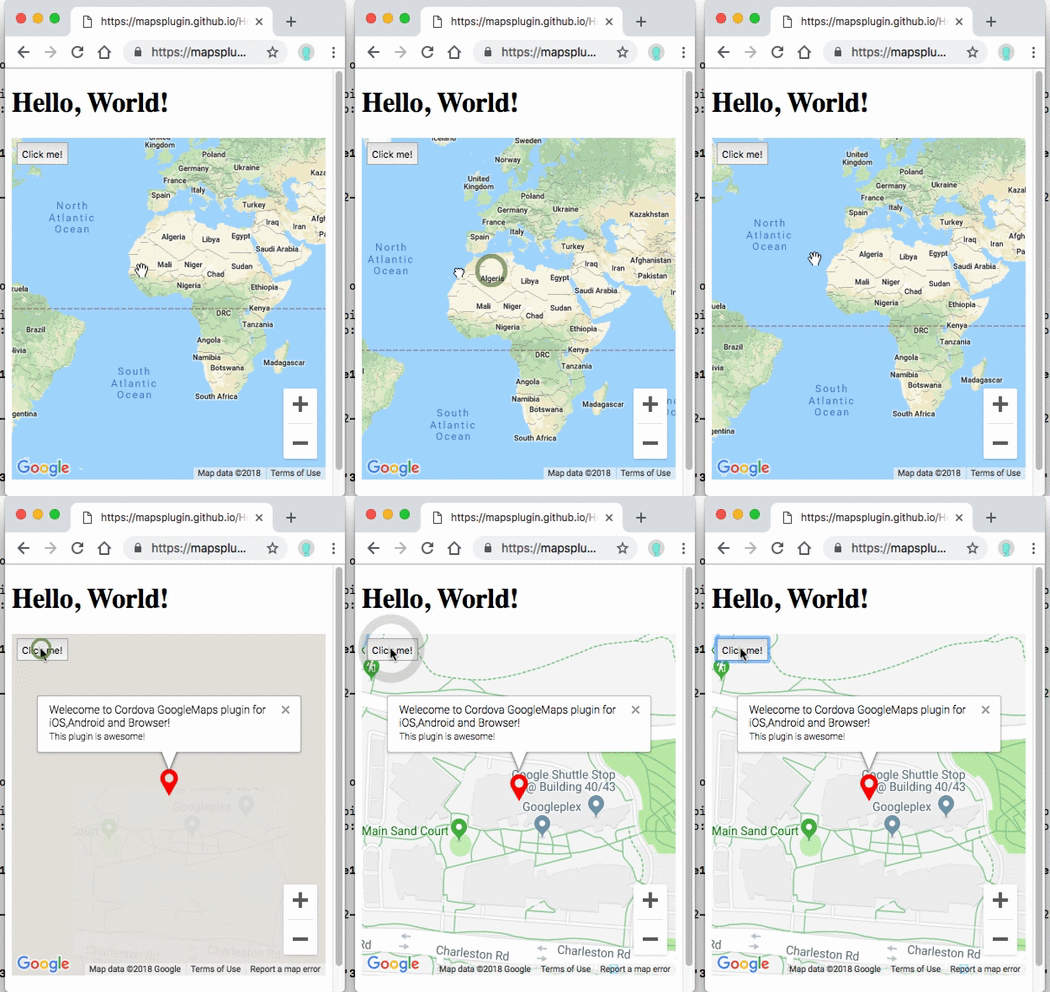
|
-----
Guides
- How to generate API keys?
- Hello, World
- Hello, World (with PhoneGap Build)
- Trouble shootings
Quick install
- Stable version(npm)
``
    $> cordova plugin add cordova-plugin-googlemaps \

        --variable API_KEY_FOR_ANDROID="..." \

        --variable API_KEY_FOR_IOS="..."
`
- Development version(beta version)
`
    $> cordova plugin add https://github.com/mapsplugin/cordova-plugin-googlemaps#multiple_maps \

        --variable API_KEY_FOR_ANDROID="..." \

        --variable API_KEY_FOR_IOS="..."
`
PhoneGap Build settings
`xml
`
Install optional variables
-  PLAY_SERVICES_VERSION = (15.0.1)
The Google Play Services SDK version.
_You need to specify the same version number with all other plugins._
Check out the latest version here.
-  ANDROID_SUPPORT_V4_VERSION = (27.1.1)
This plugin requires the Android support library v4.
_The minimum version is 24.1.0._
Check out the latest version here.
-  LOCATION_WHEN_IN_USE_DESCRIPTION
This message is displayed when your application requests LOCATION PERMISSION for only necessary times.
-  LOCATION_ALWAYS_USAGE_DESCRIPTION
This message is displayed when your application requests LOCATION PERMISSION for always.
---------------------------------------------------------------------------------------------------------
Browser platform
We support browser platform now!
You can develop your application with browser, then run it!
At the end of development, you can upload the html files to your server, or run it on Android or iOS devices.
`
$> cordova run browser
`
If you use ionic framework, it supports live-reload.
`
$> ionic cordova run browser -l
`
If you want to use live-reload, but you don't want to use other framework or without framework,
cordova-plugin-browsersync is useful.
`
  $> cordova plugin add cordova-plugin-browsersync


  $> cordova run (browser/android/ios) -- --live-reload
`
$3


  In the browser platform, the maps plugin uses Google Maps JavaScript API v3


  You need to set two API keys for Google Maps JavaScript API v3.
`js
// If your app runs this program on browser,
// you need to set API_KEY_FOR_BROWSER_RELEASE and API_KEY_FOR_BROWSER_DEBUG
// before plugin.google.maps.Map.getMap()
  //

  //   API_KEY_FOR_BROWSER_RELEASE for
https: protocol
// API_KEY_FOR_BROWSER_DEBUG for http: protocol
//
plugin.google.maps.environment.setEnv({
'API_KEY_FOR_BROWSER_RELEASE': '(YOUR_API_KEY_IS_HERE)',
'API_KEY_FOR_BROWSER_DEBUG': ''
});
// Create a Google Maps native view under the map_canvas div.
var map = plugin.google.maps.Map.getMap(div);
`
$3
JavaScript code is text code. Even if you do obfuscation, it's still readable finally.
In order to protect your API key, you need to set Key restriction for these keys.
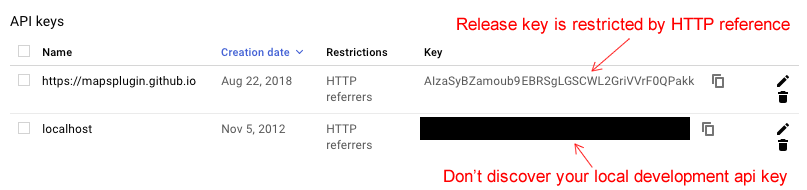
If you don't set API key, the maps plugin still work with development mode.
`js
plugin.google.maps.environment.setEnv({
'API_KEY_FOR_BROWSER_RELEASE': '(YOUR_API_KEY_IS_HERE)',
'API_KEY_FOR_BROWSER_DEBUG': '' // If key is empty or unset,
// the maps plugin runs under the development mode.
});
`
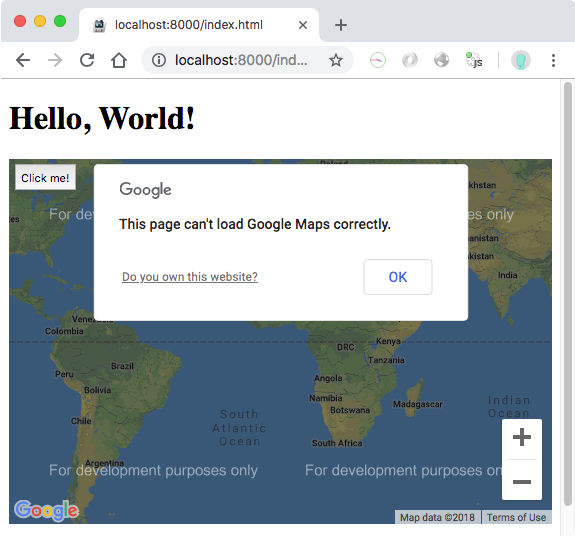
$3
Modern browsers should work without any problem.
Internet Explorer 11 might work. We don't confirm all features, but basic features work.
$3
Google Maps JavaScript API v3 is completely different ecosystem with Google Maps Android API and Google Maps SDK for iOS.
Google Maps JavaScript API v3 :
- can't draw 3D building,
- does't work if offline,
- can't map rotation,
- etc...
In the browser platform, the maps plugin works almost the same behaviors as native platforms(Android, and iOS),
but not exactly the same behaviors.
So don't expect too much.
$3
As you may know, this plugin displays native Google Maps view under the browser in Android and iOS.
However this plugin displays as normal HTML element in browser platform.
Because of this, touch behavior is different.
The maps plugin does not hook the touch position, do not set background: transparent, ... etc.
But if you use this plugin as normal behavior, you don't need to consider about this.
---------------------------------------------------------------------------------------------------------
Please support this plugin activity.
In order to keep this plugin as free, please consider to donate little amount for this project.

---------------------------------------------------------------------------------------------------------
Release Notes
- v2.5.0
- Add: (Android/iOS/Browser) Support promise for TileOverlayOptions.getTile. You must return new URL in 5 seconds.
`js
var tileOverlay = map.addTileOverlay({
getTile: function(x, y, zoom) {
return new Promise(function(resolve, reject) {
somethingAsync(function(url) {
resolve(url);
});
});
}
});
`
- Add: (Android/iOS/Browser) BaseClass.onThrottled()/addThrottledEventListener()/hasEventListener() are added.
`js
var marker = map.addMarker({ ... });
marker.onThrottled('position_changed', function(latLng) {
console.log(latLng);
}, 1000);
`
- Add: (Android/iOS/Browser) TileOverlayOptions.getTile can return base64 encoded image(png,gif,jpeg).
- Fix: (Android) Can not load icon image file for Marker after external link opened.
- Fix: (Browser) MapOptions.styles does not work.
- Fix: (Android) map.setOptions() asks location permission always even options do no include myLocation and/or myLocationButton options.
- Update: (Android) Set transparent backgroundColor at onResume() because some other plugins change background color.
- Update: (Android/iOS) Improve accuracy of touch detection on geodesic polyline.
- Update: (iOS) Remove "NSData+Base64" library. No longer necessary.
- Update: (js) ionic 4 hides Google Maps view.
- Fix: (Browser) MarkerCluster.remove() does not work on browser platform.
- Fix: (Android/iOS/Browser) App crashes (or error) if no panorama available.
- Fix: (Android/iOS/Browser) INFO_CLICK does not work on marker cluster.
- Fix: (iOS) Can not click on HtmlInfoWindow.
- v2.4.6
- Fix: (iOS) Only src/ios/check_sdk_version.js error.
- v2.4.5
- Fix: (Browser) GeocoderResult.extra.lines field is incorrect position.
- Fix: (Android/iOS/Browser) promise-7.0.4.min.js.map file is missing.
- Update: (Android/iOS/Browser) Detecting way of viewport-fit=cover.
- Update: (iOS) No longer use com.googlemaps.ios. Use CocoaPod installation instead.
- v2.4.4
- Fix: (Browser) All methods were tested, and fixed lots of bugs.
- Fix: (Android/iOS) Executes map.animateCamera() while map has been detached automatically causes dead lock.
- Update: (iOS) Fixed issue where plugin could appear behind other plugins
- Update: (Android) getMyLocation() does not return if application has been launched when location is disabled, then enable the location after soon.
- v2.4.3
- Fix: (Browser) HTMLInfoWindow displays unnecessary scroll bars.
- Fix: (Android) Can not load KML file from http://localhost on ionic 3.
- Fix: (iOS) Can not click bottom 20px.
- Fix: (Browser) map.setCameraTarget() implementation is wrong.
- Fix: (iOS) GroundOverlayOptions.anchor property is missing.
- Add: (Android/iOS/Browser) GoogleMapOptions.preferences.gestureBounds property. You can set limit bounds of panning.
`js
var map = plugin.google.maps.Map.getMap(mapDiv, {
'preferences': {
'gestureBounds': [
{lat: ..., lng: ...},
... ,
{lat: ..., lng: ...}
]
}
});
`
  - v2.4.2

    - Fix: If application uses ionic v1, it can't interactive with map view on only iPhone5 because of resetCSS

    - Fix:
Cannot set property 'isMap' of undefined error
- Update: (Browser) Can not load Google Maps JavaScript API v3 with libraries=places
  - v2.4.1

    - Fix:
map.getMap() does not work when page changing on ionic v4.
- Fix: LocationService.hasPermission() is not implement for browser platform.
- v2.4.0
- Add: Browser platform!
- Add: plugin.google.maps.environment.setEnv() method.
- Add: icon property for KmlOverlayOptions
- Fix: map.addKmlOverlay() does not work if page url contains '#hash'
---------------------------------------------------------------------------------------------------------
Demos
Demo (Browser)

---------------------------------------------------------------------------------------------------------
Documentation
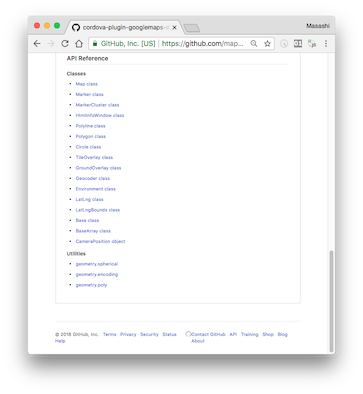
All documentations are here!!
https://github.com/mapsplugin/cordova-plugin-googlemaps-doc/blob/master/v2.3.0/README.md
Quick examples

Map
var options = {
camera: {
target: {lat: ..., lng: ...},
zoom: 19
}
};
var map = plugin.google.maps.Map.getMap(mapDiv, options)
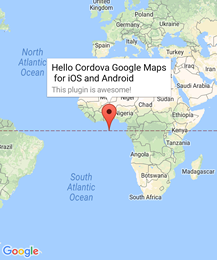
Marker
var marker = map.addMarker({
position: {lat: ..., lng: ...},
title: "Hello Cordova Google Maps for iOS and Android",
snippet: "This plugin is awesome!"
})
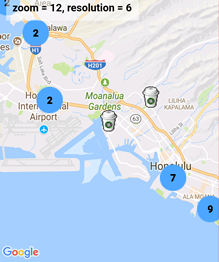
MarkerCluster
var markerCluster = map.addMarkerCluster({
//maxZoomLevel: 5,
boundsDraw: true,
markers: dummyData(),
icons: [
{min: 2, max: 100, url: "./img/blue.png", anchor: {x: 16, y: 16}},
{min: 100, max: 1000, url: "./img/yellow.png", anchor: {x: 16, y: 16}},
{min: 1000, max: 2000, url: "./img/purple.png", anchor: {x: 24, y: 24}},
{min: 2000, url: "./img/red.png",anchor: {x: 32,y: 32}}
]
});

HtmlInfoWindow
var html = "<img src='./House-icon.png' width='64' height='64' >" +
"<br>" +
"This is an example";
htmlInfoWindow.setContent(html);
htmlInfoWindow.open(marker);

Circle
var circle = map.addCircle({
'center': {lat: ..., lng: ...},
'radius': 300,
'strokeColor' : '#AA00FF',
'strokeWidth': 5,
'fillColor' : '#880000'
});

Polyline
var polyline = map.addPolyline({
points: AIR_PORTS,
'color' : '#AA00FF',
'width': 10,
'geodesic': true
});
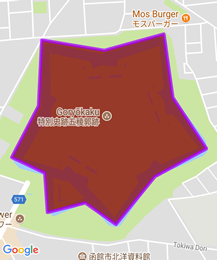
Polygon
var polygon = map.addPolygon({
'points': GORYOKAKU_POINTS,
'strokeColor' : '#AA00FF',
'strokeWidth': 5,
'fillColor' : '#880000'
});
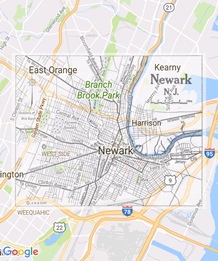
GroundOverlay
var groundOverlay = map.addGroundOverlay({
'url': "./newark_nj_1922.jpg",
'bounds': [
{"lat": 40.712216, "lng": -74.22655},
{"lat": 40.773941, "lng": -74.12544}
],
'opacity': 0.5
});
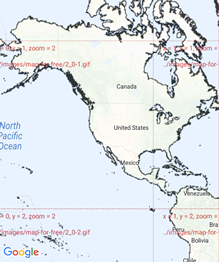
TileOverlay
var tileOverlay = map.addTileOverlay({
debug: true,
opacity: 0.75,
getTile: function(x, y, zoom) {
return "../images/map-for-free/" + zoom + "_" + x + "-" + y + ".gif"
}
});

KmlOverlay
map.addKmlOverlay({
'url': 'polygon.kml'
}, function(kmlOverlay) { ... });

Geocoder
plugin.google.maps.Geocoder.geocode({
// US Capital cities
"address": [
"Montgomery, AL, USA", ... "Cheyenne, Wyoming, USA"
]
}, function(mvcArray) { ... });

poly utility
var GORYOKAKU_POINTS = [
{lat: 41.79883, lng: 140.75675},
...
{lat: 41.79883, lng: 140.75673}
]
var contain = plugin.google.maps.geometry.poly.containsLocation(
position, GORYOKAKU_POINTS);
marker.setIcon(contain ? "blue" : "red");
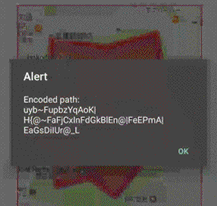
encode utility
var GORYOKAKU_POINTS = [
{lat: 41.79883, lng: 140.75675},
...
{lat: 41.79883, lng: 140.75673}
]
var encodedPath = plugin.google.maps.geometry.
encoding.encodePath(GORYOKAKU_POINTS);

spherical utility
var heading = plugin.google.maps.geometry.spherical.computeHeading(
markerA.getPosition(), markerB.getPosition());
label.innerText = "heading : " + heading.toFixed(0) + "°";

Location service
plugin.google.maps.LocationService.getMyLocation(function(result) {
alert(["Your current location:\n",
"latitude:" + location.latLng.lat.toFixed(3),
"longitude:" + location.latLng.lng.toFixed(3),
"speed:" + location.speed,
"time:" + location.time,
"bearing:" + location.bearing].join("\n"));
});

StreetView
var div = document.getElementById("pano_canvas1");
var panorama = plugin.google.maps.StreetView.getPanorama(div, {
camera: {
target: {lat: 42.345573, lng: -71.098326}
}
});
---------------------------------------------------------------------------------------------------------
$3
Google Maps JavaScript API v3 works on any platforms,
but it does not work if device is offline.
This plugin uses three different APIs:
- Android : Google Maps Android API
- iOS : Google Maps SDK for iOS
- Browser : Google Maps JavaScript API v3
In Android and iOS applications, this plugin displays native Google Maps views, which is faster than Google Maps JavaScript API v3.
And it even works if the device is offline.
In Browser platform, this plugin displays JS map views (Google Maps JavaScript API v3).
It should work as PWA (progressive web application), but the device has to be online.
In order to work for all platforms, this plugin provides own API instead of each original APIs.
You can write your code similar to the Google Maps JavaScript API v3.
Feature comparison table
| | Google Maps JavaScript API v3 | Cordova-Plugin-GoogleMaps(Android,iOS)| Cordova-Plugin-GoogleMaps(Browser) |
|----------------|-----------------------------------|---------------------------------------|---------------------------------------|
|Rendering system| JavaScript + HTML | JavaScript + Native API's | JavaScript |
|Offline map | Not possible | Possible (only your displayed area) | Not possible |
|3D View | Not possible | Possible | Not possible |
|Platform | All browsers | Android and iOS applications only | All browsers |
|Tile image | Bitmap | Vector | Bitmap |
Class comparison table
| Google Maps JavaScript API v3 | Cordova-Plugin-GoogleMaps |
|-----------------------------------|---------------------------------------|
| google.maps.Map | Map |
| google.maps.Marker | Marker |
| google.maps.InfoWindow | Default InfoWindow, and HtmlInfoWindow|
| google.maps.Circle | Circle |
| google.maps.Rectangle | Polygon |
| google.maps.Polyline | Polyline |
| google.maps.Polygon | Polygon |
| google.maps.GroundOverlay | GroundOverlay |
| google.maps.ImageMapType | TileOverlay |
| google.maps.MVCObject | BaseClass |
| google.maps.MVCArray | BaseArrayClass |
| google.maps.Geocoder | plugin.google.maps.geocoder |
| google.maps.geometry.spherical | plugin.google.maps.geometry.spherical |
| google.maps.geometry.encoding | plugin.google.maps.geometry.encoding |
| google.maps.geometry.poly | plugin.google.maps.geometry.poly |
| (not available) | MarkerCluster |
| google.maps.KmlLayer | KmlOverlay |
| (not available) | LocationService |
| google.maps.StreetView | StreetView :sparkles: |
| google.maps.Data | (not available) |
| google.maps.DirectionsService | (not available) |
| google.maps.DistanceMatrixService | (not available) |
| google.maps.TransitLayer | (not available) |
| google.maps.places.* | (not available) |
| google.maps.visualization.* | (not available) |
$3
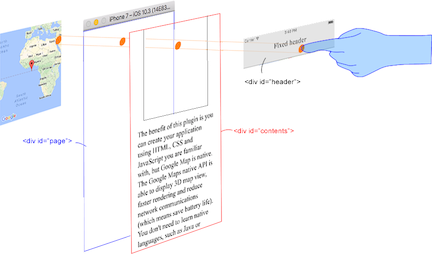
This plugin generates native map views, and puts them under the browser.
The map views are not HTML elements. This means that they are not a or anything HTML related.
But you can specify the size and position of the map view using its containing .
This plugin changes the background to transparent in your application.
Then the plugin detects your touch position, which is either meant for the native map or an html element`
(which can be on top of your map, or anywhere else on the screen).

The benefit of this plugin is the ability to automatically detect which HTML elements are over the map or not.
For instance, in the image below, say you tap on the header div (which is over the map view).
The plugin will detect whether your tap is for the header div or for the map view and then pass the touch event appropriately.
This means you can use the native Google Maps views similar to HTML elements.
---------------------------------------------------------------------------------------------------------
Official Communities
- Google+ : (managed by @wf9a5m75)
https://plus.google.com/communities/117427728522929652853
- Gitter : (managed by @Hirbod)
https://gitter.im/nightstomp/cordova-plugin-googlemaps