create-create-app
v7.3.0TypeScript
Create your own `create-something` app.
0/weekUpdated 2 years agoMITUnpacked: 44.6 KB
Published by Yasuaki Uechi
npm install create-create-app✨ Create Create App
Create your own create-something app.


Why?
- ⚖️ Built-in License selector No need to worry about license things.
- 🎩 Template engine You can use template strings in text files, file names, and folder names.
- 💄 Highly customizable Can change caveat text, add extra command-line options.
Table of contents
- Quick Start
- 1. Bootstrap your project
- 2. Add and edit template files
- 3. Build the app (TypeScript only)
- 4. Publish package to npm
- 5. PROFIT
- Template
- Advanced: Multiple templates
- Helper functions
- upper
- lower
- capital
- camel
- snake
- kebab
- space
- uuid
- Config
- templateRoot (required)
- modifyName (default: undefined)
- extra (default: undefined)
- defaultDescription (default: description)
- defaultAuthor (default: user.name in ~/.gitconfig otherwise Your name)
- defaultEmail (default: user.email in ~/.gitconfig otherwise Your email)
- defaultTemplate (default: default)
- defaultLicense (default: MIT)
- defaultPackageManager (default: undefined)
- promptForDescription (default: true)
- promptForAuthor (default: true)
- promptForEmail (default: true)
- promptForTemplate (default: false)
- promptForLicense (default: true)
- promptForPackageManager (default: false)
- skipGitInit (default: false)
- skipNpmInstall (default: false)
- after (default: undefined)
- caveat (default: undefined)
- AfterHookOptions
- Showcase
- Contribution
- Contributors ✨
Quick Start
Let's create create-greet package in five steps.
$3
``shell`
npx create-create-app greet # simplest route
npm init create-app greet # requires npm 6+
yarn create create-app greet # requires Yarn 0.25+
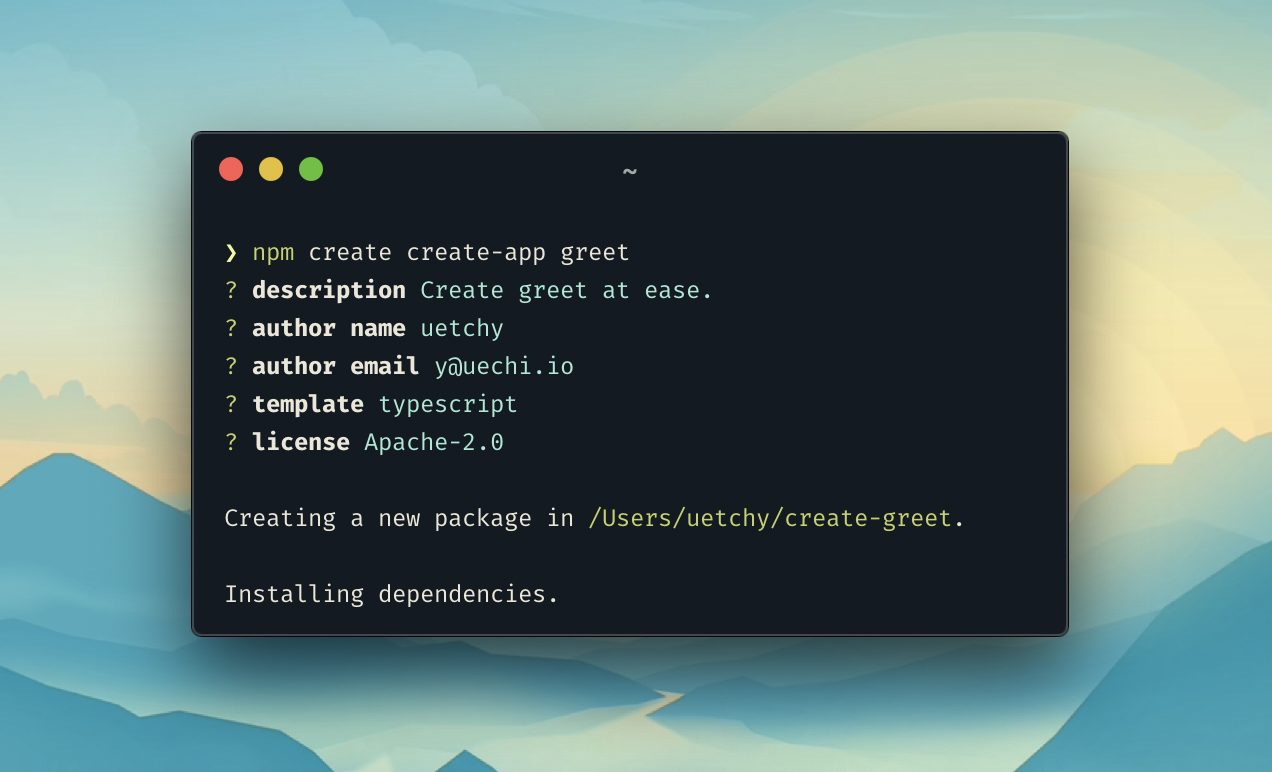
You will then be asked about your project.
$3
`shell`
cd create-greet
Then you can see the templates/default folder where the actual template files go.
Note that .gitignore files should be named gitignore to avoid being ignored on publishing.
$3
Run npm run build or yarn build to transpile TypeScript code into JavaScript. If you chose the default template, this step is not necessary.
$3
Run npm publish or yarn publish to publish your create-greet app to npm.
$3
`bash`
npx create-greet ohayo
npm init greet ohayo
yarn create greet ohayo
Template
Edit files inside templates/default. Every file name, directory name, and a text file will be processed through Handlebars template engine to replace all template strings with the respective value.
Built-in variables are:
- {{name}} package name (e.g. ohayo){{description}}
- package description{{author}}
- author name (e.g. John Doe){{email}}
- author email (e.g. john@example.com){{contact}}
- author name formatted with {{name}} <{{email}}>. If email is missing, simply {{name}}
- package license (e.g. MIT){{year}}
- current year (e.g. 2021)
$3
Creates a new directory in the location defined by templateRoot. It can be accessed via --template flag (e.g. create-something ).promptForTemplate
You might want to set to true to explicitly ask the user to choose a template during the initialization phase. If promptForTemplate is false, which is the default behavior, default template will be used unless the user explicitly selects a template via --template cli flag.
$3
In the following example, we assume that the variable name is create-react-app.
#### upper
Convert text to UPPERCASE.
{{upper name}} becomes CREATE-REACT-APP.
#### lower
Convert text to lowercase.
{{lower name}} becomes create-react-app.
#### capital
Convert text to CapitalCase.
- {{capital name}} becomes CreateReactApp
- becomes Create React App.
#### camel
Convert text to camelCase.
{{camel name}} becomes createReactApp.
#### snake
Convert text to snake_case.
{{snake name}} becomes create_react_app.
#### kebab
Convert text to kebab-case.
{{kebab name}} becomes create-react-app.
#### space
Replace all word separators with single space.
{{space name}} becomes create react app
#### uuid
Generates unique UUID string.
`
{{uuid}} // => a5df7100-da46-47a6-907e-afe861f48b39
{{upper (uuid)}} // => A5DF7100-DA46-47A6-907E-AFE861F48B39
Config
The app configuration can be found in src/cli.js (or src/cli.ts if you choose the typescript template).
`ts
import { resolve } from 'path';
import { create } from 'create-create-app';
create('create-greet', {
templateRoot: resolve(__dirname, '..', 'templates'),
extra: {
language: {
type: 'input',
describe: 'greeting language',
default: 'en',
prompt: 'if-no-arg',
},
},
modifyName: (name) => package-prefix-${name},Your app has been created successfully!
after: async ({ installNpmPackage }) => {
console.log('Installing additional packages');
await installNpmPackage('chalk');
},
caveat: ,`
});
$3
templateRoot is set to path.resolve(__dirname, '../templates'). You can change this to any location you like.
$3
(name: string) => string | Promise
Modify name property.
`jscreate-${name}
{
modifyName: (name) => (name.startsWith('create-') ? name : );`
}
$3
object | undefined
Additional questions can be defined. These options will be available as CLI flags, interactive questions, and template strings. In the example above, --language flag and the {{language}} template string will be enabled in the app.
All possible options can be found in the yargs-interactive documentation.
$3
Default value for a package description.
$3
Default value for a package author.
$3
Default value for a package author email.
$3
Default value for a template.
$3
Default value for license.
$3
Default value for package manager. npm, yarn and pnpm are available. undefined to auto detect package manager.
$3
Interactively asks users for a package description.
$3
Interactively asks users for a package author.
$3
Interactively asks users for a package author email.
$3
Interactively asks users to select a template. If there are no multiple templates in the templates directory, it won't display a prompt anyways.
Even if promptForTemplate is set to false, users can still specify a template via a command line flag --template .
`
create-something
$3
Interactively asks users for a package license.
$3
Interactively asks users for a package manager to use for installing packages from npm.
$3
Skip initializing a git repository at a creation time.
$3
Skip installing package dependencies at a creation time.
$3
(options: AfterHookOptions) => void
Define after-hook script to be executed right after the initialization process.
$3
string | ((options: AfterHookOptions) => string | void) | undefined
The caveat message will be shown after the entire process is completed.
`js`
create('create-greet', {
caveat: 'Happy coding!',
});
`jsRun -> cd ${answers.name} && make
create('create-greet', {
caveat: ({ answers }) => ,`
});
`jsInstalling additional package: ${plugin}
create('create-greet', {
extra: {
plugin: {
type: 'input',
describe: 'plugin to be used in your project',
default: 'some-plugin',
prompt: 'if-no-arg',
},
},
after: async ({ installNpmPackage, answers }) => {
const plugin = answers.plugin;
console.log();cd ${packageDir} && npm start
await installNpmPackage(plugin);
},
caveat: ({ packageDir }) => {
console.log('Next step:');
console.log();`
},
});
$3
`typescriptmodifyName
{
// variables
packageDir: string; // e.g. "/path/to/ohayo"
templateDir: string; // e.g. "/path/to/create-greet/templates/default"
year: number; // e.g. 2020
answers: {
name: string; // package name passed through
description: string; // description
author: string; // e.g. "John Doe"
email: string; // e.g. "john@example.com"
contact: string; // e.g. "John Doe
license: string; // e.g. "MIT"
[key: string]: string | number | boolean | any[]; // any values defined in the field.
};
// helper functions
run: (command: string, options?: CommonOptions
installNpmPackage: (packageName: string | [string], isDev?: boolean) => Promise
}
`
Showcase
List of amazing projects built with create-create-app.
- create-create-app - Yes, create-create-app uses create-create-app itself to generate create- template!lit` applications.
- create-book - Fast & frictionless book template generator.
- create-vivliostyle-theme - Create Vivliostyle theme at ease.
- create-alfred-workflow - Create Alfred Workflow.
- create-catalyst - NPM create-app command for scaffolding a new Web Components project with GitHub's Catalyst.
- create-lit - Create simple-starter-kit
- create-vscode-extension - Create Visual Studio Code extensions in one command
- create-express-app - Set up a modern express app by running one command.
- tsnt - 🚀An ESM node package template with ESLint, Prettier & TypeScript built in. Powered by esbuild.
- create-strawberry - npm template initializer for strawberry.js
> Missing your project? Send a PR :)
Contribution
PRs are always welcomed.
$3
Thanks goes to these wonderful people (emoji key):
 uetchy 💻 📖 |  Shinyu Murakami 💻 |  Masayoshi Takahashi 💻 |  Alexander Liu 💻 |  Vilja 💻 |  Lucas Colombo 💻 |
This project follows the all-contributors specification. Contributions of any kind welcome!