cs-country-selector
v0.0.11TypeScript
<h1>🌍 cs-country-selector</h1>
0/weekUpdated 7 months agoMITUnpacked: 98.6 KB
Published by houssemhosni13@gmail.com
npm install cs-country-selector🌍 cs-country-selector
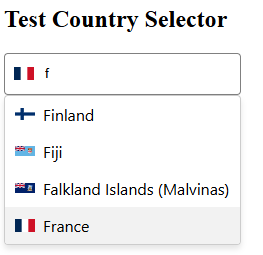
A lightweight, fully customizable country selector component for Angular, with flag support, keyboard accessibility, dynamic filtering, and zero dependencies.
💡 Built with modern Angular (standalone components) — works with all Angular versions and styles (SCSS, CSS, Tailwind, etc.)
✨ Features
- ✅ Country list with flags, codes, and names
- 🎯
onlyCountriesandexcludeCountriesfilters - 🔍 Search with
startsWithbehavior - 🧠 Keyboard accessibility (arrow keys + enter)
- 🪶 Small size, zero dependencies
- 🎨 Fully customizable layout and appearance
- 🔧 Compatible with ReactiveForms and ngModel
- ♿ Accessible with ARIA attributes
✨ Demo
🚀 Installation
npm install cs-country-selector
🔧 Usage
// inside ___.module.ts

//import CountrySelectorComponent and add it to your imports


import { CountrySelectorComponent  } from 'cs-country-selector';

imports:[CountrySelectorComponent]
//inside ___.component.ts


import { Country } from 'cs-country-selector';


selectedCountry: Country | null = null;


onCountryChange(country: Country | null) {

  console.log('Selected:', country);

}
//inside ___.component.html


<cs-country-selector

  [(ngModel)]="selectedCountry"

  [placeholder]="'Choose your country...'"

  [includeFlags]="true"

  [onlyCountries]="['US', 'FR', 'DE']"

  [excludeCountries]="['KP']"

  [containerClass]="'custom-container'"

  [inputClass]="'custom-input'"

  [dropdownClass]="'custom-dropdown'"

  [itemClass]="'custom-item'"

  [activeItemClass]="'highlighted'"

  [flagClass]="'flag-icon'"

  [selectedFlagClass]="'flag-icon-selected'"

  (countrySelected)="onCountryChange($event)"

></cs-country-selector>
📦 Country Object Format
interface Country {

  code: string;     // e.g. "FR"

  name: string;     // e.g. "France"

  flagUrl: string;  // e.g. "https://.../fr.svg"

}
🎨 Full Customizability
The cs-country-selector is built to be styled your way — without forcing a design system or theme. You can pass your own classes or override CSS variables.
✅ CSS Class Bindings
Use these [Input()] bindings to add your own classes while retaining the internal ones:
| Input | Target Element | Default Class |
|---|---|---|
| containerClass | <div> root wrapper | country-selector-container |
| inputClass | <input> search field | country-input |
| dropdownClass | Dropdown container | country-dropdown |
| itemClass | Each country <li> | country-item |
| activeItemClass | Active country (hover/arrow) | active |
| flagClass | All flags | country-flag |
| selectedFlagClass | Flag inside input field | selected-country-flag |
You can override any style using global CSS or component-level styles.
💡 Example
.custom-input {

  border-radius: 8px;

  background-color: #f0f0f0;

  padding: 10px;

  font-size: 14px;

}
🎨 Custom Scrollbar (via CSS Variables)
Scrollbar design is fully themeable via CSS variables — no need to override deeply nested elements.
Available CSS Variables
--cs-scrollbar-thumb-color--cs-scrollbar-thumb-hover-color--cs-scrollbar-width--cs-scrollbar-radius
cs-country-selector {

  --scrollbar-thumb-color: #00bcd4;

  --scrollbar-thumb-hover-color: #0097a7;

  --scrollbar-width: 10px;

  --scrollbar-radius: 10px;

}
⚙️ Filtering Countries
onlyCountries: string[]
Displays only the countries listed (by ISO alpha-2 code):
<cs-country-selector [onlyCountries]="['FR', 'DE']" />
excludeCountries: string[]
Hides the countries listed:
<cs-country-selector [excludeCountries]="['KP']" />
You can combine both as needed.
📜 License
MIT © Houssem Hosni
🙌 Contribute
Found a bug? Want to suggest a feature? Open a PR or issue on GitHub — contributions welcome!