cumulative-flow
v1.21.2
Draw SVG Cumulative Flow Diagrams
0/weekUpdated 3 years agoMITUnpacked: 1.6 MB
Published by Ulf Schneider
npm install cumulative-flow$3
- [CFD][1]
- [Parameters][2]
- [draw][3]
- [Parameters][4]
- [prediction][5]
- [remove][6]
- [image][7]
- [imageSource][8]
- [svgSource][9]
CFD


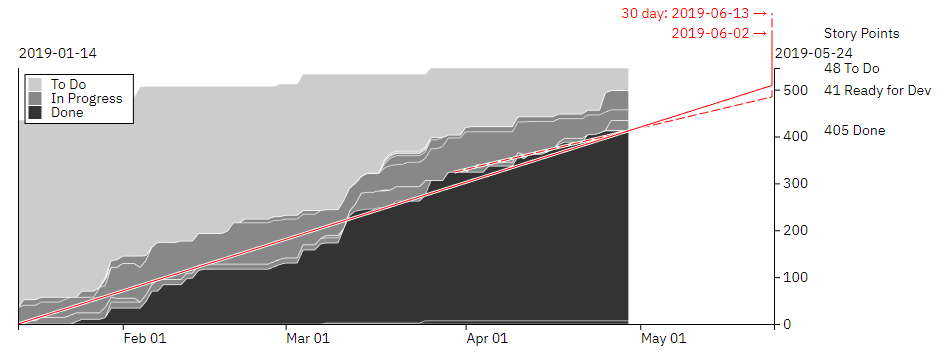
Draw SVG Cumulative Flow Diagrams and predict the anticipated completion of work.
Install in your Node project with
npm i cumulative-flow
and use it inside your code via
const cfd = require('cumulative-flow');
or, alternatively
import cfd from 'cumulative-flow';
Create the new cfd objects via
let diagram = cfd(settings);
$3
- settings [Object][10] The configuration object for the diagram.
All data for the diagram is provided with this object.
In this configuration object, whenever a date is to be given,
it can be an [ISO 8601 String][11]
or a JavaScript [Date][12] object.
A [Moment][13] object is also fine.
- settings.title [String][14]? The title for the diagram.
- settings.svg [Object][10] The DOM tree element, wich must be an svg tag.
The diagram will be attached to this DOM tree element. Example:
settings.svg = document.getElementById('cfdDiagram');'cfdDiagram' is the id of a svg tag.-
settings.id [String][14]? The id of a domtree svg element, to which the diagram will be bound to. The id will only be used in case settings.svg is not provided.
-
settings.width [Number][15]? The width of the diagram in pixels, the margin settings have to be included in that width.-
settings.height [Number][15]? The height of the diagram in pixels, the margin settings have to be included in that height.-
settings.margin {top: [Number][15], right: [Number][15], bottom: [Number][15], right: [Number][15]}? The margin for the diagram.Default values are:
settings.margin = {
        top: 75,
        right: 210,
        bottom: 30,
        left: 40 }
-
settings.fromDate ([String][14] \| [Date][16])? The start date for the diagram. Example:settings.fromDate = '2018-09-01';
-
settings.toDate ([String][14] \| [Date][16])? The end date for the diagram. Example:settings.toDate = '2018-09-05';
-
settings.predict ([String][14] \| [Date][16])? To draw an indication line for the completion of work.The predict argument determines at what date to start drawing the line. Example:
settings.predict = '2018-09-01';If no date is provided but the drawOptions allow to draw a prediction line, an automatic
start date for that line will be calculated based on the first date something went to done.
-
settings.predictTarget ([String][14] \| [Date][16])? Provide a predict target that differs from the end date of the diagram (is before the end date)
-
settings.shortTermPredict [Number][15]? Indicate the number of days to go back from current date to determine a short term predict start date. This will be used to draw a second prediction line. If 0, no
short term prediction line is drawn. Default is 0. Example:
settings.shortTermPredict = 30;
-
settings.markers [Array][17]<{date: ([String][14] \| [Date][16]), label: [String][14]}>? Highlight specific dates inside of the diagram with markers.
Each marker is an object with a date for the marker and an optional label. It can as well have an optional color.
Example:
settings.markers = [
        { date: '2018-09-03', label: 'M1', color: 'green' },
        { date: '2018-09-10', label: 'M2' }];
-
settings.drawOptions [Array][17]<[String][14]>? An array to determine the parts to be drawn. Possible options:'title' - draw the titleBy default all of these draw options are on.
'axis' - draw the x and y axis
'legend' - draw the legend information
'markers' - draw the markers
'predict' - draw the predict line
'focus' - draw detailed data when hovering the diagram
-
settings.style [Object][10]? Influence the appearance of the diagram with typeface and colors. The defaults are:
settings.style = {
        fontSize: 12,
        fontFamily: 'sans-serif',
        color: '#222',
        backgroundColor: '#fff',
        axis: {color: '#222'},
        toDo: {color: '#ccc', stroke: '#fff'},
        progress: {color: '#888', stroke: '#fff', pattern: false},
        done: {color: '#222', stroke: '#fff'},
        markers: {color: '#222', backgroundColor: '#fff'},
        predict: {color: '#222', backgroundColor: '#fff', goodColor: '#222', troubleColor: '#222'},
        shortTermPredict: {color: '#222', backgroundColor: '#fff', goodColor: '#222', troubleColor: '#222'}
        }
A setting of settings.style.progress.pattern = true will ignore the color setting for progress and instead will create a pattern made of the toDo color and the done color.
For the prediction, a
goodColor is used whenever the workload can be completed withinthe scheduled amount of time and the
troubleColor is used in case there is not sufficient time to complete all work.
-
settings.data {toDo: [Array][17]<[String][14]>, progress: [Array][17]<[String][14]>, done: [Array][17]<[String][14]>, unit: [String][14], entries: [Array][17]<[Object][10]>} The data for the diagram. Example:settings.data = {
toDo: ['new'],
progress: ['test', 'dev'],
done: ['done'],
unit: 'points',
entries: [
{ date: '2018-09-03', new: 0, dev: 0, test: 0, done: 0 },
{ date: '2018-09-04', new: 1, dev: 0, test: 0, done: 0 },
{ date: '2018-09-05', new: 1, dev: 1, test: 0, done: 0 },
{ date: '2018-09-06', new: 1, dev: 0, test: 1, done: 1 },
{ date: '2018-09-07', new: 2, dev: 1, test: 0, done: 2 },
{ date: '2018-09-08', new: 1, dev: 1, test: 2, done: 2 },
{ date: '2018-09-09', new: 0, dev: 0, test: 1, done: 5 },
{ date: '2018-09-10', new: 1, dev: 1, test: 0, done: 5 }
]}Each entry object must contain a date and the status counts for thetoDo, progress and done status categories.The unit is the unit of measurement for the status counts and can hold any value.
A value of
'points' indicates story points.An omitted unit will lead to interpreting the status counts as item counts.
The status categories
toDo, progress and donemust contain the status values as strings that belong exactly to those categories.
The rendering of the layers in the Cumulate Flow Diagram will follow the order
of the status values provided inside of the status categories. All values of the
done status category are always rendered at the bottom of the diagram,beginning from left to right. Then all
progress status values, again left to right.Finally all
new status values, of course left to right.For the above example: The
done status layer is at the bottom, followed bythe
test and dev layerand finally the
new layer is getting rendered.-
settings.legend [Object][10]? Influence the appearance of the legendThe defaults are:
settings.legend = {
        toDo: 'To Do',
        progress: 'In Progress',
        done: 'Done'
        }
$3
Draw the Cumulative Flow Diagram.
#### Parameters
- settings [Object][10]? The configuration object for the diagram. Optional.
If provided, will overwrite the settings object already given to the constructor.
$3
Calculate the predict date and the short term predict date
Returns [Object][10] with predict and shortTermPredict dates as strings
$3
Clear the diagram.
$3
Draw the Cumulative Flow Diagram and return the result as a string which can be assigned to the SRC attribute of an HTML IMG tag.
Returns [String][14]
Meta
- deprecated: use imageSource instead
$3
Draw the Cumulative Flow Diagram and return the result as a string which can be assigned to the SRC attribute of an HTML IMG tag.
Returns [String][14]
$3
Draw the Cumulative Flow Diagram and return the result as a SVG tag string.
Returns [String][14]
[1]: #cfd
[2]: #parameters
[3]: #draw
[4]: #parameters-1
[5]: #prediction
[6]: #remove
[7]: #image
[8]: #imagesource
[9]: #svgsource
[10]: https://developer.mozilla.org/docs/Web/JavaScript/Reference/Global_Objects/Object
[11]: https://en.wikipedia.org/wiki/ISO_8601
[12]: https://developer.mozilla.org/de/docs/Web/JavaScript/Reference/Global_Objects/Date
[13]: https://momentjs.com
[14]: https://developer.mozilla.org/docs/Web/JavaScript/Reference/Global_Objects/String
[15]: https://developer.mozilla.org/docs/Web/JavaScript/Reference/Global_Objects/Number
[16]: https://developer.mozilla.org/docs/Web/JavaScript/Reference/Global_Objects/Date
[17]: https://developer.mozilla.org/docs/Web/JavaScript/Reference/Global_Objects/Array