custom-cssmodules-lsp
v1.0.0-alphaTypeScript
custom language server for cssmodules
0/weekUpdated 7 months agoMITUnpacked: 51.0 KB
Published by zishun
npm install custom-cssmodules-lspcssmodules-language-server
Language server for autocompletion and go-to-definition functionality for css modules.
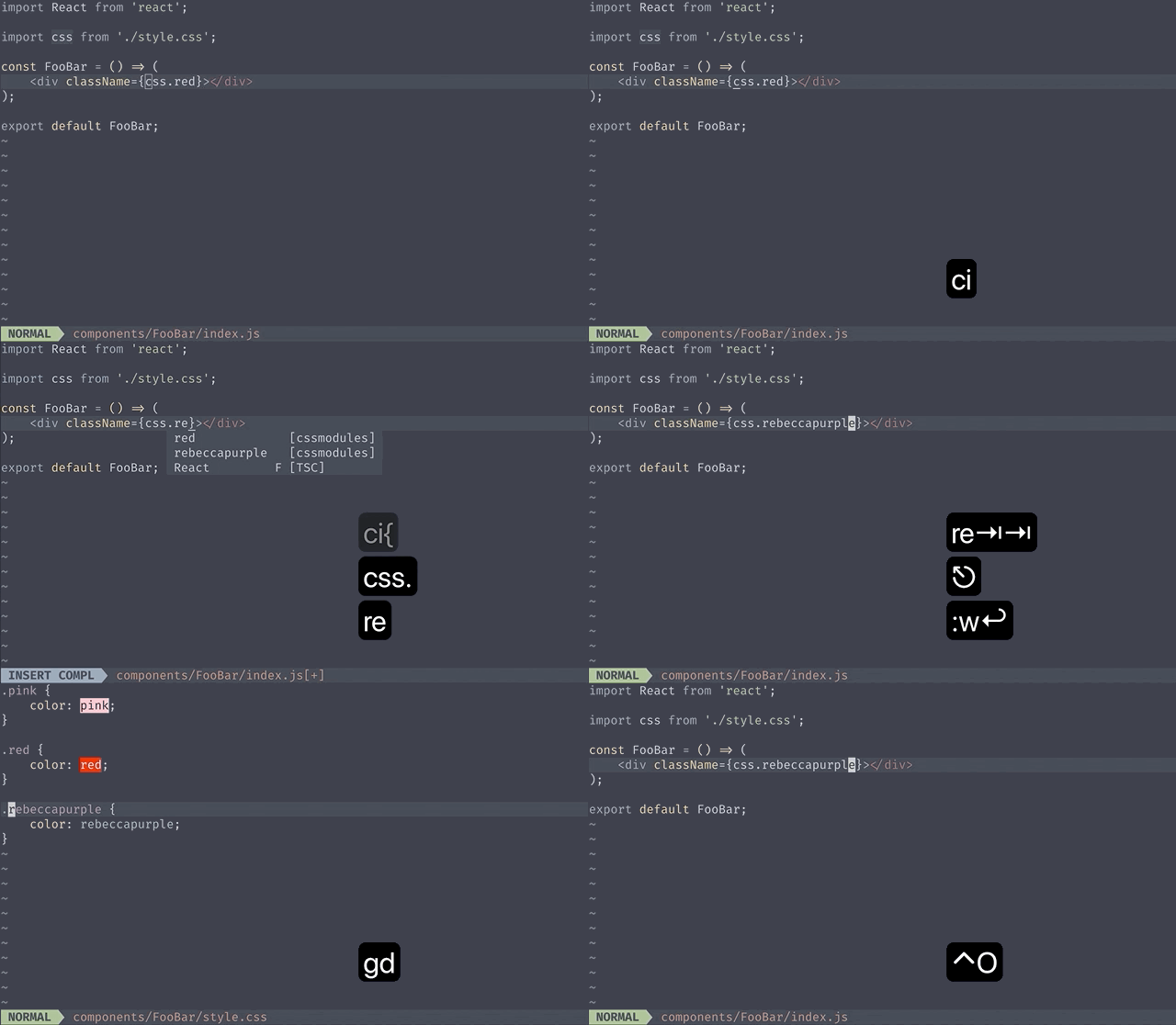
Features:
- definition jumps to class name under cursor.
- implementation (works the same as definition).
- hover provides comments before the class name with direct declarations within the class name.
The supported languages are css(postcss), sass and scss. styl files are parsed as regular css.
Installation
``sh`
npm install --global cssmodules-language-server
Configuration
See if your editor supports language servers or if there is a plugin to add support for language servers
$3
Example uses nvim-lspconfig
`lua`
require'lspconfig'.cssmodules_ls.setup {
-- provide your on_attach to bind keymappings
on_attach = custom_on_attach,
-- optionally
init_options = {
camelCase = 'dashes',
},
}
Known issue: if you have multiple LSP that provide hover and go-to-definition support, there can be races(example typescript and cssmodules-language-server work simultaneously). As a workaround you can disable definition in favor of implementation to avoid conflicting with typescript's go-to-definition.
`luadefinitionProvider
require'lspconfig'.cssmodules_ls.setup {
on_attach = function (client)
-- avoid accepting responses from this LSP`
client.server_capabilities.definitionProvider = false
custom_on_attach(client)
end,
}
$3
`vim`
let cssmodules_config = {
\ "command": "cssmodules-language-server",
\ "initializationOptions": {"camelCase": "dashes"},
\ "filetypes": ["javascript", "javascriptreact", "typescript", "typescriptreact"],
\ "requireRootPattern": 0,
\ "settings": {}
\ }
coc#config('languageserver.cssmodules', cssmodules_config)
$3
As per AstroNvim's documentation, you can install cssmodules_ls with:
`vim`
:TSInstall cssmodules_ls
Known issue: since AstroNvim uses nvim-lspconfig, it suffers from the same issue as above. Here's a workaround to be inserted into init.nvim:`lua`
-- previous config
lsp = {
-- previous configuration
["server-settings"] = {
cssmodules_ls = {
capabilities = {
definitionProvider = false,
},
},
},
}
From then, you can use which is the default shortcut for (go to implementation) as opposed to the usual gd.
For more information on how to config LSP for AstroNvim, please refer to the Advanced LSP part of the documentation.
Initialization options
$3
If you write kebab-case classes in css files, but want to get camelCase complete items, set following to true.
`json`
{
"camelCase": true
}
You can set the cssmodules.camelCase option to true, "dashes" or false(default).
| Classname in css file | true(default | dashes | false |.button
| --------------------- | ----------------- | --------------- | ----------------- |
| | .button | .button | .button |.btn__icon--mod
| | .btnIconMod | .btn__iconMod | .btn__icon--mod |
Acknowledgments
This plugin was extracted from coc-cssmodules` as a standalone language server.