cylon
v1.3.0
JavaScript framework for robotics, drones, and the Internet of Things (IoT) using Node.js
0/weekUpdated 1 years agoApache-2.0
Published by The Hybrid Group
npm install cylon
Cylon.js is a JavaScript framework for robotics, physical computing, and the Internet of Things (IoT).
It provides a simple, but powerful way to create solutions that incorporate
multiple, different hardware devices concurrently.
Want to use Node.js for robots, drones, and IoT devices? You are in the right place.
Want to use Ruby on robots? Check out our sister project, [Artoo][].
Want to use Golang to power your robots? Check out our sister project,
[Gobot][].
[Artoo]: http://artoo.io
[Gobot]: http://gobot.io
Build Status:
  
Getting Started
$3
All you need to get started on a new robot is the cylon module:
npm install cylon
With the core module installed, now install the modules for whatever hardware
support you need. For the Arduino + LED blink example, we'll need the firmata, gpio, and i2c modules:
npm install cylon-firmata cylon-gpio cylon-i2c
Examples
$3
The below example connects to an Arduino over a serial connection, and blinks an
LED once per second.
The example requires that the Arduino have the Firmata sketch installed; which
can be obtained either through the Ardunio IDE or the gort arduino upload command available in gort.
firmata
``javascript
var Cylon = require('cylon');
// define the robot
var robot = Cylon.robot({
// change the port to the correct one for your Arduino
connections: {
arduino: { adaptor: 'firmata', port: '/dev/ttyACM0' }
},
devices: {
led: { driver: 'led', pin: 13 }
},
work: function(my) {
every((1).second(), my.led.toggle);
}
});
// connect to the Arduino and start working
robot.start();
`
$3
`javascript
var Cylon = require('cylon');
Cylon.robot({
connections: {
ardrone: { adaptor: 'ardrone', port: '192.168.1.1' }
},
devices: {
drone: { driver: 'ardrone' }
},
work: function(my) {
my.drone.takeoff();
after((10).seconds(), my.drone.land);
after((15).seconds(), my.drone.stop);
}
}).start();
`
$3
`javascript
var Cylon = require('cylon');
Cylon.robot({
connections: {
digispark: { adaptor: 'digispark' },
leapmotion: { adaptor: 'leapmotion' }
},
devices: {
servo1: { driver: 'servo', pin: 0, connection: 'digispark' },
servo2: { driver: 'servo', pin: 1, connection: 'digispark' },
leapmotion: { driver: 'leapmotion', connection: 'leapmotion' }
},
work: function(my) {
my.x = 90;
my.z = 90;
my.leapmotion.on('hand', function(hand) {
my.x = hand.palmX.fromScale(-300, 300).toScale(30, 150);
my.z = hand.palmZ.fromScale(-300, 300).toScale(30, 150);
});
every(100, function() {
my.servo1.angle(my.x);
my.servo2.angle(my.z);
console.log(my.servo1.currentAngle() + ", " + my.servo2.currentAngle());
});
}
}).start();
`
$3
To use the HTTP API plugin, first install it's NPM module:
$ npm install cylon-api-http
Then it can be used in scripts:
`javascript
var Cylon = require('cylon');
// tell the HTTP API plugin to listen for requests at https://localhost:4000
Cylon.api("http", { port: 4000 });
var bots = [
{ port: '/dev/rfcomm0', name: 'Thelma' },
{ port: '/dev/rfcomm1', name: 'Louise' }
];
bots.forEach(function(bot) {
Cylon.robot({
name: bot.name,
connections: {
sphero: { adaptor: "sphero", port: bot.port }
},
devices: {
sphero: { driver: "sphero" }
},
work: function(my) {
every((1).second(), function() {
console.log(my.name);
my.sphero.setRandomColor();
my.sphero.roll(60, Math.floor(Math.random() * 360));
});
}
});
});
// start up all robots at once
Cylon.start();
`
Fluent Syntax
For those more familiar with jQuery, D3, or other fluent-style JavaScript
libraries, Cylon.JS also supports a chainable syntax:
`javascript
var Cylon = require('cylon');
Cylon
.robot()
.connection('arduino', { adaptor: 'firmata', port: '/dev/ttyACM0' })
.device('led', { driver: 'led', pin: 13 })
.on('ready', function(bot) {
setInterval(function() {
bot.led.toggle();
}, 1000);
});
Cylon.start();
`
Hardware Support
Cylon.js has an extensible syntax for connecting to multiple, different hardware
devices. The following 36 platforms are currently supported:
Platform | Support
-------- | -------
ARDrone | cylon-ardrone
Arduino | cylon-firmata
Arduino YUN | cylon-firmata
AT&T M2X | cylon-m2x
Audio | cylon-audio
Beaglebone Black | cylon-beaglebone
Bebop | cylon-bebop
Bluetooth LE | cylon-ble
Crazyflie | cylon-crazyflie
Digispark | cylon-digispark
Electric Imp | cylon-imp
Intel Edison | cylon-intel-iot
Intel Galileo | cylon-intel-iot
Intel IoT Analytics | cylon-intel-iot-analytics
Joystick | cylon-joystick
Keyboard | cylon-keyboard
Leap Motion | cylon-leapmotion
MiP | cylon-mip
MQTT | cylon-mqtt
Nest | cylon-nest
Neurosky | cylon-neurosky
OpenCV | cylon-opencv
Phillips Hue | cylon-hue
Pebble | cylon-pebble
Pinoccio | cylon-pinoccio
PowerUp 3.0 | cylon-powerup
Rapiro | cylon-rapiro
Raspberry Pi | cylon-raspi
Salesforce | cylon-force
Skynet | cylon-skynet
Spark | cylon-spark
Speech | cylon-speech
Sphero | cylon-sphero
Sphero BLE | cylon-sphero-ble
Tessel | cylon-tessel
WICED Sense | cylon-wiced-sense
Our implementation of GPIO (General Purpose Input/Output) allows for a shared
set of drivers supporting a number of devices:
- GPIO <=> Drivers
- Analog Sensor
- Button
- Continuous Servo
- Direct Pin
- IR Rangefinder
- LED
- MakeyButton
- Maxbotix Ultrasonic Range Finder
- Motor
- Relay
- RGB LED
- Servo
Additionally, we also support a number of I2C (Inter-Integrated Circuit) devices
through a shared cylon-i2c module:
- I2C <=> Drivers
- BlinkM RGB LED
- BMP180 Barometric Pressure + Temperature sensor
- HMC6352 Digital Compass
- JHD1313M1 LCD with RGB Backlight
- LCD
- LIDAR-Lite
- LSM9DS0G 9 Degrees of Freedom IMU
- LSM9DS0XM 9 Degrees of Freedom IMU
- MPL115A2 Digital Barometer & Thermometer
- MPU6050 Triple Axis Accelerometer and Gyro
- PCA9544a 4-Channel I2C Mux
- PCA9685 16-Channel 12-bit PWM/Servo Driver
In addition to our officially supported platforms, we have the following 7 user contributed platforms:
Platform | Support
-------- | -------
Parrot Rolling Spider | cylon-rolling-spider
PCDuino | cylon-pcduino
iBeacon | cylon-beacon
WeMo | cylon-wemo
Telegram | cylon-telegram
APC UPS | cylon-apcupsd
Myo | cylon-myo
We'll also have many more platforms and drivers coming soon, [follow us on Twitter][Twitter] for updates.
[Twitter]: https://twitter.com/cylonjs
Browser & Mobile Support
Cylon.js can be run directly in-browser, using the browserify NPM module.
You can also run it from withing a Chrome connected app, or a PhoneGap mobile app.
For more info on browser support, and for help with different configurations, you can find more info in our docs.
API Plugins
Cylon.js has support for different API plugins that can be used to interact with your robots remotely.
At this time we have support for http/https, mqtt, and socket.io with more coming in the near future.
To use an API plugin, install it alongside Cylon:
$ npm install cylon-api-http cylon-api-socketio
Then, all you need to do is call Cylon#api in your robot's script:
`javascript
var Cylon = require("cylon");
// For http
Cylon.api('http');
// Or for Socket.io
Cylon.api('socketio');
`
Then visit https://localhost:3000/` and you are ready to control your robots from a web browser!
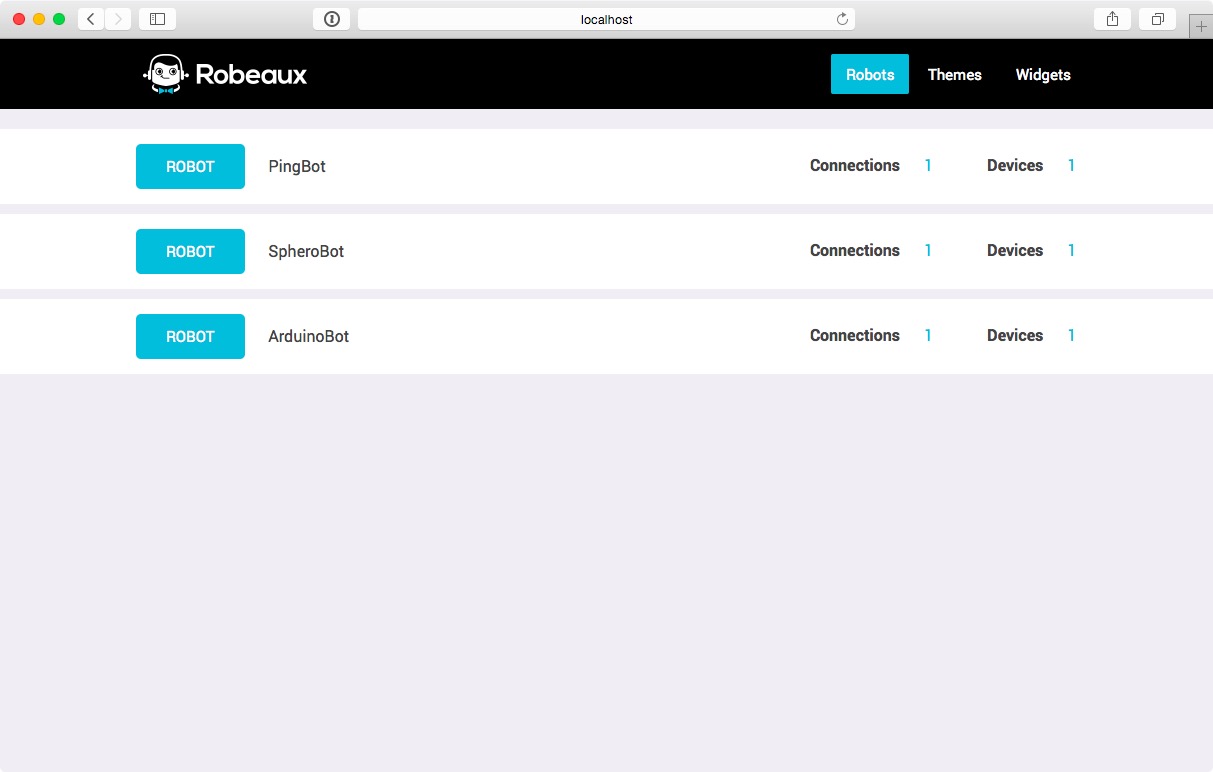
You can check out more information on the Cylon API in the docs here.
CLI
Cylon uses the Gort http://gort.io Command Line Interface (CLI) so you can access important features right from the command line. We call it "RobotOps", aka "DevOps For Robotics". You can scan, connect, update device firmware, and more!
Cylon also has its own CLI to generate new robots, adaptors, and drivers. You can check it out at https://github.com/hybridgroup/cylon-cli.
Documentation
We're busy adding documentation to our website, check it out at [cylonjs.com/documentation][docs].
If you want to help with documentation, you can find the code for our website at on the https://github.com/hybridgroup/cylon-site.
[docs]: http://cylonjs.com/documentation
[docs site]: https://github.com/hybridgroup/cylon-site
Contributing
For our contribution guidelines, please go to CONTRIBUTING.md.
Release History
For the release history, please go to RELEASES.md.
License
Copyright (c) 2013-2016 The Hybrid Group. Licensed under the Apache 2.0 license.